




We may not have the course you’re looking for. If you enquire or give us a call on 01344203999 and speak to our training experts, we may still be able to help with your training requirements.
Home
 Resources
IT Security & Data Protection
Top 10+ Threat Intelligence Tools: Features and How to Choose
Resources
IT Security & Data Protection
Top 10+ Threat Intelligence Tools: Features and How to Choose
Resources
IT Security & Data Protection
Top 10+ Threat Intelligence Tools: Features and How to Choose
Top 10+ Threat Intelligence Tools: Features and How to Choose
ByVishnu SankarLast updated on: 30 October 2026
Threat intelligence tools provide insights into malicious activities, attacker behaviour and emerging security risks.
The Gist
1. Threat intelligence tools help security teams collect, analyse and share information about existing and emerging cyber threats.2. ThreatConnect, Recorded Future, CrowdStrike, Google Threat Intelligence and MISP are among the available solutions.3. These tools support threat investigation, intelligence sharing, indicator enrichment and security monitoring.4. They can improve threat visibility, support alert prioritisation and enable more informed security decisions.5. Consider intelligence quality, threat coverage, integration capabilities, ease of use and overall cost.
A suspicious domain appears in a security alert. Is it part of a known attack campaign or an isolated event? Threat intelligence tools help security teams investigate such questions by providing context about malicious infrastructure, attacker behaviour and emerging threats. This information helps teams assess potential risks, prioritise investigations and decide on appropriate defensive actions.
However, not every tool offers the same capabilities, making the selection process important. In this blog, we'll explore leading threat intelligence tools, their key features and the factors to consider when choosing a suitable solution.
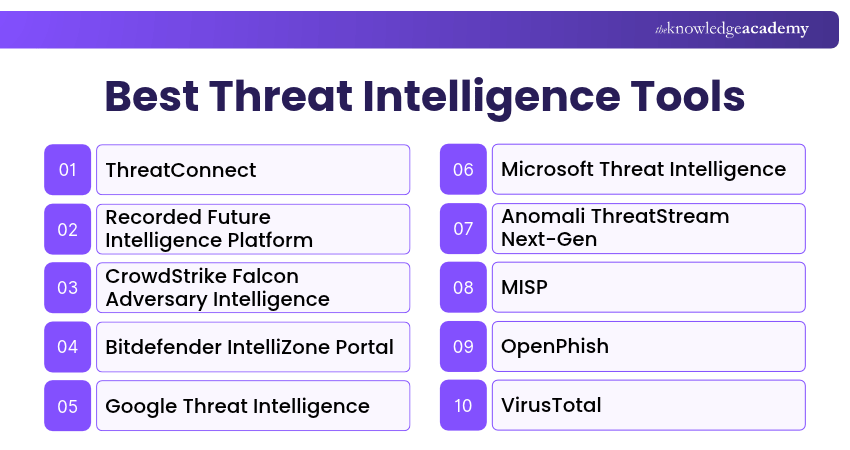
Best Threat Intelligence Tools
Threat intelligence tools differ in their features, sources and intended uses. Some provide comprehensive intelligence management capabilities, while others specialise in phishing detection, malware investigation, IP reputation data or threat exposure monitoring. Let's explore these tools in detail:
1) ThreatConnect
ThreatConnect is a threat intelligence platform that helps organisations collect, organise, analyse and operationalise threat-related information. It enables security teams to connect intelligence from different sources, identify relationships between threats and support investigations. ThreatConnect is particularly suitable for organisations managing multiple threat intelligence feeds and security workflows.
Key Features:
a) Intelligence Aggregation: Collects and organises threat information from supported internal and external sources.
b) Threat Analysis: Helps analysts investigate indicators, relationships and relevant threat activity.
c) Security Integration: Supports connecting intelligence with security operations tools and workflows.

2) Recorded Future Intelligence Platform
Recorded Future provides an intelligence platform with dedicated threat intelligence capabilities that help organisations investigate cyber threats, understand adversary activity and prioritise relevant security risks. It combines information from multiple intelligence sources to provide context about threat actors, vulnerabilities and suspicious infrastructure.
Key Features:
a) Threat Intelligence Analysis: Provides contextual information about malicious activity and emerging threats.
b) Threat Actor Research: Helps analysts investigate threat groups, campaigns and associated activities.
c) Risk Prioritisation: Supports security decisions by connecting threat information with relevant organisational risks.
Trainer Insight
A suspicious IP address or domain is only one piece of information. Threat intelligence becomes more actionable when analysts understand its source, associated activity, confidence level and relevance to their organisation.
3) CrowdStrike Falcon Adversary Intelligence
CrowdStrike Falcon Adversary Intelligence provides information about cyber adversaries, malicious activities and emerging attack techniques. It helps security teams understand attacker behaviour and incorporate relevant intelligence into detection, threat hunting and incident response workflows.
Key Features:
a) Adversary Intelligence: Provides insights into threat actors and their tactics, techniques and procedures.
b) Threat Contextualisation: Connects relevant intelligence with security investigations and organisational exposure.
c) Security Workflow Integration: Supports applying intelligence within CrowdStrike Falcon and compatible third-party tools.
4) Bitdefender IntelliZone Portal
Bitdefender IntelliZone Portal provides Security Analysts with access to threat intelligence about suspicious indicators, malicious infrastructure, threat actors and malware-related activity. Its investigation interface helps analysts explore connections between these findings and support security investigations.
Key Features:
a) Threat Intelligence Search: Enables analysts to investigate supported indicators and related threat information.
b) Malware Analysis: Provides capabilities for examining suspicious files and understanding malicious behaviour.
c) Threat Visualisation: Helps analysts explore relationships between indicators, infrastructure and threat activity.
5) Google Threat Intelligence
Google Threat Intelligence combines intelligence from Google's security research, Mandiant expertise and VirusTotal data to help organisations investigate and understand cyber threats. It provides security teams with information about threat actors, malicious infrastructure and emerging campaigns.
Key Features:
a) Threat Actor Intelligence: Provides information about adversaries, their activities and associated attack techniques.
b) Threat Investigation: Supports analysis of suspicious indicators and relationships between malicious entities.
c) Intelligence Context: Combines multiple intelligence sources to help analysts assess threat relevance.
6) Microsoft Threat Intelligence
Microsoft Threat Intelligence provides security professionals with information about malicious indicators, attacker activity and emerging threats through the Microsoft Defender portal. It supports investigations by enriching security information with relevant threat intelligence and contextual findings.
Key Features:
a) Indicator Enrichment: Provides additional context about suspicious IP addresses, domains, URLs and files.
b) Intel Explorer: Enables analysts to search, filter and investigate threat actors, campaigns, indicators and other supported intelligence within the Microsoft Defender portal.
c) Microsoft Security Integration: Makes intelligence available within supported Microsoft Defender security workflows.
7) Anomali ThreatStream Next-Gen
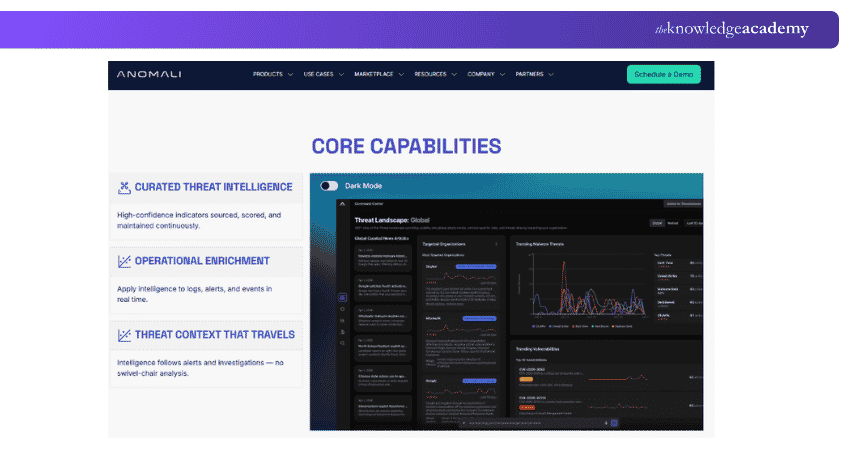
Anomali ThreatStream Next-Gen helps security teams aggregate, enrich and operationalise threat intelligence from supported sources. It combines intelligence search, contextual enrichment and security operations workflows to support threat investigations and response decisions.
Key Features:
a) Intelligence Aggregation: Brings together information from supported threat intelligence sources.
b) Indicator Enrichment: Adds contextual information to help analysts assess suspicious indicators.
c) Security Operations Integration: Supports sharing and applying intelligence within compatible security workflows.
Be the go-to expert behind cyber investigations in the Digital Forensics Training – Sign up now!
8) MISP
MISP is an open-source threat intelligence platform that helps organisations collect, analyse, correlate and share information about cybersecurity threats. It is widely used by security teams and trusted communities to exchange structured intelligence about malicious activities, indicators and security incidents.
Key Features:
a) Threat Intelligence Sharing: Enables organisations to exchange relevant intelligence with authorised users and communities.
b) Indicator Correlation: Helps identify relationships between indicators and associated threat information.
c) Open Standards and Integration: Supports structured intelligence exchange and integration with other security systems.
9) OpenPhish
OpenPhish is a specialised phishing threat intelligence service that identifies phishing URLs and provides related intelligence through community and commercial feeds. It helps organisations obtain phishing-related indicators that can support security monitoring, investigations and defensive controls.
Key Features:
a) Phishing URL Intelligence: Provides information about identified phishing websites.
b) Intelligence Feeds: Offers phishing data through available community and commercial services.
c) Security Integration: Enables supported phishing indicators to be incorporated into detection and monitoring workflows.
Pro Tip
Check the freshness and confidence of phishing indicators before using them in automated security controls. Review potential false positives and establish a process for updating or removing outdated indicators.
10) VirusTotal
VirusTotal is a security investigation service that helps analysts examine suspicious files, URLs, domains and IP addresses. It aggregates detection results and contextual information from multiple security sources, supporting malware investigations and threat analysis.
Key Features:
a) File and URL Analysis: Provides detection results and contextual information for submitted or previously analysed items.
b) Indicator Investigation: Helps analysts examine suspicious domains, IP addresses and related information.
c) Threat Relationship Analysis: Supports exploring connections between malicious files, infrastructure and other indicators through available investigation capabilities.
VirusTotal findings should be interpreted carefully. Detection results alone do not always confirm that an item is malicious. Sensitive files should not be submitted to public analysis services without appropriate authorisation and an understanding of data-sharing implications.
11) ImmuniWeb Discovery
ImmuniWeb Discovery is a continuous threat exposure management and attack surface monitoring platform that also offers cyber threat intelligence and dark web monitoring capabilities. It provides capabilities for monitoring exposed information, compromised credentials and other findings associated with an organisation's digital assets.
Key Features:
a) Dark Web Monitoring: Monitors supported sources for exposed credentials and other relevant information.
b) Threat Exposure Identification: Helps identify external risks associated with organisational assets.
c) Security Monitoring: Provides findings that can support investigation and risk prioritisation.
12) BlockList.de
BlockList.de is a community-driven abuse reporting and IP reputation data source. It collects reports about suspicious activity involving services such as SSH, email and web servers and makes relevant IP information available for investigation and security controls.
Key Features:
a) Reported IP Address Data: Provides information about IP addresses associated with reported attacks.
b) Downloadable Data Feeds: Supports access to available blocklist information for security use cases.
c) Investigation Support: Helps analysts assess whether an IP address has appeared in reported malicious activity.
Blocklist entries should be assessed alongside current network evidence and other relevant intelligence. A listed IP address does not automatically prove that every connection involving it is malicious.
Importance of Threat Intelligence Tools
Here are the key benefits:
1) Proactive Threat Identification: Threat intelligence provides information about changing attacker behaviour, malicious campaigns and new security risks. These insights can guide preventive security measures.
2) Improved Incident Response: Contextual information about suspicious activities can help analysts investigate incidents and determine appropriate response actions.
3) Better Alert Prioritisation: Intelligence can help security teams assess the relevance and severity of alerts. When combined with internal evidence, it may reduce time spent investigating less important findings.
4) Informed Security Decisions: Understanding the threat landscape helps organisations prioritise security investments, address relevant vulnerabilities and develop appropriate defensive strategies.
How to Choose the Right Threat Intelligence Tool?
Selecting a Threat Intelligence Tool requires an understanding of your organisation's security needs, threat exposure and existing technologies. Consider these factors:
1) Intelligence Requirements: Determine whether you need threat actor research, indicator investigation, phishing intelligence, malware analysis or broader threat intelligence management.
2) Intelligence Quality: Evaluate the reliability, relevance, freshness and supporting context of the information provided.
3) Integration Capabilities: Check whether the solution can connect with existing SIEM, SOAR, endpoint security and other relevant technologies.
4) Threat Coverage: Review whether the tool provides intelligence relevant to your organisation's industry, geographical exposure and technical environment.
5) Ease of Use: Assess whether Security Analysts can efficiently search, interpret, share and apply intelligence within their workflows.
6) Cost and Maintenance: Consider subscription charges, usage limits, training requirements and the resources needed to operate and maintain the solution.
Threat Intelligence Tool Implementation Checklist
□ Integrate With Existing Security Tools: Connect threat intelligence with supported SIEM, SOAR and endpoint security solutions.□ Improve Alert Accuracy and Prioritisation: Compare threat indicators with security logs, asset importance and observed behaviour.□ Use Intelligence Proactively: Monitor emerging threats, attacker techniques and vulnerabilities to prioritise remediation.□ Validate Intelligence Sources Regularly: Assess the reliability, accuracy and freshness of threat intelligence sources.□ Review Intelligence Outcomes: Evaluate investigation results, alert relevance and analyst feedback.
Learn how to minimise risks and protect critical assets with effective incident response strategies. Sign up for the Incident Response Training now!

Vishnu Sankar is a Senior Content Writer with 5+ years of experience across content development, software development, web development and system administration. His technical background and professional training support his expertise in IT and Tech, while his extensive research and writing experience covers Project Management and Health and Safety.
View Detail

 If you wish to make any changes to your course, please


