




We may not have the course you’re looking for. If you enquire or give us a call on 01344203999 and speak to our training experts, we may still be able to help with your training requirements.
Top Eight Salesforce Tools to Boost Productivity
ByVishnu SankarLast updated on: 17 September 2026
This blog explores eight Salesforce Tools that help professionals automate workflows and manage data, along with guidance on choosing the right one for the task at hand.

A five-minute Salesforce task rarely stays a five-minute task. Multiply it across a week, a team, or an entire department, and it becomes real time lost to something that could have been automated.
That's the gap Salesforce Tools are built to close. Some handle repetitive processes automatically, others simplify bulk data operations, speed up development, or connect Salesforce with the wider business. The difference between a smooth workflow and a frustrating one usually comes down to whether the right tool was chosen for the job.
What are Salesforce Tools?
Salesforce Tools are built-in features, applications, browser extensions, utilities, and integration platforms that help users perform Salesforce tasks more efficiently. They can support activities such as automating workflows, importing records, inspecting metadata, and generating documents.
Administrators may use them to manage data and configurations, while developers can use specialised tools for inspection and troubleshooting. Sales, marketing, and operations teams can also use Salesforce-connected tools to reduce repetitive work.

Why Use Salesforce Tools?
Using appropriate Salesforce Tools can make routine processes faster and easier to manage. Some of the main reasons include:
1) Reduced Manual Work: Automation tools can handle repetitive actions that would otherwise require regular user input.
2) Faster Data Management: Import, export, update, and data inspection tools simplify working with large sets of Salesforce records.
3) Simplified Administration: Tools designed for Salesforce administrators can reduce the time required to inspect metadata, fields, permissions, and records.
4) Better Workflow Automation: Salesforce automation capabilities can connect tasks, approvals, notifications, and record changes.
5) Improved Integration: Integration platforms allow Salesforce to exchange information with ERP, finance, marketing, and other business systems.
6) Less Context Switching: Browser extensions and integrated applications allow professionals to complete more tasks without constantly moving between separate systems.
Top Eight Salesforce Tools
Professionals in business development rely on a multitude of Salesforce Tools to drive success. Among the wide array of options available, certain tools stand out as popular choices for achieving efficient operations. Let’s discuss the top eight Salesforce Tools in detail:
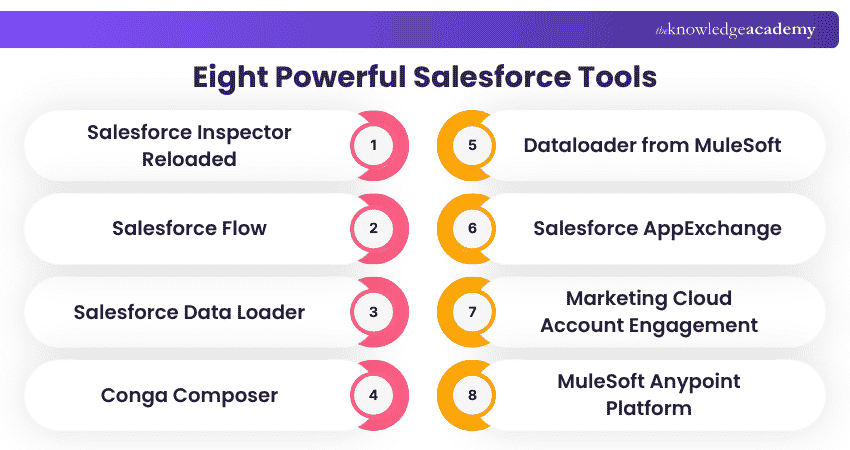
1) Salesforce Inspector Reloaded
Salesforce Inspector Reloaded is an open-source browser extension designed for Salesforce administrators and developers. It provides quick access to data, metadata, queries, APIs, logs, configuration shortcuts, and other commonly used Salesforce functions.
Use Case: Salesforce Inspector Reloaded is for troubleshooting and resolving issues related to complex object relationships in Salesforce. Users can visually explore and understand the connections between different objects, helping them identify any discrepancies or errors in the relationships.
Important: Salesforce Inspector Reloaded is a third-party extension and is not an official Salesforce product. Organisations should review their security policies before enabling browser extensions that access Salesforce environments.
2) Salesforce Flow
Salesforce Flow is the platform's automation capability for creating business processes with low-code tools. It can respond to record changes, guide users through screens, perform calculations, update records, send notifications, and coordinate multi-step processes.
Use Case: When an opportunity reaches a particular stage, a record-triggered flow could automatically update related records, create follow-up tasks, and notify the relevant team.
3) Salesforce Data Loader
Salesforce Data Loader is a downloadable client application used for bulk importing and exporting Salesforce records. It supports operations such as insert, update, upsert, delete, and export.
Use Case: An administrator can update thousands of Salesforce records from a CSV file rather than editing individual records manually.
4) Conga Composer
Conga Composer helps organisations generate documents using Salesforce data. It can populate templates with CRM information to create documents such as proposals, quotations, invoices, reports, and agreements. Automating document creation reduces repeated copying and pasting while helping teams maintain more consistent document formats.
Use Case: When a sales opportunity reaches an agreed stage, a team can generate a proposal using existing Salesforce account, contact, product, and pricing information.
5) Dataloader from MuleSoft
Dataloader from MuleSoft, available through Dataloader.io, is a browser-based tool for importing, exporting, and deleting Salesforce data. Unlike the downloadable Salesforce Data Loader application, it operates through a web browser and can support scheduled tasks and cloud-based workflows depending on the available plan.
Use Case: A sales operations team needs to correct pricing errors across 10,000 opportunity line items after a product catalogue update. Using Dataloader.io, they export the affected records, update the values in bulk, and re-import them through the browser with the job scheduled to run automatically overnight.
6) Salesforce AppExchange
Salesforce AppExchange is Salesforce's marketplace for applications and consulting solutions that extend the platform. Organisations can use it to find tools for areas such as document management, data quality, analytics, sales productivity, customer service, security, and industry-specific processes.
Use Case: A Salesforce administrator who needs a specialist duplicate-management, document-generation, or data-quality capability can explore available AppExchange solutions before deciding whether custom development is necessary.
7) Marketing Cloud Account Engagement
Marketing Cloud Account Engagement, formerly known as Pardot, is Salesforce's B2B marketing automation product. It supports activities such as prospect management, lead nurturing, email marketing, engagement tracking, automation rules, segmentation, and marketing analysis.
Use Case: A marketing team can create an automated nurturing journey that sends relevant communications according to a prospect's behaviour and stages.
8) MuleSoft Anypoint Platform
MuleSoft Anypoint Platform helps organisations connect applications, APIs, systems, and data across Salesforce and the wider enterprise technology environment. Instead of creating separate custom integrations for every application, teams can build and reuse APIs and integration components across multiple workflows.
Use Case: A company wants new customer orders placed in Salesforce to automatically appear in their finance and inventory systems in real time. Using MuleSoft Anypoint Platform, they build a reusable API integration that keeps Salesforce, the ERP system, and the warehouse management tool in sync, instead of writing separate point-to-point connections for each system.
How to Choose the Right Salesforce Tool?
Not every Salesforce Tool is suitable for every organisation. The best choice depends on the problem being solved. The table below can help match the task to the right tool:
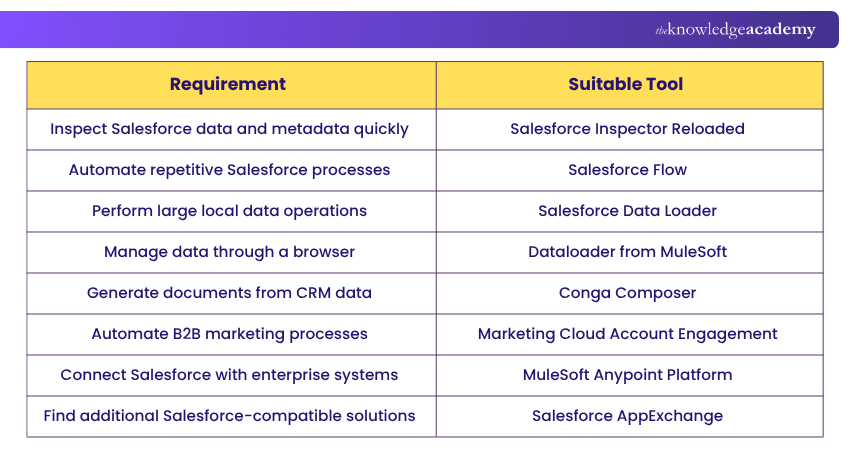
Before introducing a new tool, organisations should also consider security, permissions, licensing, integration requirements, user adoption, and long-term maintenance.
Quick Tool Selection Tip
Do not choose a Salesforce Tool simply because it offers many features. Start with the task that consumes most of the time, identify whether the problem relates to data, automation, administration, documents, marketing, or integration, and then select the tool that removes the unnecessary manual work.

Vishnu Sankar is a Senior Content Writer with 5+ years of experience across content development, software development, web development and system administration. His technical background and professional training support his expertise in IT and Tech, while his extensive research and writing experience covers Project Management and Health and Safety.
View Detail

 If you wish to make any changes to your course, please


