




We may not have the course you’re looking for. If you enquire or give us a call on 01344203999 and speak to our training experts, we may still be able to help with your training requirements.
Top 10 Performance Testing Tools: Key Features and Best Practices
ByVishnu SankarLast updated on: 30 October 2026
Explore 10 performance testing tools that help teams simulate workloads, measure response times and identify application bottlenecks. Compare Apache JMeter, Grafana k6, Gatling, Tricentis NeoLoad and other solutions to understand their features and testing capabilities.
A Quick Preview
1. For Open-source Testing: Apache JMeter, Grafana k6, Gatling and Locust offer flexible approaches to load testing.2. For Enterprise Applications: OpenText Professional Performance Engineering, WebLOAD and Tricentis NeoLoad support complex testing requirements.3. For Browser-based Testing: LoadView is one option for simulating user interactions through real browsers.4. For API Performance: ReadyAPI Performance focuses on evaluating APIs under different workloads.5. For Cloud-based Testing: BlazeMeter supports managed load testing and continuous testing workflows.
The website looks perfect. The features work as expected. The launch is approved. What could possibly go wrong?
Then the traffic arrives.
Pages begin loading slowly, checkout requests pile up and customers struggle to complete their purchases. The problem? Everything was working, but was the website ready for the pressure?
This is where performance testing tools come into play! By simulating different workloads, they help teams measure response times, assess system stability and identify potential bottlenecks before they affect real users.
But not every tool approaches performance testing in the same way. Some focus on APIs, others simulate browser interactions, while certain platforms support complex enterprise applications. In this blog, we'll explore 10 performance testing tools, their key features and best practices to help you find the right fit for your testing needs.
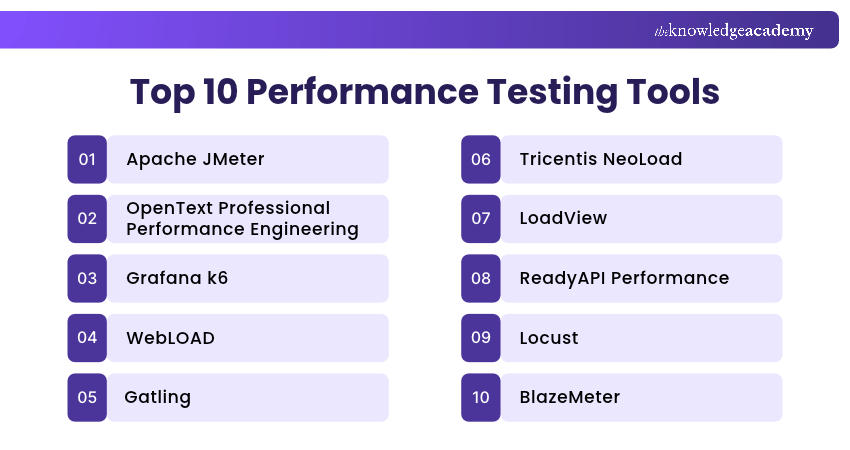
Top 10 Performance Testing Tools
Performance testing tools vary in their testing methods, supported technologies and workload capabilities. The following ten tools offer different approaches to performance testing.
1) Apache JMeter
Apache JMeter is an open-source performance and load testing tool developed by the Apache Software Foundation. It helps testers simulate workloads and measure how applications and services respond under different conditions.
JMeter is widely used for testing HTTP-based applications, APIs and other supported services. It provides a graphical interface for building test plans, although load tests should generally be executed in command-line (non-GUI) mode rather than through the graphical interface.
Key Features:
a) Load Simulation: Generate concurrent requests using configurable thread groups, ramp-up periods and test durations.
b) Protocol Support: Test supported technologies such as HTTP, HTTPS, FTP, JDBC and JMS.
c) Test Plan Creation: Build testing scenarios using samplers, controllers, assertions and other test elements.
d) Results and Reporting: Analyse response times, throughput and errors using supported reports and dashboards.
e) Extensibility: Extend functionality through compatible plugins and custom components.
Best For: QA Engineers and Performance Testers needing flexible, open-source load testing across different protocols.

2) OpenText Professional Performance Engineering
OpenText Professional Performance Engineering, formerly LoadRunner Professional, is an enterprise performance testing solution designed to evaluate applications under simulated workloads.
It supports a broad range of enterprise technologies and helps teams design test scenarios, generate virtual-user traffic and analyse performance results. It is particularly suitable for single-site performance testing teams working with complex application environments.
Key Features:
a) Virtual User Simulation: Generate workloads that represent users interacting with supported applications and services.
b) Multi-protocol Testing: Test a broad range of supported web, database and enterprise application technologies.
c) VuGen Scripting: Create and customise virtual-user scripts using the Virtual User Generator.
d) Performance Analysis: Examine transaction response times, throughput and other collected performance metrics.
e) Test Execution Control: Configure workloads and manage test execution through available performance testing components.
Best For: Enterprise performance engineering teams testing business-critical applications and multiple application protocols.
3) Grafana k6
Grafana k6 is an open-source performance testing tool that helps developers and QA teams simulate workloads using test scripts. It is designed for testing APIs, web services and other supported application components.
Its test-as-code approach makes it suitable for teams that want to maintain performance tests alongside application code. Grafana k6 also provides browser-based testing capabilities for examining selected frontend interactions.
Key Features:
a) Script-based Testing: Define workload scenarios using JavaScript or TypeScript test scripts, with built-in TypeScript transpilation.
b) Load and Stress Testing: Simulate changing traffic levels through configurable virtual users and workload stages.
c) Performance Thresholds: Set conditions for metrics such as request duration, error rates and failed checks.
d) Browser Testing: Use the k6 browser module to test supported browser interactions and collect frontend performance metrics.
e) CI/CD Integration: Incorporate performance tests into automated build and deployment workflows.
Best For: Engineering and DevOps teams seeking script-based performance testing and automated checks within CI/CD pipelines.
4) WebLOAD
WebLOAD is a performance and load testing platform developed by RadView. It helps teams simulate user activity and evaluate how web applications and enterprise systems behave under different workloads.
The platform offers tools for creating testing scenarios, managing workloads and analysing performance results. Its scripting and visual development capabilities support both straightforward and more complex testing requirements.
Key Features:
a) Load Test Design: Create testing scenarios using a graphical environment and supported JavaScript scripting capabilities.
b) Workload Simulation: Simulate user activity under varying traffic patterns and testing conditions.
c) Correlation Support: Handle dynamic values in supported application requests to maintain realistic test interactions.
d) Performance Analytics: Examine response times, errors and other available performance measurements.
e) Testing Integrations: Connect with supported development and testing tools to coordinate testing activities.
Best For: Performance testing teams evaluating complex web applications and enterprise workloads.
Practical Insight
The testing method should reflect the risk being examined. A test of normal traffic alone will not show how an application behaves when capacity limits are exceeded.
5) Gatling
Gatling is a performance testing platform that enables engineering teams to create load tests using code. It provides a Community Edition alongside commercial Gatling Enterprise capabilities.
The platform is useful for testing APIs and services under load, particularly when teams want performance testing to become part of their development workflows. It supports multiple programming languages, while Gatling Enterprise provides additional capabilities for distributed testing, collaboration and visual test design.
Key Features:
a) Test-as-code: Create and maintain load-testing simulations using supported Java, Kotlin, Scala, JavaScript and TypeScript tooling.
b) Workload Modelling: Define virtual-user injection patterns and realistic request sequences.
c) Performance Reporting: Review available response-time, throughput and error information.
d) CI/CD Integration: Execute tests through supported build and continuous integration workflows.
e) Enterprise Load Generation: Use Gatling Enterprise for distributed load generation, advanced collaboration and reporting capabilities.
Best For: Engineering teams that prefer code-based performance tests and automated testing workflows.
Master software testing best practices with Certified Software Testing Professional (CSTP) Training – Register today!
6) Tricentis NeoLoad
Tricentis NeoLoad is an enterprise performance testing platform that helps teams design, execute and analyse load tests for applications, APIs and supporting services.
It provides low-code test design options alongside test-as-code capabilities. NeoLoad also supports real-browser performance testing through its RealBrowser technology, subject to the appropriate licensing and supported environments, and offers integration options for enterprise development workflows.
Key Features:
a) Low-code Test Design: Create supported performance test scenarios through a graphical interface.
b) Protocol and Browser Testing: Test supported APIs, backend services and real-browser user journeys using compatible configurations.
c) Scalable Load Generation: Configure virtual-user workloads and execute tests using supported testing infrastructure.
d) Performance Analytics: Examine test results, transaction response times and performance trends.
e) CI/CD Integration: Incorporate performance testing into automated development and release pipelines.
Best For: Enterprises requiring a combination of low-code test creation, broad technology coverage and continuous performance testing.
Trainer’s Insight: Test the Journey, Not Just the Endpoint
A single API may respond quickly even when the complete user journey is slow. For important workflows such as checkout or payment processing, consider testing the sequence of relevant actions and examining where delays occur.
7) LoadView
LoadView is a load testing platform with managed cloud and customer-managed deployment options that helps teams evaluate website, application and API performance under simulated traffic.
It supports real-browser testing and HTTP/S-based workloads, allowing testers to examine different aspects of application performance. Its cloud infrastructure also enables teams to generate simulated traffic from multiple geographical locations.
Key Features:
a) Real-browser Load Testing: Simulate supported user interactions using actual browser instances.
b) HTTP/S Load Testing: Generate protocol-level requests to evaluate application and service performance.
c) Geographically Distributed Testing: Simulate traffic from different regions using cloud-based load generators.
d) Customised Workloads: Configure user volumes, testing durations and supported behavioural scenarios.
e) Performance Reports: Examine response times, errors and other available test results.
Best For: Teams evaluating website performance and user-facing experiences under geographically distributed traffic.
8) ReadyAPI Performance
ReadyAPI Performance is an API performance testing capability within SmartBear's ReadyAPI platform. It helps teams evaluate how supported APIs respond under simulated workloads and changing traffic conditions.
The solution is particularly useful when organisations already maintain functional API tests in ReadyAPI. Existing functional API tests created in ReadyAPI can be reused to build performance testing scenarios, reducing the need to recreate test requests and workflows.
Key Features:
a) API Load Testing: Simulate traffic against supported REST and SOAP APIs.
b) Test Reusability: Use existing functional API tests as a starting point for performance testing.
c) Workload Profiles: Configure virtual-user loads and traffic patterns to simulate different performance testing conditions.
d) Distributed Testing: Generate workloads using available agents and supported execution infrastructure.
e) Monitoring and Reporting: Examine response times, throughput, errors and other collected API performance metrics.
Best For: API testing teams seeking load and stress testing within an integrated API testing platform.
9) Locust
Locust is an open-source performance and load testing tool that allows teams to define simulated user behaviour using Python.
It provides a web-based interface and command-line execution options, making it suitable for developers who prefer writing test scenarios as code. Locust provides built-in HTTP clients for protocol-level load testing and can be extended to test other protocols. Its standard HTTP clients do not simulate full browser rendering.
Key Features:
a) Python-based Test Scripts: Define user activities, tasks and request sequences using Python.
b) Concurrent User Simulation: Configure simulated users and the rate at which users start.
c) Distributed Execution: Scale supported workloads across multiple worker processes or machines.
d) Real-time Statistics: Examine request rates, response times and failures while a test runs.
e) Custom Workloads: Develop tailored user journeys, testing logic and load patterns.
Best For: Python Developers and QA Engineers seeking flexible, code-driven load testing.
10) BlazeMeter
BlazeMeter is a cloud-based continuous testing platform from Perforce that supports performance testing alongside other testing capabilities.
It helps teams run load tests, analyse application behaviour and integrate testing into development workflows. Its compatibility with Apache JMeter makes it particularly useful for teams that want to run and scale existing JMeter test plans in the cloud.
Key Features:
a) Cloud-based Load Testing: Execute and manage performance tests using cloud-hosted infrastructure without maintaining dedicated local load generators.
b) JMeter Compatibility: Run and scale compatible Apache JMeter test plans through the platform.
c) Distributed Load Generation: Distribute simulated workloads across multiple testing engines and supported geographical locations.
d) Performance Reporting: Review test results, response times, error rates and other performance indicators.
e) Continuous Testing Integration: Connect supported performance tests with CI/CD and development workflows.
Best For: Development, QA and performance engineering teams seeking managed load execution and continuous performance testing.
Key Point
A tool's suitability depends not only on its features but also on its testing scope, execution requirements and associated costs.
Understand scripting and simulations for diverse scenarios with our JMeter Training – Sign up now!
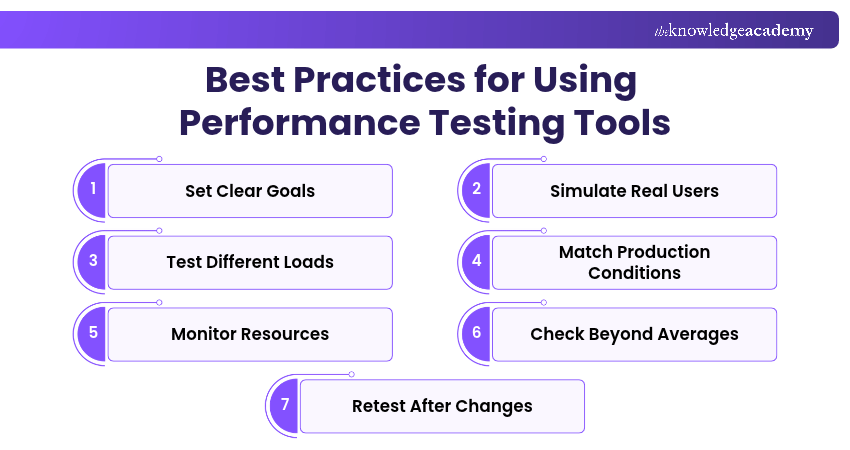
Best Practices for Using Performance Testing Tools
Performance testing tools help teams simulate workloads and analyse application behaviour. However, reliable results depend on how tests are planned and executed. Here are some of the best practices to follow:
1) Define Clear Performance Goals: Establish measurable targets for response times, throughput, error rates and expected workloads before running tests. These targets should reflect your application's performance requirements.
2) Simulate Realistic User Behaviour: Create test scenarios based on actual user activities, such as logging in, browsing pages and completing transactions. Include realistic request patterns and pauses between actions.
3) Test Under Different Workloads: Conduct load, stress, spike and endurance tests as appropriate to assess application performance during normal traffic, sudden increases in demand and sustained usage.
4) Use a Representative Test Environment: Configure the testing environment to resemble production as closely as practical, including relevant infrastructure, network settings and test data.
5) Monitor Application and Infrastructure Resources: Track CPU, memory, database activity and network usage alongside application response times to help identify potential performance bottlenecks.
6) Analyse More than Average Response Times: Examine throughput, error rates and response-time percentiles such as p95 and p99. These metrics can reveal performance issues that average response times may hide.
7) Repeat Tests After Important Changes: Rerun comparable performance tests following significant code, database or infrastructure updates to identify regressions and evaluate improvements.
Keep This in Mind
A successful performance test does not guarantee that an application will perform identically in production. Real user behaviour, network conditions, third-party services and unexpected workloads can affect results. Performance testing provides evidence for evaluating system behaviour, not a guarantee that future performance issues will never occur.
Learn practical testing techniques to improve systems and application performance with our Software Testing Courses – Register now!

Vishnu Sankar is a Senior Content Writer with 5+ years of experience across content development, software development, web development and system administration. His technical background and professional training support his expertise in IT and Tech, while his extensive research and writing experience covers Project Management and Health and Safety.
View Detail

 If you wish to make any changes to your course, please


