




We may not have the course you’re looking for. If you enquire or give us a call on 01344203999 and speak to our training experts, we may still be able to help with your training requirements.
Best Penetration Testing Tools and Their Key Features
ByVishnu SankarLast updated on: 29 October 2026
Explore the top penetration testing tools, their key features and uses, and how to choose the right solution for different security testing requirements.

The Gist
1. Penetration testing tools help identify, investigate and validate weaknesses in systems, networks and applications.2. Nmap, Metasploit, Wireshark and Burp Suite support different security testing activities.3. Some tools focus on web applications, while others assess networks, passwords or wireless security.4. Free, open-source and commercial tools offer different capabilities and levels of support.5. Choosing the right tool depends on testing objectives, system compatibility, budget and technical expertise.
A locked door might look secure, but what if there's an unnoticed window left open? Cyber security works in much the same way. Even well-protected systems can contain hidden weaknesses that attackers may exploit. The challenge is finding these vulnerabilities before they become serious threats.
This is where penetration testing tools come into play. From uncovering network vulnerabilities to assessing web application security, these tools help professionals identify potential risks. But with so many options available, which ones are worth exploring? Let's discover the best tools for penetration testing, their features and how they can strengthen your security assessments.
Best Penetration Testing Tools
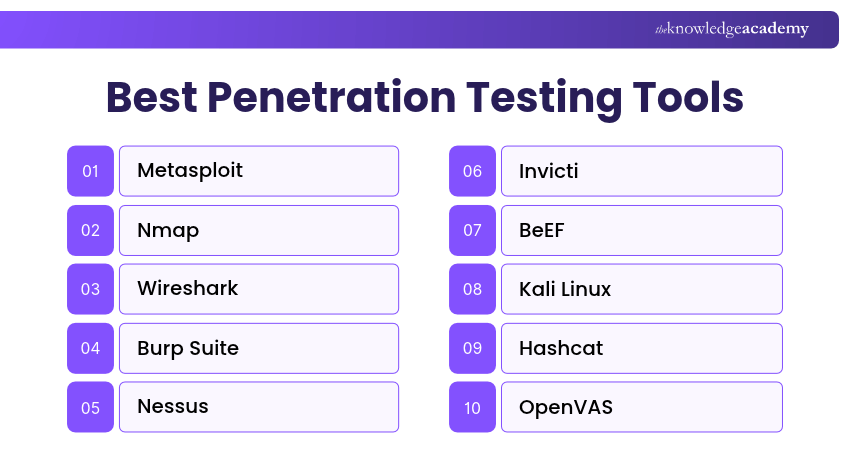
Penetration testing tools are available in both free and commercial versions, with different capabilities for identifying and assessing security weaknesses. Here are the tools commonly used in penetration testing and related security assessment workflows:
1) Metasploit
Metasploit is a penetration testing framework used to develop, test and execute exploits in authorised security assessments. It provides modules and supporting tools that help security professionals validate vulnerabilities. Metasploit also supports post-exploitation activities within controlled testing environments. Its modular structure makes it useful for researching vulnerabilities and evaluating security controls.
Key Features:
a) Exploit development and execution
b) Post-exploitation modules
c) Integration with supporting reconnaissance and assessment tools

2) Nmap
Nmap, short for Network Mapper, is an open-source tool used for network discovery and security auditing. It helps security professionals identify active devices, open ports and services running across a network. Nmap is particularly useful during the reconnaissance stage of penetration testing. It provides insights into network configurations and exposed services that may require further investigation.
Key Features:
a) Host discovery and network scanning
b) Transmission Control Protocol (TCP) and User Datagram Protocol (UDP) port scanning
c) Service and version detection
d) Script-based security checks using the Nmap Scripting Engine (NSE)
3) Wireshark
Wireshark is an open-source network protocol analyser used to capture and examine network traffic. It provides detailed information about packets transmitted across supported network interfaces. Security professionals use Wireshark to investigate unusual network behaviour, analyse protocols and troubleshoot communication problems. It can also help identify insecure traffic patterns during security assessments.
Key Features:
a) Live packet capture and offline analysis
b) Display filters for analysing specific traffic
c) Packet-level troubleshooting and analysis
d) Network traffic statistics and visualisation tools
Pro Tip
Different penetration testing tools serve different purposes, so combining them can provide a more complete security assessment. For example, Nmap can identify exposed network services, while Wireshark can analyse traffic patterns to investigate potential security weaknesses.
4) Burp Suite
Burp Suite is a web application security testing toolkit. It provides tools for examining web traffic, testing application behaviour and identifying security vulnerabilities. Its intercepting proxy enables testers to inspect and modify HTTP and HTTPS requests and responses. Automated vulnerability scanning is available in Burp Suite Professional and Burp Suite DAST, rather than the free Community Edition.
Key Features:
a) Intercepting proxy for analysing web traffic
b) Manual testing and request manipulation
c) Automated vulnerability scanning in supported editions
d) Tools for investigating authentication, session management and application vulnerabilities
5) Nessus
Nessus is a vulnerability assessment tool developed by Tenable. It helps security teams identify known vulnerabilities, missing security patches and configuration weaknesses across supported systems. It is commonly used to evaluate the security posture of network assets and prioritise remediation activities. However, vulnerability scanning alone does not demonstrate that every identified weakness can be exploited.
Key Features:
a) Automated vulnerability scanning
b) Detection of known vulnerabilities and misconfigurations
c) Configuration and compliance assessment capabilities
d) Vulnerability reporting and remediation guidance
Quick Guide: Vulnerability Scanning vs Penetration Testing
Vulnerability scanning identifies potential security weaknesses, while penetration testing involves additional investigation and validation to understand their practical impact. For example, Nessus may detect a vulnerable service, but further authorised testing may be necessary to determine whether the vulnerability is exploitable.
6) Invicti
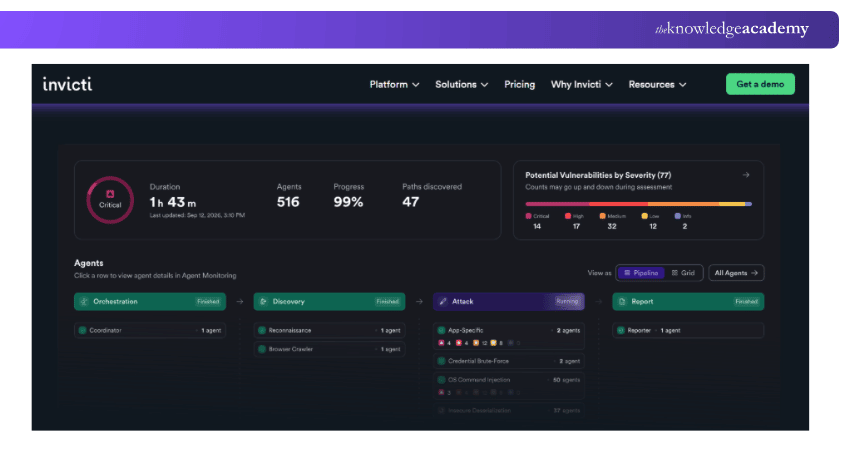
Invicti is an automated web application security scanner for detecting vulnerabilities in web applications and APIs. It helps organisations assess common application security weaknesses and prioritise remediation. The platform supports testing for vulnerabilities such as SQL injection and cross-site scripting (XSS). It can also assist security teams in managing findings across web application environments.
Key Features:
a) Automated web application vulnerability scanning
b) Detection of SQL injection, XSS and other security weaknesses
c) Support for modern web application technologies
d) Vulnerability reporting and integration with development and CI/CD tools
7) BeEF
BeEF, or Browser Exploitation Framework, is an open-source security testing framework focused on web browser environments. It helps security professionals demonstrate the potential impact of browser-related security weaknesses. The framework is primarily used in controlled testing environments to explore browser security risks and assess the effectiveness of defensive controls.
Key Features:
a) Browser hooking and session management
b) Modular command execution for browser security assessments
c) Browser-based information gathering
d) Demonstration of client-side attack risks
8) Kali Linux
Kali Linux is an open-source, Debian-based Linux distribution designed for penetration testing, security research and digital forensics. Unlike individual testing tools, it provides an operating environment containing numerous security utilities. It supports activities such as network analysis, vulnerability assessment, password auditing and wireless security testing.
Key Features:
a) Collection of security assessment tools
b) Support for multiple hardware and virtualisation platforms
c) Customisable penetration testing environment
d) Rolling updates and package management
9) Hashcat
Hashcat is a password recovery and auditing tool used to assess password strength through offline hash analysis. It supports numerous hash types and provides different password candidate generation methods. Security professionals use Hashcat to determine whether authorised password hashes can be recovered using predictable or weak passwords. Hardware acceleration can improve performance for supported workloads.
Key Features:
a) Offline password hash auditing
b) Support for numerous hash algorithms
c) Hardware acceleration using Graphics Processing Units (GPUs) and other supported devices
d) Multiple password candidate generation methods
10) OpenVAS
OpenVAS Scanner is an open-source vulnerability scanning engine. It performs security checks to identify potential vulnerabilities in systems and network services. As part of the broader Greenbone vulnerability management stack, it supports vulnerability assessment activities using regularly updated security test feeds.
Key Features:
a) Network vulnerability scanning
b) Detection of known vulnerabilities in supported systems and services
c) Updated security testing feeds
d) Integration with Greenbone vulnerability management components
11) Nikto
Nikto is an open-source web server scanner used to identify common security issues in web server configurations. It can detect potentially dangerous files, outdated components and known configuration weaknesses. Its command-line interface makes it suitable for security professionals who need a straightforward approach to web server assessment.
Key Features:
a) Web server security scanning
b) Detection of outdated or potentially vulnerable server components
c) Identification of suspicious files and configuration issues
d) Reporting of identified security findings
Learn to automate security processes and identify vulnerabilities before attackers do. Sign up for the Automation and Penetration Testing Training now!
12) sqlmap
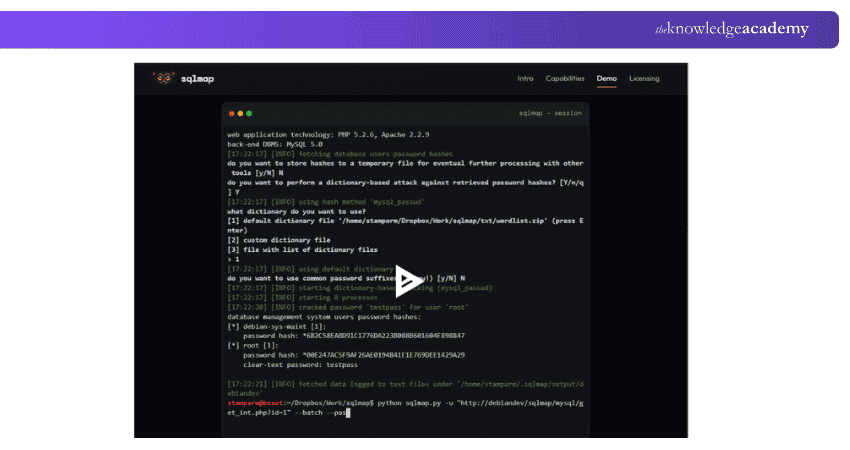
sqlmap is an open-source penetration testing tool for detecting and assessing SQL injection vulnerabilities. It automates many aspects of database-related security testing. Security professionals use sqlmap to investigate whether web applications improperly handle database queries. Its capabilities support testing across several database management systems.
Key Features:
a) Automated SQL injection detection
b) Support for multiple database management systems
c) Database fingerprinting
d) Controlled validation of SQL injection impact
13) THC-Hydra
THC-Hydra is an open-source password auditing and network authentication testing tool used in penetration testing. It helps security professionals assess the strength of login credentials by performing password-guessing attacks against supported network services. The tool supports multiple protocols, including Secure Shell (SSH), File Transfer Protocol (FTP), HTTP and Remote Desktop Protocol (RDP).
It also supports dictionary-based and brute-force password testing to identify weak or predictable credentials during authorised assessments. Its parallel processing capabilities enable multiple login attempts to be tested efficiently.
Key Features:
a) Support for numerous network authentication protocols
b) Dictionary-based password auditing
c) Configurable parallel login testing
Trainer's Insight: Understand Password Testing Methods
Hashcat and John the Ripper primarily support offline password hash auditing, while THC-Hydra tests authentication against network services. Choosing the appropriate method helps testers assess password security while managing risks such as account lockouts and service disruption.
14) ZAP
ZAP, formerly known as OWASP ZAP, is a free and open-source tool for web application security testing. It helps security professionals identify vulnerabilities through manual exploration and automated security testing. ZAP includes an intercepting proxy, web application crawling capabilities and vulnerability scanning tools, making it useful for learning and assessing web application security.
Key Features:
a) Intercepting and modifying HTTP and HTTPS traffic
b) Passive and active vulnerability scanning
c) Traditional, AJAX and Client Spider capabilities
d) Automation and integration options
15) Wifite
Wifite is a wireless network auditing tool that automates selected Wi-Fi security testing activities. It works with supporting wireless assessment utilities to evaluate weaknesses in wireless authentication and encryption mechanisms, including WEP, WPA/WPA2 and Wi-Fi Protected Setup (WPS) configurations.
It can simplify authorised wireless assessments, although its capabilities depend on the installed version, compatible wireless hardware and supporting tools.
Key Features:
a) Automated wireless security auditing
b) Support for selected wireless authentication assessments
c) Integration with supporting wireless testing utilities
d) Compatibility with supported wireless adapters and operating systems, depending on the version
16) Aircrack-ng
Aircrack-ng is a collection of tools used for wireless network security assessment. It supports tasks such as packet capture, wireless traffic analysis and evaluating the strength of certain wireless authentication configurations. The suite is commonly used to investigate security weaknesses in Wi-Fi networks, particularly those using older or vulnerable configurations.
Key Features:
a) Wireless packet capture and analysis
b) WEP and WPA/WPA2-PSK password auditing
c) Wireless adapter and packet injection testing
d) Wireless traffic monitoring and analysis
17) Wapiti
Wapiti is an open-source web application vulnerability scanner that performs black-box security testing. It examines application behaviour to identify potential weaknesses without needing access to the application's source code. It is useful for assessing common vulnerabilities in web applications and generating reports that support further investigation.
Key Features:
a) Black-box web application scanning
b) Detection of SQL injection and XSS vulnerabilities
c) Detection of file inclusion, command execution and other supported vulnerabilities
d) Generation of vulnerability reports
18) Reaver
Reaver is a wireless security assessment tool focused on weaknesses associated with Wi-Fi Protected Setup (WPS). It is particularly relevant when evaluating routers that use vulnerable WPS PIN authentication mechanisms. Its usefulness depends on the target device's WPS configuration and implemented security protections.
Key Features:
a) WPS PIN-based vulnerability testing
b) Automated PIN-guessing assessments
c) Identification of WPS-enabled access points through supporting utilities
d) Assessment of vulnerable WPS authentication implementations
19) Kismet
Kismet is a wireless network detection, monitoring and intrusion detection tool. It helps security professionals identify nearby wireless devices and analyse supported wireless traffic. Unlike tools primarily focused on password auditing, Kismet emphasises wireless discovery, passive monitoring and situational awareness.
Key Features:
a) Wireless network and device discovery
b) Wireless packet capture and monitoring
c) Support for Wi-Fi, Bluetooth and other compatible wireless technologies
d) Wireless intrusion detection capabilities
20) Social-Engineer Toolkit (SET)
The Social-Engineer Toolkit (SET) is an open-source framework used to simulate selected social engineering scenarios during authorised security assessments. It can help organisations evaluate employee awareness and the effectiveness of security controls through controlled exercises. Because these activities can affect users and systems, they require clearly defined permissions and safeguards.
Key Features:
a) Automated social engineering assessment workflows
b) Support for controlled phishing assessments
c) Website-based security testing scenarios
d) Customisable social engineering testing methods
21) Intruder
Intruder is a vulnerability management platform that helps organisations identify and prioritise security weaknesses across supported infrastructure and applications. It supports automated scanning and ongoing security monitoring, making it useful for organisations seeking visibility into vulnerabilities between formal penetration tests.
Key Features:
a) Automated vulnerability scanning
b) Continuous vulnerability monitoring
c) Risk-based prioritisation of findings
d) Reporting and remediation tracking
22) Astra Pentest
Astra Pentest is a penetration testing as a service (PTaaS) platform from Astra Security, combining automated vulnerability scanning with expert-led penetration testing services. The platform helps organisations identify application and infrastructure vulnerabilities, manage reported findings and coordinate remediation activities.
Key Features:
a) Automated vulnerability scanning
b) Expert-led penetration testing services
c) Centralised vulnerability management dashboard
d) Remediation guidance and retesting support
Accelerate software quality with faster, more reliable testing. Sign up for the Fundamentals of Test Automation Training – Sign up now!
23) John the Ripper
John the Ripper is a password security auditing and recovery tool that supports multiple password hash formats. It is commonly used to evaluate password strength through offline testing. The tool provides different password candidate generation approaches and is available in open-source and commercial variants.
Key Features:
a) Offline password hash auditing
b) Support for numerous password hash formats
c) Dictionary and rule-based candidate generation
d) Cross-platform password recovery capabilities
24) Nuclei
Nuclei is an open-source vulnerability scanner developed by ProjectDiscovery. It uses customisable templates to identify known vulnerabilities, security misconfigurations and exposed services across supported targets. Security professionals use Nuclei to automate security checks and investigate potential weaknesses during authorised penetration testing assessments.
Key Features:
a) Template-based vulnerability scanning
b) Detection of known vulnerabilities and security misconfigurations
c) Support for custom security checks across multiple protocols
d) Automated scanning and workflow integration
25) Hexway
Hexway provides platforms for managing penetration testing workflows, security findings and vulnerability information. Rather than functioning primarily as a network scanner or exploitation framework, it helps security teams organise assessment data, collaborate and prepare security reports.
Key Features:
a) Centralised security assessment data management
b) Integration with supported penetration testing tools
c) Penetration testing workflow management
d) Collaboration and reporting capabilities
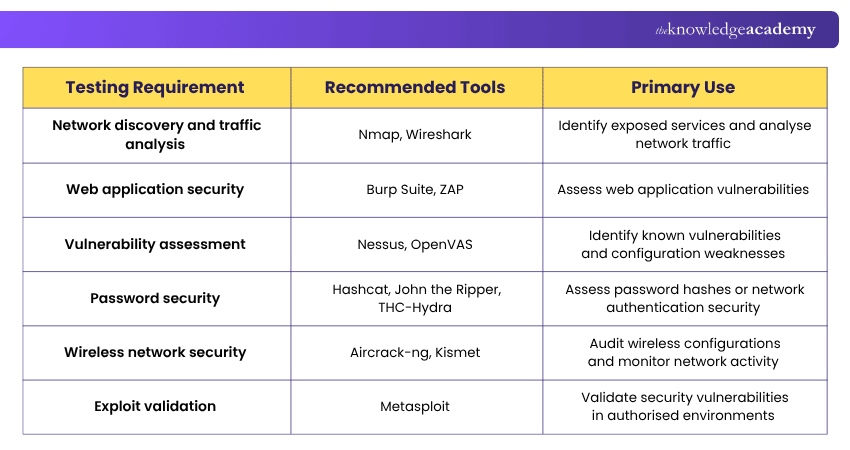
The following table compares selected tools based on their primary security testing functions to help you identify suitable options for different assessment requirements.
How to Choose the Right Penetration Testing Tool?
Selecting the right penetration testing tool depends on the systems being assessed, the testing objectives and the available resources. Consider the following factors before choosing a solution.
a) Identify Your Testing Requirements: Determine whether you need to assess networks, web applications, authentication systems or wireless environments. Different tools specialise in different testing activities.
b) Evaluate Technical Capabilities: Review the supported features, scanning methods, reporting options and automation capabilities. Ensure the tool can assess the technologies included in your authorised testing scope.
c) Consider Your Technical Expertise: Some tools provide graphical interfaces and guided workflows, while others require command-line knowledge and a deeper understanding of security testing techniques.
d) Review Licensing and Costs: Compare free, open-source and commercial options. Consider available features, support arrangements, licensing restrictions and overall costs.
e) Check Compatibility and Integrations: Verify that the tool supports your operating systems, target technologies and existing security workflows. Integration with reporting and issue-tracking platforms may also be valuable.
f) Assess Reporting and Remediation Support: Choose tools that provide findings your team can understand, validate and act upon. Clear reports help stakeholders prioritise security improvements.
Quick Checklist: Before Choosing a Tool
□ Have you defined the testing objectives and obtained authorisation?□ Does the tool support your target systems and technologies?□ Does it provide the testing capabilities you require?□ Is it compatible with your team's technical expertise?□ Have you checked its licensing, costs and maintenance status?□ Can its findings support clear reporting and remediation?

Vishnu Sankar is a Senior Content Writer with 5+ years of experience across content development, software development, web development and system administration. His technical background and professional training support his expertise in IT and Tech, while his extensive research and writing experience covers Project Management and Health and Safety.
View Detail

 If you wish to make any changes to your course, please


