




We may not have the course you’re looking for. If you enquire or give us a call on 01344203999 and speak to our training experts, we may still be able to help with your training requirements.
Best Minute Taking Software Tools for Teams and Professionals
ByCharlotte WilsonLast updated on: 11 September 2026
Explore popular minute taking software for note-taking, collaboration, transcription and action tracking, along with practical tips for choosing the right option.
Think about yesterday’s meeting. Ask three colleagues what was decided, and you may get three slightly different answers.
One remembers the decision. Another remembers the deadline. Someone else remembers an action item that nobody wrote down.
That is why good Meeting Minutes matter, and the right software can make creating them much easier.
Minute Taking Software helps turn conversations into a reliable record of decisions, responsibilities and next steps. Some tools focus on collaborative notes, others on structured minutes, transcription or action tracking.
So, which one actually fits your meetings? That depends on what you need to capture and what needs to happen afterwards.
What is Minute Taking Software Tools?
Minute taking software refers to digital applications that help users capture, organise and manage Meeting Minutes, including key discussions, decisions and action items. Depending on the application, it may also support collaborative note-taking, transcription, summaries, action tracking and meeting templates.
Some solutions are designed specifically for meeting management, while broader productivity applications can also be used to create and manage Meeting Minutes.
Minute Taking Tools or Software can help users:
a) Record key discussions and decisions
b) Organise Meeting Minutes consistently
c) Collaborate on notes in real time
d) Assign and track action items
e) Search past meeting records
f) Transcribe and summarise discussions using AI
Ultimately, the goal is to create a clear, accessible record of what was discussed, what was decided, who is responsible and what happens next.
Did You Know?
Meeting Minutes do not need to be a word-for-word record. Effective minutes usually focus on key discussions, decisions, actions and responsibilities rather than capturing everything that was said.

Best Software for Taking Meeting Minutes
The best Minute Taking Software depends on how your meetings work. A small team may only need collaborative notes, while another organisation may require transcription, structured agendas, action tracking or connections with Project Management workflows.
Here are eight popular applications that can support different Minute Taking requirements:
1) Fellow
Fellow is a meeting management platform and AI meeting assistant that helps teams organise agendas, document discussions and manage meeting outcomes. Its combination of collaborative meeting features and AI-assisted documentation makes it particularly useful for teams that conduct frequent meetings.
Key Features:
a) Collaborative Agendas and Notes: Participants can contribute to agendas and meeting notes.
b) AI Meeting Notes: Fellow can record supported meetings and generate transcripts, summaries, decisions and suggested action items.
c) Action Items: Teams can record and assign follow-up responsibilities.
d) Meeting History: Records from previous meetings can be retained and revisited.
e) Integrations: Fellow can connect meeting workflows with other workplace applications.
Best For: Teams looking for structured meeting management with AI-assisted documentation.
2) Evernote
Evernote is a broader note-taking and productivity platform rather than dedicated minute-taking software. It supports organised notes, tasks, search and attachments, and its current AI features include transcription and meeting-note support. Feature availability may depend on the selected plan.
Key Features:
a) Flexible Note-taking: Capture different types of meeting information.
b) Organisation: Keep notes arranged using notebooks and organisational features.
c) Search: Find previously recorded information when required.
d) Attachments: Keep relevant files and supporting information alongside notes.
e) Cross-device Access: Access notes across supported devices based on the chosen plan.
Best For: Individuals who need flexible note-taking and organisation rather than complete meeting management.
3) Google Docs
Google Docs is a cloud-based document editor that can be used to create and collaboratively manage Meeting Minutes.
Its collaborative features allow several participants to contribute to the same document. This makes it particularly useful for teams that prefer manually prepared Meeting Minutes without requiring specialised meeting management functionality.
Key Features:
a) Real-time Collaboration: Multiple participants can contribute to the same document.
b) Comments: Users can discuss or clarify information within the document.
c) Version History: Previous document versions can be reviewed when required.
d) Sharing Controls: Meeting records can be shared with relevant participants.
e) Workspace Integration: Documents can work alongside other applications within Google Workspace.
Best For: Teams looking for simple and collaborative Meeting Minutes.
4) MeetingBooster
MeetingBooster is designed around structured meeting management and professional Meeting Minutes. It supports different stages of a meeting, including preparation, documentation and follow-up.
Its structured approach can be useful for organisations that need greater consistency across formal or recurring meetings.
Key Features:
a) Structured Meeting Minutes: Supports consistent meeting documentation.
b) Meeting Agendas: Helps organise discussion topics before a meeting.
c) Action Tracking: Records responsibilities and follow-up actions.
d) Meeting Organisation: Keeps related meeting information structured.
e) Recurring Meetings: Supports teams that conduct meetings regularly.
Best For: Organisations requiring structured and professional meeting documentation.
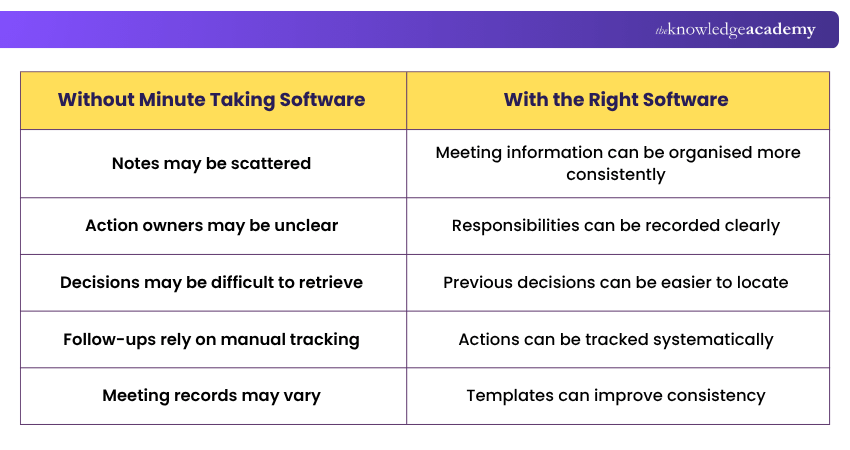
Before vs After: Using Minute Taking Software
5) FreJun
FreJun is an AI-enabled business-calling platform that records and analyses telephone conversations. It can support call documentation and follow-up, but it is not designed primarily for taking minutes during general team meetings.
Key Features:
a) Automated Transcription: Converts supported conversations into written text.
b) Conversation Records: Maintains records that can be reviewed later.
c) Searchable Information: Helps users revisit captured conversations.
d) Workflow Support: Connects communication records with wider business processes.
Best For: Teams looking to automate parts of conversation capture and documentation.
6) MeetingKing
MeetingKing is designed to support structured meetings, agendas, notes and follow-up actions. It focuses on connecting what happens during a meeting with the responsibilities that follow it.
This task-oriented approach can be useful when accountability is an important part of the meeting process.
Key Features:
a) Agenda Management: Organises discussion topics before the meeting.
b) Meeting Notes: Captures discussions and outcomes.
c) Task Assignment: Converts meeting outcomes into follow-up activities.
d) Meeting Summaries: Maintains a structured record of important information.
Best For: Teams that want Meeting Minutes closely connected with actions and follow-ups.
7) nTask
nTask combines meeting functionality with wider Project Management capabilities. This can help teams connect discussions and meeting outcomes with ongoing projects and tasks.
Rather than managing Meeting Minutes separately, project teams can keep relevant actions closer to the work they relate to.
Key Features:
a) Meeting Management: Organises meetings and related information.
b) Agendas and Notes: Helps structure meeting topics and discussions.
c) Task Management: Connects meeting actions with tasks.
d) Project Workflows: Keeps meeting outcomes connected with broader projects.
e) Collaboration: Supports teams working across shared projects and responsibilities.
Best For: Project teams that want meeting and Project Management capabilities within the same environment.
Understand the intricacies of company law and regulatory frameworks with our Company Secretary Training – Register now!
8) Magic Minutes
Magic Minutes focuses on structured Meeting Minutes and action tracking. It can help teams organise meeting records and connect discussions with responsibilities that need to be followed up afterwards.
Its structured approach makes it particularly relevant to teams conducting formal or recurring meetings.
Key Features:
a) Structured Minutes: Organises meeting information consistently.
b) Action Tracking: Records actions arising from discussions.
c) Meeting Records: Maintains documentation from previous meetings.
d) Follow-up Support: Helps keep responsibilities visible after the meeting.
Best For: Teams that prioritise structured Meeting Minutes and action tracking.
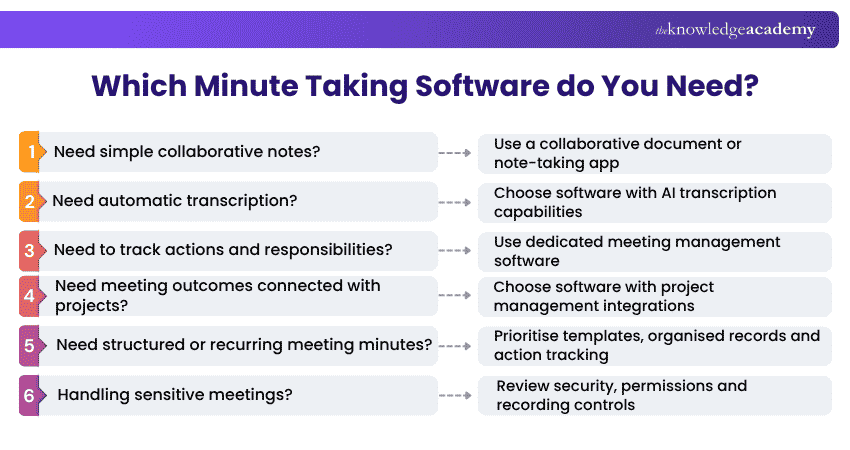
Not sure which option matches your meetings? Use this quick guide to identify the capabilities you need most.
Quick Decision Guide: Which Minute Taking Software Do You Need?
5) FreJun
FreJun is an AI-enabled business-calling platform that records and analyses telephone conversations. It can support call documentation and follow-up, but it is not designed primarily for taking minutes during general team meetings.
Key Features:
a) Automated Transcription: Converts supported conversations into written text.
b) Conversation Records: Maintains records that can be reviewed later.
c) Searchable Information: Helps users revisit captured conversations.
d) Workflow Support: Connects communication records with wider business processes.
Best For: Teams looking to automate parts of conversation capture and documentation.
6) MeetingKing
MeetingKing is designed to support structured meetings, agendas, notes and follow-up actions. It focuses on connecting what happens during a meeting with the responsibilities that follow it.
This task-oriented approach can be useful when accountability is an important part of the meeting process.
Key Features:
a) Agenda Management: Organises discussion topics before the meeting.
b) Meeting Notes: Captures discussions and outcomes.
c) Task Assignment: Converts meeting outcomes into follow-up activities.
d) Meeting Summaries: Maintains a structured record of important information.
Best For: Teams that want Meeting Minutes closely connected with actions and follow-ups.
7) nTask
nTask combines meeting functionality with wider Project Management capabilities. This can help teams connect discussions and meeting outcomes with ongoing projects and tasks.
Rather than managing Meeting Minutes separately, project teams can keep relevant actions closer to the work they relate to.
Key Features:
a) Meeting Management: Organises meetings and related information.
b) Agendas and Notes: Helps structure meeting topics and discussions.
c) Task Management: Connects meeting actions with tasks.
d) Project Workflows: Keeps meeting outcomes connected with broader projects.
e) Collaboration: Supports teams working across shared projects and responsibilities.
Best For: Project teams that want meeting and Project Management capabilities within the same environment.
Understand the intricacies of company law and regulatory frameworks with our Company Secretary Training – Register now!
8) Magic Minutes
Magic Minutes focuses on structured Meeting Minutes and action tracking. It can help teams organise meeting records and connect discussions with responsibilities that need to be followed up afterwards.
Its structured approach makes it particularly relevant to teams conducting formal or recurring meetings.
Key Features:
a) Structured Minutes: Organises meeting information consistently.
b) Action Tracking: Records actions arising from discussions.
c) Meeting Records: Maintains documentation from previous meetings.
d) Follow-up Support: Helps keep responsibilities visible after the meeting.
Best For: Teams that prioritise structured Meeting Minutes and action tracking.
Not sure which option matches your meetings? Use this quick guide to identify the capabilities you need most.
Quick Decision Guide: Which Minute Taking Software Do You Need?
How to Choose the Right Minute Taking Software?
Having more features does not automatically make one solution better than another. The right software should match how your team conducts meetings, records information and manages follow-up activities.
Consider these factors before choosing:
1) Ease of Use
Minute Taking often happens during fast-moving discussions, so complicated software can make important information harder to capture.
Look for an intuitive interface that allows users to record, organise and retrieve meeting information without unnecessary steps.
2) Collaboration
If several people contribute to Meeting Minutes, collaborative functionality becomes important.
Features such as simultaneous editing, comments, mentions and sharing can make it easier for participants to contribute information and review the final record.
3) Action Item Tracking
Effective Meeting Minutes should capture more than discussions. They should also make it clear what needs to happen next.
Consider whether the software allows you to record an action, assign an owner, set a due date and track its progress. This can help turn meeting decisions into clear responsibilities.
4) AI Transcription and Summaries
AI-powered software can reduce manual work by converting conversations into text and generating summaries or suggested action items.
However, AI output can contain transcription errors or miss important context. Names, technical terminology, dates, decisions and responsibilities should therefore be checked before the final Meeting Minutes are distributed.
Trainer's Pro Tip
Treat an AI transcript as a source for your Meeting Minutes, not automatically as the final minutes. Review decisions, names, responsibilities, dates and action items before sharing the final record.
5) Integrations
Consider whether the software works with applications your team already uses, such as calendars, video conferencing platforms, communication applications and Project Management systems.
Useful integrations can reduce the need to transfer meeting information manually between different applications.
6) Search and Organisation
Meeting Minutes become more useful when people can retrieve important information months after a meeting has taken place.
Look for searchable records, meeting histories, folders, tags or other organisational features that make previous decisions and discussions easier to locate.
7) Security and Privacy
Meeting Minutes can contain confidential business information, personal data or sensitive discussions.
Review access controls, sharing permissions, data storage, retention policies and data-handling practices before selecting software. If meetings are recorded or transcribed, organisations should also consider applicable privacy requirements, participant notification or consent requirements and internal policies.
8) Cost and Scalability
A solution that works well for one user may not be practical for an organisation with hundreds of employees.
Consider subscription costs, user limits, usage allowances and which features are included at each plan level. Also think about whether the software can continue meeting your requirements as your organisation grows.
Quick Software Checklist
Before making your decision, ask:
☐ Is it easy for our team to use?☐ Can it capture the information we actually need?☐ Does it support our existing workflow?☐ Can actions and responsibilities be tracked?☐ Can previous meetings be searched easily?☐ Are its security and privacy controls suitable?☐ Will its pricing and user limits remain practical as our team grows?If several answers are “No”, keep comparing.
Learn effective diary, meeting, and office management techniques with our PA and Secretarial Courses – Join now!

Charlotte Wilson creates Business Skills content that helps professionals communicate more effectively, manage workplace pressures and collaborate with others. Her practical resources support stronger professional relationships, individual effectiveness and positive team behaviour.
View Detail

 If you wish to make any changes to your course, please


