


We may not have the course you’re looking for. If you enquire or give us a call on 01344203999 and speak to our training experts, we may still be able to help with your training requirements.
Best Kali Linux Tools for Cyber Security Professionals
ByVishnu SankarLast updated on: 02 November 2026
Kali Linux tools help cyber security professionals assess networks, identify vulnerabilities, analyse traffic and investigate security weaknesses. Explore their key features and how they support penetration testing, security auditing and digital forensics.
At a Glance
1. Kali Linux is a Debian-based operating system designed for penetration testing, security research and digital forensics.2. Nmap, Wireshark and Metasploit support different network security assessment activities.3. Burp Suite and sqlmap help professionals evaluate web application security.4. Aircrack-ng and Fluxion support specialised wireless security assessments.5. Selecting the right tool depends on testing objectives, system compatibility, technical expertise and proper authorisation.
Imagine being assigned a cybersecurity assessment with several tasks to complete:
a) Identify exposed network services
b) Examine a web application for vulnerabilities
c) Analyse suspicious network traffic
d) Evaluate password security
e) Investigate potential wireless security weaknesses
Each task requires a different approach, and choosing the right tools can make the assessment more efficient. This is where Kali Linux tools come into play. From network scanning and vulnerability assessment to digital forensics, Kali Linux provides access to numerous security utilities.
Read on to explore the best Kali Linux tools, their key features and the security testing activities they support.
Best Kali Linux Tools
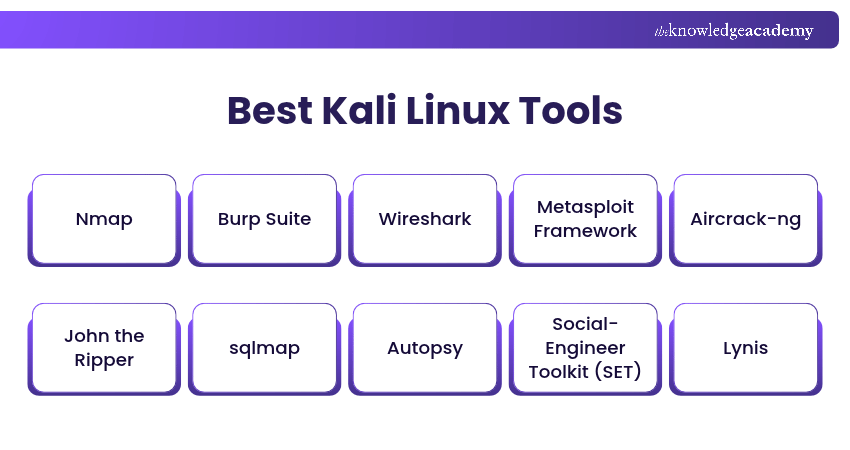
Kali Linux supports a wide range of tools for cyber security assessments. Some focus on network discovery, while others specialise in web application testing, password auditing, digital forensics or vulnerability analysis. Here are the most useful Kali Linux tools and their key features:
1) Nmap
Nmap, short for Network Mapper, is an open-source network scanning and discovery tool. It helps security professionals identify active devices, open ports and services running across a network. Nmap is particularly useful during the reconnaissance stage of penetration testing. It provides information about network hosts, open ports and running services that may require further security investigation.
Key Features:
a) Host discovery and network scanning
b) TCP and UDP port scanning
c) Service and version detection
d) Script-based security checks using the Nmap Scripting Engine (NSE)

2) Burp Suite
Burp Suite is a web application security testing platform. It provides utilities for analysing web traffic, identifying application vulnerabilities and investigating security weaknesses. Its intercepting proxy allows security professionals to inspect and modify HTTP and HTTPS requests and responses during authorised assessments. Burp Suite also provides automated vulnerability scanning in supported commercial editions.
Key Features:
a) Intercepting proxy for analysing web traffic
b) Manual web application security testing
c) Automated vulnerability scanning in supported editions
d) Tools for examining authentication, sessions and application requests
3) Wireshark
Wireshark is an open-source network protocol analyser used to capture and examine network traffic. It provides detailed information about packets transmitted across supported network interfaces. Security professionals use Wireshark to investigate unusual traffic patterns, analyse network protocols and troubleshoot communication problems.
Key Features:
a) Live packet capture and offline traffic analysis
b) Detailed inspection of supported network protocols
c) Advanced filtering for targeted packet analysis
d) Network troubleshooting and traffic investigation
4) Metasploit Framework
Metasploit Framework is an open-source penetration testing platform used for developing, testing and validating exploits. It provides a collection of modules that help security professionals assess whether identified vulnerabilities could be exploited. The framework supports controlled vulnerability validation and post-exploitation testing within authorised environments.
Key Features:
a) Exploit development and vulnerability validation
b) Payload generation and management
c) Post-exploitation testing modules
d) Auxiliary modules for scanning and information gathering
5) Aircrack-ng
Aircrack-ng is a collection of tools designed for wireless network security auditing. It supports activities such as wireless packet capture, traffic analysis and assessment of selected Wi-Fi security configurations. Security professionals use Aircrack-ng to investigate weaknesses in supported wireless authentication and encryption mechanisms.
Key Features:
a) Wireless packet capture and analysis
b) Monitoring of wireless network activity
c) Assessment of supported Wi-Fi authentication methods
d) Wireless encryption and password security testing
Trainer's Insight:
Automated vulnerability scanners can identify many known security weaknesses, but they may miss complex application logic flaws or generate findings that require verification. Combining automated scanning with authorised manual investigation supports more accurate security assessments.
6) John the Ripper
John the Ripper is a password auditing and recovery tool used to assess password strength through offline hash analysis. It supports multiple password hash formats and password candidate generation techniques. The tool helps security professionals identify weak passwords within authorised security assessments.
Key Features:
a) Offline password hash auditing
b) Support for multiple password hash formats
c) Dictionary-based and rule-based candidate generation
d) Cross-platform password recovery capabilities
7) sqlmap
sqlmap is an open-source penetration testing tool designed to detect and assess SQL injection vulnerabilities in web applications. It automates several database security testing activities and helps security professionals investigate weaknesses caused by insecure handling of database queries.
Key Features:
a) Automated SQL injection detection
b) Support for multiple database management systems
c) Database type and version identification
d) Controlled validation of SQL injection impact
8) Autopsy
Autopsy is a digital forensics application used to examine file systems and investigate digital evidence. It supports forensic activities such as file analysis, recovering information and reviewing evidence collected from storage devices. The Autopsy package available through Kali Linux is the older Autopsy Forensic Browser, which provides an interface to The Sleuth Kit. It should be distinguished from the modern standalone Autopsy forensic application.
Key Features:
a) File system investigation
b) Analysis of supported disk images
c) File and metadata examination
d) Digital forensic evidence review
9) Social-Engineer Toolkit (SET)
Social-Engineer Toolkit (SET) is an open-source penetration testing tool designed to assess security risks associated with social engineering attacks. It provides various attack simulation methods that help security professionals evaluate how human behaviour and security controls may be exploited during authorised assessments.
Key Features:
a) Spear-phishing and email attack simulations
b) Website cloning and phishing scenario testing
c) Credential harvesting simulations
d) Multiple social engineering attack vectors
10) Lynis
Lynis is an open-source security auditing tool for Linux and Unix-based systems. It examines system configurations and identifies potential weaknesses that may require further investigation. System administrators and security professionals use Lynis to review system hardening practices and improve security configurations.
Key Features:
a) Linux and Unix security auditing
b) System configuration assessment
c) Identification of security weaknesses
d) Security hardening recommendations
Learn how to combine automation and penetration testing to identify vulnerabilities faster in the Automation & Penetration Testing Training – Sign up now!
11) Greenbone Vulnerability Manager (GVM)
GVM is a vulnerability assessment and management component within the Greenbone vulnerability management framework that helps security professionals identify and evaluate security weaknesses across networks and IT systems.
It coordinates vulnerability scans performed by supported scanners, helping users detect known vulnerabilities, assess their severity and generate reports that support security remediation activities.
Key Features:
a) Management of network vulnerability scans
b) Vulnerability detection using security test feeds through supported scanners
c) Vulnerability severity assessment and reporting
d) Scan configuration and vulnerability management
12) Nuclei
Nuclei is an open-source, template-based vulnerability scanner. It helps security professionals identify known vulnerabilities, misconfigurations and other security weaknesses across supported technologies. Its customisable templates allow users to perform targeted security checks and integrate vulnerability scanning into automated assessment workflows.
Key Features:
a) Template-based vulnerability scanning
b) Detection of known vulnerabilities and misconfigurations
c) Support for multiple protocols and technologies
d) Integration with automated security testing workflows
13) Fluxion
Fluxion is a specialised wireless security assessment tool used to demonstrate certain Wi-Fi security risks involving social engineering. It focuses on scenarios involving wireless access point impersonation and credential-related security weaknesses within authorised and controlled environments. Fluxion is particularly relevant for understanding how deceptive wireless network scenarios can affect users and organisations.
Key Features:
a) Wireless phishing attack simulations
b) Rogue access point and captive portal testing
c) WPA/WPA2 authentication handshake capture
d) Wireless credential verification against captured handshakes
14) Maltego
Maltego is a link analysis and Open-Source Intelligence (OSINT) platform used to investigate relationships between entities such as people, organisations, domains and digital assets. It helps security professionals organise information from supported data sources and visualise relationships through interactive graphs. Maltego is useful during reconnaissance, cyber security investigations and threat intelligence activities.
Key Features:
a) Entity relationship mapping and visualisation
b) OSINT investigation capabilities
c) Integration with supported data sources
d) Data enrichment through supported transforms
15) Yersinia
Yersinia is a specialised network security testing framework designed to investigate weaknesses in selected Layer 2 network protocols. It supports security assessment activities involving protocols used for network switching, discovery and related infrastructure functions. Yersinia is most relevant to professionals evaluating network infrastructure security rather than general web application testing.
Key Features:
a) Layer 2 network protocol security testing
b) Security testing of STP, DHCP and CDP
c) Simulation of supported protocol-based attacks
d) Command-line, interactive and graphical interfaces
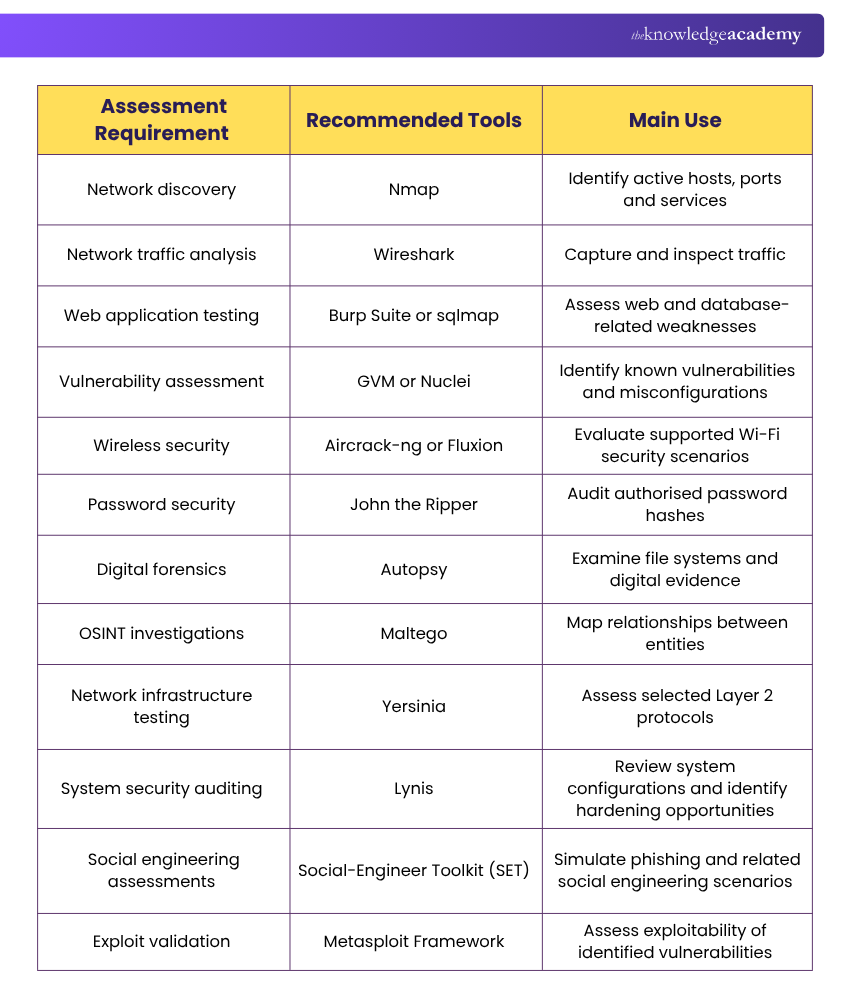
Use the following table to identify suitable tools based on your main assessment objective.
How to Choose the Right Kali Linux Tool?
Selecting the right Kali Linux tool depends on the systems being assessed, the security objectives and the available technical resources. Consider the following factors before choosing a tool:
1) Identify Your Testing Requirements
Determine whether the assessment focuses on network discovery, web applications, password security, wireless networks or digital forensics. For example, Nmap is suitable for identifying exposed network services, while Burp Suite is designed for web application security testing.
2) Check System Compatibility
Ensure the tool supports your Kali Linux environment, hardware and target technologies. Some tools require additional packages, wireless adapters or specific system configurations.
3) Evaluate Technical Capabilities
Review the tool's supported features, testing methods, automation options and reporting capabilities. Choose software that addresses the specific assessment rather than relying on the number of available features alone.
4) Consider Your Technical Expertise
Some tools provide graphical interfaces, while others require command-line knowledge and a deeper understanding of security testing techniques. Select tools that match your technical abilities and the complexity of the assessment.
5) Review Licensing and Costs
Kali Linux provides access to numerous free and open-source tools, but some commercial applications require separate licences. Check the available editions, usage restrictions and support options before choosing a solution.
6) Evaluate Reporting and Security Impact
Choose tools that provide information your team can understand and act upon. Also consider how scanning and testing activities could affect the availability or performance of the systems being assessed.
So, choosing the right Kali Linux tools depends on your objectives, technical expertise and testing environment. By combining suitable utilities with authorised security practices, professionals can conduct more organised assessments and better understand potential security risks.
Turbocharge software quality with cutting-edge testing. Register for the Fundamentals of Test Automation Training – Sign up now!

Vishnu Sankar is a Senior Content Writer with 5+ years of experience across content development, software development, web development and system administration. His technical background and professional training support his expertise in IT and Tech, while his extensive research and writing experience covers Project Management and Health and Safety.
View Detail

 If you wish to make any changes to your course, please


