




We may not have the course you’re looking for. If you enquire or give us a call on 01344203999 and speak to our training experts, we may still be able to help with your training requirements.
Top Game Development Tools to Build Your Next Game
ByJohn DaviesLast updated on: 17 September 2026
Discover the top game development tools and learn how they can help you design, build, and successfully bring your game ideas to life.
Creating a game involves far more than writing code. Developers may need to design environments, animate characters, produce audio, manage assets, test functionality, and coordinate changes across multiple team members.
This is where game development tools become essential.
The right combination of game engines, development environments, creative software, audio solutions, and collaboration tools can make the production process more organised and manageable.
Whether you are building your first game or refining your development workflow, knowing which tools to use can make all the difference. So, read on!
What is Game Development?
Game development is the process of creating a video game from an initial idea to a playable experience. It involves several stages, including concept development, game design, programming, visual creation, animation, audio production, testing, and deployment. Depending on the project, games may be developed for Personal Computers (PCs), consoles, mobile devices, web browsers, or other platforms.

Game Development Tools
Game development relies on more than one type of software. These tools range from game engines and graphics to audio, testing, and collaboration software. Each serves a different purpose within the development workflow, and the right combination depends on factors such as the type of game, target platform, team size, technical requirements, and development goals.
Game Engines
Game engines provide the core framework for building and running video games. They bring together features for rendering graphics, physics, scripting, animation, audio, input handling, and other gameplay systems within a single development environment.
1) Unity
Unity is one of the most widely recognised game engines for creating interactive 2D and 3D experiences. It uses C# as its primary scripting language and provides an extensive editor where developers can manage scenes, animations, physics, lighting, interfaces, and gameplay systems.
Best for: Cross-platform 2D and 3D projects requiring a flexible development ecosystem.
2) Unreal Engine
Unreal Engine is particularly suited to visually demanding 3D games, large environments, and high-fidelity experiences. It includes advanced world-building, animation, rendering, terrain, and procedural creation capabilities alongside Blueprint visual scripting.
Best for: Visually demanding 3D games, detailed environments, and projects where high-fidelity graphics are a priority.
In GDC’s 2026 State of the Game Industry survey, 42% of developers reported Unreal Engine as their primary engine, compared with 30% using Unity.
3) Godot Engine
Godot is a free, open-source engine with dedicated 2D and 3D development capabilities. Its node-and-scene structure, GDScript support, C# compatibility, and flexible asset pipeline make it suitable for developers who want greater control over their development environment.
Best for: Independent developers and teams looking for an open-source and adaptable engine.
4) GameMaker
GameMaker focuses primarily on 2D game development and offers GameMaker Language (GML) visuals and GML code. Its built-in room, object, sprite, animation, debugging, and level-design features make it accessible to beginners while supporting more advanced projects.
Best for: 2D games, independent projects, and developers who want a relatively accessible workflow.
5) Construct 3
Construct 3 is a browser-based game engine designed for rapid game creation and prototyping. Its event-sheet system enables developers to build gameplay logic visually, while JavaScript and TypeScript scripting provide greater flexibility when custom code is needed.
Best for: Beginners, rapid prototypes, and projects that benefit from visual development.
Game Art and Animation Tools
Visual assets give a game its characters, environments, objects, interfaces, and overall artistic identity. These tools support different workflows ranging from detailed 3D production to pixel-based 2D artwork. The following tools support different game art and animation workflows:
1) Blender
Blender is a free, open-source 3D creation suite covering modelling, sculpting, rigging, animation, rendering, simulation, and game asset production. Its broad feature set makes it useful for producing 3D assets that can later be imported into game engines.
Best for: End-to-end 3D asset creation using free, open-source software.
2) Autodesk Maya
Autodesk Maya is a professional 3D modelling and animation application commonly used for creating detailed characters, environments, rigs, and animations. Its extensive production tools make it well suited to complex asset pipelines and professional 3D production workflows.
Best for: Professional character animation, modelling, rigging, and high-detail 3D production.
3) Aseprite
Aseprite is designed specifically for pixel art and animated sprites. It includes layers, frame-based animation, onion skinning, palette controls, tagging, and multiple playback modes for creating and refining 2D game artwork.
Best for: Pixel-art games, sprite animation, and retro-inspired 2D projects.
Programming Tools and IDEs
Programming tools and Integrated Development Environments (IDEs) help developers write, edit, debug, and manage game code. Features such as error detection, code completion, and debugging help streamline development and make coding more efficient. Here are some commonly used programming tools and IDEs for game development:
1) Visual Studio
Visual Studio provides dedicated game development support for technologies including Unity, Unreal Engine, C++, and DirectX. Its debugging, breakpoints, performance tools, code navigation, and development features help programmers diagnose issues and manage larger codebases.
Best for: Complex game projects that require advanced debugging and code management.
2) JetBrains Rider
JetBrains Rider offers engine-aware coding assistance for game development, particularly with Unity and Unreal Engine. It provides code completion, inspections, refactoring, debugging, navigation, and other engine-specific features that help developers work efficiently across complex projects.
Best for: Developers who want advanced code analysis and engine-specific programming support.
3) Xcode
Xcode is Apple’s integrated development environment for building, testing, and debugging applications and games across Apple platforms. It provides code editing, debugging, performance analysis, interface development, simulation, and testing capabilities, making it particularly useful for developers targeting Apple devices.
Best for: Developing, testing, and debugging games for iPhone, iPad, Mac, Apple TV, and Apple Vision Pro.
Create immersive worlds with 3D Game Development Training and turn creative ideas into playable experiences.
Game Audio and Sound Design Tools
Game audio tools help developers create, edit, mix, implement, and manage sound effects, dialogue, music, and other audio elements within a game. Here are some useful tools for game audio and sound design:
1) FMOD Studio
FMOD Studio is an adaptive audio authoring solution designed specifically for games. Sound Designers can create interactive music, dynamic effects, and responsive audio behaviours that change according to gameplay.
Best for: Interactive music, responsive sound design, and game-engine audio integration.
2) Wwise
Wwise is an interactive audio authoring and sound-engine solution used to manage complex game-audio behaviours. It allows audio teams to control how sound responds to gameplay while supporting detailed mixing, implementation, and performance workflows.
Best for: Large or audio-intensive projects requiring advanced interactive sound control.
3) Audacity
Audacity is a free, open-source audio editor and recorder that can be used to create and refine audio assets for games. It provides tools for recording, trimming, mixing, applying effects, reducing noise, and exporting audio in different formats, making it useful for preparing sound effects, dialogue, and other game audio.
Best for: Beginners and smaller projects that need an accessible, free audio editor.
4) REAPER
REAPER is a Digital Audio Workstation (DAW) that supports multitrack recording, editing, processing, mixing, and audio production. Its flexible routing, automation, effects, and plugin support make it suitable for creating and refining sound effects, dialogue, music, and other audio elements used in games.
Best for: Detailed sound design, multitrack editing, and audio production workflows.
Remember!
A finished game asset is rarely the same as its original source file. Models, textures, animations, and audio often need to be exported and optimised before they are ready for use inside a game engine.
Version Control and Collaboration Tools
Game projects often involve programmers, artists, designers, audio professionals, testers, and producers working on the same files and tasks. By using version control and collaboration tools, teams can track updates, assign responsibilities, and ensure transparency across development activities. Here are some useful version control and collaboration tools for game development:
1) GitHub
GitHub hosts Git repositories and adds collaboration features such as branches, pull requests, code reviews, issues, and project discussions. It helps development teams manage code changes while providing a shared environment for reviewing and coordinating technical work.
Best for: Git-based source control, code reviews, and collaborative development workflows.
2) Perforce Helix Core
Perforce Helix Core is a scalable version control system suited to game development projects with large codebases and binary assets. It can support programmers, artists, and designers working within the same production pipeline while maintaining controlled file histories.
Best for: Large studios, asset-heavy projects, and teams working with extensive binary files.
3) Jira
Jira is a project-tracking and task-management platform rather than a version control system. Game development teams can use it to organise tasks, bugs, milestones, dependencies, workloads, and development progress across different disciplines.
Best for: Teams that need structured project planning and visibility across development workflows.
Build Your Game Development Toolchain
Project Brief:You are creating a small 2D game with a three-person team. You need to code gameplay, create graphics, and prevent project files from becoming disorganised.Fill the four slots:Engine: __________Coding Tool: __________Graphics Tool: __________Version Control Tool: __________Challenge: Can you choose a tool from the blog for every stage without adding unnecessary software?
Build engaging worlds, characters, and gameplay mechanics with 2D Game Development Training – Sign up now!
AI Tools for Game Development
Artificial Intelligence (AI) tools are used in game development to support tasks such as asset creation, character behaviour, dialogue, animation, and testing. They can help developers experiment with ideas, automate selected production tasks, and create more responsive game experiences. Here are some AI tools designed for or applicable to game development:
1) Inworld AI
Inworld AI provides AI technologies for building interactive characters and real-time experiences. Developers can use its voice, speech, and AI capabilities to create game characters that respond to player interactions, world states, and story context.
Best for: Games that require interactive characters, real-time conversations, and responsive narrative experiences.
2) Modl.ai
Modl.ai provides AI-powered tools designed to support game testing and quality assurance. Its AI agents can explore game environments, perform testing tasks, and help identify potential issues during development, reducing some of the repetitive work involved in manual testing.
Best for: Development teams looking to automate repetitive game testing and support quality assurance workflows.
3) Ludo.ai
Ludo.ai is an AI-powered platform designed to support game ideation and pre-production. It can help developers explore game concepts, mechanics, themes, trends, and other creative directions while organising ideas during the early stages of development.
Best for: Game ideation, concept development, and early-stage creative planning.
How to Choose the Right Game Development Tools?
The most suitable toolset depends on what you are creating and how the project will be produced. Instead of choosing software based only on popularity, consider the practical requirements it needs to support:
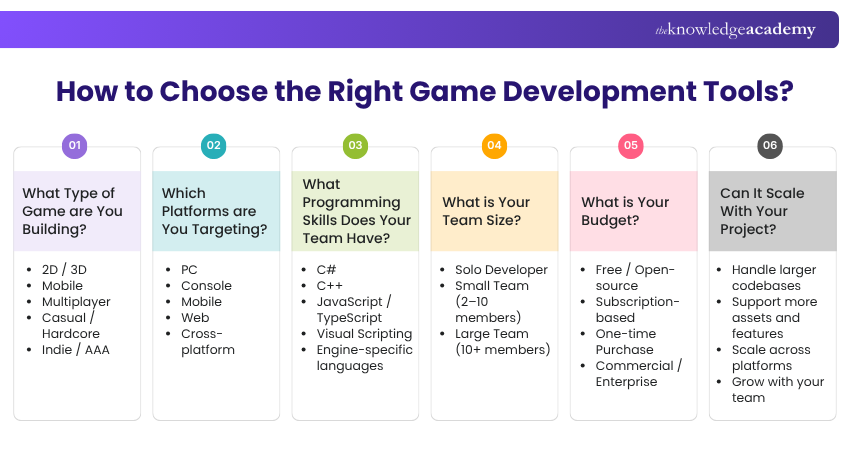
1) Project Type: Consider whether you are creating a 2D platformer, mobile title, realistic 3D game, multiplayer experience, or another format. Different projects place different demands on rendering, scripting, asset creation, and performance.
2) Target Platforms: Identify whether the game needs to run on PC, console, mobile, web, or several platforms. Check that your chosen tools support the required deployment targets and platform-specific workflows.
3) Programming Language: Consider the languages already used or preferred by the development team. Compatibility with languages such as C#, C++, or engine-specific scripting can influence both productivity and learning requirements.
4) Team Size: A solo developer may prioritise simplicity and integrated workflows, while a larger studio may need stronger collaboration and asset-management capabilities. The toolset should remain manageable as more people contribute to the project.
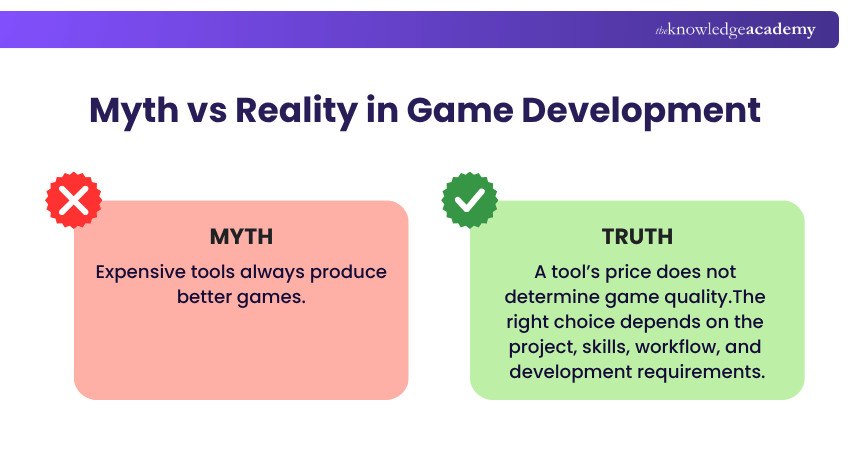
5) Budget and Licensing: Compare purchase costs, subscriptions, revenue conditions, commercial-use terms, and additional plug-in expenses. A free tool can be suitable for one project while a paid solution may provide capabilities another team considers essential.
6) Workflow and Integration: Check how effectively different tools exchange files and connect with the engine, IDE, audio software, and version control system. Strong integrations can reduce unnecessary manual work between development stages.
7) Scalability: Consider whether the tool can continue supporting the project as its codebase, asset library, platforms, or team expands. Selecting with future requirements in mind can reduce the need for disruptive workflow changes later.
Quick Quiz: What’s Missing?
A game development team has an engine, IDE, artwork, models, and audio tools. However, team members keep overwriting each other’s project changes.Which tool category could solve the problem?A) Game EngineB) Version Control SystemC) 3D Modelling ToolD) Audio ToolAnswer: B) Version Control SystemWhy? It keeps track of changes and helps teams work on the same project without conflicting with or overwriting each other’s work
Turn engagement into action with Gamification Training and create motivating experiences that inspire stronger participation.

John Davies creates security-focused content that helps organisations understand digital risks and establish appropriate safeguards. His practical explanations connect regulatory expectations, governance principles and security controls with wider organisational priorities.
View Detail

 If you wish to make any changes to your course, please


