




We may not have the course you’re looking for. If you enquire or give us a call on 01344203999 and speak to our training experts, we may still be able to help with your training requirements.
Top Digital Forensics Tools
ByVishnu SankarLast updated on: 26 November 2026
Explore the top digital forensics tools used to collect, preserve and analyse electronic evidence. Discover key features and how to select the right tools for different evidence sources.
The Gist
1. Digital Evidence: Forensic tools support evidence collection, preservation and analysis.2. Tool Specialisation: Different tools examine storage, memory, mobile devices and network activity.3. Investigation Workflow: Combining suitable tools helps investigators examine and correlate evidence.4. Evidence Integrity: Verification and documentation support reliable forensic findings.5. Tool Selection: Consider evidence sources, compatibility, capabilities and costs.
Every digital device can leave behind traces of activity, from file modifications and browsing records to network connections and application data. When a cyber incident occurs, these traces can provide valuable information about what happened and how systems were affected.
Digital forensics tools help investigators examine this information systematically while preserving relevant evidence. Whether you are investigating a compromised computer, examining mobile data or analysing network activity, selecting the right software is important.
In this blog, you'll explore the best digital forensics tools, their features, and how to choose the most suitable option for an investigation.
Best Digital Forensics Tools
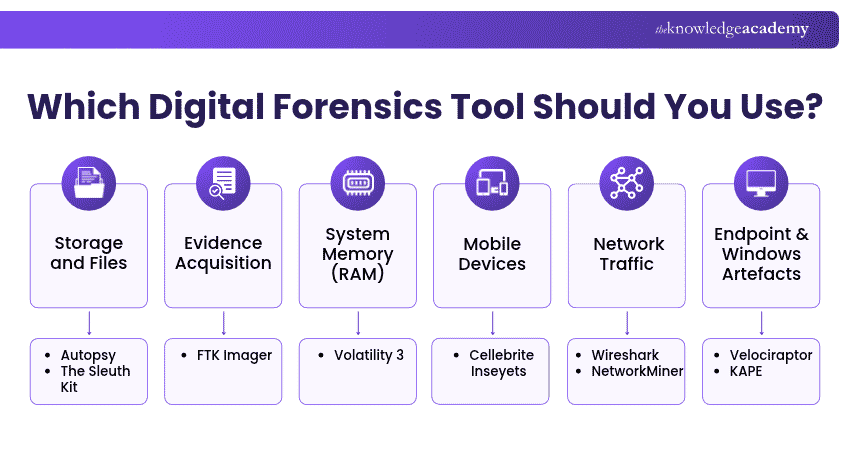
Digital investigations involve different types of evidence, so no single tool is suitable for every situation. Some solutions focus on evidence acquisition, while others specialise in analysing files, memory, mobile devices or network activity.
The following tools include open-source, free and commercial solutions used across digital forensic investigations. Let's look at them below
1) Autopsy
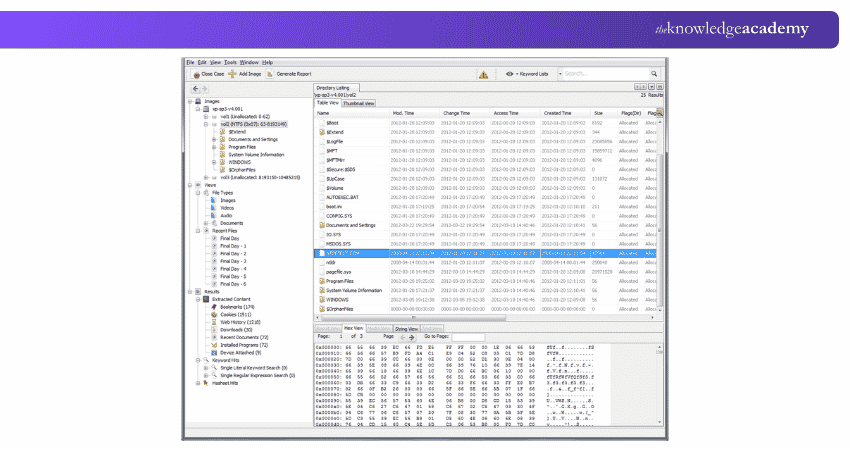
Autopsy is an open-source digital forensics platform that provides a graphical interface for examining computer storage devices and forensic disk images. It uses the Sleuth Kit and other modules to support evidence examination.
The platform helps investigators analyse file systems, identify deleted files where recoverable, search data and review relevant artefacts.
Key Features:
a) File-system examination and keyword searching
b) Timeline analysis and file recovery capabilities
c) Graphical interface for organising investigations
Autopsy is useful for computer forensic investigations where examiners need to explore files, storage activity and related evidence.

2) The Sleuth Kit
The Sleuth Kit is a collection of open-source libraries and command-line tools designed to examine disk images and file systems. It allows investigators to analyse storage structures and recover information from supported file systems.
Its utilities can identify file metadata, examine file-system structures and investigate allocated or unallocated storage areas.
Key Features:
a) Command-line file-system analysis
b) Examination of disk images and storage metadata
c) Support for forensic workflows and scripting
The Sleuth Kit is suitable for investigators who require detailed file-system examination or want to automate specific forensic analysis tasks.
3) FTK Imager
FTK Imager is a free forensic imaging and data preview tool provided by Exterro. It helps investigators create copies of storage media while documenting and verifying the integrity of acquired data.
The tool also allows users to preview supported evidence sources, examine file structures and export selected files for further investigation.
Key Features:
a) Forensic imaging of supported storage devices
b) File and folder preview capabilities
c) Cryptographic hash calculation and verification
FTK Imager is particularly useful during evidence acquisition, when investigators need to create reliable copies of digital storage media.
Pro Tip
Use cryptographic hashes, such as SHA-256, where supported to verify forensic image integrity. Recording acquisition details and checking hashes helps demonstrate that evidence copies remain consistent during examination and storage.
4) ExifTool
ExifTool is a command-line application developed by Phil Harvey for reading, writing and editing metadata in a wide range of file formats. Investigators can use it to examine information associated with images, documents, videos and other supported files.
Depending on the format, metadata may include timestamps, device information, camera settings and location details.
Key Features:
a) Extraction of metadata from multiple file types
b) Support for numerous metadata standards
c) Command-line processing and automation
ExifTool is valuable when investigators need to examine file metadata for additional context about digital evidence. Metadata should be interpreted carefully because it may be altered or incomplete.
5) SIFT Workstation
SIFT Workstation is a digital forensics and incident response environment developed and maintained by SANS. It combines various free and open-source forensic utilities into a Linux-based investigation environment.
The workstation supports activities such as file-system examination, artefact analysis, timeline reconstruction and incident investigation.
Key Features:
a) Collection of forensic and incident response utilities
b) Support for disk and file-system investigations
c) Integrated tools for analysing digital evidence
SIFT Workstation is useful for practitioners who want access to multiple forensic utilities within a single investigation environment.
Develop the skills to respond faster, recover stronger, and stay secure with the Incident Response Training - Join now!
6) Volatility 3
Volatility 3 is an open-source memory forensics framework designed to analyse captured system memory. It helps investigators examine information that may not be available through traditional disk analysis.
The framework can identify processes, examine memory structures, investigate loaded modules and support malware-related memory analysis through relevant plugins.
Key Features:
a) Analysis of supported memory images
b) Process and memory structure examination
c) Extensible plugin-based framework
Volatility 3 is particularly useful when investigating suspicious processes, malware activity and other evidence preserved in system memory.
Trainer Insight
Volatile evidence stored in RAM may be lost when a device shuts down. Where authorised and appropriate, preserve this evidence before shutdown while considering the impact of live acquisition on the system.
7) Magnet AXIOM
Magnet AXIOM is a commercial digital investigation platform developed by Magnet Forensics. It helps investigators process, examine and correlate evidence from supported computers, mobile devices, cloud sources and other digital evidence.
The platform brings different artefacts together to support searches, timelines and investigative analysis.
Key Features:
a) Analysis of multiple digital evidence sources
b) Artefact recovery and examination
c) Timeline, filtering and reporting capabilities
Magnet AXIOM is useful for investigations involving several evidence sources that need to be examined and correlated within a structured workflow.
8) Cellebrite Inseyets
Cellebrite Inseyets is a commercial mobile digital forensics suite designed to support authorised device access, data extraction, decoding and analysis.
It provides capabilities for examining supported mobile devices and identifying relevant information from applications, communications and device activity.
Key Features:
a) Supported mobile device data extraction
b) Decoding and examination of mobile artefacts
c) Investigation, review and reporting features
Cellebrite Inseyets is used in mobile forensic investigations where lawful access to and analysis of smartphone evidence is required.
9) X-Ways Forensics
X-Ways Forensics is a commercial forensic analysis tool designed for detailed examination of storage devices, disk images and file systems.
It provides capabilities for reviewing data structures, examining files, recovering deleted data where possible and analysing digital evidence.
Key Features:
a) Disk and file-system examination
b) File recovery and data analysis capabilities
c) Detailed forensic processing and reporting
X-Ways Forensics is useful for investigators who require advanced storage analysis and detailed examination of computer-based evidence.
Learn how effective security incident reporting helps organisations prevent future occurrences in the Incident Reporting Training – Sign up now!
10) Wireshark
Wireshark is an open-source network protocol analyser used to capture and examine network packets. It helps investigators understand communication between devices and identify unusual network behaviour.
Its filtering and protocol analysis capabilities allow users to examine network conversations and investigate suspicious traffic patterns.
Key Features:
a) Live packet capture and saved capture analysis
b) Protocol decoding and packet filtering
c) Detailed examination of network communications
Wireshark is valuable in network forensic investigations, especially when analysing captured traffic related to suspected security incidents.
Pro Tip
Encrypted network traffic may limit visibility into message contents. Use available connection metadata and supporting evidence to investigate communication patterns.
11) NetworkMiner
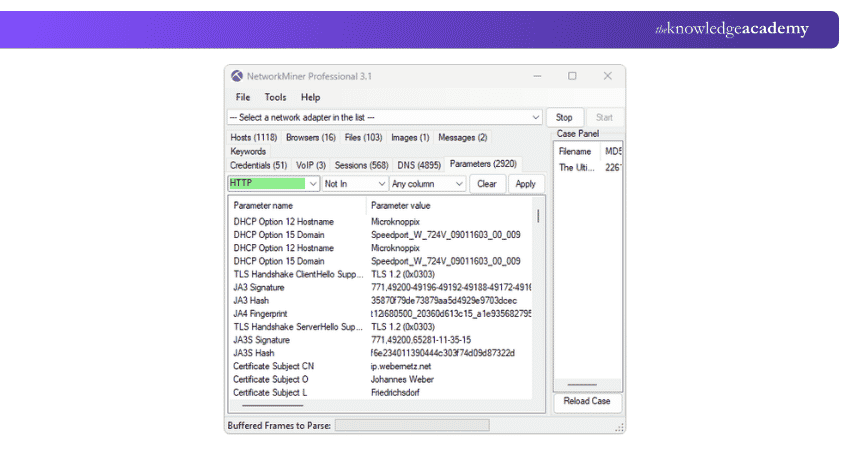
NetworkMiner is a network forensic analysis tool developed by Netresec. It examines packet captures to identify information about hosts, sessions and transferred data.
Unlike tools focused primarily on individual packets, NetworkMiner helps investigators organise relevant network artefacts for examination.
Key Features:
a) Network host and session identification
b) Extraction of supported files and artefacts from captures
c) Analysis of network traffic evidence
NetworkMiner is useful when investigators need to reconstruct network activity or examine information contained within captured communications.
12) Velociraptor
Velociraptor is an open-source digital forensics and incident response platform used to investigate activity across endpoints.
It enables authorised investigators to collect forensic artefacts, run targeted queries and examine suspicious activity on supported systems.
Key Features:
a) Endpoint-based forensic artefact collection
b) Targeted investigation and threat-hunting queries
c) Support for investigations across multiple systems
Velociraptor is useful in enterprise investigations where security teams need to examine numerous endpoints without relying solely on manual device-by-device collection.
13) KAPE
KAPE, short for Kroll Artefact Parser and Extractor, is a forensic collection and processing utility used to rapidly gather relevant artefacts from Windows systems.
It helps investigators collect selected files and process supported artefacts without necessarily requiring a complete disk image for every initial examination.
Key Features:
a) Targeted forensic artefact collection
b) Processing of supported Windows artefacts
c) Configurable collection and processing workflows
KAPE is particularly useful during incident response and forensic triage when investigators need to examine relevant Windows activity efficiently.
14) Plaso (log2timeline)
Plaso is an open-source forensic timeline analysis framework. It extracts timestamped events from supported data sources to help investigators reconstruct activity across digital systems.
The associated log2timeline tool extracts events into a Plaso storage file, which can be processed and exported using tools such as psort for chronological analysis.
Key Features:
a) Extraction of timestamped events from supported artefacts
b) Creation of forensic event timelines
c) Correlation of events from multiple evidence sources
Plaso is useful when investigators need to understand the sequence of activity surrounding a security incident or suspected unauthorised access.
Build a strong foundation in computer forensics and learn how to analyse digital evidence with confidence. Sign up for the Computer Forensics Foundation Training now!
15) Eric Zimmerman's Forensic Tools
Eric Zimmerman's forensic tools are a collection of utilities used primarily to analyse Windows artefacts during digital forensic investigations.
Different tools within the collection examine specific evidence sources, including registry data, file-system records and information related to user or system activity.
Key Features:
a) Specialised Windows artefact parsing
b) Examination of supported Registry and file-system records
c) Structured output for additional forensic analysis
These utilities are useful when investigators need detailed information from Windows artefacts rather than a single general-purpose investigation platform.
Digital Forensics Tool Selection Checklist
Before using a tool, consider the following questions:□ Does it support the required evidence source?□ Is it compatible with the relevant operating system or file formats?□ Can it preserve or verify evidence integrity?□ Does it offer the necessary acquisition or analysis capabilities?□ Are its licensing terms and costs suitable?□ Can findings be documented and independently validated?

Vishnu Sankar is a Senior Content Writer with 5+ years of experience across content development, software development, web development and system administration. His technical background and professional training support his expertise in IT and Tech, while his extensive research and writing experience covers Project Management and Health and Safety.
View Detail

 If you wish to make any changes to your course, please


