




We may not have the course you’re looking for. If you enquire or give us a call on 01344203999 and speak to our training experts, we may still be able to help with your training requirements.
Top DevOps Tools for Efficient Software Delivery
ByNilotpal SarmahLast updated on: 17 September 2026
DevOps Tools help automate and connect development, testing, deployment, security, and monitoring processes. Explore the top tools that enable faster, reliable, and efficient software delivery.
A toolbox is useful not because it contains dozens of tools, but because each tool solves a specific problem. DevOps Tools work in much the same way.
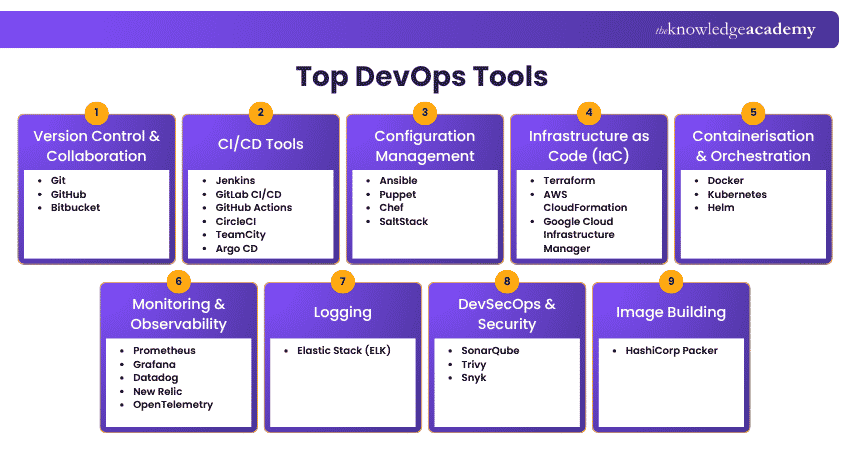
Git manages code changes, Jenkins automates pipelines, terraform provisions infrastructure, Docker packages applications, Kubernetes manages containers, and Prometheus monitors system behaviour. This blog explores 29 DevOps Tools and shows where each fit within modern software delivery.
What are DevOps Tools?
DevOps Tools are technologies that support activities across software development and IT operations. They help teams manage source code, automate builds and deployments, provision of infrastructure, manage containers, monitor applications, and integrate security checks into development workflows.
However, there is no single tool that performs every DevOps function. Organisations typically create a DevOps toolchain, where different tools work together across the software delivery lifecycle.
For example:
Code → Build → Test → Deploy → Operate → Monitor → Improve

Top 29 DevOps Tools
The Top 29 DevOps Tools include the following varieties explained below: This section will explore some of the leading DevOps automation tools that empower organisations in their software development and operations efforts:
Version Control and Collaboration Tools
VCSs are critical for managing and tracking changes to source code and collaborating effectively among development teams. Here are some popular Version Control Systems:
1) Git
Git is a distributed Version Control System widely used for managing source code. Developers can create branches, track changes, merge updates, and collaborate without overwriting one another's work. Its distributed architecture allows every developer to maintain a complete copy of the repository history, making Git flexible for both small and large development teams.
2) GitHub
GitHub is a cloud-based development platform built around Git. It provides repository hosting, pull requests, code reviews, issue tracking, and collaboration features. It also includes GitHub Actions, which allows teams to automate development and CI/CD workflows directly from their repositories.
3) Bitbucket
Bitbucket is a Git-based source code hosting and collaboration platform from Atlassian. It provides repository management, pull requests, code reviews, and integrations with tools such as Jira. Bitbucket Pipelines can also be used to build automated CI/CD workflows.
Continuous Integration/Continuous Deployment (CI/CD) tools
Continuous Integration and Continuous Delivery tools automate processes such as building, testing and deploying software. They help teams detect problems earlier and release application changes more frequently and consistently.
4) Jenkins
Jenkins is an open-source automation server widely used to build CI/CD pipelines. Its extensive plugin ecosystem enables integration with source control systems, testing frameworks, deployment platforms, and cloud environments. Teams can use Jenkins to automatically build and test code whenever changes are committed and trigger deployment processes after successful validation.
5) GitLab CI/CD
GitLab provides integrated source code management and CI/CD capabilities. Teams can define automated pipelines that build, test, and deploy applications whenever code changes occur. Having repository management and CI/CD capabilities within the same platform can simplify development workflows.
6) GitHub Actions
GitHub Actions enables teams to automate software workflows directly within GitHub repositories. Workflows can respond to events such as code pushes, pull requests, and releases. This makes it useful for automated testing, building applications, deployments, and other repository-based tasks.
7) CircleCI
CircleCI is a CI/CD platform designed to automate application builds, tests, and deployments. It supports cloud-hosted and self-hosted execution environments and integrates with popular development platforms.
8) TeamCity
TeamCity is a CI/CD server developed by JetBrains. It provides build automation, testing, deployment workflows, and support for multiple build agents. It also integrates with various development and deployment technologies.
9) Argo CD
Argo CD is a declarative Continuous Delivery tool designed specifically for Kubernetes. It follows GitOps principles by using Git repositories as the source of truth for application configurations and automatically synchronising the desired state with Kubernetes environments.
Boost your development workflow with our Continuous Integration Training with TeamCity today.
Configuration Management Tools
Configuration management tools automate the process of maintaining consistent configurations across servers and infrastructure. Instead of manually configuring each environment, teams can define the required system state and apply it consistently.
10) Ansible
Ansible is an open-source automation platform commonly used for configuration management, application deployment, and infrastructure automation. It uses human-readable YAML-based playbooks and can operate without requiring agents to be installed on managed systems.
11) Puppet
Puppet is a configuration management platform used to automate infrastructure configuration and enforce desired system states. It uses declarative configuration principles to help organisations maintain consistency across large environments.
12) Chef
Chef is an infrastructure automation and configuration management tool that allows teams to define system configurations as code. Configurations can therefore be versioned, tested, and deployed consistently across environments.
13) Salt
It is an automation and configuration management platform that supports remote execution and infrastructure management. It commonly uses a master-minion architecture while also supporting masterless configurations.
Infrastructure as Code (IaC) Tools
Infrastructure as Code tools enable teams to define and manage infrastructure resources using code, allowing for version control, reproducibility, and scalability. Here are a few notable IaC tools:
14)Terraform
Terraform is an Infrastructure as Code tool used to provision and manage infrastructure through declarative configuration files. It works with numerous infrastructure and cloud providers, making it useful for organisations operating across different environments.
15) AWS CloudFormation
AWS CloudFormation allows teams to define and provision AWS infrastructure using templates. Resources such as networks, databases, servers, and other AWS services can be managed through code, helping teams create repeatable infrastructure environments.
16) Google Cloud Infrastructure Manager
Google Cloud Infrastructure Manager provides Infrastructure as Code capabilities for deploying and managing resources within Google Cloud. It uses Terraform configurations, helping teams automate infrastructure deployment and maintain consistent cloud environments.
Containerisation and Orchestration Tools
Modern applications frequently use containers to package software consistently across development, testing and production environments. Containerisation and orchestration tools help teams create, deploy, and manage these environments at scale.
17) Docker
Docker is a containerisation platform that packages applications and their dependencies into portable containers. Containers can run consistently across different environments, reducing problems caused by differences between development, testing, and production systems.
18) Kubernetes
Kubernetes is an open-source container orchestration platform used to deploy, scale and manage containerised applications. It can automate tasks such as application scaling, service discovery, load balancing, and recovery from container failures.
19) Helm
Helm is a package manager for Kubernetes. It uses reusable packages called charts to define, install and manage Kubernetes applications. This can simplify deployments that involve numerous Kubernetes resources.
Unlock the potential for DevOps with our comprehensive Kubernetes Training today.
Monitoring and Observability Tools
Deploying an application is only part of software delivery. Teams also need visibility into how applications and infrastructure behave after deployment. Monitoring and observability tools collect metrics and other telemetry that help teams detect problems and understand system performance.
20) Prometheus
Prometheus is an open-source monitoring and alerting toolkit designed around time-series data. It is widely used for monitoring cloud-native and containerised environments and provides a flexible query language for analysing collected metrics.
21) Grafana
Grafana is an observability and data visualisation platform that can connect to numerous data sources, including Prometheus. Teams can build dashboards, visualise metrics, and configure alerts to understand application and infrastructure behaviour.
22) Datadog
Datadog is a cloud-based observability platform covering infrastructure, applications, logs, and other telemetry. Its unified dashboards can help teams investigate performance issues across distributed systems.
23) New Relic
New Relic provides application performance monitoring and observability capabilities across applications and infrastructure. Teams can use it to investigate performance problems, analyse telemetry, and monitor application behaviour.
24) OpenTelemetry
OpenTelemetry is an open-source observability framework that provides vendor-neutral APIs, SDKs and tools for generating, collecting and exporting telemetry data such as traces, metrics and logs. It helps teams instrument distributed applications while maintaining flexibility in their observability backends.
Logging Tools
Logs provide detailed records of events occurring within applications, servers and infrastructure. Centralised logging tools make it easier to search, analyse and troubleshoot these records.
25) Elastic Stack
The Elastic Stack commonly combines Elasticsearch, Logstash, and Kibana.
Elasticsearch stores and searches data, Logstash collects and processes data, and Kibana
provides visualisation and exploration capabilities. Together, these technologies can
support centralised logging, troubleshooting, and observability workflows.
DevSecOps and Security Tools
DevSecOps integrates security checks throughout software development rather than treating security as a final step before deployment. Several tools can automate code, dependency, container, and infrastructure security checks.
26) SonarQube
SonarQube analyses source code to identify quality problems, bugs, and security-related issues. It can be incorporated into CI/CD pipelines, so code is automatically analysed during development.
27) Trivy
Trivy is an open-source security scanner commonly used for containers, filesystems, repositories and Infrastructure as Code configurations. It can help teams identify known vulnerabilities and misconfigurations earlier in development workflows.
28) Snyk
Snyk provides developer-focused security capabilities for identifying vulnerabilities across code, open-source dependencies, containers and Infrastructure as Code. It integrates with development environments and CI/CD workflows.
Image Building Tools
Image-building tools help teams create standardised machine images that can be reused across different environments.
29) HashiCorp Packer
Packer automates the creation of machine images from reusable configuration templates. Teams can use the same configuration to create consistent images for different cloud providers and virtualisation environments. This supports immutable infrastructure practices where infrastructure is replaced with a newly built version rather than manually modified after deployment.
Don't Confuse These DevOps Tools
Git vs GitHubGit is the distributed Version Control System. GitHub is a platform built around Git for repository hosting and collaboration.Docker vs KubernetesDocker helps build and run containers, while Kubernetes orchestrates containerised workloads across infrastructure.Terraform vs AnsibleTerraform primarily provisions infrastructure, while Ansible commonly configures systems and automates operational tasks. Their capabilities can overlap, but they often complement one another.Prometheus vs GrafanaPrometheus primarily collects and queries metrics, while Grafana is commonly used to visualise data from Prometheus and other sources.
Enhance your DevOps expertise with our Certified DevOps Security Professional (CDSOP) Course – Sign up today.
How to Choose the Right DevOps Tools?
With so many DevOps Tools available, choosing the most popular option is not necessarily the best approach. Tools should solve specific problems within the organisation's software delivery workflow. Consider the following factors:
1) Identify Your Requirements
Start by identifying the problem the tool needs to solve. A team struggling with deployment delays may prioritise CI/CD automation, while one experiencing production visibility issues may need better observability tools.
2) Check Integration Capabilities
DevOps Tools rarely operate independently. Check whether a tool integrates effectively with your source control system, CI/CD platform, cloud environment and other technologies.
3) Consider Scalability
A tool that works for a small development team may not necessarily suit hundreds of applications or thousands of infrastructure resources. Consider how the platform performs as workloads and teams grow.
4) Evaluate Automation Capabilities
Look for opportunities to reduce repetitive manual tasks across testing, deployment, configuration, and infrastructure management. Effective automation can improve consistency while reducing human error.
5) Assess Security Requirements
Security should be considered throughout the DevOps lifecycle. Evaluate features such as access control, secrets management, vulnerability scanning, auditability, and security integrations.
6) Review Cost and Licensing
Consider more than the initial licence cost. Infrastructure requirements, support plans, training, maintenance, and operational complexity can all affect the total cost of using a tool.
7) Consider Team Expertise
A technically powerful platform may create unnecessary complexity if the team cannot operate it effectively. Choose tools that match both technical requirements and available expertise.
Start With the Problem, Not the Tool
Avoid selecting a technology simply because it is popular. First identify the bottleneck in your delivery process. Slow integration may require CI/CD automation, inconsistent environments may point towards IaC or configuration management, while poor production visibility may indicate an observability gap.
Benefits of Using DevOps Tools
The right DevOps toolchain can improve several areas of software delivery.
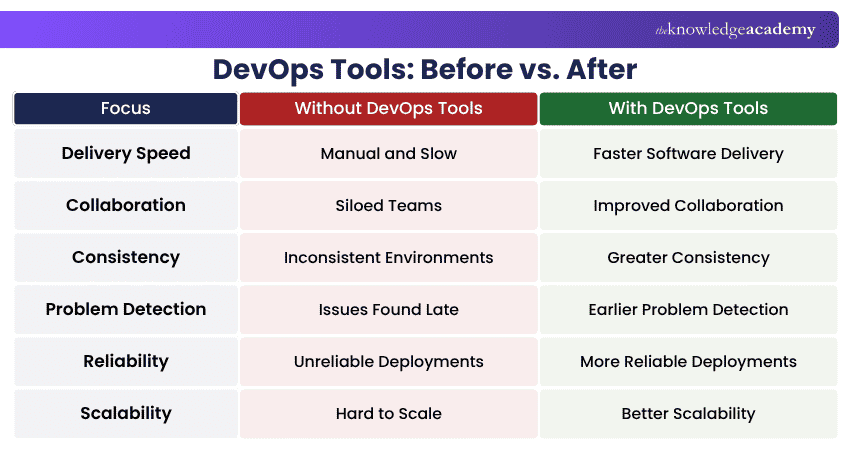
1) Faster Software Delivery: Automated building, testing, and deployment can reduce manual work and shorten release cycles.
2) Improved Collaboration: Shared repositories, automated workflows, and centralised platforms give development and operations teams better visibility into software changes.
3) Greater Consistency: Configuration management, containers and Infrastructure as Code can reduce differences between development, testing and production environments.
4) Earlier Problem Detection: Automated tests, monitoring, logging, and security scanning can identify issues earlier in the software lifecycle.
5) More Reliable Deployments: Repeatable deployment processes reduce reliance on manual configuration and help teams create more predictable releases.
6) Better Scalability: Automation and orchestration tools make it easier to manage increasing infrastructure and application workloads without relying entirely on manual administration.
Beyond Delivery
Effective Continuous Delivery is not only associated with better software delivery. DORA research also links it with lower burnout, greater job satisfaction, less deployment pain and stronger organisational culture.
Build smarter DevOps skills with our Certified DevOps Professional (CDOP) Course – Register now!

Nilotpal Sarmah is a Senior Content Writer with 11+ years of overall experience spanning engineering, operations and content development. His technical knowledge and extensive writing experience enable him to simplify specialised topics across IT and Tech, Business Skills, Project Management, Health and Safety, and ISO and Compliance.
View Detail

 If you wish to make any changes to your course, please


