


We may not have the course you’re looking for. If you enquire or give us a call on 01344203999 and speak to our training experts, we may still be able to help with your training requirements.
Top 12 Data Mining Tools: Features and Uses
ByThe Knowledge AcademyLast updated on: 02 November 2026
From visual platforms like Orange and KNIME to programming-based solutions like Python and Apache Spark MLlib, these tools support statistical analysis and machine learning.
The Gist
1. Data mining tools support data preparation, classification, clustering, predictive modelling and pattern discovery.2. Orange, KNIME and RapidMiner AI Studio offer visual workflows suitable for users who prefer limited coding.3. Python with scikit-learn provides flexibility for developing customised machine learning solutions.4. Apache Spark MLlib supports distributed machine learning, while H2O-3 provides automated modelling capabilities.5. Selecting the right tool requires assessing data volume, technical expertise, model evaluation features and deployment requirements.
A retail business has thousands of customer transactions but cannot easily identify which products are frequently purchased together. A telecommunications company wants to understand why customers leave. Both have valuable data, but extracting useful patterns requires appropriate analytical methods and tools.
This is where data mining tools become important. They help professionals prepare information, explore relationships, develop predictive models and evaluate results. Whether you prefer drag-and-drop workflows or programming-based analysis, understanding the available tools can help you approach complex data challenges more effectively.
Top 12 Data Mining Tools
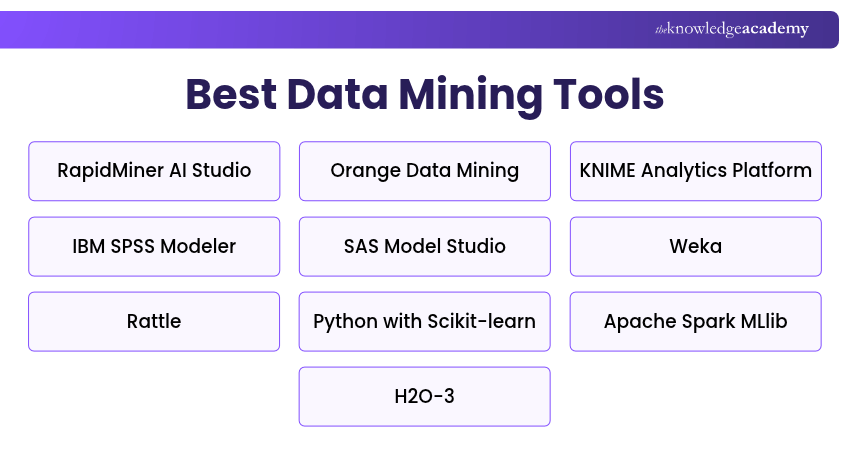
Different data mining tools serve different analytical needs. Here's a quick overview to help you identify a suitable starting point.
1) RapidMiner AI Studio (Formerly Altair AI Studio)
RapidMiner AI Studio, formerly Altair AI Studio and previously RapidMiner Studio, is a visual data science platform used for data preparation, machine learning and predictive analytics. Its workflow-based environment allows users to develop analytical processes using configurable operators. The platform is suitable for analysts who want to experiment with machine learning techniques without writing extensive code.
Key Features:
a) Visual Workflow Design: Allows users to connect operators for data preparation, transformation and modelling.
b) Machine Learning Algorithms: Provides operators for classification, regression, clustering and other analytical tasks.
c) Data Integration: Supports importing and processing information from different sources.
d) Model Evaluation: Includes tools for comparing models and examining predictive performance.
e) Extensible Workflows: Supports integration with compatible tools and analytical extensions.
Best For: Analysts and data science learners seeking visual predictive modelling workflows.

2) Orange Data Mining
Orange Data Mining is an open-source data mining and machine learning tool that uses a visual programming interface. It allows users to connect interactive widgets for data exploration, visualisation, preprocessing and model development.
Key Features:
a) Drag-and-drop Interface: Enables users to construct analytical workflows visually.
b) Data Visualisation: Provides interactive charts and exploratory visualisation tools.
c) Classification and Clustering: Supports a range of machine learning methods.
d) Data Preparation: Includes tools for selecting, transforming and preprocessing data.
e) Python-based Extensibility: Allows advanced users to extend workflows through Python-compatible functionality.
Best For: Students, beginners and analysts learning visual data mining.
Pro Tip
Start with a small, representative dataset when developing a data mining workflow. Check data types, missing values and expected outputs before introducing larger datasets. This helps identify preparation errors early and makes troubleshooting easier.
3) KNIME Analytics Platform
KNIME Analytics Platform is an open-source, workflow-based data analytics platform used for data preparation, transformation, visualisation and machine learning. It allows users to create analytical workflows by connecting configurable nodes, reducing the need to write code for every operation.
Key Features:
a) Visual Workflow Creation: Enables users to develop analytical processes through interconnected nodes.
b) Data Integration: Supports numerous file formats, databases and external services.
c) Data Transformation: Provides nodes for cleaning, filtering, joining and preparing datasets.
d) Machine Learning Integration: Supports predictive modelling and connections with Python and other analytical environments.
e) Workflow Reusability: Allows workflows and components to be reused across analytical tasks.
Best For: Data Analysts and teams requiring repeatable data preparation and machine learning workflows.
4) IBM SPSS Modeler
IBM SPSS Modeler is a data mining and predictive analytics platform that uses visual workflows to prepare data, build models and analyse results. It supports statistical and machine learning techniques for organisations working with structured business data.
Key Features:
a) Visual Modelling Interface: Enables users to create analytical streams without extensive programming.
b) Predictive Analytics: Supports classification, regression, clustering and related techniques.
c) Data Preparation: Provides tools for cleaning and transforming data.
d) Model Evaluation: Helps users assess predictive performance and compare modelling approaches.
e) Enterprise Integration: Supports connections with compatible IBM and third-party data environments.
Best For: Business Analysts and enterprise teams developing predictive models.
Trainer's Insight
A predictive model can produce misleading results if information from the validation or test data influences training. Split the data appropriately and ensure preprocessing steps are fitted only on the training data, or within the training portion of every cross-validation fold.
5) SAS Model Studio
SAS Model Studio is a browser-based modelling environment on SAS Viya that supports data mining, machine learning and predictive analytics. It helps analysts build, compare and deploy models through visual pipelines while supporting more advanced analytical workflows.
Key Features:
a) Visual Model Pipelines: Allows users to create modelling workflows through a graphical interface.
b) Automated Machine Learning: Supports automated model development and comparison.
c) Data Preparation: Provides capabilities for transforming and preparing analytical data.
d) Model Comparison: Helps evaluate candidate models using suitable performance measures.
e) SAS Viya Integration: Supports enterprise analytics, scalability and associated model management workflows.
Best For: Enterprise analytics teams developing governed predictive modelling workflows.
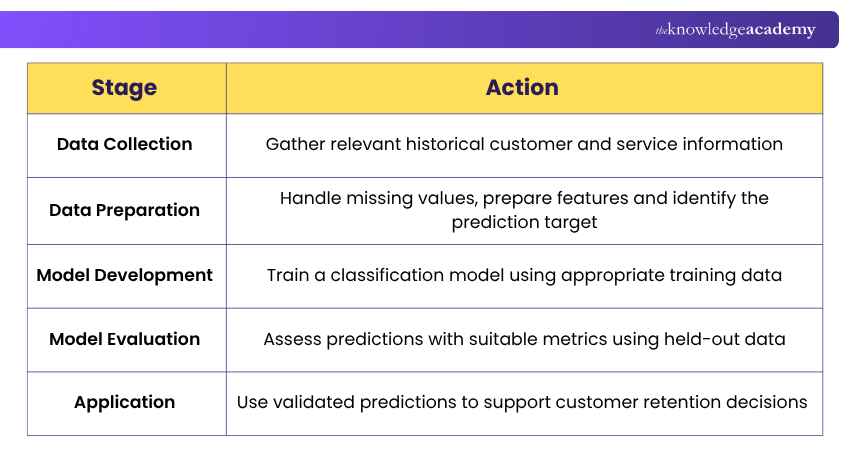
Practical Example: Predicting Customer Churn
A telecommunications company seeks to identify customers who may stop using its services. The following process illustrates how data mining tools can support this task:
6) Weka
Weka is an open-source machine learning software collection developed using Java. It provides tools for data preprocessing, classification, regression, clustering and visualisation. Its graphical interfaces make it particularly useful for exploring machine learning algorithms and comparing modelling approaches.
Key Features:
a) Machine Learning Algorithms: Includes methods for classification, regression, clustering and association analysis.
b) Data Preprocessing: Provides filtering and transformation capabilities.
c) Graphical Interfaces: Includes tools such as Explorer and Experimenter.
d) Model Evaluation: Supports testing and comparing algorithms.
e) Java Integration: Allows developers to incorporate Weka capabilities into compatible applications.
Best For: Students, researchers and professionals learning machine learning concepts.
7) Rattle
Rattle is an R-based data mining tool that provides a graphical interface for exploring data and developing analytical models. Its newer interface uses Flutter, replacing the older RGtk2-based design, while retaining R-based analytical capabilities.
Key Features:
a) Graphical Interface: Supports data mining operations without requiring every step to be coded manually when using the compatible Rattle interface.
b) R Integration: Uses R and compatible packages for statistical analysis.
c) Data Exploration: Helps users inspect and understand datasets.
d) Predictive Modelling: Supports common modelling activities through its interface.
e) R Code Logging: Records and comments on R commands used in the graphical interface, helping users study, save and reproduce analytical operations.
Best For: R learners and analysts who prefer a graphical approach to data mining.
8) Python with Scikit-learn
Python with scikit-learn provides a flexible programming-based environment for machine learning and data mining. Scikit-learn is an open-source Python library offering algorithms and utilities for preprocessing, classification, regression, clustering and model evaluation.
Key Features:
a) Machine Learning Algorithms: Supports a wide selection of supervised and unsupervised learning methods.
b) Data Preprocessing: Provides tools for scaling, encoding, transforming and preparing data.
c) Pipelines: Allows preprocessing and modelling steps to be combined into repeatable workflows.
d) Model Selection: Supports cross-validation, parameter searches and performance evaluation.
e) Python Ecosystem Integration: Works with libraries such as NumPy, pandas and Matplotlib.
Best For: Data Scientists and developers building customised machine learning workflows.
Build strong fundamentals for real-world coding with our Python Course – Join now!
9) Apache Spark MLlib
Apache Spark MLlib provides machine learning capabilities within the Apache Spark distributed processing framework. It supports analytical workflows that benefit from Spark's distributed data processing environment.
Key Features:
a) Distributed Processing: Supports machine learning tasks across configured Spark computing resources.
b) Classification and Regression: Provides algorithms for predictive modelling.
c) Clustering: Supports grouping records based on similarities.
d) ML Pipelines: Helps combine data transformation and modelling stages.
e) Spark Integration: Works with Spark DataFrames and related processing capabilities.
Best For: Data engineering and machine learning teams working with distributed datasets.
For new Spark MLlib development, the DataFrame-based spark.ml API is the primary interface. The older RDD-based spark.mllib API remains in maintenance mode.
10) H2O-3
H2O-3 is an open-source, distributed machine learning platform that supports predictive modelling and automated machine learning. It provides interfaces for developing models and includes H2O AutoML, which can train and compare multiple algorithms.
Key Features:
a) Distributed Machine Learning: Supports model development across configured computing resources.
b) H2O AutoML: Automates training and comparison of candidate models.
c) Classification and Regression: Provides algorithms for common predictive modelling tasks.
d) Python and R Integration: Allows users to develop models through supported programming interfaces.
e) Model Explainability: Includes methods for examining model predictions and behaviour.
Best For: Data Scientists and analytics teams exploring automated predictive modelling.
11) Teradata Autonomous Knowledge Platform
Teradata Autonomous Knowledge Platform is an enterprise platform that brings together data, analytics and AI capabilities across supported deployment environments. Introduced under this name in 2026, it builds on Teradata's earlier Vantage platform and supports large-scale enterprise data processing and analytical workflows.
Unlike dedicated data mining tools, this is a broader enterprise data and AI platform that can support analytical and machine learning use cases as part of an integrated environment. Availability of individual capabilities and deployment options depends on Teradata's product rollout and supported configurations.
Key Features:
a) Enterprise Data Processing: Supports analytical operations across large and complex datasets.
b) Integrated Analytics: Enables analytical workloads alongside enterprise data management.
c) Teradata AI Studio: Provides AI development capabilities within the broader Teradata ecosystem, subject to supported product configurations.
d) Cloud and On-premises Deployment: Teradata's broader platform strategy supports cloud, on-premises and hybrid environments, although individual Autonomous Knowledge Platform capabilities follow product-specific availability schedules.
e) Security and Governance: Provides controls for managing access and governed data usage.
Best For: Large organisations managing enterprise analytics and AI workloads that extend beyond standalone data mining software.
Learn to build scalable, efficient data warehousing solutions with our Teradata Training – Register now!
12) ELKI
ELKI (Environment for Developing KDD-Applications Supported by Index-Structures) is an open-source, Java-based data mining framework designed primarily for research in clustering, outlier detection and related algorithms.
It provides a collection of methods for exploring data patterns and evaluating analytical approaches. The framework is particularly relevant to researchers who need to compare algorithms and examine how distance measures and index structures affect analytical results.
Key Features:
a) Clustering Algorithms: Provides algorithms such as k-means, DBSCAN and hierarchical clustering for grouping data.
b) Outlier Detection: Offers methods for identifying unusual observations using distance-based, density-based and other approaches.
c) Index Structures: Supports data indexing methods that can improve the efficiency of selected analytical operations.
d) Algorithm Evaluation: Provides facilities for comparing clustering and outlier detection methods.
e) Research Extensibility: Allows researchers and developers to extend the framework with specialised algorithms and analytical components.
Best For: Researchers, students and developers studying clustering, anomaly detection and data mining algorithms.
Data Mining Tool Selection Checklist
Use this checklist before selecting a solution:
□ Define the data mining objective and expected outcome.□ Identify supported data sources and file formats.□ Assess dataset size and processing requirements.□ Check supported algorithms and modelling techniques.□ Evaluate model validation and performance reporting.□ Consider programming skills and ease of use.□ Review security, data privacy and governance requirements.□ Compare licensing, infrastructure and support costs.□ Test the tool using a representative dataset.

The Knowledge Academy develops accessible learning content across Project Management, IT, Cybersecurity, Data Science, Business Analysis, HR, Accounting and Finance, Leadership and Health and Safety. Its resources combine subject research with clear explanations to help professionals build practical knowledge across a wide range of disciplines.
View Detail

 If you wish to make any changes to your course, please


