


We may not have the course you’re looking for. If you enquire or give us a call on 01344203999 and speak to our training experts, we may still be able to help with your training requirements.
Top 25 Data Management Tools: Features and Examples
ByVishnu SankarLast updated on: 03 November 2026
Data management tools help businesses store, organise, integrate and analyse information across different systems. This blog explores 25 data management tools, their key features and practical uses, helping you understand which solutions may suit your organisation's needs.
At a Glance
1. Data Integration: Tools such as Stitch, Fivetran and Boomi help connect information across different systems.2. Data Storage: Snowflake, IBM Db2 and Apache Cassandra support different data storage and processing requirements.3. Data Governance: OneTrust, Collibra and IBM MDM help organisations manage data policies, quality and consistency.4. Business Analytics: Tableau, Looker and Microsoft Power BI help professionals explore information and present findings.5. Tool Selection: The right solution depends on data requirements, integrations, security, scalability and costs.
Your Data is Everywhere. But is It Working Together?
Imagine a company preparing its monthly performance report. Sales figures sit in one system, customer records are stored in another and website data is spread across several platforms. Every team has information, yet bringing it together takes hours.
With the right tools, those systems can be connected, records organised and relevant information accessed without repeatedly transferring files by hand.
That's where data management tools become useful. They support different stages of working with data, from storage and integration to governance and analysis. But with so many options available, which tools are best suited to different data management tasks? The answer depends on the task, as each tool below handles a different part of the process.
25 Best Data Management Tools
Data management tools serve different purposes. Some move information between systems, while others manage databases, improve data consistency or support business reporting. The following 25 data management tools represent different categories, including data integration, storage, governance and analytics. Their suitability depends on specific business requirements. Let's discuss in detail:
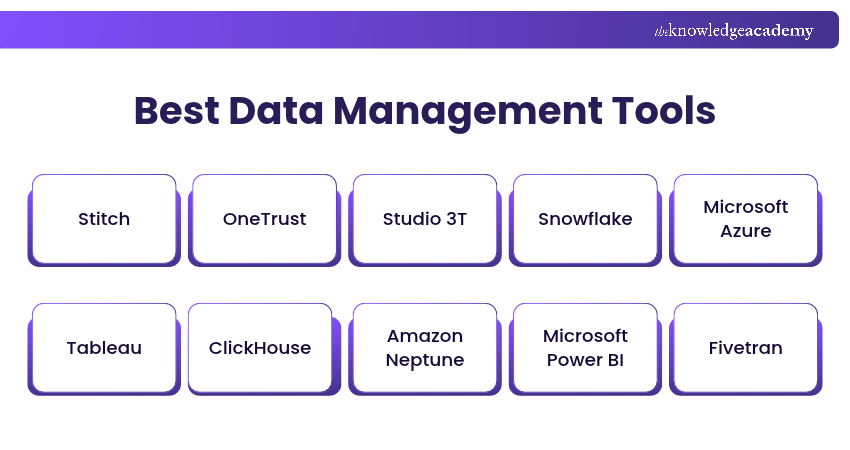
1) Stitch
Stitch is a cloud-based data integration service that helps organisations extract information from different sources and load it into a chosen destination, such as a data warehouse. It supports automated data replication, reducing the need for repeated manual transfers.
It is particularly relevant when businesses need to bring information from applications and databases into a central location for further processing or reporting. Stitch is now part of Qlik, which encourages new users to explore Qlik Talend Cloud and provides migration options for existing Stitch customers.
Key Features:
a) Connects supported databases and applications to data destinations.
b) Automates data extraction and replication.
c) Supports scheduled data-loading workflows.
Example: An online retailer uses Stitch to move sales and marketing data into a warehouse for consolidated reporting.
2) OneTrust
OneTrust provides software for privacy management and data governance activities. It helps organisations manage information about personal data, assess privacy risks and support compliance workflows.
Its capabilities are useful for organisations that handle sensitive information and need structured processes for privacy oversight. However, using OneTrust does not automatically guarantee regulatory compliance.
Key Features:
a) Supports privacy assessments and compliance workflows.
b) Helps organisations document and manage data-related risks.
c) Provides tools for managing privacy-related processes.
Example: A company uses OneTrust to maintain records of personal data processing and coordinate privacy assessments.
3) Studio 3T
Studio 3T is a database management application designed for MongoDB. It provides a graphical interface for working with collections, writing queries and examining database information.
Developers and Database Administrators can use Studio 3T to simplify selected database development and maintenance activities.
Key Features:
a) Provides a graphical interface for MongoDB databases.
b) Supports query writing, editing and debugging.
c) Offers tools for exploring and managing database records.
Example: A Database Administrator uses Studio 3T to investigate records in a MongoDB collection and refine a query.
4) Snowflake
Snowflake is a cloud-based data platform that supports data storage, processing and analytical workloads. Organisations can use it to bring together information from different sources and run queries over large datasets.
The platform supports scalable computing resources, although performance, data freshness and costs depend on how workloads are configured.
Key Features:
a) Supports cloud-based analytical data storage and processing.
b) Allows computing resources to be scaled for different workloads.
c) Provides capabilities for data sharing and analysis.
Example: A retailer uses Snowflake to analyse purchasing patterns across its online and physical stores.
5) Microsoft Azure
Microsoft Azure is a cloud computing platform that provides services for data storage, databases, analytics and application development. Its data-related offerings include Azure SQL Database, Azure Blob Storage and other specialised services.
Azure is broader than a single data management application, so businesses should select the relevant service according to their storage, processing and security requirements.
Key Features:
a) Provides cloud storage and managed database services.
b) Supports data processing, integration and analytical workloads.
c) Offers identity, access and monitoring capabilities.
Example: A company uses Azure SQL Database to host application data while storing supporting files in Azure Blob Storage.
6) Tableau
Tableau is a business intelligence and data visualisation platform used to explore information through charts, dashboards and reports. It can connect to supported data sources and help users identify patterns in their datasets.
Its main purpose is analysis and visual communication rather than operating as a general-purpose database management system.
Key Features:
a) Creates interactive charts and dashboards.
b) Connects to different supported data sources.
c) Supports visual data exploration and reporting.
Example: A Sales Manager uses Tableau to compare regional revenue and investigate changes in product performance.
7) ClickHouse
ClickHouse is a column-oriented database management platform designed for analytical queries over large volumes of data. It is used in applications requiring fast aggregation and analysis of records. Its architecture makes it particularly useful for analytical workloads, although suitability depends on data structures, queries and deployment requirements.
Key Features:
a) Supports high-performance analytical queries.
b) Uses column-oriented storage for analytical processing.
c) Handles large datasets and aggregation workloads.
Example: A software company uses ClickHouse to analyse application event records and monitor usage patterns.
Gain an understanding of transactions and data locking in MariaDB with our MariaDB Standard DBA Training - Sign up now!
8) Amazon Neptune
Amazon Neptune is a family of managed graph database and analytics services from Amazon Web Services (AWS), including Neptune Database and Neptune Analytics. Graph databases are designed to work with relationships between connected records, such as people, products or transactions.
Neptune is useful for applications involving highly connected information, including certain fraud detection and recommendation use cases.
Key Features:
a) Supports graph data models and relationship-based queries.
b) Provides managed database infrastructure through AWS.
c) Supports applications built around connected data.
Example: A financial services company uses a graph database to examine relationships between accounts and transactions during fraud investigations.
9. Microsoft Power BI
Microsoft Power BI is a Business Intelligence (BI) platform that helps users transform information into reports, dashboards and visualisations. It connects to supported sources and provides tools for modelling and analysing data.
Organisations use Power BI to track business performance and share insights. The frequency of data updates depends on the connection method and configuration.
Key Features:
a) Creates interactive reports and dashboards.
b) Supports data modelling and analytical calculations.
c) Integrates with supported Microsoft and third-party data sources.
Example: A finance team creates a Power BI dashboard displaying revenue, expenditure and budget variances across departments.
Real-world Scenario: The Dashboard Nobody Trusts
Imagine a retail company where the sales and finance teams report different monthly revenue figures. Both dashboards appear accurate, but one includes refunded orders while the other excludes them.The teams investigate the discrepancy and discover that they are using different definitions of revenue. They agree on a common reporting definition and update their calculations.
10) Fivetran
Fivetran is a managed data integration system that helps businesses move information from supported applications and databases into analytical destinations. It automates many aspects of data extraction and synchronisation. It is useful for maintaining recurring data transfers between supported systems.
Key Features:
a) Provides managed connectors for supported data sources.
b) Automates data replication and synchronisation.
c) Supports data integration into analytical platforms.
Example: A marketing team uses Fivetran to consolidate advertising and customer relationship management data for reporting.
11) Collibra
Collibra is a data governance platform that helps organisations manage information about their data assets. It supports activities such as data cataloguing, ownership, policy management and data stewardship.
Collibra can improve how teams discover and understand data. However, consistent and accurate information still depends on appropriate governance processes and organisational responsibilities.
Key Features:
a) Supports data cataloguing and asset discovery.
b) Helps document data ownership and governance policies.
c) Provides workflows for data stewardship and governance activities.
Example: A financial institution uses Collibra to document key datasets, identify responsible data owners and maintain consistent definitions across departments.
12) Looker
Looker is a Business Intelligence (BI) platform from Google Cloud that supports data exploration, modelling and reporting. It allows organisations to define business metrics and build analytical experiences using governed data.
Looker is particularly relevant when teams need consistent definitions for measures such as revenue, customer activity or operational performance.
Key Features:
a) Supports governed data modelling and business metrics.
b) Provides dashboards and exploratory analytics.
c) Connects to supported analytical databases and data platforms.
Example: A subscription business uses Looker to maintain consistent customer retention metrics across management reports.
13) Redis
Redis is an in-memory data store used as a database, cache and message broker in applications requiring fast data access. It is used for caching, session management and other performance-sensitive workloads.
Redis supports different data structures and can help reduce repeated requests to slower underlying systems. It is not a direct replacement for every type of database.
Key Features:
a) Supports fast in-memory data access.
b) Provides data structures suited to different application tasks.
c) Can be used for caching and selected real-time workloads.
Example: An e-commerce website uses Redis to cache frequently requested product information and reduce repeated database queries.
14) Syniti
Syniti provides solutions for enterprise data migration, quality and management. Its offerings help organisations assess, prepare and move information when introducing or updating business systems.
Syniti is particularly relevant to complex data transformation projects where records must be checked and corrected before migration.
Key Features:
a) Supports data migration and transformation processes.
b) Provides capabilities for assessing and improving data quality.
c) Helps organisations manage data during system changes.
Example: A manufacturer uses Syniti to prepare customer and supplier records before migrating to a new enterprise system.
Trainer Insight: Check the Data After Migration
A completed data transfer does not necessarily mean the migration was successful. Teams should check whether important records are complete, correctly mapped and usable in the destination system.For example, customer records may transfer successfully while certain date formats or account relationships change unexpectedly. Post-migration reconciliation helps identify these discrepancies before the new system becomes the primary source of information.
15) Google Cloud
Google Cloud is a cloud computing platform that provides data storage, processing, database and analytics services. Its offerings include BigQuery and Cloud Storage, along with other managed services for different workloads.
Like Microsoft Azure, Google Cloud is a broad platform rather than one specialised data management tool.
Key Features:
a) Provides cloud-based storage and database services.
b) Supports analytical processing through services such as BigQuery.
c) Offers access control, monitoring and related infrastructure capabilities.
Example: A business stores raw files in Cloud Storage and uses BigQuery to analyse structured sales information.
Learn about data normalisation, de-normalisation, and SQL queries with our Relational Databases & Data Modelling Training - Register now!
16) Qlik Talend Cloud
Qlik Talend Cloud is a data integration and quality solution that helps organisations connect, transform and prepare information from multiple sources. It supports data pipelines and processes used to deliver information to analytical and operational systems.
It is useful when organisations need both data movement and capabilities for improving the quality of information.
Key Features:
a) Connects and integrates data from supported sources.
b) Supports transformation and data quality workflows.
c) Helps manage automated data pipelines.
Example: A retail business uses Qlik Talend Cloud to combine product records from several systems and prepare them for a central analytical platform.
17) Spotfire
Spotfire is a data analytics and visualisation platform used to explore complex information through interactive visual tools. It supports analytical applications across areas such as manufacturing, life sciences and business operations.
Key Features:
a) Provides interactive data visualisation.
b) Supports exploratory and advanced analytical workflows.
c) Connects to supported data sources for analysis.
Example: A Manufacturing Analyst uses Spotfire to examine equipment measurements and investigate patterns associated with production problems.
18) IBM Db2
IBM Db2 is a database management system used to store, manage and query structured information. It supports applications that require reliable transaction processing and analytical capabilities.
Organisations use Db2 in enterprise environments where database administration, security and performance management are important.
Key Features:
a) Supports relational database storage and SQL queries.
b) Provides capabilities for transaction processing and data security.
c) Supports enterprise database administration and management.
Example: A financial organisation uses IBM Db2 to manage structured records for a business application.
19) Apache Cassandra
Apache Cassandra is a distributed NoSQL database designed to manage data across multiple nodes. Its architecture supports scalability and fault tolerance for applications that need distributed data storage.
Cassandra can be useful for large workloads distributed across systems, but actual availability and performance depend on the deployment design, configuration and operating conditions.
Key Features:
a) Distributes data across multiple nodes.
b) Supports scalable data storage.
c) Provides replication and fault-tolerance capabilities.
Example: A technology company uses Cassandra to store application activity records generated across several services.
20) Boomi
Boomi provides integration and automation capabilities for connecting applications, data and business processes. It helps organisations exchange information between systems that would otherwise operate separately.
Boomi is especially relevant to application integration and workflow automation rather than functioning as a traditional database.
Key Features:
a) Connects supported applications and data systems.
b) Supports data mapping and integration workflows.
c) Automates selected business processes.
Example: A company uses Boomi to exchange customer information between its CRM and order management systems.
21) Databricks
Databricks is a data and AI platform that supports data engineering, analytics and machine learning workloads. It brings together capabilities for processing large datasets and working with structured and unstructured information.
Its lakehouse approach combines elements associated with data lakes and analytical data warehouses.
Key Features:
a) Supports large-scale data processing and engineering.
b) Provides capabilities for analytics and machine learning.
c) Supports lakehouse-based data architectures and workloads.
Example: A logistics company uses Databricks to process shipment records and build analytical models for delivery planning.
Pro Tip: Match Processing Resources to Workloads
Review how often datasets need processing and whether every job needs the same computing power. Oversized jobs and unused resources increase costs, so adjust configurations to match workload patterns.
22) Informatica Intelligent Data Management Cloud (IDMC)
Informatica Intelligent Data Management Cloud (IDMC) is a cloud-based platform providing capabilities for data integration, quality, governance and related management activities. Its different capabilities can support organisations that need to coordinate several data management activities within one platform.
Key Features:
a) Supports data integration and transformation.
b) Provides data quality and governance capabilities.
c) Helps organisations manage complex data workflows.
Example: A large organisation uses IDMC to integrate records from several business applications and apply data quality checks before reporting.
23) IBM Master Data Management (MDM)
IBM Master Data Management (MDM) helps organisations manage important shared business information, such as customer, product and supplier records. Master data management aims to establish consistent representations of important entities across systems. This can reduce duplication and support more reliable operations and reporting.
Key Features:
a) Supports matching and consolidation of master records.
b) Provides capabilities for governing shared business data.
c) Helps maintain consistent information across connected systems.
Example: A retailer uses IBM MDM to identify duplicate customer records and create a more consistent customer view across sales channels.
24) Oracle Autonomous AI Database
Oracle Autonomous AI Database is a managed cloud database service that automates several database administration activities. It supports different data workloads, including transaction processing and analytical applications.
The service provides database management and automation capabilities, although organisations must still manage their applications, access requirements and data appropriately.
Key Features:
a) Automates selected database management and optimisation tasks.
b) Supports different database and analytical workloads.
c) Provides managed scaling and database service capabilities.
Example: A business uses Oracle Autonomous AI Database to operate an application database while reducing some routine administration tasks.
25) SAP Datasphere
SAP Datasphere is a data management and integration solution that helps organisations connect, model and access information across SAP and other supported systems.
It focuses on retaining business context as information is combined and prepared for analytics. This is particularly useful in organisations working with complex enterprise data.
Key Features:
a) Supports data integration and access across systems.
b) Provides data modelling and semantic capabilities.
c) Helps organisations work with consistent business data definitions.
Example: An organisation combines financial and operational information from connected systems through SAP Datasphere to support business reporting.
How to Improve Data Management in an Organisation?
Effective data management requires clear processes, reliable information and appropriate tools. The following practices can help organisations improve how they handle business data.
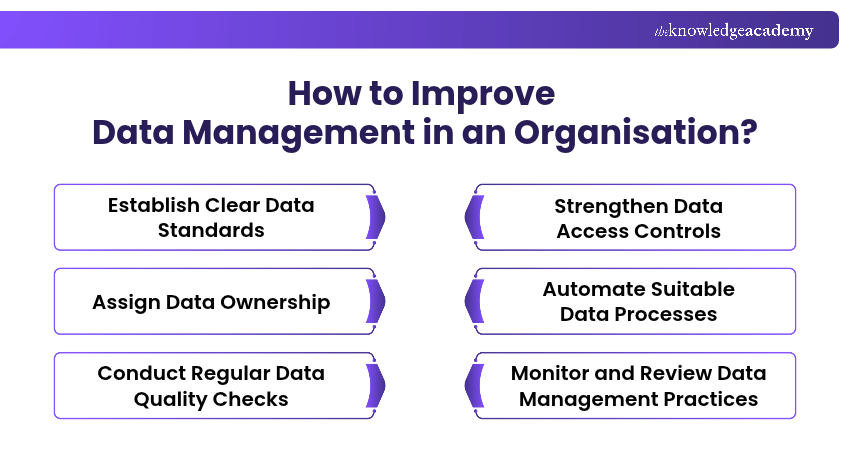
1) Establish Clear Data Standards: Define consistent formats, naming conventions and data entry rules to reduce errors and inconsistencies.
2) Assign Data Ownership: Identify who is responsible for maintaining important datasets, approving changes and resolving data quality issues.
3) Conduct Regular Data Quality Checks: Review records for duplicates, missing values and outdated information to maintain accuracy and reliability.
4) Strengthen Data Access Controls: Provide access according to job responsibilities and regularly review permissions to protect sensitive information.
5) Automate Suitable Data Processes: Use appropriate tools to support repeatable activities such as data integration, validation and scheduled updates.
6) Monitor and Review Data Management Practices: Monitor data quality, system performance and user feedback to identify areas for improvement.
Master database fundamentals and their role in modern applications with our Introduction to Database Training - Join now!

Vishnu Sankar is a Senior Content Writer with 5+ years of experience across content development, software development, web development and system administration. His technical background and professional training support his expertise in IT and Tech, while his extensive research and writing experience covers Project Management and Health and Safety.
View Detail

 If you wish to make any changes to your course, please


