




We may not have the course you’re looking for. If you enquire or give us a call on 01344203999 and speak to our training experts, we may still be able to help with your training requirements.
Top Cyber Security Tools for Stronger Protection
ByJohn DaviesLast updated on: 11 September 2026
This blog explores Cyber Security Tools, their uses, benefits and key factors to consider when choosing the right solution.
Imagine you are catching up with an IT colleague over coffee.
Their phone keeps lighting up with security alerts. They sigh and say:
"We know cyber threats are real. But with so many tools available, how do we know which ones will genuinely protect our systems?"
It is a sensible question. One tool may uncover exposed services, another may analyse suspicious network activity, while another protects passwords or encrypts sensitive files. The challenge is knowing what each tool does and where it fits, and choosing at random often means paying for capability you'll never actually use.
That's not a reason to give up before starting. It just means the right approach is understanding the landscape first. That is where Cyber Security Tools come in.
What are Cyber Security Tools?
Cyber Security Tools are software applications, platforms and utilities used to protect systems, networks, applications and data from security risks. They can help organisations discover assets, identify vulnerabilities, monitor network activity, manage passwords, encrypt information and investigate suspicious behaviour.
Some tools are designed for daily defensive operations, while others are used during authorised security testing or incident investigations. For example, a password manager helps protect account access, whereas a network analyser helps teams inspect traffic when investigating an issue.

10 Cyber Security Tools to Know
The following tools support different parts of a Cyber Security programme. They should not be viewed as a single complete security solution. Instead, each tool addresses a specific security need. Let's learn about them below:
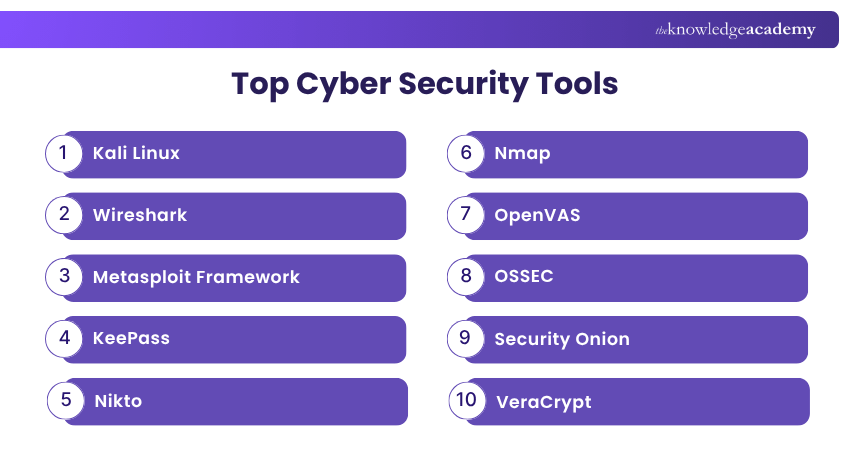
1) Kali Linux
Kali Linux is an open-source, Debian-based Linux distribution designed for penetration testing and security auditing. It contains a wide range of tools for information gathering, vulnerability assessment, wireless testing, digital forensics and other authorised security activities.
It is useful for experienced security professionals who need a dedicated environment for testing systems. Kali Linux is not a replacement for a complete security programme and should only be used in authorised environments.
Trainer's Insight
Do not choose Cyber Security Tools simply because they are popular. Start with your organisation's biggest risk, such as weak passwords, unpatched systems or limited network visibility. Then select a tool your team can configure, monitor and maintain effectively.
2) Wireshark
Wireshark is a free, open-source network protocol analyser. It captures and displays network traffic so users can examine packets in detail and understand what is happening across a network.
Security and network teams use Wireshark to troubleshoot connectivity problems, investigate unusual traffic and analyse network communications during incidents. Interpreting packet-level data requires networking knowledge and careful handling of potentially sensitive information.
3) Metasploit Framework
Metasploit Framework is an open-source penetration-testing framework used to validate vulnerabilities and assess the security of systems. It includes modules that can help authorised testers simulate techniques an attacker may use.
Security teams can use Metasploit to confirm whether a reported vulnerability is exploitable and to test whether a mitigation is effective. It should never be used against systems without written authorisation because unauthorised use can disrupt services and may be illegal.
4) KeePass
KeePass is a free, open-source password manager that stores login credentials in an encrypted database. Users unlock the database with a master password and can create and store strong, unique passwords for different accounts.
It can help reduce risky practices like password reuse and storing credentials in unprotected documents. KeePass is particularly useful for individuals or technically confident teams that prefer local control over their password database.
5) Nikto
Nikto is an open-source web server scanner that checks web servers for potentially risky files, outdated software versions and common configuration issues. It can help identify visible weaknesses that require further investigation.
Nikto is useful during authorised web server assessments, especially as an initial check. Its findings should be reviewed rather than treated as confirmed vulnerabilities because results can require validation and may include false positives.
Plan ahead and protect what matters by signing up for the Cyber Security Risk Management Training today!
6) Nmap
Nmap, short for Network Mapper, is a free and open-source tool for network discovery and security auditing. It can identify active hosts, open ports, running services and other characteristics of systems on a network.
Security teams use Nmap to create a clearer picture of their attack surface, identify unexpected services and support vulnerability assessments. Network scans should be planned carefully because certain scan types can trigger security alerts or affect fragile systems.
7) OpenVAS
OpenVAS is part of Greenbone's vulnerability-management offering. It is used to scan systems and networks for known vulnerabilities and configuration issues, helping teams prioritise remediation work.
A vulnerability scan can reveal weaknesses, but it does not fix them automatically. Organisations must review findings, assess business risk, apply patches or configuration changes and verify that remediation was successful.
8) OSSEC
OSSEC is an open-source host-based intrusion detection system. It monitors systems through functions such as log analysis, file integrity monitoring, rootkit detection, registry monitoring and alerting.
It can help teams detect unexpected changes on servers and endpoints. For example, OSSEC may alert a team when a critical configuration file changes or when repeated failed sign-in attempts suggest suspicious activity.
9) Security Onion
Security Onion is a free and open platform for network and host visibility, intrusion detection, log management and case management. It brings together multiple security-monitoring capabilities to support threat detection, investigation and threat hunting.
It is particularly useful for organisations that need centralised visibility across network and endpoint data. Like other security-monitoring platforms, it requires thoughtful deployment, data-retention planning and skilled analysts who can investigate alerts.
10) VeraCrypt
VeraCrypt is free, open-source disk-encryption software. It can create encrypted volumes and encrypt selected drives or partitions to help protect data stored on laptops, desktops and removable media.
Encryption can reduce the risk of unauthorised access if a device or storage medium is lost or stolen. However, it does not protect data after an authorised user has unlocked the device, and it is not a replacement for anti-malware controls, backups or access management.
Trainer's Insight
The best Cyber Security Tools are not always the most complex ones. Start with the risks your organisation needs to manage, then choose tools your team can configure, monitor and maintain effectively. A well-managed basic tool can offer more value than an advanced tool that nobody reviews.
How to Choose the Right Cyber Security Tools?
Choosing the right Cyber Security Tools should begin with the security problem that needs to be addressed. Organisations should avoid selecting tools simply because they are popular or offer many features. Consider the following factors:
1) Security Requirements: Identify whether the priority is password protection, network visibility, vulnerability management, encryption or threat detection.
2) Existing Environment: Check whether the tool works with the organisation's operating systems, cloud services, endpoints and network infrastructure.
3) Technical Expertise: Some tools require strong knowledge of networks, Linux, security testing or log analysis.
4) Scalability: Consider whether the tool can support the current number of users, devices and systems, as well as future growth.
5) Integration: Look for tools that can work with existing security controls, such as identity platforms, endpoint protection, ticketing systems and logging tools.
6) Cost and Support: Open-source tools may reduce licence costs, but organisations should account for implementation, maintenance, training and support requirements.
7) Legal and Ethical Use: Ensure penetration testing and scanning tools are used only with explicit permission and within an approved scope.
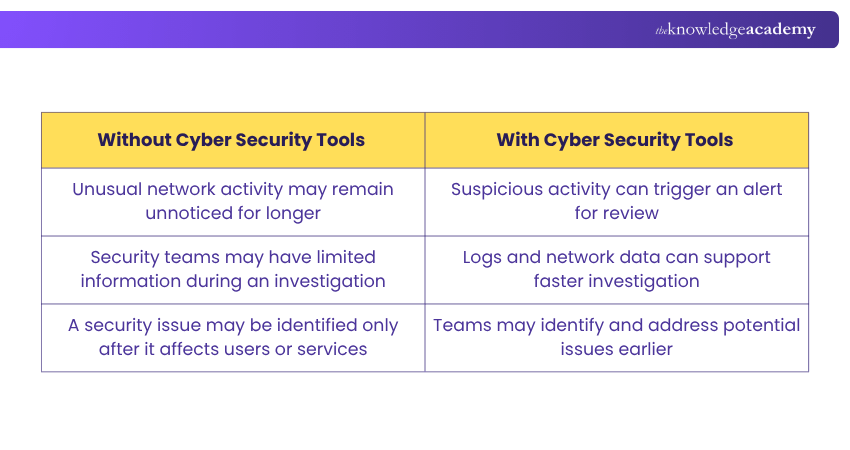
Before and After Implementing Cyber Security Tools
Benefits of Using Cyber Security Tools
Cyber Security Tools can strengthen an organisation's ability to manage risk when they are used as part of a broader security strategy. Let's look at the key benefits below:
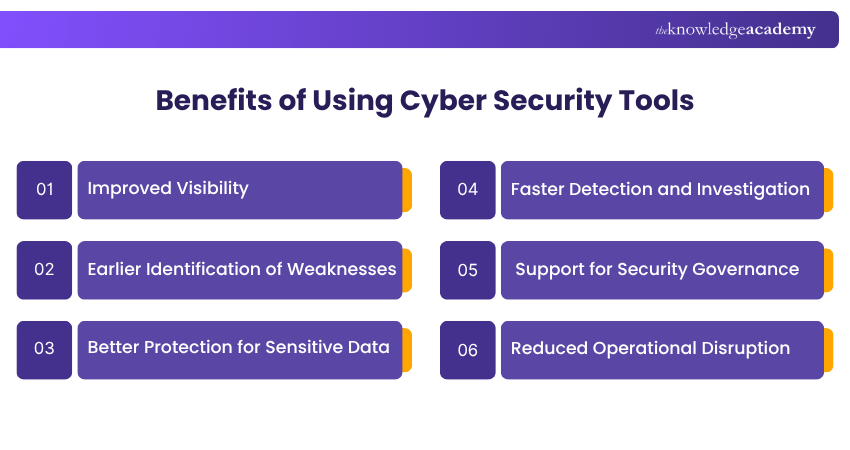
1) Improved Visibility
Network monitoring, log analysis and discovery tools help organisations understand what systems are connected to their environment and what activity is taking place.
2) Earlier Identification of Weaknesses
Vulnerability scanners and security assessment tools can identify outdated software, weak configurations and exposed services before attackers exploit them.
3) Better Protection for Sensitive Data
Encryption tools and password managers help protect sensitive information and reduce the risk associated with weak or reused credentials.
4) Faster Detection and Investigation
Intrusion detection and monitoring tools can alert teams to suspicious activity, making it easier to investigate and respond to potential incidents.
5) Support for Security Governance
Security tools can provide logs, reports and evidence that support internal security reviews, risk management and compliance activities. However, compliance depends on meeting the full requirements of the relevant law, regulation or standard.
6) Reduced Operational Disruption
By helping teams detect and address issues earlier, Cyber Security Tools can reduce the chance of prolonged service disruption, data loss and recovery costs.
Cyber Security Tools Checklist
Before selecting or implementing a Cyber Security Tool, check the following:
□ Identify the security risk you need to address.□ Review the tools and security controls already in use.□ Confirm that the tool works with your systems and infrastructure.□ Ensure your team has the skills to configure and manage it.□ Obtain written permission before scanning or testing any system.□ Assign responsibility for reviewing alerts, reports and updates.□ Review the tool regularly to confirm it continues to meet your needs.
Turn everyday users into strong defenders and build a culture that spots threats with the Cyber Security Awareness Training now!

John Davies creates security-focused content that helps organisations understand digital risks and establish appropriate safeguards. His practical explanations connect regulatory expectations, governance principles and security controls with wider organisational priorities.
View Detail

 If you wish to make any changes to your course, please


