


We may not have the course you’re looking for. If you enquire or give us a call on 01344203999 and speak to our training experts, we may still be able to help with your training requirements.
Top 20 Content Creation Tools for Writing, Design and Video
ByThe Knowledge AcademyLast updated on: 21 November 2026
Content creation tools help you write and edit content, design visuals, produce videos and create audio. Explore tools that simplify creative tasks, support collaboration and help you prepare content for different publishing channels.

Quick Preview
1. Write and Edit: Create articles, draft marketing copy, improve readability and collaborate on written content.2. Create Visuals: Design social graphics, edit photos, produce illustrations and turn data into charts.3. Produce Video and Audio: Record screen demos and remote interviews, edit clips through a transcript and clean up voiceovers.4. Refine Your Workflow: Choose tools based on content formats, editing capabilities, collaboration features and plan limits.
9:15 am · Turn a campaign brief into a first draft.
11:30 am · Turn a spreadsheet into a chart readers can understand.
3:45 pm · Find one good answer in a 40-minute recording.
Three tasks, three different skills, and one deadline. Each calls for a different approach, whether you're drafting content, creating visuals or editing recordings. That's where content creation tools come in. Here are 20 options for tackling these creative tasks.
Best Content Creation Tools
From drafting articles and designing visuals to recording and editing videos, each tool below supports a specific part of content production. Here’s what each one does and when to use it.

1) Jasper
Jasper is an AI platform designed for marketing teams to create and refine written content. It supports tasks such as drafting blog articles, developing campaign copy and adapting messages for different audiences. For example, a content writer can use Jasper to develop a first draft from an approved brief, then review its accuracy, tone and brand consistency before publication.
Trainer Insight: Review AI-generated Content Before Publishing
AI-generated drafts can speed up content production, but they still need human review. Check factual accuracy, source references, tone and brand terminology before approving content for publication.

2) WordPress
WordPress is a content management system that allows creators to write, format and publish website content. Its block editor supports text, images, headings and other elements used to build articles and pages. For example, a writer can create a blog post, add supporting visuals and review the layout before publishing it on a website.
3) Google Docs
Google Docs supports collaborative writing through shared documents, comments, suggested edits and version history. It suits articles, scripts, and course pages that pass through several reviewers. During a course page revamp, for example, a subject expert can flag an inaccurate claim in a comment while the copy editor proposes a revision in suggesting mode.
4) ChatGPT
ChatGPT can brainstorm content angles, build outlines, and adapt source material for different audiences. Give it an approved source, a target audience, and a clear format. For example, use a webinar transcript to draft three LinkedIn post angles, then check the suggested quotes and factual claims against the original transcript.
5) Grammarly
Grammarly flags issues with grammar, spelling and punctuation. It also offers suggestions for clarity and tone, with some features depending on the plan. Use it during the copy-editing stage to catch awkward wording or inconsistencies across a campaign. Review each proposed change against your house style and approved terminology.
6) Hemingway Editor
Hemingway Editor highlights writing patterns that can make copy harder to read, such as complex sentences and passive voice. It also estimates the reading grade level. Use it to find dense passages in a beginner’s guide and simplify the explanation while keeping the technical terms readers need.
7) Canva
Canva provides templates and a visual editor for social graphics, presentations and other branded assets. It works well for recurring content series that need a consistent look. Create a LinkedIn carousel template with fixed heading positions and spacing, then duplicate it for each new topic.
8) Adobe Express
Adobe Express offers social media templates and quick editing tools for tasks such as resizing images. Use it when a campaign needs versions of the same creative for several placements. Start with an event announcement, adapt it for a square feed post and a vertical Story, then check the crop and text placement in each version.
9) Adobe After Effects
Adobe After Effects is a motion graphics and visual effects application used to create animations, animated text and visual compositions. It allows designers to combine layers, animate elements and add effects to video content. For example, a creator can animate a title sequence for a training video or develop moving graphics that explain a process.
10) Adobe Illustrator
Adobe Illustrator is a vector design tool for logos, icons and illustrations. Vector artwork can scale across formats, making it suitable for visuals you plan to reuse at different sizes. For example, create one icon set for a blog infographic, a presentation and a printed handout.
Learn how to design logos and create branding elements with our Adobe Illustrator Training – Join now!
11) Adobe Firefly
Adobe Firefly can generate images from written prompts. Its text-to-image feature is useful when you want to explore visual concepts before committing to a design. Generate several banner ideas with different compositions, then check the selected image for visual errors and suitability before publication.
12) Datawrapper
Datawrapper turns datasets into charts, maps and tables that you can embed in online content. It suits articles that ask readers to compare figures or follow a trend. For example, embed a line chart showing quarterly survey results and include the sample size and data source so readers can interpret the changes.
13) OBS Studio
OBS Studio is free, open-source software for video recording and live streaming on Windows, macOS and Linux. It lets you combine sources such as screen capture, a webcam and a microphone. Use it to record a software walkthrough with the presenter visible alongside the demonstration.
14) Adobe Premiere (Formerly Premiere Pro)
Adobe Premiere is the current name for Adobe’s video editor previously known as Premiere Pro. The desktop application supports timeline editing, colour correction, audio tools and captions. Use it to assemble a course trailer from presenter footage, screen recordings and graphics, then align the captions with the final edit.
Understand advanced techniques for seamless editing and storytelling with Adobe Premiere Pro Course – Register now!
15) DaVinci Resolve
DaVinci Resolve combines video editing, colour grading, visual effects and audio post-production. Blackmagic Design offers a free edition and a paid Studio edition. It is useful when footage comes from several cameras and you need to balance exposure or match colours across shots before finishing the edit.
16) Descript
Descript lets you edit audio and video through the associated transcript. Deleting a passage from the transcript removes the corresponding segment from the edit. This is useful for interview-led content, where you can search for a phrase, cut a repeated answer or pull out an excerpt without searching through the full recording.
17) Audacity
Audacity is a free, open-source audio editor available for Windows, macOS and Linux. Use it to trim a voiceover or reduce a steady background sound such as a low hum. Preview the noise reduction before applying it, especially if the speaker is quiet and the effect could make their voice less clear.
18) Riverside
Riverside is a recording platform for remote interviews, podcasts and video conversations. It records high-quality tracks locally on each contributor’s device and makes separate tracks available for editing, subject to plan limits. Separate tracks help when a host and guest speak at different volumes and you need to adjust each voice independently.
Pro Tip: Record a 20-second sound check before an interview
Ask each speaker to talk at their normal volume, then listen back through headphones. Catching an echo, a rubbing microphone or keyboard noise early can save a full re-recording.
19) CapCut
CapCut is a video editing platform that helps creators produce videos for social media and other digital channels. It provides tools for trimming clips, adding transitions, applying effects and creating captions. For example, a creator can turn a recorded interview into a short vertical video, add readable subtitles and adjust the framing before exporting it.
20) Adobe Photoshop
Adobe Photoshop helps creators retouch photographs and combine images for blog banners, thumbnails and campaign visuals. Its layers let you edit individual elements of a design independently. For example, use the Remove tool to clean up distracting cables in a workplace photo, then add the blog title on a separate layer.
Learn how to retouch, optimise images, and create amazing Photoshop designs with our Photoshop Course – Join now!
How to Choose the Right Content Creation Tools?
Choosing the right content creation tools starts with understanding your workflow and the type of content you produce. Whether you're writing articles, designing visuals or editing videos, consider the following factors to find tools that meet your needs.
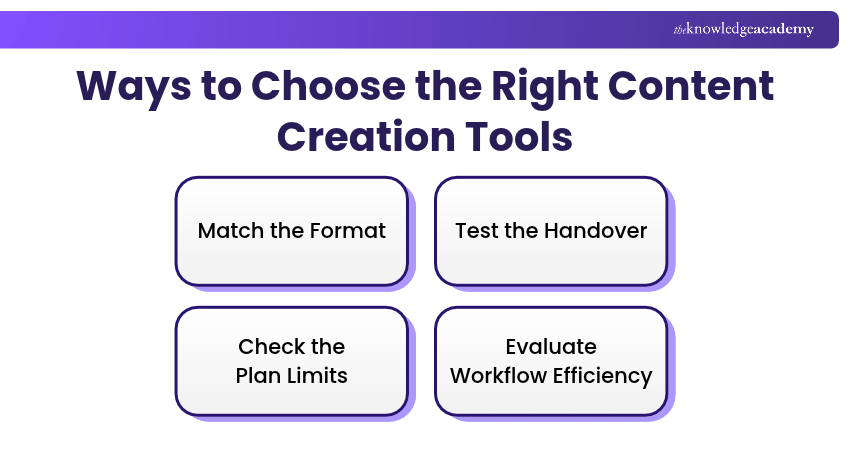
1) Match the Format: Check whether the tool supports the export formats, dimensions and accessibility features your publishing channels require.
2) Test the Handover: Run an asset through drafting, review and publication. Check whether reviewers can leave feedback in context and whether a colleague can pick up the work.
3) Check the Plan Limits: Confirm that your chosen plan covers the features you rely on, such as separate audio tracks, export options or reviewer access.
4) Evaluate Workflow Efficiency: Consider the time needed for editing, revisions, approvals and exports, not just creating the first draft.
Turn one campaign idea into posts that feel at home on different platforms with our Design And Create Engaging Content For Social Media Training – Join now!

The Knowledge Academy develops accessible learning content across Project Management, IT, Cybersecurity, Data Science, Business Analysis, HR, Accounting and Finance, Leadership and Health and Safety. Its resources combine subject research with clear explanations to help professionals build practical knowledge across a wide range of disciplines.
View Detail

 If you wish to make any changes to your course, please


