




We may not have the course you’re looking for. If you enquire or give us a call on 01344203999 and speak to our training experts, we may still be able to help with your training requirements.
Essential Proofreading Tips for Error-free Writing
ByGaurav KalitaLast updated on: 17 September 2026
Proofreading tips help you identify spelling, grammar, punctuation, consistency and formatting errors before finalising your work.
Consider this sentence:
“The marketing team have received three new enquiries since Monday, however the figures still needs to be verified.”
It looks clear at first, but a closer read reveals several errors in grammar, punctuation and word choice. Small mistakes like these can make otherwise strong writing look careless.
Proofreading helps you catch these final errors before your work is submitted, published or shared. So, let’s look at the Proofreading Tips that can help you review your writing more effectively.
What is Proofreading?
Proofreading is the final review of written content before it is submitted, published or shared. It focuses on correcting spelling, grammar, punctuation, consistency and formatting errors.
It usually takes place after major changes to structure and wording are complete. For example, when proofreading a business report, you might check headings, figures, punctuation and spelling rather than rewriting entire sections.
Quick Check: Editing or Proofreading?
Ask yourself what kind of change you are making:
Changing the argument or structure? → EditingRewriting unclear sentences? → EditingCorrecting a typo? → ProofreadingFixing inconsistent capitalisation? → ProofreadingChecking punctuation or formatting? → ProofreadingThe distinction matters because proofreading too early can waste effort. If a paragraph is later rewritten or removed, time spent perfecting every comma in that paragraph has achieved very little.

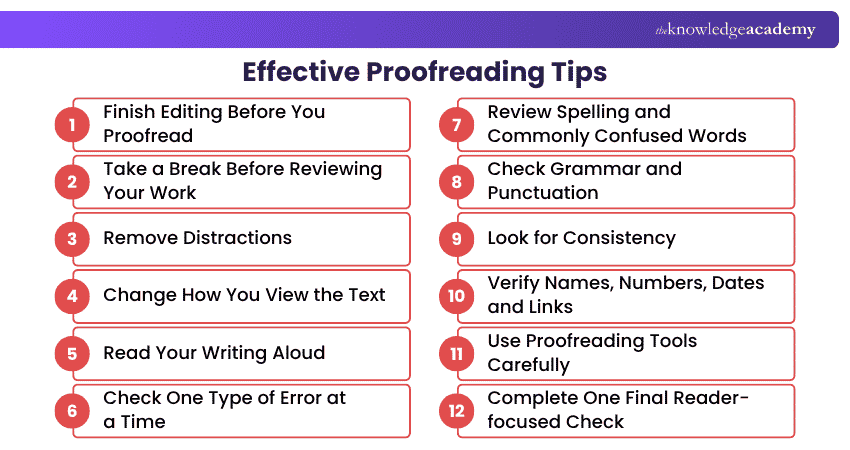
12 Effective Proofreading Tips
Good proofreading is less about reading repeatedly and more about reading deliberately. The following proofreading tips can help you examine your work from different angles and reduce the likelihood of overlooking errors.
1) Finish Editing Before You Proofread
Complete major revisions before beginning the final proofread.
Check whether your ideas are complete, sections appear in the correct order and sentences communicate what you intend. Once you are satisfied with the content and structure, move on to smaller language and presentation errors.
Editing and proofreading serve different purposes. Editing may involve changes to structure, clarity and expression, while proofreading concentrates on the final surface-level errors and inconsistencies.
Following this order also prevents you from repeatedly proofreading sentences that may later change.
2) Take a Break Before Reviewing Your Work
Distance can make errors easier to notice.
After spending a long time writing, you become familiar with the wording. That familiarity can cause your brain to anticipate what comes next instead of examining every word carefully.
Leave the document for a while before returning to it. The amount of time available will depend on your deadline, but even a short break can help reset your attention.
Where possible, plan proofreading time into your deadline instead of completing the first full draft immediately before submission.
3) Remove Distractions
Proofreading requires concentration because many errors are small and easy to overlook.
Find a suitable environment, silence unnecessary notifications and close unrelated tabs or applications. If possible, proofread during a period when you are unlikely to be interrupted.
You do not necessarily need complete silence. The aim is simply to reduce anything that repeatedly pulls your attention away from the text.
A focused 20-minute review may reveal more than an hour of distracted rereading.
4) Change How You View the Text
Making the document look unfamiliar can help you see it differently.
Try temporarily:
1) Changing the font
2) Increasing the text size
3) Adjusting line spacing
4) Printing the document
5) Viewing it on another device
6) Switching from an editing view to a PDF or print preview
Remember to restore any temporary formatting changes before completing your final review.
5) Read Your Writing Aloud
Silent reading can become fast and automatic. Reading aloud forces you to process the text differently.
Listen for:
1) Missing words
2) Repeated words
3) Unnatural pauses
4) Awkward sentence construction
5) Punctuation that affects meaning
6) Sentences that are unexpectedly difficult to follow
If you stumble repeatedly over a sentence, examine it more closely.
You can also use a text-to-speech feature and listen while following the text on screen. Hearing the words can reveal problems that your eyes have repeatedly passed over.
6) Check One Type of Error at a Time
Trying to find every possible problem during a single read places a heavy demand on your attention.
Instead, use separate proofreading passes.
For example:
Pass 1: Spelling
Pass 2: Grammar
Pass 3: Punctuation
Pass 4: Numbers and factual details
Pass 5: Formatting and consistency
This makes each review more focused.
7) Review Spelling and Commonly Confused Words
Spellcheck can identify many obvious errors, but correctly spelt words can still be wrong in context.
Pay attention to commonly confused words such as:
1) Their / there / they're
2) Affect / effect
3) Principal / principle
4) Complement / compliment
5) Stationary / stationery
Also check repeated spelling variations.
Names, technical terminology and brand names deserve extra attention because automated spellcheckers may not recognise them reliably.
8) Check Grammar and Punctuation
Review each sentence for grammatical completeness and punctuation.
Look particularly for:
1) Subject-verb agreement
2) Missing or duplicated words
3) Incorrect apostrophes
4) Misplaced commas
5) Incomplete sentences
6) Unintended run-on sentences
7) Inconsistent quotation marks
8) Incorrect singular or plural forms
Punctuation deserves more than a visual scan because it can affect meaning.
For example:
Let's eat, Grandma.
and
Let's eat Grandma.
contain almost identical words, but the comma changes the message dramatically.
Slow down, because punctuation controls how a sentence should be interpreted.
9) Look for Consistency
A document can contain no obvious spelling mistakes and still appear unpolished because similar elements are presented differently.
Check consistency in areas such as:
1) Capitalisation
2) Heading styles
3) Bullet punctuation
4) Date formats
5) Number formats
6) Abbreviations
7) Terminology
8) Hyphenation
9) Bold and italics
10) References and citations
For example, if you write e-commerce in one section and ecommerce in another, decide which form your publication follows and standardise it.
The same principle applies to titles, labels, terminology and visual formatting.
10) Verify Names, Numbers, Dates and Links
Not every proofreading error is grammatical.
A perfectly written sentence can still contain the wrong figure, date or web address.
Check:
1) People's names and job titles
2) Company and product names
3) Dates
4) Prices
5) Percentages
6) Measurements
7) Phone numbers
8) Email addresses
9) URLs
10) Figure and table numbers
11) Cross-references
Do not assume that a detail is correct simply because you remember typing it carefully.
For factual content, verification should involve checking the relevant authoritative source rather than relying only on your draft.
11) Use Proofreading Tools Carefully
Spellcheckers, grammar tools and AI-assisted writing tools can help identify possible errors and inconsistencies.
They can be particularly useful for highlighting:
1) Misspellings
2) Repeated words
3) Possible grammatical problems
4) Punctuation issues
5) Inconsistent wording
6) Awkward phrasing
However, automated suggestions should be treated as recommendations rather than automatic corrections.
12) Complete One Final Reader-focused Check
After correcting individual errors, read the finished version once more as a reader rather than as the writer.
At this stage, avoid restarting a major rewrite unless you discover a serious problem.
Instead, ask:
1) Is anything obviously missing?
2) Can I understand each sentence on the first reading?
3) Do headings and sections appear correctly?
4) Are lists and tables complete?
5) Does the page look professional?
6) Did any correction accidentally create a new error?
Learn to craft compelling stories, vivid characters, and engaging narrative styles by registering for our Creative Writing Course now!
Common Proofreading Mistakes to Avoid
Proofreading techniques become less effective when the process itself is rushed or poorly structured. Avoid these common mistakes:
1) Proofreading While Still Rewriting
Large changes and small corrections require different types of attention. Finish the main editing first.
2) Relying Entirely on Spellcheck
A spellchecker cannot reliably determine whether every correctly spelt word is the correct word for your intended meaning.
3) Reading Too Quickly
Reading at normal speed encourages your brain to process meaning rather than inspect individual details.
4) Trying to Find Everything in One Pass
Grammar, formatting, spelling and factual verification compete for attention. Separate passes can make problems easier to spot.
5) Proofreading Immediately After Writing
When possible, create some distance from the draft so that the wording feels less predictable.
6) Automatically Accepting Tool Suggestions
Review every automated correction in context before applying it.
7) Ignoring Formatting
Proofreading includes more than words. Inconsistent headings, spacing, bullets or numbering can also reduce the quality of the final document.
8) Making Last-minute Changes Without Rechecking Them
One small correction can accidentally introduce a new mistake. Always inspect changed sentences once more.
Become the best version of yourself with our range of Personal Development Courses. Sign up now!

Gaurav Kalita is a Content Writer with 2+ years of experience in content development, research and storytelling. His background in English literature and teaching, combined with his growing interest in AI and Machine Learning, supports his writing across Business Skills and IT and Tech.
View Detail

 If you wish to make any changes to your course, please


