


We may not have the course you’re looking for. If you enquire or give us a call on 01344203999 and speak to our training experts, we may still be able to help with your training requirements.
Essential UI Designer Skills and Ways to Develop Them
ByThe Knowledge AcademyLast updated on: 10 November 2026
UI Designer skills combine creativity, technical knowledge and problem-solving to create attractive, accessible and user-friendly interfaces. Explore the essential skills, from visual design and prototyping to responsive layouts, along with practical ways to develop them.
What You'll Learn
Here's what you'll learn about UI Designer skills:1) Visual Design: How colour, typography, spacing and visual hierarchy shape an interface.2) Design Tools: Why proficiency in tools such as Figma and Sketch matters.3) Accessible Interfaces: How accessible design supports different user needs, while responsive design adapts layouts to different screen sizes.4) Professional Skills: The importance of communication, collaboration and problem-solving.5) Skill Development: Practical ways to improve your abilities and showcase your work.
The world of User Interface (UI) design is ever-evolving, and building the right UI Designer skills is essential for creating compelling digital experiences. As a UI Designer, you need a combination of creativity, technical knowledge and problem-solving abilities to design interfaces that are both visually appealing and easy to use.
But creating an effective interface involves more than choosing attractive colours and layouts. It requires understanding user needs, designing smooth interactions and adapting to different devices. So, what skills should you focus on to succeed in this field? Let's explore the essential skills that can help you create effective user interfaces.
Essential UI Designer Skills
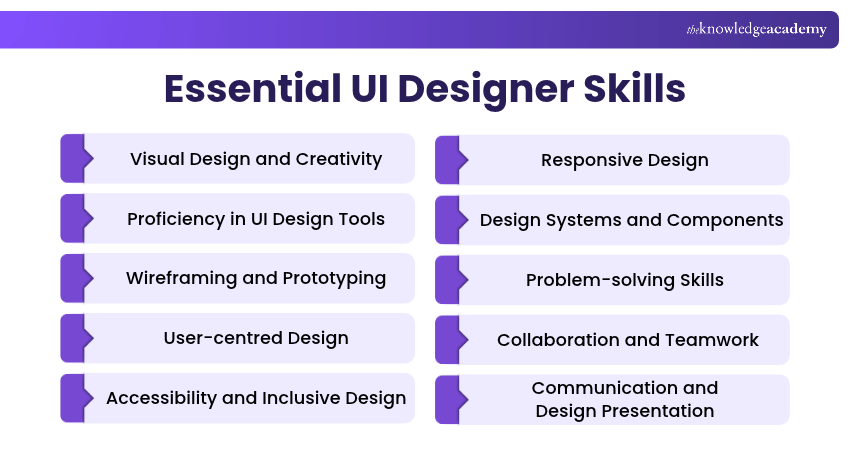
A successful UI Designer is a well-rounded professional with a diverse set of skills. These abilities help them create visually appealing, accessible and user-friendly interfaces while handling modern design challenges. Here are the essential UI Designer skills worth developing:
1) Visual Design and Creativity
Visual design and creativity are essential to creating effective user interfaces. These skills involve developing original ideas and using colour, typography, spacing and visual hierarchy to create appealing interfaces. Strong visual design skills help designers make information easier to understand while ensuring that every element serves a clear purpose.

2) Proficiency in UI Design Tools
Technical proficiency in design tools is essential for bringing creative ideas to life. UI Designers should become familiar with tools such as Figma and Sketch to create layouts, interactive prototypes and reusable components. Understanding these tools also helps designers collaborate with developers, manage design files and refine interfaces efficiently.
3) Wireframing and Prototyping
Wireframing and prototyping help UI Designers explore ideas before finalising an interface. Wireframes lay out the structure and arrangement of elements, while prototypes demonstrate how users might interact with a design. These skills help designers explore navigation, gather early feedback and identify potential usability issues before development begins.
4) User-centred Design
Understanding user behaviour and preferences is crucial for designing interfaces that meet real needs. UI Designers should be able to interpret user research, recognise common challenges and apply relevant insights to their designs. This helps them make informed decisions rather than relying entirely on personal preferences.
5) Accessibility and Inclusive Design
Accessibility helps ensure that digital interfaces can be used by people with different abilities and needs. UI Designers should understand important accessibility principles, including readable typography, sufficient colour contrast, clear navigation, keyboard accessibility and visible focus indicators.
Trainer Insight
A visually appealing interface is not always an accessible one. For example, a button may look attractive but become difficult to use if its text lacks sufficient contrast or its focus indicator is missing. Consider accessibility from the initial design stages rather than treating it as a final adjustment.
6) Responsive Design
Responsive design involves creating layouts that adapt to different screen sizes and devices. UI Designers must understand flexible layouts, spacing, breakpoints and how interface elements behave across desktop, tablet and mobile devices. These skills help maintain usability, readability and visual consistency across different devices.
7) Design Systems and Components
Design systems help maintain consistency across digital products by providing reusable components, visual styles and established design patterns. UI Designers should understand how to create and use components such as buttons, navigation menus and form elements. This reduces unnecessary repetition, supports collaboration and helps teams maintain a consistent interface.
Create adaptable interfaces for different devices with our Responsive Web Design Training - Join today!
8) Problem-solving Skills
Problem-solving is an integral part of UI design. Designers often encounter challenges involving navigation, user interactions, unclear layouts or technical limitations. Strong problem-solving skills help them analyse these issues, explore possible solutions and make design decisions that improve usability and functionality.
9) Collaboration and Teamwork
UI Designers collaborate with UX Designers, developers, Product Managers and other stakeholders to bring their designs to life. Strong teamwork skills help them understand different perspectives, coordinate responsibilities and resolve design-related challenges throughout the development process.
10) Communication and Design Presentation
Clear communication is essential for explaining design ideas, decisions and concepts to others. UI Designers must be able to present their work, explain the reasoning behind design choices and respond constructively to feedback. These skills help stakeholders understand the design direction and support smoother collaboration during projects.
Develop practical interface design and prototyping skills with our Figma Course – Join now!
How to Develop UI Designer Skills
Developing UI Designer skills requires regular practice, continuous learning and a willingness to improve. Here are some practical ways to strengthen your abilities and grow as a UI Designer:
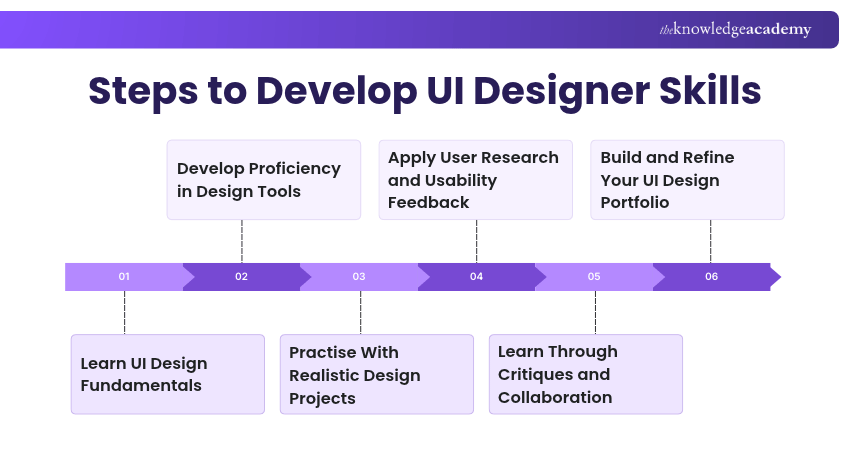
a) Learn UI Design Fundamentals: Start with the basics of UI design, including colour theory, typography, layout, visual hierarchy and accessibility. Use books, online courses and tutorials to build a strong foundation.
b) Develop Proficiency in Design Tools: Learn to use UI design tools such as Figma and Sketch to create layouts, reusable components and interactive prototypes. Practise regularly to improve your technical skills and confidence.
c) Practise With Realistic Design Projects: Build your skills by designing websites, mobile applications or individual interface components. Redesigning existing interfaces can also help you explore creative solutions and overcome practical design challenges.
d) Apply User Research and Usability Feedback: Understand user needs through research findings and usability testing. Use these insights to identify design issues, improve navigation and create more user-friendly interfaces.
e) Learn Through Critiques and Collaboration: Study experienced designers' work and seek constructive feedback from peers or mentors. Collaborate with UX Designers and developers to gain different perspectives and improve your design approach.
f) Build and Refine Your UI Design Portfolio: Create a portfolio featuring your strongest projects, including wireframes, design decisions and final interfaces. This helps potential employers and clients understand your skills and problem-solving approach.
Bonus Tip
Don't limit your portfolio to polished interface screenshots. Include a short case study explaining the design problem, the alternatives you considered and how feedback shaped the result. This helps employers understand your thinking and problem-solving abilities, not just your visual design skills.
Learn cutting-edge technologies for versatile web solutions with our App & Web Development Training – Sign up now!

The Knowledge Academy develops accessible learning content across Project Management, IT, Cybersecurity, Data Science, Business Analysis, HR, Accounting and Finance, Leadership and Health and Safety. Its resources combine subject research with clear explanations to help professionals build practical knowledge across a wide range of disciplines.
View Detail

 If you wish to make any changes to your course, please


