


We may not have the course you’re looking for. If you enquire or give us a call on 01344203999 and speak to our training experts, we may still be able to help with your training requirements.
Home
 Resources
IT Infrastructure & Networking
Essential Troubleshooting Skills and How to Improve Them
Resources
IT Infrastructure & Networking
Essential Troubleshooting Skills and How to Improve Them
Essential Troubleshooting Skills and How to Improve Them
ByThe Knowledge AcademyLast updated on: 18 November 2026
Troubleshooting skills help professionals identify problems, investigate their causes and develop effective solutions. Explore essential skills, from critical thinking and root cause analysis to record-keeping and documentation.

What You'll Learn
1. Troubleshooting requires a systematic approach to identifying problems, investigating possible causes and testing solutions.2. Critical thinking, research and technical knowledge help professionals understand issues and make informed decisions.3. Communication, time management and attention to detail support effective problem resolution.4. Diagnostic tools, testing and documentation help identify faults, verify solutions and manage recurring problems.5. Practical experience, feedback and learning from previous issues can help strengthen troubleshooting skills.
In today's fast-paced workplace, unexpected problems can arise at any time. Whether you're resolving a software issue, investigating a system failure or addressing an operational challenge, the ability to identify issues and find effective solutions can make a significant difference in your professional performance.
But troubleshooting involves more than simply fixing what has gone wrong. It requires analysing situations, identifying underlying causes and choosing appropriate solutions. So, what skills can help you handle these challenges confidently? In this blog, we'll explore the essential troubleshooting skills and practical ways to improve them. Let's begin!
Key Troubleshooting Skills
Troubleshooting skills help professionals approach problems systematically, assess possible causes and determine suitable solutions. These abilities are valuable across different industries, enabling individuals to manage challenges, minimise disruptions and maintain productivity.
Here are the key troubleshooting skills that can help you resolve workplace issues effectively:
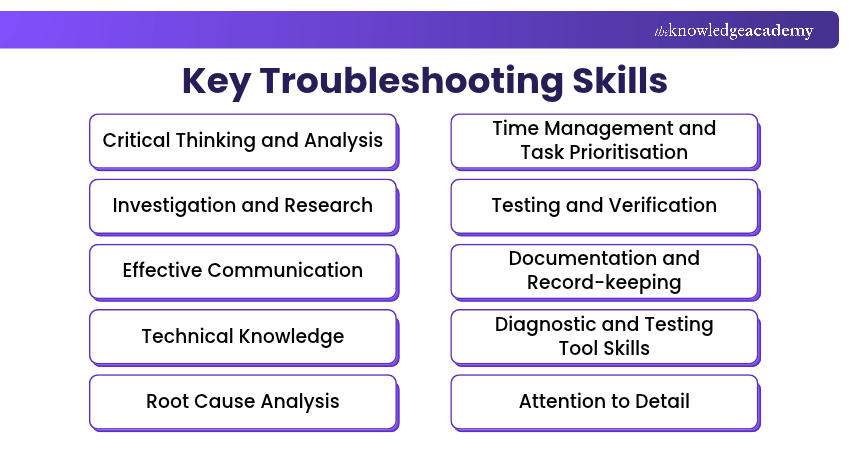
1) Critical Thinking and Analysis
Critical thinking helps professionals examine technical problems logically, evaluate evidence and identify potential causes. It involves analysing error messages, system behaviour and performance data rather than immediately assuming what has gone wrong. Strong analytical skills enable technicians to identify patterns and distinguish symptoms from underlying faults.
For example, when a computer runs slowly, a technician might check memory usage, processor activity, background applications and storage performance before recommending a solution. By comparing these findings, they can narrow down possible causes and avoid unnecessary hardware replacements or software changes.

2) Investigation and Research
Investigation and research skills help professionals gather information and diagnose unfamiliar technical issues. This involves examining system logs, reviewing error codes, checking configuration settings and consulting official technical documentation.
A systematic investigation helps technicians understand when a problem started, what has changed and which components may be affected. For example, when an application repeatedly crashes, a technician may review event logs, check software compatibility and investigate recent updates.
3) Effective Communication
Effective communication is essential for professionals when diagnosing technical problems and explaining solutions to users. Troubleshooting often involves gathering information from individuals who may not understand technical terminology.
Professionals must ask relevant questions, listen carefully and explain technical issues in simple language to identify symptoms and understand how problems affect users. Clear communication also helps keep users and stakeholders informed during system failures, network disruptions or software issues.
4) Technical Knowledge
Technical knowledge provides the foundation for identifying and resolving hardware, software and network problems. IT professionals need an understanding of computer components, operating systems, networking fundamentals, storage systems and common application errors.
This knowledge helps them recognise how systems operate, identify possible failure points and select appropriate troubleshooting methods. For example, diagnosing network problems requires knowledge of IP addressing, routers and connectivity.
5) Root Cause Analysis
Root cause analysis helps technical professionals identify the underlying reasons for hardware failures, software errors and network problems. Instead of relying on temporary fixes, they examine potential contributing factors and test their findings to determine what is causing the issue.
When the same issue occurs repeatedly, review previous troubleshooting records to identify common conditions, recent changes or patterns. This can help distinguish recurring symptoms from their underlying causes and support more effective solutions.
Trainer's Insight
Root cause analysis becomes more effective when professionals test possible causes rather than relying on assumptions. For example, if an application repeatedly crashes, comparing error logs with recent software or configuration changes can help narrow down the cause.
Stop fixing symptoms and start solving causes with the Root Cause Analysis Training – Sign up today!
6) Time Management and Task Prioritisation
Time management helps IT professionals handle multiple technical issues while maintaining service availability and user productivity. They must assess the impact and urgency of incidents, alongside their severity and relevant business requirements, to determine which problems require immediate attention.
Effective task prioritisation ensures that critical system failures are addressed before minor technical inconveniences. This helps reduce downtime, meet service expectations and ensure that technical problems are resolved efficiently.
7) Testing and Verification
Testing and verification skills enable professionals to design appropriate diagnostic tests, interpret results and evaluate potential solutions to technical problems. These skills require logical thinking, attention to detail and the ability to distinguish between expected and unexpected system behaviour.
Professionals with effective verification skills can evaluate whether a solution has fully resolved an issue, confirm that the affected system or service functions as expected and identify any unintended effects.
8) Documentation and Record-keeping
Documentation and record-keeping help professionals maintain accurate information about technical issues, diagnostic activities and implemented solutions. Troubleshooting records typically include reported symptoms, error messages, relevant system configurations, investigation steps and resolution details.
Accurate records also support knowledge-sharing, incident escalation and recurring problem analysis. Over time, well-maintained documentation can improve troubleshooting efficiency and help organisations develop more reliable technical support processes.
9) Diagnostic and Testing Tool Skills
Diagnostic tool proficiency involves using specialised software, utilities and monitoring systems to identify technical faults and assess system performance. For example, IT professionals troubleshooting Windows systems may use tools such as Event Viewer, Task Manager, Performance Monitor, network testing commands and hardware diagnostic utilities.
Understanding what these tools measure and how to interpret their results is essential for accurate troubleshooting. Moreover, selecting the appropriate tool helps gather useful evidence and narrow down potential causes.
10) Attention to Detail
Attention to detail helps detect subtle errors, recognise unusual system behaviour and identify inconsistencies that might otherwise go unnoticed. This skill involves carefully examining error messages, system configurations and performance data to identify potential faults.
Even minor issues, such as incorrect settings, outdated drivers or file permission errors, can affect system functionality. Therefore, professionals with strong attention to detail can examine technical information accurately and recognise differences between expected and actual system behaviour.
Practical Ways to Improve Troubleshooting Skills
Improving troubleshooting skills requires consistent practice, careful observation and a willingness to learn from experience. Here are some practical ways to improve these skills:
a) Practise Systematic Problem-solving: Follow a structured approach by understanding the problem, gathering information and identifying possible causes before choosing a solution. This helps avoid assumptions and supports informed decisions.
b) Strengthen Your Diagnostic Techniques: Examine symptoms, analyse evidence and test possible causes. Breaking complex problems into smaller parts can help identify issues more accurately and reduce unnecessary trial and error.
c) Learn From Previous Troubleshooting Cases: Review past problems, their causes and the solutions applied. Learning from previous experiences helps recognise recurring issues and improve future troubleshooting.
d) Use Appropriate Troubleshooting Tools: Learn to use diagnostic tools relevant to your profession. For example, IT professionals can use system logs and network diagnostic utilities to identify and investigate technical issues.
e) Seek Feedback and Continue Learning: Seek guidance from experienced colleagues, attend relevant training and review your troubleshooting approach. Regular feedback helps identify areas for improvement and strengthen your problem-solving abilities.
Bonus Tip
When investigating a problem, change one factor at a time wherever practical and safe. Record the results of each test so you can identify which change affected the issue and avoid repeating unsuccessful attempts.
Gain the expertise needed to deliver effective technical solutions with IT Support and Solution Training – Join now!

The Knowledge Academy develops accessible learning content across Project Management, IT, Cybersecurity, Data Science, Business Analysis, HR, Accounting and Finance, Leadership and Health and Safety. Its resources combine subject research with clear explanations to help professionals build practical knowledge across a wide range of disciplines.
View Detail

 If you wish to make any changes to your course, please


