


We may not have the course you’re looking for. If you enquire or give us a call on 01344203999 and speak to our training experts, we may still be able to help with your training requirements.
15 Essential Motion Graphics Skills for Designers
ByThe Knowledge AcademyLast updated on: 13 November 2026
Motion graphics skills combine visual design, animation techniques, technical expertise, and creative thinking to produce engaging, animated content. Explore the essential skills, from typography and storytelling to 3D animation, compositing and software proficiency, that support a career in motion design.
What You'll Learn
1. Core design principles and animation techniques used in motion graphics.2. How typography, timing and storytelling create engaging animations.3. Essential software for 2D animation, 3D design and compositing.4. Technical and professional skills needed for effective production.5. Ways to improve workflows, visual quality and creative outcomes.
A logo that reveals itself through animation. Text that moves in rhythm with narration. A product demonstration that explains complex features in seconds. What brings these visuals together? A combination of creativity, design knowledge, and technical skills.
Motion Graphics Designers use these capabilities to transform static elements into engaging animations for advertisements, videos, websites, presentations, and digital platforms. Understanding the essential motion graphics skills can help you develop stronger projects and build a professional portfolio.
Essential Motion Graphics Skills Every Designer Should Know
Motion Graphics Designers require a combination of creative, technical, and professional abilities. Here are the important skills that contribute to producing effective animated content:
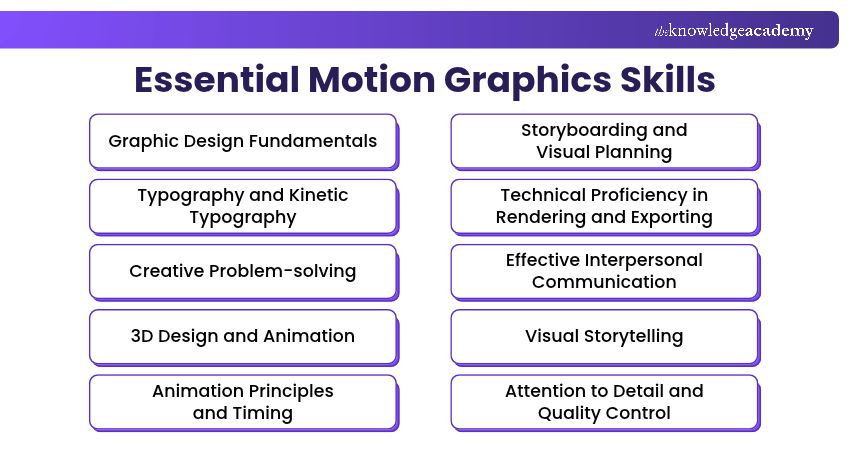
1) Graphic Design Fundamentals
Graphic design fundamentals establish the visual foundation of motion graphics. Understanding composition, colour theory, contrast, alignment, and visual hierarchy helps designers arrange elements in a balanced and meaningful way.
These principles guide how audiences interpret information before animation begins. Strong graphic design skills help ensure that animated visuals remain readable, consistent, and aligned with the intended message across different screens and formats. Designers should also consider accessibility through readable text, sufficient contrast and clear visual hierarchy.

2) Typography and Kinetic Typography
Typography influences how written information appears and communicates within animated content. Designers must understand font selection, spacing, alignment, readability, and text hierarchy to present messages clearly.
Kinetic typography extends these principles by introducing movement to letters, words, and sentences. Techniques such as animated text reveals, scaling, and transitions can emphasise important information while supporting the pace and tone of a video.
3) Creative Problem-solving
Creative problem-solving helps designers address visual and production challenges without compromising project objectives. These challenges may involve communicating complicated information, adapting designs for different formats, or working within technical limitations.
For example, a designer might replace a detailed explanation with a simple animated diagram to make the content easier to understand. This skill involves evaluating alternatives and selecting solutions that communicate effectively within the available resources.
4) 3D Design and Animation
3D design enables Motion Graphics Designers to create objects, environments, and animated elements with depth. Important techniques include modelling, texturing, lighting, camera positioning, and understanding spatial relationships.
Tools such as Blender and Cinema 4D support 3D animation and procedural workflows. Their capabilities can be useful for product visualisations, animated titles, and complex visual sequences. Although 3D expertise is not essential for every motion design role, it can expand the range of projects a designer can undertake.
Give your imagination a whole new dimension with the Maxon Cinema 4D Training – Join now!
5) Animation Principles and Timing
Animation principles determine how objects move and respond within a composition. Designers should understand keyframes, easing, timing, spacing, anticipation and follow-through to create movement that feels intentional.
For example, easing allows an object to accelerate or decelerate rather than move at a constant speed. Effective timing also helps guide attention and establish visual rhythm. These techniques are especially important when animating logos, icons, interfaces, and graphic transitions.
Pro Tip
Instead of adjusting keyframes through trial and error, use the graph editor to refine animation curves. Small changes to speed and acceleration can make transitions feel more natural without adding extra frames.
6) Storyboarding and Visual Planning
Storyboarding involves organising the main visual sequences of an animation before production begins. Designers use sketches, reference frames and animatics to determine how scenes will develop and connect.
This process helps identify visual requirements, experiment with different compositions, and communicate the intended direction to stakeholders. A well-planned storyboard can also reduce unnecessary revisions by resolving structural issues before detailed animation work begins.
7) Technical Proficiency in Rendering and Exporting
Technical proficiency helps designers prepare animated projects for reliable playback across different platforms. It includes understanding video resolution, frame rates, aspect ratios, codecs, compression, and rendering settings.
For instance, a social media animation may require a different aspect ratio or export configuration from a presentation video. Designers must also balance visual quality with file size, playback requirements, and delivery specifications to produce suitable final outputs.
8) Effective Interpersonal Communication
Interpersonal communication enables Motion Graphics Designers to understand project requirements and collaborate with clients, Creative Directors, Video Editors, and other professionals.
Designers must explain creative decisions, ask relevant questions, and interpret feedback accurately. Clear communication helps establish expectations about visual style, deliverables, and revisions. It also supports productive discussions when technical limitations or creative disagreements arise during production.
9) Visual Storytelling
Visual storytelling involves organising animated elements to communicate a clear message or narrative. It requires understanding the relationship between visual sequences, audience attention, and information being presented.
Designers use visual metaphors, scene transitions, and carefully structured information to explain concepts or guide viewers through a message. Strong storytelling skills are particularly useful for explainer videos, educational animations, and brand communication.
Learn to turn bold ideas into breathtaking animations with the Adobe After Effects Course – Sign up now!
10) Attention to Detail and Quality Control
Attention to detail helps designers identify inconsistencies that may affect the quality of an animation. This includes checking visual alignment, unexpected movements, text errors, missing frames, and inconsistencies between scenes.
Quality control also involves reviewing the exported file to confirm that the final animation matches the intended design. Careful inspection helps prevent distracting errors and ensures the finished content meets the required specifications.
11) Motion Graphics Software Proficiency
Software proficiency allows designers to create, edit and manage animation projects efficiently. Familiarity with relevant tools helps them choose suitable techniques and work across different production stages.
Commonly used software includes:
a) Adobe After Effects: Used for 2D animation, motion graphics, compositing and visual effects.
b) Adobe Illustrator: Useful for creating vector illustrations, icons and graphic assets.
c) Cinema 4D: Supports 3D motion design, procedural animation and rendering.
d) Blender: Provides tools for 3D modelling, animation, simulation and rendering.
e) Adobe Premiere: Supports video editing, sequencing and integration with motion graphics workflows.
12) Audio Synchronisation and Sound Design
Audio synchronisation involves coordinating animation with music, narration, and sound effects. Designers must understand how audio cues influence the timing and presentation of animated elements.
For example, text can appear alongside spoken words, while visual transitions can follow important beats in a soundtrack. Basic audio editing knowledge also helps designers balance sound levels and avoid distracting changes that interfere with the message.
13) Effective Time Management
Time management helps Motion Graphics Designers organise workloads and meet production deadlines. Animation projects often involve several stages, including asset preparation, animation, review, and final delivery.
Designers must estimate how much time each stage requires, prioritise important tasks, and account for possible revisions. Effective time management supports a consistent workflow and helps maintain production quality when working on multiple projects.
14) Compositing and Visual Effects
Compositing involves combining visual elements from different sources into a unified scene. Motion Graphics Designers use techniques such as masking, tracking, keying, and layer blending to integrate animated graphics with images or video footage.
For example, motion tracking can help place an animated label alongside a moving product in a video. Understanding compositing techniques allows designers to create more convincing visual combinations and adapt graphics for different production requirements.
Trainer's Insight
Organise compositions so individual elements can be changed without rebuilding entire sequences. Clear layer names, logical grouping, and editable source assets make it easier to accommodate feedback during production.
15) Adaptability to New Tools and Workflows
Adaptability enables Motion Graphics Designers to respond to changes in software, production methods, and client expectations. It involves evaluating new features, learning relevant techniques, and deciding whether they improve the creative process.
For example, procedural animation can automate repeated visual arrangements, while AI-assisted tools may simplify certain masking or selection tasks. Designers should assess the accuracy and suitability of these outputs rather than relying entirely on automation.
Turn simple shapes into stunning visual stories by joining the Adobe Illustrator Training now!

The Knowledge Academy develops accessible learning content across Project Management, IT, Cybersecurity, Data Science, Business Analysis, HR, Accounting and Finance, Leadership and Health and Safety. Its resources combine subject research with clear explanations to help professionals build practical knowledge across a wide range of disciplines.
View Detail

 If you wish to make any changes to your course, please


