


We may not have the course you’re looking for. If you enquire or give us a call on 01344203999 and speak to our training experts, we may still be able to help with your training requirements.
Top 12 Front-end Developer Skills and How to Improve Them
ByThe Knowledge AcademyLast updated on: 12 November 2026
This blog explores 12 essential skills, from HTML, CSS and JavaScript to frameworks, testing and performance optimisation, along with practical ways to strengthen them.
The Gist
Front-end development combines programming knowledge, design principles and technical expertise to create websites that work effectively across devices. Here are five essential points:1. Start With the Basics: HTML, CSS and JavaScript form the foundation of front-end development.2. Think Beyond Appearance: Accessibility, responsive design and performance are essential to the user experience.3. Write Maintainable Code: TypeScript, Git and testing help developers manage changes and improve code reliability.4. Use the Right Tools: Browser developer tools, build tools and package managers simplify development workflows.5. Keep Improving: Practical projects, code reviews and continuous learning help strengthen development skills.
What You See: A simple website.
What You Don't See:
1) Multiple technologies working together.
2) Layouts adjusting to different screens.
3) Features responding to users' actions.
4) Tests checking whether features behave as expected.
That's front-end development in action!
Every one of these hidden tasks relies on a specific technical skill. Some shape how a page is structured and styled, while others keep features reliable, accessible and fast. Together, they decide how well a website works for different users and devices. Let’s explore the skills behind them!
Top 12 Front-end Developer Skills
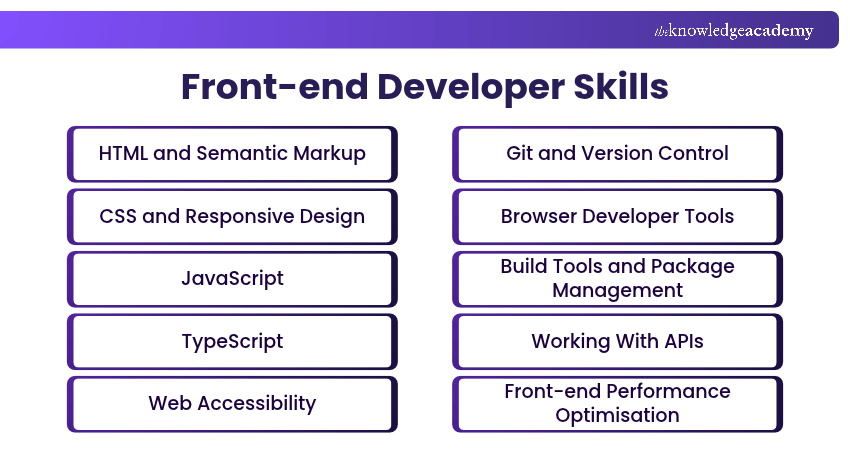
Front-end Developers combine technical knowledge and problem-solving abilities to create functional, accessible and engaging websites. Here are 12 essential skills used in modern front-end development:
1) HTML and Semantic Markup
HTML is the foundational skill of front-end development. Front-end Developers use Hypertext Markup Language (HTML), the standard markup language for web pages, to define elements such as headings, paragraphs, links, images and forms, which browsers then interpret and display.
Semantic HTML is the skill of choosing elements that describe their purpose, such as
Key applications include:
1) Content Structure: Organising headings, paragraphs and page sections.
2) Navigation: Creating links and navigation elements.
3) Forms: Building input fields, labels and controls.
4) Semantic Elements: Using meaningful HTML tags to describe content.
Learn the fundamentals of HTML for web development mastery with our Introduction to HTML Training - Join now!
2) CSS and Responsive Design
CSS is the skill of controlling how websites look and feel. Front-end Developers use Cascading Style Sheets (CSS) to style colours, typography, spacing and layouts, working alongside HTML to create consistent and visually appealing interfaces.
Responsive design permits websites to adapt to different screen sizes and devices. Developers use Flexbox, CSS Grid, media queries and flexible layouts to maintain usability across smartphones, tablets and desktop computers.
Key techniques include:
1) Flexbox: Arranges elements within flexible, one-dimensional layouts.
2) CSS Grid: Creates layouts using rows and columns.
3) Media Queries: Adjusts styles based on conditions such as viewport width.
4) Fluid Layouts: Uses flexible measurements to accommodate different screens.
3) JavaScript
JavaScript is a programming language that gives dynamic and interactive functionality to websites. It allows Front-end Developers to create dropdown menus, form validation, interactive maps and dynamic content updates.
Developers should understand variables, functions, arrays, objects, event handling and asynchronous programming. Knowledge of the Document Object Model (DOM) is also important for modifying webpage content.
Key applications include:
1) DOM Manipulation: Updating webpage elements dynamically.
2) Event Handling: Responding to clicks, typing and other user actions.
3) Form Validation: Checking user input and displaying feedback.
4) Asynchronous Programming: Handling tasks such as API requests using Promises and async/await.
4) TypeScript
TypeScript extends JavaScript with static type checking, helping developers identify certain programming errors before execution. It is particularly useful for larger applications where maintainability and code reliability are important.
Developers use TypeScript to define expected data types, organise application structures and improve code clarity. It also supports code completion and refactoring in compatible development environments.
Important capabilities include:
1) Static Type Checking: Identifies certain type-related errors during development.
2) Type Inference: Determines many data types automatically.
3) Interfaces: Define expected structures for objects.
4) Generics: Support reusable, type-safe functions and components.
TypeScript code is transformed into JavaScript, with TypeScript-specific type information removed during compilation. Understanding JavaScript fundamentals makes TypeScript easier to learn.
Learn how to set up the environment for TypeScript in your projects with our Web Development Training with TypeScript Training - Sign up today!
5) Web Accessibility
Web accessibility involves designing and developing websites that people with different abilities can use, including those who rely on assistive technologies. Front-end Developers can apply the Web Content Accessibility Guidelines (WCAG) to improve accessibility.
Important considerations include keyboard navigation, colour contrast, meaningful text alternatives and accessible forms. Developers should also test websites manually and with assistive technologies where appropriate.
Essential practices include:
1) Keyboard Navigation: Ensuring interactive features work without a mouse.
2) Alternative Text: Providing meaningful descriptions for informative images.
3) Colour Contrast: Maintaining sufficient contrast for readable content.
4) Accessible Forms: Using clear labels, instructions and error messages.
6) Git and Version Control
Git is a distributed version control system used to monitor changes to source code. It allows Front-end Developers to manage project versions, collaborate with teams and restore earlier changes when required.
Developers use Git to create branches, record updates, merge contributions and resolve conflicts. Platforms such as GitHub and GitLab offer additional collaboration features, including pull requests and code reviews.
Essential Git skills include:
1) Commits: Recording changes to project files.
2) Branching: Developing features independently.
3) Merging: Combining changes from different branches.
4) Conflict Resolution: Managing incompatible code modifications.
Pro Tip
When working with Git, create small, focused commits and write descriptive messages explaining what changed. This makes it easier for team members to review updates, understand project history and identify changes when troubleshooting issues.
7) Browser Developer Tools
Browser developer tools help Front-end Developers inspect, debug and analyse websites. Built into browsers such as Chrome, Firefox and Edge, these tools provide information about webpage structure, JavaScript behaviour, network requests and performance. Developers use them to identify styling issues, investigate errors and test responsive layouts.
Common features include:
1) Elements Inspector: Examines HTML structure and CSS styling.
2) Console: Displays JavaScript errors and debugging messages.
3) Network Panel: Monitors requests and resource loading.
4) Debugger: Helps trace JavaScript execution and identify issues.
5) Device Emulation: Tests layouts at different viewport sizes.

8) Build Tools and Package Management
Build tools and package management are the skills of organising application resources, managing dependencies and preparing code for deployment.
Tools such as Vite and Webpack support development and production builds, while package managers such as npm, pnpm and Yarn manage software dependencies. Understanding these tools helps developers maintain projects and automate repetitive tasks.
Key applications include:
1) Dependency Management: Installing and updating required libraries.
2) Module Processing: Preparing application modules for development or deployment.
3) Development Servers: Running applications in local environments.
4) Production Builds: Generating application assets for deployment.
9) Working With APIs
Application Programming Interfaces (APIs) allow software applications to exchange information. Front-end Developers use APIs to retrieve data, submit information and connect user interfaces with back-end services.
For example, an e-commerce website may use an API to display product details, prices and availability. Developers commonly work with HTTP methods, JSON data and JavaScript's Fetch API.
Important API skills include:
1) HTTP Requests: Sending requests using methods such as GET and POST.
2) JSON Handling: Processing structured data returned by APIs.
3) Asynchronous Requests: Retrieving information without unnecessarily blocking the interface.
4) Error Handling: Managing failed requests and unexpected responses.
5) Authentication Awareness: Understanding how applications handle authenticated requests securely.
10) Front-end Performance Optimisation
Front-end performance optimisation focuses on improving website loading speed, responsiveness and visual stability. Well-optimised websites can provide smoother experiences across different devices and network conditions.
Common optimisation techniques include:
1) Image Optimisation: Reducing image sizes while maintaining suitable quality.
2) Code Optimisation: Minimising unnecessary JavaScript and CSS.
3) Lazy Loading: Deferring suitable off-screen resources.
4) Caching: Reducing repeated resource downloads.
5) Performance Monitoring: Using Lighthouse and PageSpeed Insights to identify performance issues and assess relevant performance metrics.
11) Front-end Frameworks and Libraries
Front-end frameworks and libraries simplify application development by providing reusable components and established development patterns. They help developers organise complex interfaces and maintain application code.
Popular technologies include React, Angular and Vue.js. React is a JavaScript library focused on building user interfaces, while Angular and Vue are frameworks used for web application development.
Important concepts include:
1) Components: Creating reusable interface elements.
2) State Management: Managing data that affects application behaviour.
3) Data Flow: Handling information between components.
4) Routing: Managing navigation between application views.
5) Lifecycle and Effects: Handling updates and external interactions using framework-specific features.
A solid understanding of JavaScript is important before learning a Front-end framework or library.
12) Front-end Testing
Front-end testing checks whether website features and application components function as expected. It helps developers identify defects, maintain code quality and reduce problems when applications are updated.
Testing may involve checking individual functions, component interactions or complete user journeys. Tools such as Vitest, Jest, Playwright and Cypress support different automated testing approaches.
Common testing methods include:
1) Unit Testing: Checks individual functions or application logic.
2) Component Testing: Verifies the behaviour of interface components.
3) Integration Testing: Checks how connected components work together.
4) End-to-End Testing: Validates complete user journeys.
5) Cross-Browser Testing: Checks functionality across browsers and devices.
Front-end Developer Skills Checklist
Use this checklist to assess your practical development experience and identify areas for improvement.□ Core Technologies: Can you build a webpage using HTML, CSS and JavaScript?□ Responsive Design: Can you create layouts for mobile, tablet and desktop?□ Accessibility: Can you check keyboard navigation, colour contrast and forms?□ Version Control: Can you manage branches, commits and merges using Git?□ Application Development: Can you build an interface that displays API data?□ Testing and Debugging: Can you find errors, test key features and verify fixes?
Next Step: Review any unchecked areas and practise them through a small development project.
How to Improve Front-end Developer Skills?
Improving Front-end Developer skills requires consistent practice, structured learning and hands-on experience. Here are six practical ways to strengthen your technical expertise and develop confidence in real-world projects:
1) Master the Fundamentals: Develop a strong understanding of HTML, CSS and JavaScript. Practise building simple websites to understand how structure, styling and interactivity work together before exploring advanced technologies.
2) Work on Real-world Projects: Build portfolio websites, dashboards or task management applications to apply your knowledge. Start with basic features and introduce more complex functionality to strengthen your practical experience.
3) Follow Structured Learning: Use professional training courses, coding tutorials and official documentation to improve your knowledge systematically. Refer to resources such as MDN Web Docs and apply new concepts through practical exercises.
4) Participate in Code Reviews: Collaborate with other developers and seek constructive feedback on your work. Contribute to open-source projects or shared repositories to understand coding standards and improve code quality.
5) Strengthen Problem-solving Skills: Practise reproducing errors, identifying their causes and evaluating possible solutions. Test changes systematically to understand what resolves an issue and improve your debugging abilities.
6) Stay Updated with Web Technologies: Follow official documentation, release notes and developer communities to stay informed about relevant developments. Prioritise technologies that support your projects and career goals.
Keep This in Mind
A website that works on your computer may not work for everyone. Test your projects across different browsers, screen sizes and network conditions. Check keyboard navigation, accessibility and key features to identify issues before deployment.
Understand the fundamentals of UX/UI design principles with our App & Web Development Training - Sign up today!

The Knowledge Academy develops accessible learning content across Project Management, IT, Cybersecurity, Data Science, Business Analysis, HR, Accounting and Finance, Leadership and Health and Safety. Its resources combine subject research with clear explanations to help professionals build practical knowledge across a wide range of disciplines.
View Detail

 If you wish to make any changes to your course, please


