


We may not have the course you’re looking for. If you enquire or give us a call on 01344203999 and speak to our training experts, we may still be able to help with your training requirements.
Essential Data Entry Skills for Success
ByThe Knowledge AcademyLast updated on: 03 November 2026
Discover the top data entry skills needed for accurate and efficient information handling. From typing proficiency and software knowledge to data validation, organisation and confidentiality, explore the essential abilities that support professional and efficient data entry work.

Before You Start
Data entry skills combine technical proficiency with careful information handling. As you read, identify which skills you already use confidently and which need improvement. Pay particular attention to accuracy, software knowledge, data verification and confidentiality.
A single incorrect number in a customer record or financial report can create confusion and affect business decisions. This is why data entry requires more than fast typing. Professionals must enter, organise and verify information carefully while protecting sensitive data and ensuring records remain reliable.
To handle these responsibilities effectively, professionals need a combination of technical and organisational skills. Developing the right data entry skills can help improve efficiency, minimise errors and meet workplace requirements. In this blog, we'll explore the essential data entry skills and how they support effective information management. Let's begin!
Top Data Entry Skills
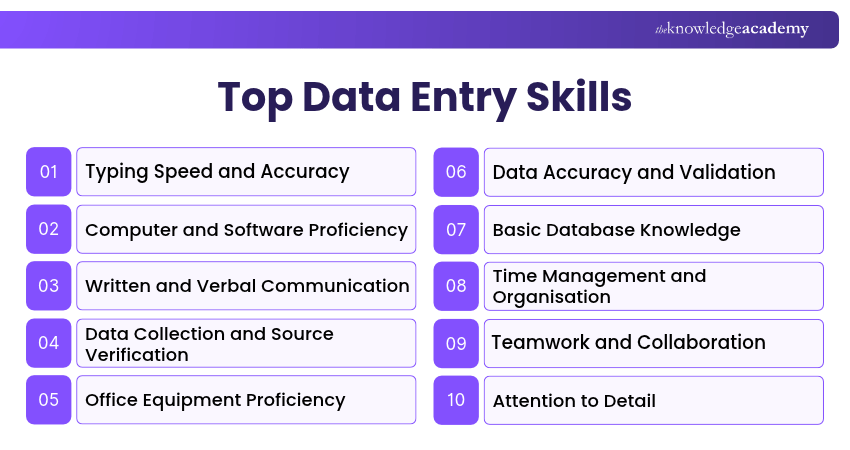
Data entry professionals need a combination of technical and interpersonal skills to enter, verify, organise and maintain information accurately. Here are the important skills to develop:
1) Typing Speed and Accuracy
Typing speed and accuracy are fundamental to effective data entry. The ability to enter information quickly while maintaining accuracy helps professionals complete tasks efficiently and minimise errors.
Here are four ways to improve your typing skills:
a) Practise Touch Typing: Learn to type without constantly looking at the keyboard.
b) Focus on Accuracy: Reduce typing errors before increasing your speed.
c) Take Typing Tests: Measure your Words Per Minute (WPM) and accuracy regularly.
d) Practise Consistently: Use typing exercises to improve speed, familiarity and confidence.
Although some employers specify typing-speed targets, there is no universal WPM requirement for all data entry roles.

2) Computer and Software Proficiency
Proficiency in commonly used software is essential for data entry. Professionals should be comfortable using computers, spreadsheets, document editors and data management applications.
Important areas include:
a) Spreadsheet Skills: Enter, sort, filter and organise information using applications such as Microsoft Excel or Google Sheets.
b) Document Management: Create, edit, save and organise files using common office applications.
c) Data Entry Systems: Work with online forms, business applications and record management systems.
d) Keyboard Shortcuts: Use relevant commands to navigate applications and complete routine tasks efficiently.
Common applications used in data entry include Microsoft Word, Excel and Access, along with Google Docs, Google Sheets and Google Forms. The specific applications used depend on the organisation and the type of information being processed.
3) Written and Verbal Communication
Written and verbal communication skills are vital in data entry. Professionals must understand instructions, clarify missing information and communicate data-related issues effectively.
Important communication abilities include:
a) Clear Writing: Prepare concise emails and messages when requesting information or reporting errors.
b) Active Listening: Understand instructions and ask questions when details are unclear.
c) Verbal Communication: Explain problems or updates clearly to supervisors and colleagues.
d) Professional Language: Use appropriate grammar and terminology when communicating about records.
These abilities help prevent misunderstandings and support accurate information handling.
4) Data Collection and Source Verification
Data entry professionals may need to gather information from forms, documents, business systems or other authorised sources before entering it into a database.
Key abilities include:
a) Information Collection: Gather relevant details from approved documents and systems.
b) Source Verification: Check information against reliable original records where appropriate.
c) Quality Assessment: Identify missing, outdated or inconsistent information.
d) Source Documentation: Record where information came from when required by workplace procedures.
For example, a Data Entry Clerk may compare details on a completed application form with supporting documents before updating a customer record.
5) Office Equipment Proficiency
Data entry involves the use of various office equipment, such as computers, printers, scanners, and document-processing devices. Professionals should understand how to operate relevant equipment safely and perform basic troubleshooting when necessary.
For example, using a scanner correctly helps convert paper documents into digital files. Employees may also need to check whether scanned information is complete and readable before storing or processing it.
6) Data Accuracy and Validation
Data accuracy and validation are essential for ensuring that entered information is correct, complete and consistent with its source.
Important practices include:
a) Verify Entries: Compare recorded information with original documents.
b) Check Completeness: Identify missing values and incomplete records.
c) Apply Validation Rules: Follow required formats for dates, numbers and other data fields.
d) Correct Errors: Fix identified mistakes or report them through the appropriate process.
e) Maintain Consistency: Follow established naming conventions and data entry standards.
For example, checking whether an invoice number matches its original document can help prevent incorrect records.
Trainer's Insight: Valid Data Isn't Always Correct Data
A date may follow the required format but still be incorrect. For example, 15/08/2026 may satisfy a date-format rule even when the original document shows 15/09/2026. Always compare important entries with authorised source records instead of relying solely on automated validation.
7) Basic Database Knowledge
Database structure refers to how information is organised and related within a database. Data entry professionals benefit from understanding basic database concepts so they can work with structured records accurately.
Important concepts include:
a) Tables: Organise related information into structured collections.
b) Fields: Represent individual data attributes, such as names or dates.
c) Records: Contain information about an individual item or entry.
d) Data Types: Specify the kind of information a field can store, such as text, numbers or dates.
e) Unique Identifiers: Help distinguish records and reduce confusion between similar entries.
For example, understanding customer IDs can help employees locate and update the correct customer record.
Go beyond spreadsheets, learn structured data management with the Microsoft Access Training now!
8) Time Management and Organisation
Time management and organisational abilities are essential skills for data entry, as professionals often work with multiple records, deadlines and information-processing tasks.
Key abilities include:
a) Task Prioritisation: Complete urgent and important assignments in an appropriate order.
b) Work Scheduling: Allocate sufficient time for data entry and verification.
c) File Organisation: Maintain structured folders and records for efficient retrieval.
d) Progress Tracking: Monitor completed work and outstanding tasks.
Using calendars, task lists and workplace management tools can help organise activities and meet deadlines without compromising accuracy.
Pro Tip: Separate Entry From Verification
Work through a manageable batch of records, then review the entries against their source documents before marking them complete. This helps maintain focus and makes it easier to identify mistakes without repeatedly switching between unrelated tasks.
9) Teamwork and Collaboration
Teamwork and collaboration help data entry professionals coordinate tasks and maintain accurate records. They often work with colleagues who collect, review or use the information being recorded.
Important teamwork abilities include:
a) Share Updates: Communicate progress and outstanding information requirements.
b) Clarify Responsibilities: Understand who should provide, verify or approve information.
c) Support Colleagues: Coordinate work when records require input from different departments.
d) Report Issues: Inform relevant team members about missing information or discrepancies.
Effective collaboration helps maintain consistent records and supports smooth information flow across departments.
10) Attention to Detail
Attention to detail is the ability to notice small errors, inconsistencies and omissions while processing information. It is particularly important when handling names, numerical values, dates and identification details.
Professionals should review records carefully, follow required formats and check for mistakes before submitting their work. For example, identifying a misplaced decimal point in a financial record can help prevent inaccurate reporting.
11) Critical Thinking and Problem-solving
Critical thinking helps data entry professionals identify potentially incorrect information, investigate discrepancies and determine when clarification is needed. They may need to compare conflicting records, identify possible errors and determine the appropriate next step based on available evidence and workplace procedures.
For example, if two documents contain different customer addresses, a data entry professional should check the authorised source or request clarification rather than guessing which address is correct.
12) Data Confidentiality and Security
Data entry professionals may handle personal, financial, employee or business information that requires careful protection. Understanding data confidentiality and security practices helps prevent unauthorised access, disclosure or misuse.
Important practices include:
a) Access Control: Use only the information and systems authorised for your role.
b) Secure Handling: Follow workplace procedures when storing and sharing records.
c) Password Protection: Use approved authentication methods and protect account credentials.
d) Data Protection Awareness: Follow applicable data protection requirements and organisational policies.
e) Incident Reporting: Report suspected data loss or unauthorised access through the appropriate channels.
For example, customer records should only be shared with authorised individuals for legitimate work purposes.
Mini Skills Practice Challenge
Practice Challenge: Check 20 Sample RecordsCreate a spreadsheet containing 20 fictional customer records. Introduce missing values, duplicate records and inconsistent date formats. Practise identifying errors, verifying information against fictional source documents and recording the corrections made.Use only fictional information, not real customer or employee details.
Organise better, work smarter and own your workday by joining the Office Skills Training now!

The Knowledge Academy develops accessible learning content across Project Management, IT, Cybersecurity, Data Science, Business Analysis, HR, Accounting and Finance, Leadership and Health and Safety. Its resources combine subject research with clear explanations to help professionals build practical knowledge across a wide range of disciplines.
View Detail

 If you wish to make any changes to your course, please


