




We may not have the course you’re looking for. If you enquire or give us a call on 01344203999 and speak to our training experts, we may still be able to help with your training requirements.
Home
 Resources
Programming & DevOps
Microsoft SQL Server Licensing Guide: Models, Editions and Requirements
Resources
Programming & DevOps
Microsoft SQL Server Licensing Guide: Models, Editions and Requirements
Resources
Programming & DevOps
Microsoft SQL Server Licensing Guide: Models, Editions and Requirements
Microsoft SQL Server Licensing Guide: Models, Editions and Requirements
ByThe Knowledge AcademyLast updated on: 11 September 2026
Microsoft SQL Server licensing varies based on the edition, deployment environment, processor cores, and users or devices accessing the system. This guide explains the key licensing models, SQL Server editions, virtualisation considerations, and requirements to help you choose a suitable licensing approach.
Per Core or Server + CAL? Standard or Enterprise? Physical server or virtual machine? SQL Server licensing involves several connected decisions, and choosing one option can affect what comes next.
This Microsoft SQL Server Licensing Guide breaks down the key models, editions, virtualisation considerations, and licensing requirements to make those decisions easier to understand.
What is Microsoft SQL Server Licensing?
Microsoft SQL Server licensing defines how organisations can deploy, run, and access SQL Server. The licensing requirements depend on factors such as the edition selected, whether SQL Server runs on a physical server or Virtual Machine (VM), the number of cores involved, and how users or devices access the system.
The two main commercial editions are Enterprise and Standard. Enterprise is licensed through the Per Core model, while Standard supports both Per Core and Server + CAL licensing. Microsoft also provides other editions for development, testing, evaluation, and smaller-scale applications.

Quick Licensing Picture
Edition → Deployment → Access → LicenceWhich SQL Server edition do you need?↓Will it run on a physical server or VM?↓How will users or devices access it?↓Which licensing model applies?The right SQL Server licence depends on both the software and the environment in which it runs.
Types of Microsoft SQL Server Licensing Models
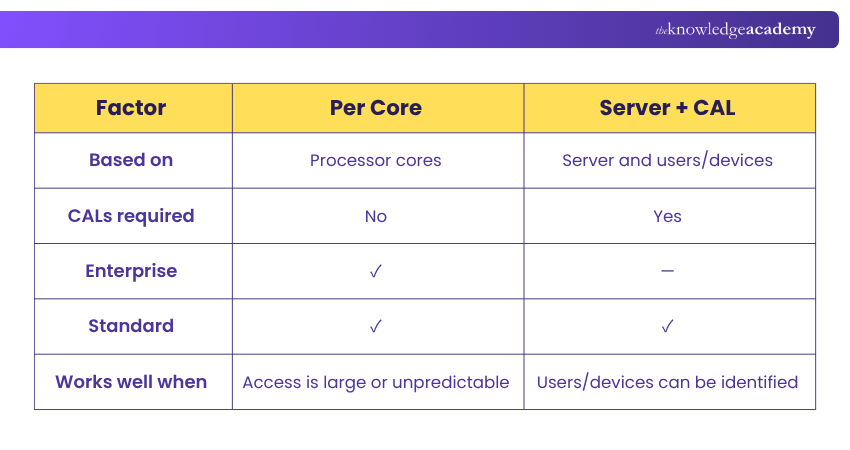
Microsoft SQL Server primarily uses two traditional licensing approaches: Per Core and Server + CAL. Each measures SQL Server usage differently, so understanding how they work is the first step towards selecting an appropriate option. SQL Server 2025 also supports pay-as-you-go billing for eligible Azure Arc-enabled deployments.
1) Per Core Licensing
Per Core licensing is based on the number of physical or virtual cores used to run SQL Server rather than the number of users or devices accessing it. This makes it suitable for environments with large, changing, or difficult-to-count user populations.
Both Enterprise and Standard Editions can use Per Core licensing. Core licences are sold in two-core packs, and Microsoft's physical server licensing rules include a minimum of four core licences per physical processor.
Often considered for: Environments with high or unpredictable access, internet-facing workloads, or situations where counting individual users or devices is impractical.
2) Server + CAL Licensing
Under Server + CAL licensing, an organisation purchases a licence for the server and Client Access Licences (CALs) for the users or devices accessing SQL Server.
A User CAL covers a particular user, while a Device CAL covers a particular device. This model is available for SQL Server Standard Edition and can work well where the number of users or devices is known and manageable.
CAL requirements can also apply to indirect access, so organisations should consider how users and devices connect to SQL Server when calculating their requirements.
Often considered for: Environments with a known and manageable number of users or devices, particularly where SQL Server Standard Edition is being used.
Microsoft SQL Server Editions and Their Licensing Options
Choosing an edition is closely connected to licensing because different SQL Server editions support different capabilities and licensing arrangements.
1) Enterprise Edition
Enterprise Edition is designed for organisations running demanding and mission-critical database workloads. It provides advanced capabilities for scalability, availability, security, analytics, and performance.
For new licensing, Enterprise uses the Per Core licensing model, making processing capacity an important factor when determining requirements.
2) Standard Edition
Standard Edition provides core database and Business Intelligence capabilities for workloads that do not require the complete feature set of Enterprise.
One of its key licensing differences is flexibility. Organisations can license Standard through either Per Core or Server + CAL, allowing the licensing approach to reflect their infrastructure and access patterns.
Build practical SQL expertise with our Querying Data with Microsoft Transact-SQL DP080 Course – Join today!
3) Developer Editions
Developer Editions are intended for building, testing, and demonstrating SQL Server applications rather than running production workloads.
The current SQL Server offering includes Enterprise Developer and Standard Developer, enabling developers to work with capabilities corresponding to those commercial editions without licensing them for production use. Microsoft also provides an Evaluation Edition for temporary non-production evaluation purposes.
4) Express Edition
Express is a free, entry-level SQL Server edition suited to smaller data-driven applications, development, and suitable production workloads. Its resource and feature limits make it less appropriate for more demanding environments.
Quick Edition Check
Need advanced, mission-critical capabilities? → EnterpriseNeed core database capabilities with licensing flexibility? → StandardBuilding or testing applications? → DeveloperRunning a small or lightweight application? → Express
How Does SQL Server Licensing Work in Virtual Environments?
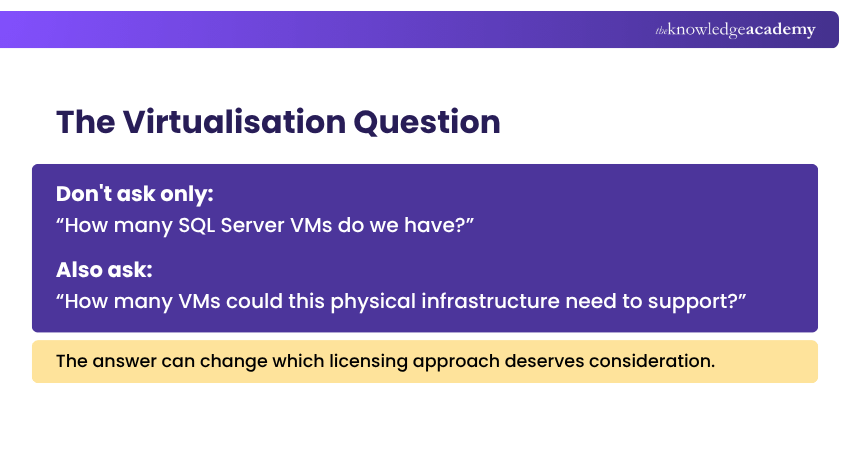
Virtualisation can make SQL Server licensing more complex because organisations need to consider both the resources assigned to individual Virtual Machines (VMs) and the physical infrastructure hosting them.
Licensing Individual Virtual Machines
SQL Server can be licensed at the VM level in eligible scenarios. Under Per Core licensing, organisations license the virtual cores allocated to the virtual OSE, subject to a minimum of four core licences per virtual OSE. This licensing approach requires active Software Assurance or a qualifying subscription licence.
This approach can make sense when SQL Server operates in a limited number of VMs rather than across a heavily virtualised server environment.
Licensing Physical Servers
Another approach is to license the physical cores of the server hosting SQL Server workloads. All applicable physical cores need to be appropriately licensed according to Microsoft's core licensing requirements.
Physical licensing can become particularly relevant when multiple SQL Server virtual workloads operate on the same infrastructure.
Unlimited Virtualisation
SQL Server Enterprise can provide unlimited virtualisation rights when qualifying licensing conditions are satisfied, including appropriate physical-core licensing and applicable Software Assurance or subscription rights.
This can be valuable for organisations operating highly virtualised environments with numerous SQL Server workloads.
What is Software Assurance for SQL Server?
Software Assurance (SA) provides additional benefits and licensing rights alongside eligible Microsoft licences. For SQL Server, these rights can become particularly important when organisations use virtualisation or regularly move workloads between infrastructure.
Depending on the applicable agreement and deployment, Software Assurance can support benefits such as version rights, licence mobility, enhanced virtualisation, and certain high-availability and disaster recovery rights. Organisations should therefore consider SA as part of their wider SQL Server licensing strategy.
How to Choose the Right SQL Server Licensing Model?
There is no single licensing model that suits every SQL Server environment. The decision should reflect how SQL Server will actually be deployed and accessed.
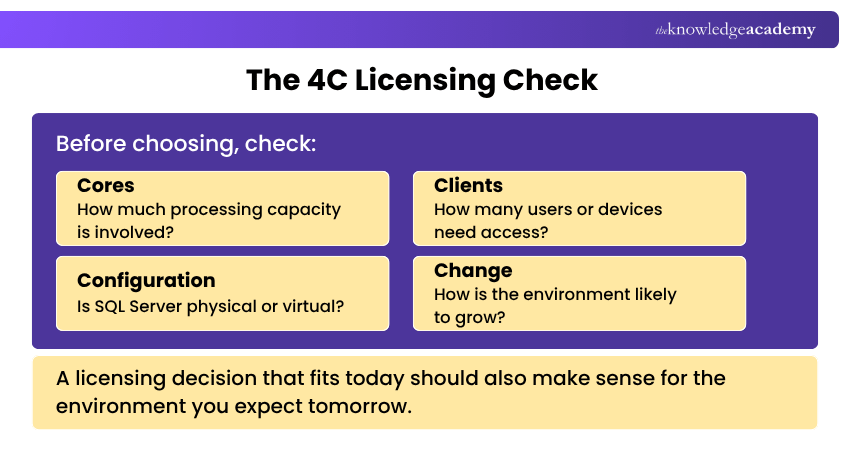
Start by considering four questions:
1) Which SQL Server edition do you require? Enterprise and Standard have different licensing options.
2) How many users or devices need access? A predictable number can make Server + CAL worth considering for Standard.
3) How is SQL Server deployed? Physical and virtual environments can produce different licensing requirements.
4) How could the environment change? Future users, VMs, cores, or workload growth can affect the long-term suitability of a licensing model.
How to Maintain SQL Server Licence Compliance?
Maintaining compliance requires organisations to keep their licence entitlements aligned with their actual SQL Server deployments. This becomes particularly important as infrastructure changes over time.
Maintain an accurate inventory of SQL Server installations, editions, physical and virtual environments, and relevant licence entitlements. Infrastructure changes such as adding cores, deploying VMs, or moving workloads should also trigger a licensing review.
Microsoft licensing terms and commercial agreements can change or provide different rights. Organisations should therefore review the current Microsoft Product Terms and their applicable agreement when making significant licensing or infrastructure decisions.
Build strong database fundamentals with our Introduction to SQL Databases Training 10985C – Join today!

The Knowledge Academy develops accessible learning content across Project Management, IT, Cybersecurity, Data Science, Business Analysis, HR, Accounting and Finance, Leadership and Health and Safety. Its resources combine subject research with clear explanations to help professionals build practical knowledge across a wide range of disciplines.
View Detail

 If you wish to make any changes to your course, please


