




We may not have the course you’re looking for. If you enquire or give us a call on 01344203999 and speak to our training experts, we may still be able to help with your training requirements.
Microsoft Fabric License: Explained
ByThe Knowledge AcademyLast updated on: 26 November 2026
Microsoft Fabric offers different licensing options to support data analytics, collaboration and business intelligence. Explore individual licenses, computing capacities and how to choose the right option.

At a Glance
1. Licensing Structure: Microsoft Fabric combines user licenses and computing capacity.2. Individual Licenses: Free, Power BI Pro and PPU support different user needs.3. Capacity Options: Fabric capacity runs analytics workloads, while trial supports evaluation.4. Access and Sharing: Permissions depend on user licenses, capacity size and workspace roles.5. Choosing a License: Consider workloads, user access, collaboration and costs.
One Platform. Different Licenses. Which One Do You Need?
Imagine your organisation is ready to use Microsoft Fabric. Your team wants to create reports, analyse data and collaborate across departments. But before getting started, one question arises: Which Microsoft Fabric license should you choose?
With options such as free, pro, premium per user and Fabric capacity, understanding the differences can be confusing. Choosing the wrong combination may create unnecessary expenses or limit access to important features.
That's where understanding Microsoft Fabric licensing becomes essential. In this blog, we'll explore the available license types, compare their capabilities and help you identify the most suitable option for your organisation.
What is a Microsoft Fabric License?
A Microsoft Fabric license determines how users and organisations access, create, manage and share content within Microsoft Fabric. The platform combines data engineering, data warehousing, data science, real-time analytics and business intelligence.
Its licensing involves two main components: individual user licenses and computing capacity. Individual licenses determine user access, particularly for Power BI content, while capacity licenses provide computing resources for Fabric workloads. For example, a team may need Fabric capacity for data engineering and Power BI Pro licenses to create and share reports.

The Different Types of Microsoft Fabric Licenses
Microsoft Fabric licensing can be understood through two broad categories: capacity licenses and individual licenses. Here is a closer look at both categories:
1) Capacity Licenses
Capacity licenses provide the computing resources organisations need to process data, execute workloads and use supported Microsoft Fabric services. Different capacity options are available depending on the organisation's needs.
a) Microsoft Fabric Capacity (F SKUs):
Microsoft Fabric capacity licenses, known as F SKUs, provide dedicated computing resources for workloads such as data engineering notebooks and Power BI. They are available in different sizes, including F2, F4, F8, F16, F32 and F64, with larger options available for more demanding workloads.
Each SKU provides a specified number of Capacity Units (CUs), which determine the computing resources available. Organisations can purchase F capacity through Azure using pay-as-you-go billing or a capacity reservation.
Pro Tip
If your organisation plans to distribute Power BI reports to users with Free licenses, check the capacity size first. Fabric F64 or larger allows appropriately authorised Free users to view shared Power BI content, while smaller F capacities generally require Pro or PPU licenses for viewers.
b) Fabric Trial Capacity:
Microsoft Fabric offers a trial capacity that allows eligible users to explore its features before purchasing a paid capacity. The standard trial period lasts 60 days and supports many Fabric experiences, including data engineering, data science, data warehousing and Power BI.
However, trial capabilities and available capacity sizes depend on Microsoft's current trial conditions. Trials may provide F4 or F64 capacity, and this option is useful for teams that want to experiment with Microsoft Fabric, evaluate workloads and understand capacity requirements before making a purchase.
2) Individual Licenses
Individual licenses determine which Microsoft Fabric and Power BI activities users can perform. Microsoft provides three main per-user licensing options:
a) Free License:
The Microsoft Fabric Free license allows users to access supported Fabric experiences when their organisation provides suitable capacity and permissions. Users can create and work with non-Power BI Fabric items, such as lakehouses and notebooks, in appropriately configured F or trial capacity.
However, creating, sharing and viewing Power BI content may require additional licenses or qualifying capacity. For example, users with free licenses can view shared Power BI content on F64 or larger capacity when they have the required viewer permissions.
b) Power BI Pro License:
Power BI Pro enables users to create, publish, collaborate on and share Power BI reports and dashboards. It is particularly useful for teams that need regular collaboration and report distribution.
However, a Pro license does not independently provide the computing capacity needed to run broader Microsoft Fabric workloads. Organisations using data engineering, warehousing or similar Fabric features still require suitable Fabric capacity or an eligible trial capacity.
Learn how to visualise data, reveal opportunities, and drive growth by joining the Microsoft Power BI Training now!
c) Power BI Premium Per User (PPU) License:
PPU provides access to most Power BI Premium features through an individual subscription. It is designed for users who need advanced Power BI capabilities without purchasing dedicated organisational capacity solely for those features.
PPU licenses can support premium Power BI workloads through shared Power BI capacity, but they do not independently provide Fabric capacity for non-Power BI experiences such as lakehouses, notebooks or warehouses. Users accessing content in PPU workspaces generally need their own PPU license.
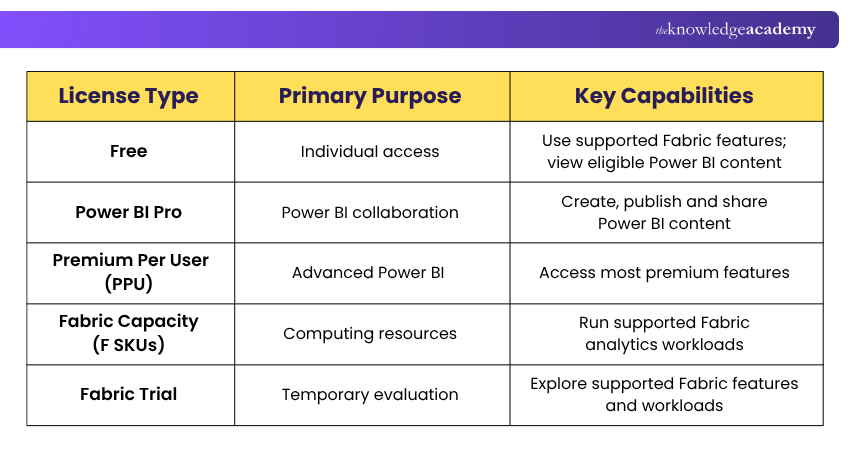
Here’s a quick look at the key differences:
How Does Microsoft Fabric Licensing Work?
Microsoft Fabric licensing works by combining individual user licenses, organisational computing capacity and workspace permissions. User licenses determine what employees can do, while Fabric capacity provides the resources needed to run analytics workloads. Workspace permissions control which content users can access and manage.
Imagine a company that wants to use Microsoft Fabric for data analysis and reporting. It has three groups of employees with different responsibilities and licensing requirements:
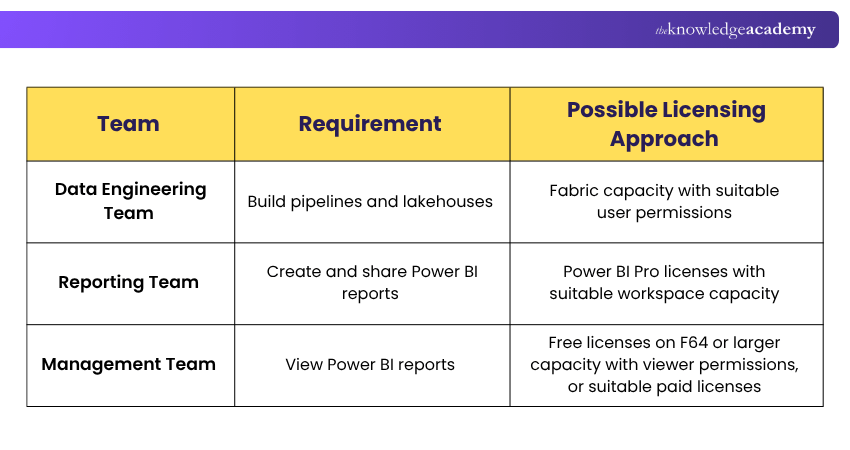
This example shows that every employee does not necessarily need the same license. The data engineering team requires access to Fabric computing resources, while the reporting team needs appropriate Power BI authoring and sharing permissions.
Management users may only need viewing access. Their licensing requirements depend on the underlying capacity and permissions. By matching licenses to user responsibilities, organisations can manage access and avoid unnecessary spending.
Boost your expertise in data analysis, reporting, dashboards and business intelligence tools. Sign up for the Business Intelligence Analyst Course now!
How to Choose the Right Microsoft Fabric License?
Choosing the right Microsoft Fabric license involves understanding what your organisation needs and how employees will use the platform. Rather than selecting a license based only on price, consider the following factors:
a) Your Organisation's Requirements: Determine whether your team needs Power BI reporting, data engineering, data warehousing or other Fabric workloads.
b) Number of Users: Identify how many employees need to create content, collaborate or simply view reports. Different responsibilities may require different licenses.
c) Computing Capacity: Evaluate the volume of data, processing requirements and expected workload growth before selecting an F SKU.
d) Collaboration Needs: Consider how reports and other Fabric items will be shared between teams. Power BI licensing requirements may vary according to capacity size and workspace permissions.
e) Available Budget: Compare user subscription costs, capacity charges and expected usage before deciding on a licensing approach. Also consider whether pay-as-you-go billing or a capacity reservation better suits your workload.
Checklist: Before Choosing a Microsoft Fabric License
□ Identify whether your organisation needs Power BI alone or additional Fabric workloads.□ Determine who needs to create, share or view content.□ Check the computing capacity required for your workloads.□ Verify the user licensing requirements for Power BI collaboration.□ Compare pay-as-you-go capacity and reservation pricing.□ Consider future growth and expected increases in data processing.

The Knowledge Academy develops accessible learning content across Project Management, IT, Cybersecurity, Data Science, Business Analysis, HR, Accounting and Finance, Leadership and Health and Safety. Its resources combine subject research with clear explanations to help professionals build practical knowledge across a wide range of disciplines.
View Detail

 If you wish to make any changes to your course, please


