




We may not have the course you’re looking for. If you enquire or give us a call on 01344203999 and speak to our training experts, we may still be able to help with your training requirements.
Xero vs QuickBooks: What’s the Difference?
ByOlivia TaylorLast updated on: 03 October 2026
Xero vs QuickBooks compares accounting features, automation, reporting, pricing, and usability to help businesses choose suitable software for managing finances, tracking performance, and supporting informed financial decisions.
Choosing the appropriate accounting software can transform your financial management. In this blog, you will learn about Xero vs QuickBooks and which platform aligns best with your objectives. Let's analyse the main differences that will assist you in making the correct choice.
What is Xero?
Xero is cloud-based accounting software developed by a company founded in New Zealand and created to support growing businesses with day-to-day accounting and financial tasks online. It connects with bank accounts to import transactions and provides features such as invoicing, bank reconciliation, reporting, inventory and, depending on the plan, payroll, expenses and other accounting tools.
Xero offers a free introductory period for eligible new users, after which they can select a suitable pricing plan and access the cloud-based platform through supported devices and browsers.

What is QuickBooks?
QuickBooks is cloud-based accounting software from Intuit that helps businesses manage invoicing, expenses, payables, reporting, and tax-related accounting tasks. Payroll is available as a paid add-on. It connects to bank accounts to import transactions and provides reporting tools to help users monitor financial performance.
QuickBooks was originally offered as desktop software, while QuickBooks Online now allows users to access their accounts through an internet connection. It offers several plans and a 30-day free trial for eligible new users.
Improve reporting accuracy and streamline daily accounting tasks with our QuickBooks Training - Join now!
Difference Between Xero and QuickBooks
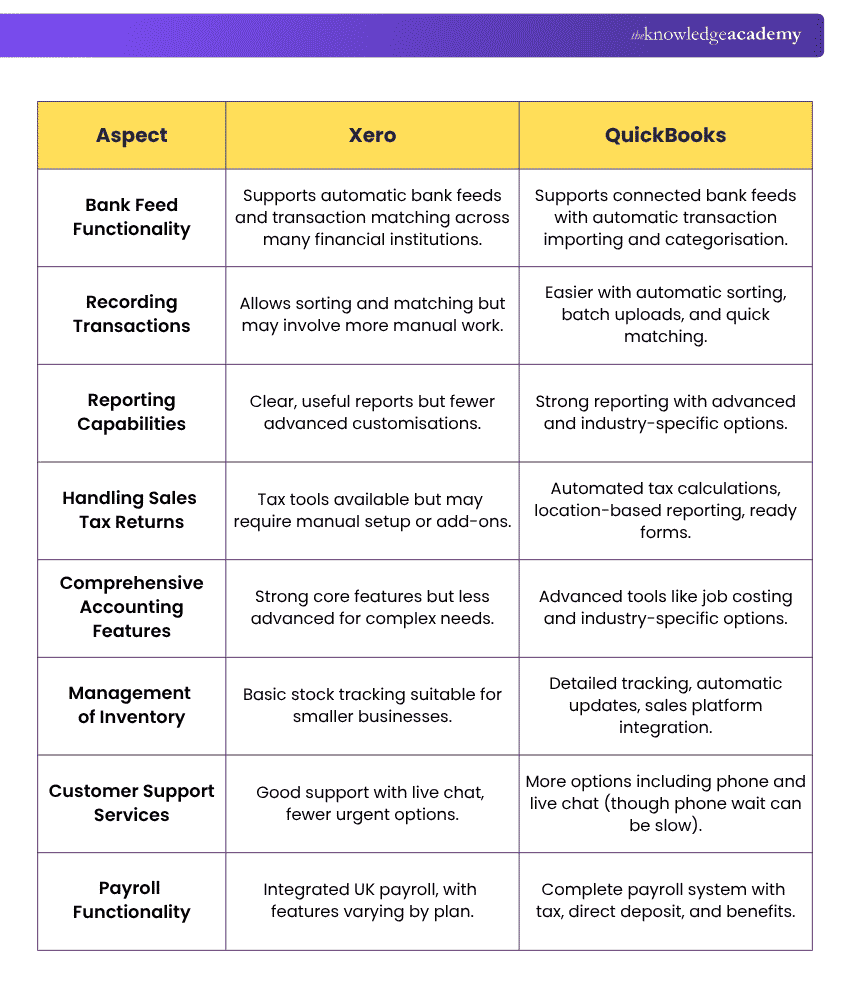
Xero and QuickBooks are both great tools for managing business finances. Here’s a simple comparison between Xero and QuickBooks:
1) Bank Feed Functionality
Xero and QuickBooks can connect to your bank, so transactions appear automatically. Both Xero and QuickBooks support connected bank feeds and transaction matching. Availability and setup can vary depending on the bank, account type, and connection. Automated bank feeds can reduce the time spent checking transactions and help keep accounts up to date.
2) Recording Transactions
Both QuickBooks and Xero provide tools for importing, categorising, and matching transactions, although available automation and workflows vary by plan and account setup. Less manual work means you can focus more on running your business. This can also reduce manual data-entry errors.
3) Reporting Capabilities
Both QuickBooks and Xero provide financial reporting and customisation tools. The available reporting, budgeting, dashboard, and analytics features vary across their pricing plans. Detailed reports in Xero and QuickBooks help you understand your business performance better and make it easier to plan for the future.
4) Initial Cost
Xero and QuickBooks use tiered pricing, and starting costs vary by plan, business requirements, and current promotions. Compare the latest prices and included features before choosing.
5) Handling VAT Returns
Both Xero and QuickBooks support Value-Added Tax (VAT) management and can help eligible UK businesses prepare and submit VAT returns to HMRC. Available tools and supported schemes vary by platform and plan. Both platforms provide VAT tools that can reduce manual work during filing and help lower the risk of errors.
6) Comprehensive Accounting Features
Both platforms provide advanced accounting features, with capabilities varying by plan. QuickBooks' higher-tier plans include tools such as workflow automation and advanced reporting, while Xero's higher-tier plans expand features such as forecasting, performance analytics, budgeting and, on Ultimate, project tracking. Advanced tools can be important if your business has complex needs. For smaller or simpler businesses, the required features will depend on their accounting needs and chosen plan.
7) Management of Inventory
Both platforms provide inventory tools, although availability and capabilities differ. QuickBooks stock tracking is available on Plus and Advanced, while Xero supports real-time stock tracking and inventory reporting for up to 4,000 finished items. Better inventory tools mean you can track what’s selling and what’s not. This can help you manage stock levels and avoid running out.
8) Customer Support Services
QuickBooks provides phone and live messaging support. Xero provides 24/7 online support through Xero Central and can arrange customer callbacks when required, but it does not provide a general inbound telephone helpline. Quick support can save you time when you have a problem. It also means less downtime for your business.
9) Payroll Functionality
QuickBooks offers Payroll Core, Premium, and Elite as paid add-ons with different workforce features. Xero also offers payroll, with included allowances and additional charges varying by plan. A strong payroll system can save hours of work each month. It can also support accurate and timely payroll processing.
Quick Self-Check
Which matters most to your business: reporting, payroll, inventory, bank feeds, pricing, or customer support? Use your priorities to narrow down the better fit.
Build job-ready competence for roles in accounting, bookkeeping, and finance with our Accounting Software Training - Sign up now!
Benefits and Drawbacks of Xero
Here is an outline of the benefits and drawbacks that typically accompany keeping tabs on the financial state of one's enterprise using Xero software.
Benefits of Using Xero
a) As a cloud-based application, Xero can be accessed through supported browsers on Mac and Windows devices and offers tiered pricing plans.
b) Small and medium-sized businesses can use Xero's automation features and cloud-based tools to simplify routine accounting tasks.
Drawbacks of Using Xero
a) Some advanced features and accounting workflows can take new users time to become familiar with.
b) Xero does not provide an inbound telephone support line, although its support team can arrange callbacks when needed.
Benefits and Drawbacks of QuickBooks
The following is an overview of the benefits and drawbacks of using QuickBooks to manage business finances:
Benefits of QuickBooks
a) QuickBooks provides tools for common accounting activities such as invoicing, expense tracking, bank reconciliation and financial reporting within a single platform.
b) QuickBooks provides phone and live messaging support for customers.
Drawbacks of QuickBooks
a) Costs increase on higher-tier QuickBooks plans, especially when paid add-ons such as payroll are included.
b) Some features, including payroll, require separate paid options instead of forming part of the standard accounting plans.
Pricing and Value Comparison: Xero vs QuickBooks
In terms of pricing and value, both Xero and QuickBooks use different pricing structures and feature combinations across tiered plans. QuickBooks pricing increases across higher-tier plans as more users and advanced features are included.
Xero also uses tiered pricing, with features and allowances increasing across plans. The suitable option depends on your budget and the features your business requires. It is also worth comparing the included features carefully, as the lowest-priced plan may not always provide the best value for every business.
Trainer's Pro Tip
Compare the features included in each plan, not just the starting price. Check reporting, payroll, inventory, user access, and support before choosing the option that fits your business needs.
Xero vs QuickBooks: Which One Should You Choose?
Both Xero and QuickBooks offer powerful accounting features, but the right choice depends on your business needs. QuickBooks offers tiered accounting, reporting, stock, and workflow tools, while Xero provides cloud-based accounting, reporting, collaboration, and automation features. The suitable option depends on the features and plans a business requires.
When to Choose Xero?
Choose Xero if you:
1) Need unlimited users without per-user fees
2) Prefer Xero’s plan structure and features
3) Need inventory tracking for up to 4,000 items
4) Already use Xero-compatible apps or workflows
When to Choose QuickBooks?
Choose QuickBooks if you:
1) Need inventory, budgeting, or project profitability tools
2) Want advanced reporting and workflow automation
3) Prefer phone and live-message support
4) Already use QuickBooks-compatible systems
Ultimately, the best option depends on your business size, budget, and accounting requirements.
Keep This in Mind
Xero and QuickBooks both offer useful tools for managing business finances, but their features, pricing, support, payroll, and reporting options differ.
The right choice depends on your business size, accounting needs, budget, and preferred way of working. Before deciding, compare the latest plans and included features carefully to ensure the software matches your day-to-day financial management requirements.
Enhance your payroll expertise with our Payroll Courses – Join today!

Olivia Taylor makes complex financial subjects easier for professionals to understand and apply. Her content connects accounting principles with the practical requirements of financial control, organisational planning and responsible decision-making.
View Detail

 If you wish to make any changes to your course, please


