




We may not have the course you’re looking for. If you enquire or give us a call on 01344203999 and speak to our training experts, we may still be able to help with your training requirements.
Windows Server Standard vs Datacenter: Key Differences
ByNilotpal SarmahLast updated on: 03 October 2026
Windows Server Standard vs. Datacenter: An In-Depth Comparison. Understand the distinctions between these Windows Server editions, including performance, virtualisation, licensing, high availability, and storage aspects. Gain clarity on which suits your needs in this comprehensive analysis. Read more to learn!
Choosing between Windows Server Standard and Datacenter depends largely on your virtualisation requirements, infrastructure design, advanced feature needs, and licensing strategy. Both editions provide many of the same core Windows Server roles, but they differ significantly in virtualisation rights and several datacenter-focused capabilities.
This blog compares Windows Server 2025 Standard and Datacenter to help you understand their key differences and choose an appropriate edition for your environment. So, read on!
What is Windows Server Standard?
Windows Server Standard is a powerful Operating System (OS) designed by Microsoft specifically for server environments. It is known to offer a range of features and functionalities essential for physical or minimally virtualised server environments. It is a reliable and secure platform that enables organisations to manage their server infrastructure effectively and efficiently.
Additionally, for organisations seeking to enhance their server management, understanding Microsoft Windows Server Features can provide valuable insights into optimising performance, security, and scalability. Some of the features offered by Windows Server Standard are as follows:
a) Active Directory Domain Services: One of its prominent features is Active Directory Domain Services (AD DS). It provides a central repository for managing an organisation's user accounts, groups, and network resources. It allows administrators to control resource access, enforce security policies, and simplify user authentication and authorisation processes. With AD DS, businesses can establish a scalable and secure network infrastructure.
b) File and Print Services: It includes file and print services that facilitate efficient file sharing and printing within an organisation. Administrators can create shared folders, control access permissions, and manage printing resources to ensure seamless collaboration and productivity. This feature simplifies sharing files and documents among employees, enabling effective teamwork and information exchange.
c) Web and Application Platform: It is a robust web and application platform that supports various web technologies. It includes Internet Information Services (IIS), a powerful web server that enables hosting and managing websites and web applications. Additionally, it supports popular programming languages and frameworks such as ASP.NET and PHP, allowing developers to create dynamic and interactive web applications.
d) Remote Desktop Services: Another valuable feature of Windows Server Standard is Remote Desktop Services (RDS). It enables remote access to desktops and applications, providing flexibility and mobility for employees. With RDS, users can securely access their work environment from supported locations and devices, subject to configuration and licensing. It simplifies application deployment and management, making it easier for administrators to provide users with the necessary resources.
e) Hyper-V: Windows Server Standard includes Hyper-V, Microsoft's virtualisation platform. Hyper-V enables creating and managing Virtual Machines (VMs) on a physical server. This feature allows businesses to consolidate workloads, improve server utilisation, and reduce hardware costs. When licensed by physical cores, Windows Server 2025 Standard provides rights for up to two virtual OSEs per fully licensed server, with additional virtualisation rights available by relicensing all physical cores on the server.

What is Windows Server Datacenter?
Windows Server Datacenter is a feature-rich edition designed for highly virtualised and software-defined datacenter environments. It offers advanced capabilities and extensive scalability to meet the demanding requirements of enterprise-level businesses. It provides a robust foundation for efficiently building and managing complex server infrastructures. Some of the features offered by Windows Server Datacenter are as follows:
a) Workload and Infrastructure Scale: Both Standard and Datacenter can support substantial server workloads, and Datacenter does not automatically provide faster application performance simply because of the edition. Its main scalability advantages come from broader virtualisation rights and datacenter-focused capabilities that support highly virtualised and software-defined environments.
b) Unlimited Virtualisation Rights: One of the key advantages of Windows Server Datacenter is the inclusion of unlimited virtualisation rights. This means that you can run unlimited VMs on your licensed servers, plus one Hyper-V host, making it an ideal choice for businesses heavily invested in virtualisation technologies. These rights allow for greater flexibility and consolidation of server resources, leading to cost savings and improved efficiency.
c) Advanced Storage and Networking Features: Windows Server Datacenter incorporates advanced storage and networking features to support large-scale deployments. It includes features like Storage Spaces Direct, which allows organisations to create highly available and scalable software-defined storage solutions. Additionally, Datacenter includes advanced software-defined networking capabilities that support more flexible and centrally managed network configurations in virtualised environments.
d) Shielded Virtual Machines: Windows Server Datacenter supports advanced guarded-fabric capabilities for Shielded VMs, including Host Guardian Hyper-V support. This feature helps protect virtual machines and their data from unauthorised access. Shielded VMs use encryption and secure boot technologies to ensure that VMs can only run on trusted and authorised hosts, preventing tampering and unauthorised access to sensitive information.
e) High Availability and Resiliency: Both Standard and Datacenter support failover clustering. However, Datacenter adds capabilities suited to advanced datacenter deployments, including Storage Spaces Direct and broader Storage Replica capabilities. It also supports Host Guardian Hyper-V features used in guarded fabric and Shielded VM scenarios.
Pro Tip
Check whether you will actually use Datacenter-only capabilities. Its value is strongest when high VM density and advanced datacenter features are part of the infrastructure plan.
Windows Server Standard vs Datacenter: Key Differences
While both Windows Server Standard and Windows Server Datacenter editions offer powerful features, there are key differences that set them apart. These differences include:
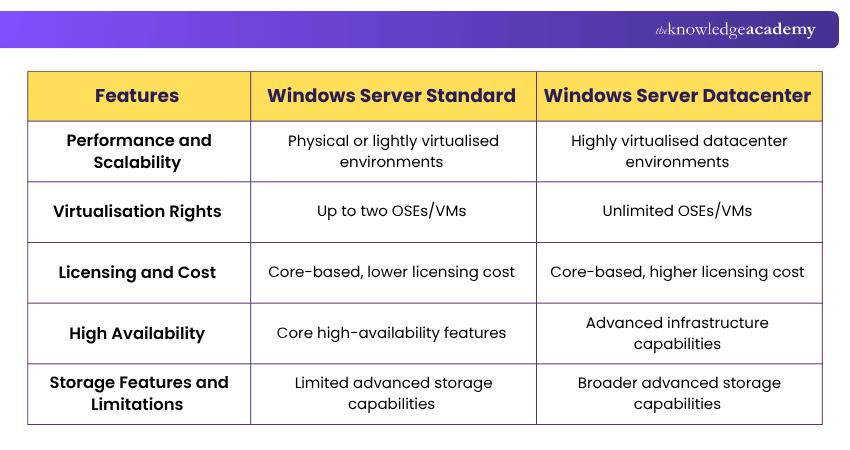
1) Performance and Scalability
Windows Server Standard and Datacenter share the same core Windows Server platform, so Datacenter does not automatically provide faster application performance. Standard is primarily suited to physical or lightly virtualised environments, while Datacenter is designed for highly virtualised and software-defined datacenter environments.
Datacenter supports environments requiring greater virtualisation density and advanced infrastructure capabilities. Its unlimited virtualisation rights under physical-core licensing make it particularly suitable when organisations need to run many Windows Server Virtual Machines (VMs).
2) Virtualisation Rights and Capabilities
Virtualisation rights are one of the main differences between Windows Server Standard and Datacenter. When licensed by physical cores, Standard provides rights for up to two virtual Operating System Environments (OSEs) or Hyper-V-isolated containers. The physical Windows Server instance may also be used solely to host and manage those virtualised workloads.
Datacenter provides rights to run an unlimited number of OSEs or Windows Server Containers with Hyper-V isolation on a fully licensed server. This makes it better suited to environments with extensive virtualisation requirements.
Quick Edition Check
Which best describes your environment?
A) Few VMs and mainly core server featuresB) Many VMs and advanced datacenter capabilitiesTypical fit:A → Windows Server StandardB → Windows Server Datacenter
3) Licensing and Cost Considerations
Both Windows Server Standard and Datacenter use core-based licensing and generally require Windows Server Client Access Licences (CALs) for users or devices accessing the server. When licensing physical cores, Microsoft applies minimum licensing requirements of at least eight core licences per physical processor and at least 16 core licences per server. Standard has a lower reference licensing cost and can suit environments with limited virtualisation needs.
Datacenter has a higher licensing cost but provides broader virtualisation rights and advanced datacenter capabilities. The appropriate edition therefore depends on VM density, required features, infrastructure design, and overall licensing requirements rather than organisation size alone.
4) High Availability
Both Windows Server Standard and Datacenter support failover clustering and other core availability capabilities. Therefore, high availability itself is not exclusive to the Datacenter edition.
Datacenter adds advanced infrastructure capabilities such as Storage Spaces Direct, broader Storage Replica functionality, and Host Guardian Hyper-V Support. These features can support more complex, highly available, resilient, and virtualised environments.
5) Storage Features and Limitations
Both Standard and Datacenter include core storage capabilities such as Storage Spaces and Data Deduplication. The main differences lie in advanced storage technologies rather than basic storage functionality.
Storage Spaces Direct requires Datacenter, while Storage Replica is available in both editions, but Standard is limited to one partnership and one resource group with a single volume of up to two TB, while Datacenter provides unlimited Storage Replica capabilities.
Keep This in Mind
Choose Windows Server Standard for physical or lightly virtualised environments with limited VM requirements.Choose Windows Server Datacenter for highly virtualised environments that need broader virtualisation and advanced datacenter capabilities.The right choice depends on your virtualisation density, required features, and licensing needs, not simply organisation size.
Build practical server expertise with Windows Server Administration 55371AC Training and manage enterprise environments more confidently.

Nilotpal Sarmah is a Senior Content Writer with 11+ years of overall experience spanning engineering, operations and content development. His technical knowledge and extensive writing experience enable him to simplify specialised topics across IT and Tech, Business Skills, Project Management, Health and Safety, and ISO and Compliance.
View Detail

 If you wish to make any changes to your course, please


