




We may not have the course you’re looking for. If you enquire or give us a call on 01344203999 and speak to our training experts, we may still be able to help with your training requirements.
What is XML: Key Concepts, Uses and Benefits
ByThe Knowledge AcademyLast updated on: 25 August 2026
XML provides a flexible way to represent, structure and exchange data across different systems and applications. This blog explains What is XML, its key concepts, data types, applications, benefits and limitations, along with how it differs from HTML.
Key Takeaways
1. XML uses custom tags and hierarchical elements to provide context and represent relationships between pieces of information.2. DTD and XML Schema Definition (XSD) can define rules and constraints used to validate XML documents.3. XML stores content as text, while XML Schema can define data types such as strings, numbers, dates and Boolean values.4. XML remains useful in web services, configuration files and document workflows.5. Unlike HTML, XML focuses on structuring data rather than presenting web content.
Read this once:
18 | 450 | Active
Now read it again:
Age: 18 | Balance: £450 | Status: Active
Same values. Different understanding.
XML adds context and structure to disconnected values. Its descriptive elements and hierarchy show what each value represents and how different pieces of information relate to one another.
That ability to turn raw values into structured, meaningful information is what makes XML useful across many systems and applications. Let’s explore what XML is and how it achieves this in practice.
What is XML?
XML, or Extensible Markup Language, is a text-based markup language used to represent and exchange structured information. It uses descriptive tags to identify individual pieces of data and organise them into a hierarchical structure.
Unlike HTML, which uses predefined elements to structure and describe web content, XML allows developers to define elements suited to the information being represented. This flexibility makes XML useful for exchanging structured information between different systems and applications.

History of XML
XML was developed through work at the World Wide Web Consortium (W3C) in the 1990s as a simpler way to use SGML-style structured documents on the Web. XML 1.0 became a W3C Recommendation in February 1998.
Since then, XML has supported numerous technologies and structured data formats used for document processing, configuration, integration and information exchange.
Did You Know?
XML 1.0 became a W3C Recommendation on 10 February 1998, meaning the XML standard has been established for more than 28 years. The original specification emphasised interoperability and support for a wide range of applications.
Key Concepts of XML
Understanding a few fundamental concepts can make it easier to see how XML organises and represents information. Let us explore key concepts of XML in this section:
Anatomy of an XML Document
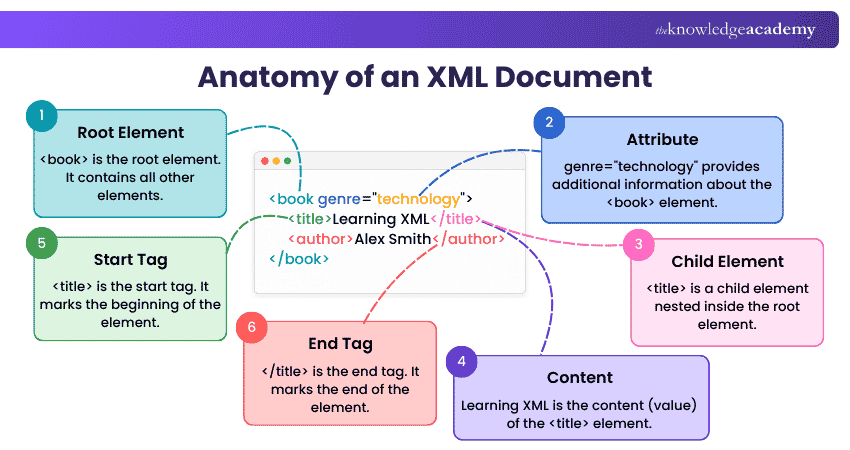
An XML document uses elements, attributes and content to organise information into a clear hierarchical structure. Here is a simple example:
1) Tags and Elements
Tags mark the boundaries of elements in an XML document and are written within angle brackets. An element can contain text, other elements or other permitted content.
For example:
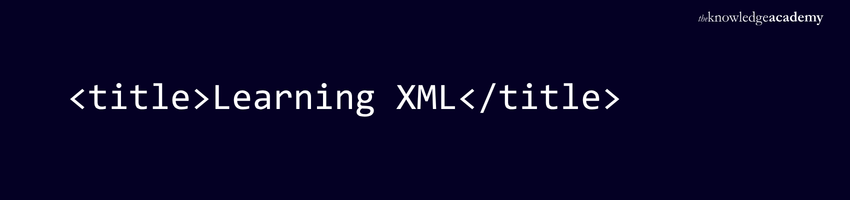
Here,
is the end tag. Together, they form the title element.
2) Attributes
Attributes provide additional information about an XML element. They appear within the start tag as name-value pairs.
For example:
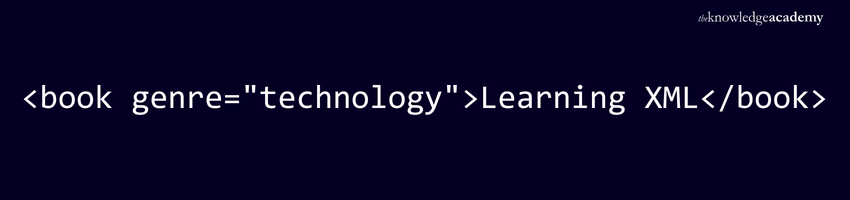
Here, genre is the attribute name and technology is its value. Attributes can provide supplementary information associated with an element without requiring another child element.
3) Nesting and Hierarchy
XML allows elements to be nested within other elements, creating a hierarchical structure of parent and child elements.
For example:
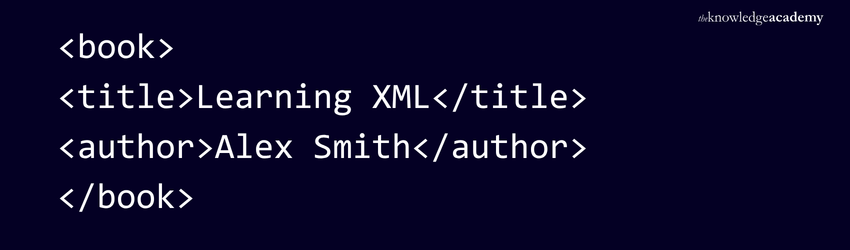
Here,
Spot the XML Mistake
Can you identify what is wrong with this XML?
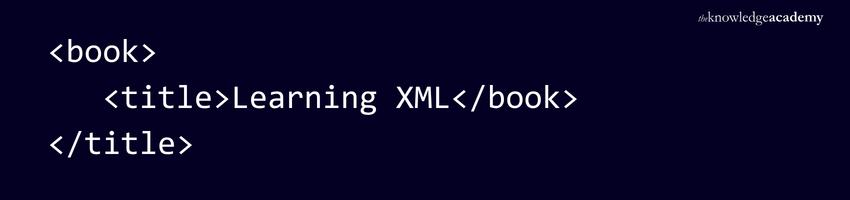
What went wrong?
The
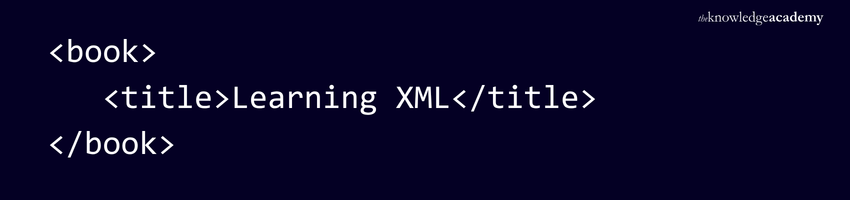
Remember: If an element opens inside another element, it must close before the outer element closes.
4) Well-formedness and Validity
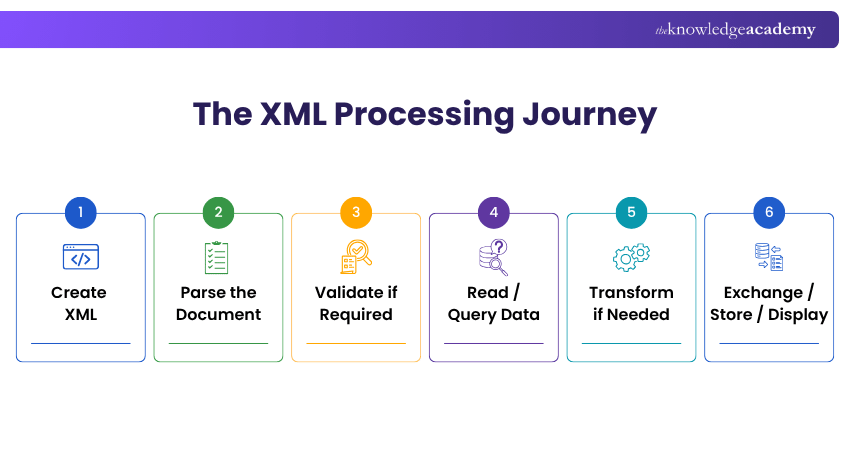
A well-formed XML document follows XML's fundamental syntax requirements. For example, elements must be properly nested, start and end tags must match and the document must have a single root element.
A valid XML document is well-formed and conforms to the rules defined by its associated grammar or schema, such as a DTD or XML Schema Definition (XSD). XSD can also define data types and additional constraints for XML content.
Common Data Types in XML Schema
XML documents store content as text, but XML Schema can define specific data types for that content. This helps applications interpret and validate values consistently. Common XML Schema data types include strings, numbers, dates, times and Boolean values.
1) String Data
String data represents textual information such as names, descriptions and addresses.
For example:

With XML Schema, this element can be defined using a string data type to indicate that textual content is expected.
2) Numeric Data
Numeric data represents values such as prices, quantities and measurements. XML Schema provides several numeric data types, including integer and decimal.
For example:

Defining the expected numeric type helps applications validate whether the supplied value meets the required type and constraints.
3) Date and Time Data
XML Schema provides data types for representing dates and times, which can be useful for transactions, events, schedules and other time-based information.
For example:

A schema can define this value as a date, allowing it to be checked against the expected date format.
4) Boolean Data
Boolean data represents logical values such as true or false. It is commonly used for conditions, settings and status indicators.
For example:

Using the XML Schema Boolean data type allows the value to be validated according to the defined Boolean representation.
Learn the fundamentals of HTML for web development mastery with our Introduction to HTML Training – Sign up today!
Applications of XML
XML is used in situations where structured information needs to be stored, exchanged, transformed or validated. Some common applications include:
1) Web Services
XML is widely associated with SOAP-based web services, where applications exchange structured XML messages. XML can also be used as a representation format in REST APIs, although REST itself does not depend on XML.
2) Configuration Files
Some applications and development frameworks use XML files to store configuration settings. Keeping configuration information separate from application code can make settings easier to manage and modify.
3) Data Exchange and Integration
XML can help different applications exchange structured information through an agreed format. It can also act as an intermediary when systems use different internal data structures.
4) Document Exchange
XML can represent structured business documents such as invoices, purchase orders and shipping information. Industry-specific XML vocabularies can provide agreed structures for exchanging information between organisations.
5) Data Transformation
XSLT can transform XML documents into other XML structures or output formats such as HTML and plain text. This allows the same underlying information to be reorganised or presented in different ways.
6) XML-based Formats
XML provides the syntax behind several specialised formats and languages. Examples include SVG for vector graphics and RSS and Atom for web content syndication.
7) Schema-based Validation
XML can be used in workflows where incoming documents need to meet predefined structural and data requirements. DTD or XSD validation can help identify non-conforming documents before further processing.
Trainer's Insight
Validation is most useful when XML moves between systems that expect a specific structure. A document may follow XML syntax correctly but still fail validation if it does not meet the rules defined by the applicable DTD or XSD.
Advantages of Using XML
XML offers several benefits for representing and exchanging structured information. Here are some key advantages of using XML:
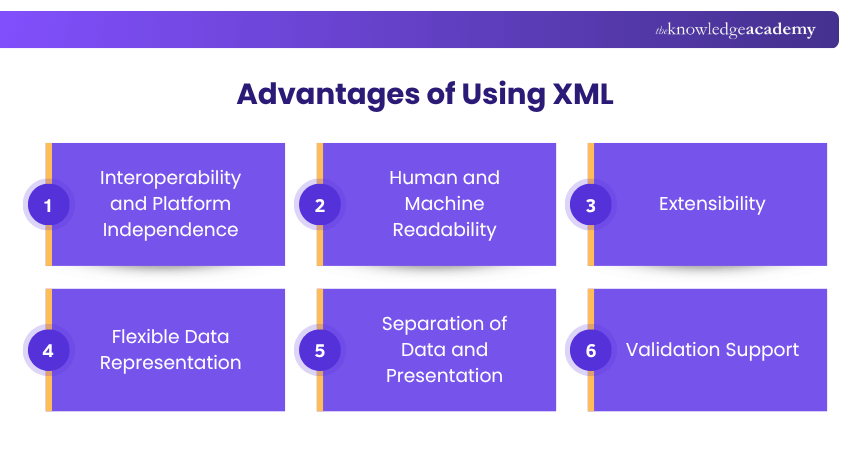
1) Interoperability and Platform Independence
XML uses a standard text-based syntax that allows compatible applications across different platforms and programming environments to exchange structured information.
2) Human and Machine Readability
Descriptive elements can make XML relatively easy for developers to inspect, while its structured syntax enables software applications to parse and process the same information.
3) Extensibility
XML does not restrict users to a fixed vocabulary of elements. Developers and organisations can define structures suited to their own data requirements.
4) Flexible Data Representation
XML's hierarchical structure allows elements to be nested, making it suitable for representing complex relationships between pieces of information.
5) Separation of Data and Presentation
XML primarily describes information and its structure rather than specifying how it should appear. This allows the same data to be processed or presented in different ways.
6) Validation Support
XML supports established validation mechanisms that can improve consistency when information is exchanged between systems.
7) Established Ecosystem
XML has a mature ecosystem that includes parsers, schemas, validators, transformation technologies and established XML-based standards.
Explore responsive web design principles and techniques using CSS with our HTML and CSS Course – Join now!
Limitations of Using XML
Although XML offers flexibility and strong support for structured information, it also has some limitations.
1) Verbose Syntax and Larger File Sizes
XML uses descriptive start and end tags, which can make documents longer and increase file size, particularly when representing large amounts of relatively simple data.
2) Processing Overhead
Parsing large or complex XML documents can require additional processing time and memory, depending on the document size, complexity and parsing method.
3) Greater Complexity
XML can involve related technologies such as namespaces, schemas, XPath and XSLT. While these provide powerful capabilities, they can increase the learning and implementation effort for applications with simpler requirements.
Difference Between XML and HTML
XML and HTML both use markup, elements and tags, but they serve different purposes. XML is designed to describe and represent structured information, while HTML is designed to structure content for display and interaction in web browsers.
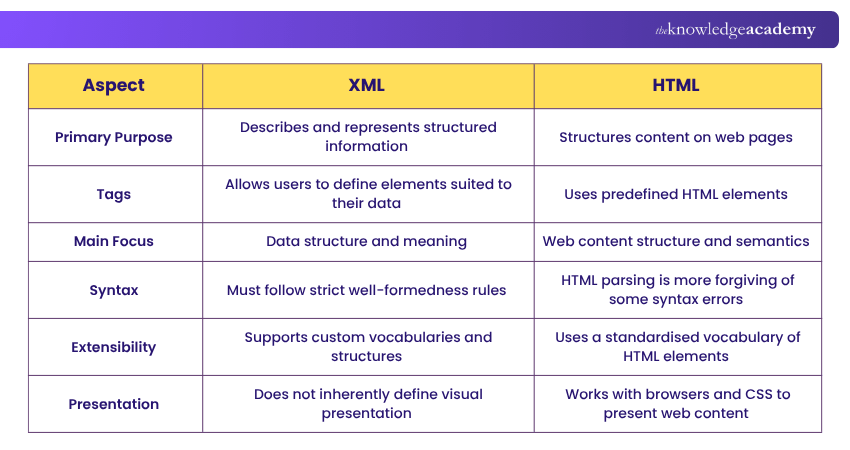
For Example
XML might use, and to describe product information. HTML, on the other hand, uses elements such as ,
and to structure content on a web page.
Conclusion
XML has been around for decades, yet its structured approach remains valuable across many established workflows. Understanding What is XML helps you recognise when its extensibility, validation capabilities and interoperability add value. It also helps you identify when its verbosity or complexity may make another data format more practical.
Learn cutting-edge technologies for versatile web solutions with the App & Web Development Training – Join now!

The Knowledge Academy is a world-leading provider of professional training courses, offering globally recognised qualifications across a wide range of subjects. With expert trainers, up-to-date course material, and flexible learning options, we aim to empower professionals and organisations to achieve their goals through continuous learning.


 If you wish to make any changes to your course, please


