




We may not have the course you’re looking for. If you enquire or give us a call on + 1-866 272 8822 and speak to our training experts, we may still be able to help with your training requirements.
What is Microsoft 365 Copilot: Everything You Need to Know
ByThe Knowledge AcademyLast updated on: 21 August 2026
Microsoft 365 Copilot is an AI-powered assistant that helps users work smarter in apps like Word, Excel, PowerPoint, Outlook, and Teams.
Key Takeaways
1. Microsoft 365 Copilot provides AI assistance across Microsoft 365 apps, chat, search and other connected work experiences.2. It can help with drafting, summarising, analysing information, creating presentations and catching up on communication.3. Microsoft Graph can provide relevant work context while respecting the user's existing permissions.4. Copilot can generate inaccurate or incomplete information, so important outputs still require human review.5. Clear prompts with a defined goal, context, source and expectations can improve the usefulness of Copilot responses.
"Catch me up on yesterday's project discussion, identify the outstanding actions, review the latest figures and help me prepare an update for tomorrow's meeting."
It sounds like one request. But look at how much work could sit behind it.
Outlook → Emails and communication Teams → Meetings and discussions Word → Documents and reports Excel → Data and analysis PowerPoint → Presentations
Microsoft 365 Copilot brings AI assistance into this connected working environment. Rather than using AI only as a separate chatbot, you can use Copilot across Microsoft 365 experiences to help find information, create content, understand data, and catch up on work.
So, what exactly is Microsoft 365 Copilot, how does it work, and when can it genuinely make your work easier? Let's find out.
What is Microsoft 365 Copilot?
Microsoft 365 Copilot is an AI-powered productivity tool designed to assist users with everyday work across Microsoft 365. Users can enter prompts and receive AI-generated responses that may draw on web information and relevant work content they are authorised to access.
Copilot works with Microsoft 365 applications and services such as Word, Excel, Teams PowerPoint and Outlook. Depending on the experience and licence available, it can help create content, summarise information, analyse data, find relevant information and support other workplace tasks.
Unlike a traditional search box that mainly retrieves existing information, Copilot can respond to natural-language instructions and use AI to transform, summarise or generate content based on the request and available context.
Quick Clarification: Microsoft 365 Copilot vs Copilot Chat
These names can easily cause confusion.
Microsoft 365 Copilot Chat provides an AI chat experience for eligible Microsoft 365 users. Its available grounding and features depend on the user's licence. A full Microsoft 365 Copilot licence provides broader work-based capabilities, including richer use of organisational information available through Microsoft Graph.
The Key Point: Not every Copilot user necessarily has access to the same features. Availability depends on the Microsoft 365 plan, licence, app and organisational configuration.

How Does Microsoft 365 Copilot Work?
Microsoft 365 Copilot combines user prompts, AI models and relevant Microsoft 365 context to generate responses. Here is a simplified view of what happens:
Behind Your Prompt
1. You Enter a Prompt
You tell Copilot what you need using natural language. For example:
"Summarise the key decisions and outstanding actions from yesterday's project meeting."
↓
2. Copilot Identifies Relevant Context
Where applicable, Copilot can use grounding to identify information relevant to the request. Microsoft Graph can provide context from content such as emails, chats, documents and meetings that the signed-in user has permission to access.
↓
3. AI Models Process the Request
Copilot sends the grounded prompt to an appropriate AI model, which generates a response based on the request and available context.
↓
4. Copilot Returns the Response
The result is presented to the user within the relevant Copilot or Microsoft 365 experience.
↓
5. You Review and Refine It
The generated output should be checked for relevance, completeness, and accuracy before being relied upon for important work.
Trainer
The quality of a Copilot response does not depend on the AI model alone. The quality of the prompt, available context and underlying information all influence how useful the response can be.
Get hands-on experience with our AI-powered automation – sign up for our Microsoft 365 Copilot Introduction Training.
What Can Microsoft 365 Copilot Do Across Microsoft 365 Apps?
Microsoft 365 Copilot can support different activities depending on the application and available features.
Copilot App-to-Task Matrix
|
Microsoft 365 App
|
How Copilot Can Help
|
|
Word
|
Create, rewrite, summarise and understand documents
|
|
Excel
|
Explore data, work with formulas and identify useful insights
|
|
PowerPoint
|
Create and refine presentations
|
|
Outlook
|
Summarise email threads, draft messages and provide writing suggestions
|
|
OneNote
|
Draft plans, generate ideas, create lists and organise information
|
|
Teams
|
Review meeting highlights, key discussion points and action items
|
These capabilities continue to evolve, and Microsoft currently provides Copilot experiences across a wider range of Microsoft 365 services, including OneDrive, SharePoint, Planner and others.
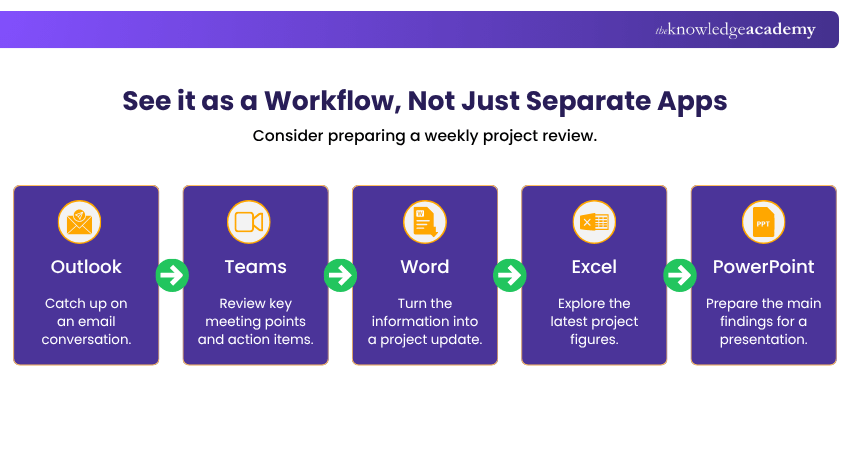
The value of Microsoft 365 Copilot is therefore not simply that it provides an AI feature inside several applications. Its broader usefulness comes from helping users work with information across the Microsoft 365 environment.
Boost team collaboration with AI-powered efficiency – sign up for our Microsoft 365 Copilot for Teams Course.
Benefits and Limitations of Microsoft 365 Copilot
Microsoft 365 Copilot can simplify many everyday tasks, but it should not be treated as an automatic replacement for human expertise.
Benefits of Microsoft 365 Copilot
1) Reduces Repetitive Work:
Copilot can help with activities such as summarising information, preparing first drafts and organising content, reducing the amount of manual effort required for routine knowledge work.
2) Helps Users Catch Up Faster
Long email conversations, meeting discussions and documents can take time to review manually. Copilot can help users identify important information and key points more quickly.
3) Supports Content Creation
Copilot can assist users in developing initial drafts, rewriting text and creating or refining presentations.
4) Works Across Familiar Microsoft 365 Experiences
Users can access Copilot capabilities within applications they already use, reducing the need to move information constantly between unrelated tools.
5) Can Use Relevant Work Context
With appropriate Microsoft 365 Copilot capabilities, Microsoft Graph can provide context from work information the user is authorised to access, helping responses become more relevant to the user's organisation and task.
Limitations of Microsoft 365 Copilot
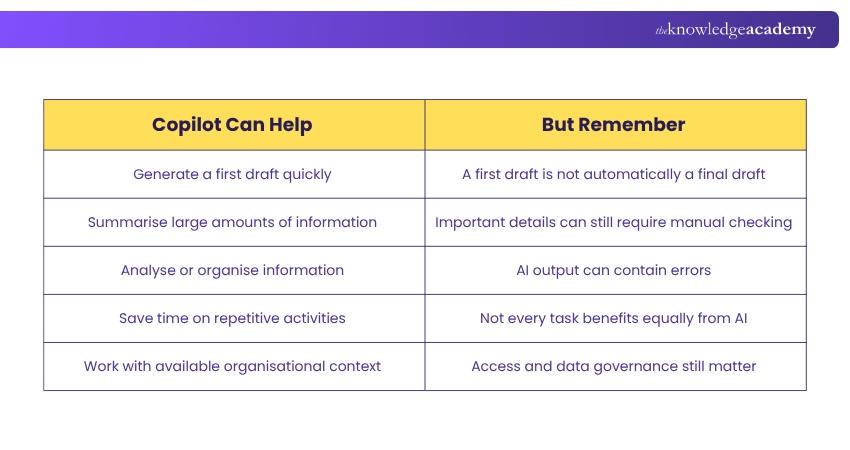
1) Responses Can Be Incorrect
AI-generated content can contain inaccuracies, incomplete information or misleading conclusions. Important outputs should therefore be verified.
2) Results Depend on Context
A vague prompt, missing information or poor-quality source material can reduce the usefulness of the response.
3) Capabilities Vary
Features can differ depending on the Microsoft 365 application, subscription, licence and organisational configuration.
4) Existing Data Governance Still Matters
Copilot respects existing permissions, but poorly managed or overshared content may still surface to users who already have access to it. Microsoft therefore highlights oversharing and data governance as important considerations when deploying Copilot.
5) Human Judgement Remains Essential
Copilot can support decision-making by helping users process information, but business-critical, technical or sensitive conclusions should still involve appropriate human review.
When Should You Use Microsoft 365 Copilot?
Not every task requires Copilot. The better question is whether AI assistance adds meaningful value to the task you are already trying to complete.
Copilot Fit Check
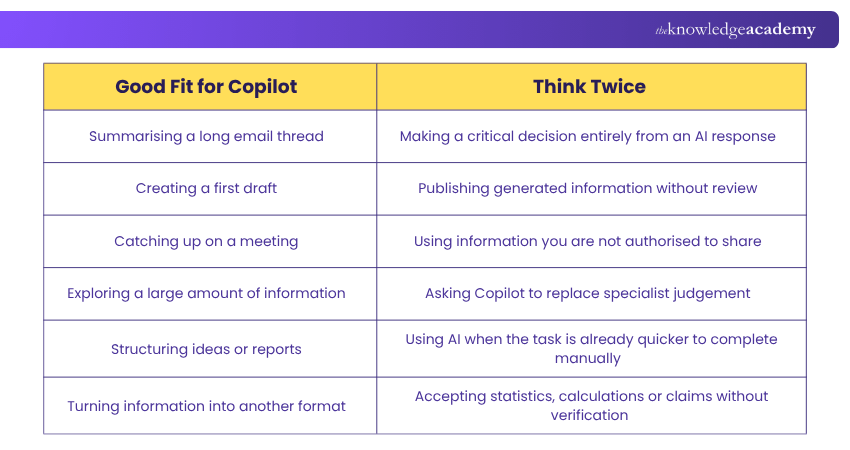
Copilot May Be Particularly Useful When
The task is repetitive:
You regularly spend time summarising, drafting or reorganising information.
The information is scattered:
You need to bring together relevant information from different parts of your work.
You need a starting point:
A blank document, presentation or report is slowing you down.
You need to catch up:
You have missed a meeting or returned to a long conversation and need the main points.
You want to explore information:
You need help identifying useful patterns, questions or areas for further investigation.
Trainer Insight
Start with tasks where Copilot can save time and where you can easily check the result. This makes it easier to understand where AI genuinely adds value before using it for more complex work.
Conclusion
Microsoft 365 Copilot brings AI assistance into familiar Microsoft 365 apps, helping users draft content, summarise information, analyse data and manage everyday tasks more efficiently. However, its value depends on how it is used. Clear prompts, relevant context and human review are still essential for getting useful results.
By understanding its capabilities and limitations, users can apply Copilot more effectively while staying in control of important decisions and final outputs.
Gain the skills to create visualisations, reports and more with Microsoft 365 Copilot for Excel Training.

The Knowledge Academy develops accessible learning content across Project Management, IT, Cybersecurity, Data Science, Business Analysis, HR, Accounting and Finance, Leadership and Health and Safety. Its resources combine subject research with clear explanations to help professionals build practical knowledge across a wide range of disciplines.
View Detail

 If you wish to make any changes to your course, please


