


 Top Rated Course

We may not have the course you’re looking for. If you enquire or give us a call on 01344203999 and speak to our training experts, we may still be able to help with your training requirements.
What is a Honeypot? Using Deception Technology for Security
John Davies 16 July 2026A Honeypot is a security mechanism designed to attract cyber attackers by mimicking a real computer system, network, or application with vulnerabilities. Honeypots can range from simple files to entire networks, allowing security professionals to study attack vectors, including attackers' tactics and procedures.
Home
 Resources
IT Security & Data Protection
What is a Honeypot? Using Deception Technology for Security
Resources
IT Security & Data Protection
What is a Honeypot? Using Deception Technology for Security
Resources
IT Security & Data Protection
What is a Honeypot? Using Deception Technology for Security

Training Outcomes Within Your Budget!
We ensure quality, budget-alignment, and timely delivery by our expert instructors.
Table of Contents

Battles are not limited to geographical locations in the modern world. Cyberattacks are the modern form of battles that plague the virtual world of Cyber Security. But what if we could set clever traps that could turn attackers into unwitting informants? That's precisely what the concept of Honeypots helps us achieve. These clever decoys act like bait, luring attackers into a controlled trap that looks real but isn’t.
While the Hackers think they’ve found a target, security teams quietly study their every move. So, Honeypots reveal their attack methods, uncover system weaknesses and strengthen overall defences. This blog explores What is a Honeypot in detail and unveils how this brilliant idea turns threats into valuable intelligence. So read on!
Table of Contents
1) What is a Honeypot?
2) How do Honeypots Work?
3) What are Honeypots Used for?
4) Different Types of Honeypots
5) What are the Advantages of Using Honeypots?
6) What are the Disadvantages of Honeypots?
7) Honeypot Network Setup
8) Conclusion
What is a Honeypot?
A Honeypot in computer security is a decoy system designed to look like a real server, database, or application. Its main purpose is to attract cyber attackers and trick them into targeting it instead of real systems. Everything inside the Honeypot is fake, but it is designed to appear completely genuine to intruders.
Honeypots are useful for both defence and research. They help organisations detect and respond to threats, while also adding to overall Cyber Security knowledge. Honeypots can be simple traps or advanced setups that mimic entire networks.

How do Honeypots Work?
A Honeypot is designed to resemble a real computer system, complete with applications and data that lure Cybercriminals. Here's how it works:
1) It might pretend to hold sensitive information like credit card numbers or personal details, using fake data to tempt attackers.
2) When Hackers try to break in, the IT team can watch how they act, study their methods, and see how security defences respond.
3) This knowledge is then used to strengthen overall network protection.
4) Honeypots often expose certain weaknesses, such as open ports that attackers look for during scans.
5) These traps make it easier for security teams to observe how an attack begins and unfolds.
6) Unlike other security tools, a Honeypot doesn’t directly block attacks. Instead, its purpose is to improve an organisation’s intrusion detection systems and threat responses.
What are Honeypots Used for?
The main purpose of Honeypots is to gather Internet Protocol (IP) addresses, email addresses, and other details about spammers so that web administrators can reduce spam on their sites. The collected data is also used by law enforcement for research to fight bulk email crimes. However, Honeypots are not always used for security. They can also be used for network scanning or reconnaissance, even by Hackers.
Different Types of Honeypots
Here are the main types of Honeypots that you need to know about:
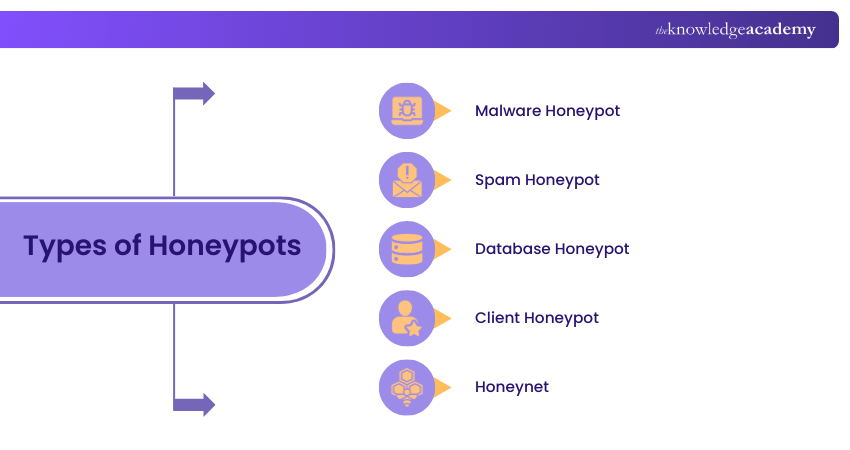
1) Malware Honeypot
A malware Honeypot is set up to attract malware by mimicking known attack paths. For example, it can act like a USB storage device. When malware tries to infect it, the Honeypot tricks the malware into attacking the fake USB instead.
2) Spam Honeypot
Spam Honeypots are designed to catch spammers by using open proxies and mail relays. Spammers test these relays by sending themselves emails. Once detected, the Honeypot blocks their attempts and prevents large amounts of spam from being sent.
3) Database Honeypot
A database Honeypot creates fake databases to attract attacks such as SQL injections. These decoy systems allow researchers to study how attackers try to manipulate data. They are often set up with database firewalls for added safety.
4) Client Honeypot
Client Honeypots pretend to be a client computer to interact with malicious servers. They observe how attackers try to compromise a system during the process. These Honeypots usually run in a controlled, virtual environment with safety measures to protect researchers.
5) Honeynet
A honeynet is a collection of Honeypots working together as a network. It allows security teams to study many types of attacks, such as DDoS or Ransomware. All activity is contained within the honeynet to ensure the organisation’s real systems remain safe.
Unlock the door to Cyber Security mastery with our EC – Council Certification - Sign up now and become a trusted cyber defender!
What are the Advantages of Using Honeypots?
Here are the key benefits of using Honeypots:
1) Honeypots help find weak points in systems, like showing how IoT devices can be attacked and suggest ways to improve security.
2) Since they should not receive real traffic, any activity is suspicious, making it easier to spot attacks.
3) They make it simple to notice attack patterns, such as repeated IP addresses or activity from the same country, which might get lost in normal network traffic.
4) Honeypots are light on resources. They can run on old computers and use free software, so they are easy to set up.
5) They produce very few false alerts, unlike many intrusion detection systems (IDS), which often raise too many unnecessary warnings.
6) Data from Honeypots can also help improve IDS by making alerts more accurate and reducing false alarms.
What are the Disadvantages of Honeypots?
Here are the drawbacks of Honeypots:
1) Honeypots only collect information when attackers target them. If no one attempts access, there’s no data to analyse.
2) Honeypots only capture malicious traffic aimed at them. If attackers suspect it’s a Honeypot, they may avoid it completely.
3) Experienced Hackers can often tell a Honeypot apart from real systems using fingerprinting techniques.
4) High-interaction Honeypots can be riskier because they mimic real systems more closely. If breached, they may give attackers a path to root access or be used as a launchpad for further attacks.
5) Honeypots don’t reveal all threats. Just because an attack doesn’t appear on a Honeypot doesn’t mean it doesn’t exist. Other security measures and IT Security news must also be followed.
6) If identified, attackers can create fake or spoofed attacks to distract defenders while targeting real systems.
7) Honeypots are useful for learning about threats but cannot replace security measures such as firewalls, intrusion detection systems or endpoint protection.
The art of outsmarting cybercriminals is just a click away. Sign up for our Certified Penetration Testing Professional Certification now!
Honeypot Network Setup
The following examples will illustrate how a Honeypot network setup can work:
Example Scenario: Database Attack
A retail company could set up a fake SQL server that appears to hold customer order histories and payment details. The database is filled with decoy information, such as false names and transaction records. When attackers attempt to steal or manipulate this data, the IT team can monitor their techniques and identify weaknesses that might threaten real systems.
Example Scenario: Insider Attack
A hospital’s IT team might suspect an insider trying to access sensitive medical records. To test this, they can build a fake server with the same strict login requirements as their real systems. Only someone with insider knowledge could attempt access, allowing the team to track suspicious activity while protecting the actual patient records.
Example Scenario: Random Attacks
A university could create an easy-to-breach web server containing dummy research files. The purpose is not to protect specific assets but to attract random cyberattacks happening on the internet. By observing how Hackers exploit the server, the IT team gains valuable insights into common attack methods and patterns in the wild.
Conclusion
Having some insight into What is a Honeypot is key in today’s world because it can turn cyber threats into valuable lessons by exposing how attackers operate. While they can’t replace strong security measures, they offer rare insights that strengthen defences and reduce risks. Essentially, Honeypots transform danger into knowledge to help organisations stay one step ahead in the world of Cyber Security.
Guard the digital frontier with the power of Cloud security. Register for our Certified Cloud Security Engineer Certification and embrace cyber excellence!
Frequently Asked Questions
What is an Example of a Honeypot Attack?

A good example is when Hackers try to break into a fake database set up to look like it stores credit card details or customer records. While they attempt to steal the decoy data, security teams observe their methods and gather intelligence.
What is a Honeypot Trap?
A Honeypot trap is a decoy system designed to attract cyber attackers. It mimics a real target, such as a server, email system or database, but is isolated and monitored. The “trap” lies in luring Hackers into interacting with it, allowing security teams to study their behaviour safely.

John Davies


Cyber Security Governance & Assurance Specialist
John Davies is a cybersecurity expert specialising in governance, risk management, and compliance. With over 15 years in the field, he has led enterprise-wide security programmes across finance, healthcare and public sector organisations. His content provides practical guidance on building secure environments, managing risk and aligning with regulatory frameworks.


 If you wish to make any changes to your course, please


