




We may not have the course you’re looking for. If you enquire or give us a call on +32 35001305 and speak to our training experts, we may still be able to help with your training requirements.
What is Debugging: Process, Types, and Benefits Explained
ByNilotpal SarmahLast updated on: 10 October 2026
Debugging is the process of identifying, analysing, and fixing errors or bugs in software code to ensure it runs smoothly and performs as expected. It helps developers trace the root cause of issues, understand unexpected program behaviour, and verify that the applied fix works correctly.

At a Glance
1. Debugging focuses on identifying the root cause of unexpected software behaviour.2. A typical process involves reproducing and locating a bug, analysing its root cause, applying a fix and testing the solution.3. Techniques such as backtracking, logging and cause elimination suit different problems.4. Debugging tools help developers inspect program execution, variables and system behaviour.5. Effective debugging can improve software quality, stability and maintainability.
From chasing elusive bugs to fine-tuning performance, software development is no walk in the park. Sometimes it can feel like code has a mind of its own that turns your vision into a messy maze of software malfunctions. This is where debugging comes in as the arbiter of order in the world of coding. This process helps track down hidden errors and understand strange software behaviour.
This blog outlines everything you need to know about debugging, whether you're a beginner writing your first code or an expert managing complex systems. So read on, explore the types and key benefits of debugging and master this essential Software Developer skill!
What is Debugging?
Debugging is the process of identifying, isolating and fixing problems in computer programs or engineering systems. Once a fix or workaround is applied, the solution must be tested to confirm that the issue has been resolved without introducing new problems. In software development, debugging begins when an error is detected and reproduced in the code.
It plays a key role alongside software testing and is essential throughout the development lifecycle. In hardware development, debugging focuses on detecting faulty, incorrectly configured or improperly connected components. For example, engineers might perform a JTAG connection test to troubleshoot integrated circuit connections.

The Importance of Debugging
Debugging plays a crucial role in identifying why an operating system, application, or program is not working as expected. Even with strong coding standards in place, new software almost always contains some bugs. In many cases, fixing these issues can take more time than writing the original code.
Typically, development teams prioritise bugs based on factors such as severity, user impact, security risk and frequency. Critical issues that cause crashes, data loss or security vulnerabilities are generally addressed before lower-impact defects.
How Does Debugging Work in Software?
Debugging begins as soon as the code is written and continues as it integrates into larger systems. In large projects, practices such as unit testing, code reviews and pair programming can help identify issues early, while developers use logs, debugger tools and Integrated Development Environment (IDE) debug modes to investigate program behaviour.
Familiarity with error messages can help developers understand the nature of an issue more quickly. Breakpoints allow execution to pause, letting developers inspect variables, step through code and observe how the program behaves at specific points during execution.
Process of Debugging
Debugging is an essential programming skill. Here’s a simplified step-by-step breakdown to help you approach it effectively:
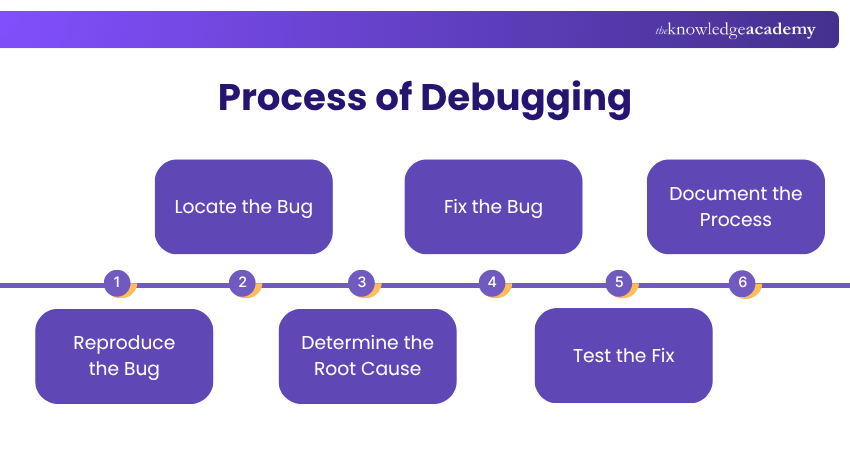
Step 1: Reproduce the Bug
1) Replicate the exact conditions that cause the issue
2) Note any inputs, environment settings, or user actions involved
3) Observe the bug's behaviour closely for clues
Step 2: Locate the Bug
1) Review error messages, logs, or console output
2) Trace the code path to find where things go wrong
3) Use debugging tools or breakpoints to narrow down the area
Step 3: Determine the Root Cause
1) Analyse the logic behind the failing section
2) Check variable values, data flow, and function interactions
3) Compare expected behaviour with actual behaviour
Step 4: Fix the Bug
1) Apply a targeted correction to the faulty code
2) Test small changes incrementally instead of large edits
3) Use version control to safely manage and track modifications
Step 5: Test the Fix
1) Run Unit Tests to check the specific fix
2) Perform Integration Tests to validate module interactions
3) Conduct System and Regression Tests to ensure overall stability
Trainer's Insight
Reproduce the problem consistently before changing the code. A repeatable bug provides a reliable starting point for tracing its source and checking whether the eventual fix works.
Step 6: Document the Process
1) Record the cause of the bug and the steps taken to fix it
2) Note any edge cases or lessons learned
3) Update internal documentation or comments for future reference
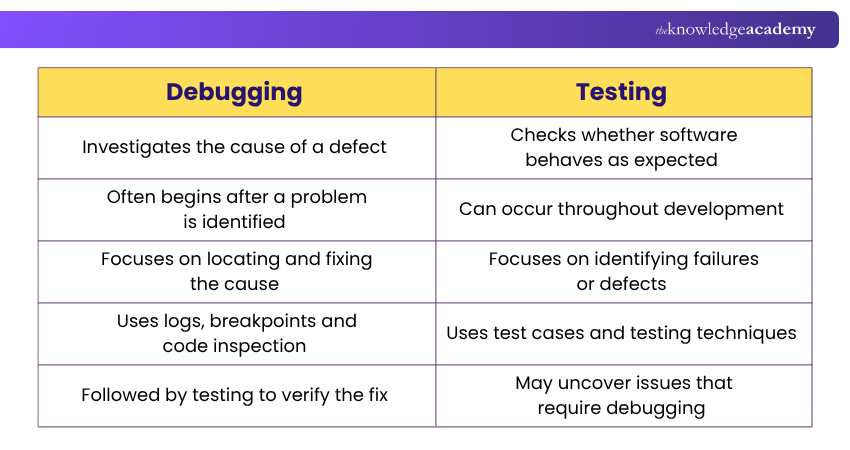
But never confuse debugging with testing. Here are the key differences between them:
Top Debugging Techniques
Debugging can often be complex and time-consuming, but applying the right approach can make it far more efficient. Each technique is suited to different situations and understanding them helps developers tackle bugs with greater precision. Below are the main debugging techniques that are commonly used in software development:
1) Backtracking
This method involves tracing the steps of the program backwards from where the bug appeared. Developers review the execution path to pinpoint the exact point where things began to fail. It becomes even more effective when it's used alongside a debugging tool.
2) Cause Elimination
In this hypothesis-based method, developers list possible causes of the bug and test each one to rule them out systematically. It works best when the team understands the codebase and the conditions under which the issue occurred.
3) Divide and Conquer
For large codebases, the system is split into manageable sections such as functions, modules or methods. Each segment is tested individually until the faulty area is located. That section is then further broken down to isolate the exact source of the issue.
4) Print and Log
This approach involves inserting print or log statements to track variable values, execution flow, application state and relevant events. It’s instrumental in distributed or concurrent systems where the execution order can affect outcomes.
5) Rubber Duck
Here, developers verbally explain the code line by line, often to an inanimate object. The act of articulation helps reveal logical gaps or overlooked bugs that weren’t obvious during silent review.
6) Automated
Automated debugging uses tools to help detect, reproduce, analyse or isolate software defects with minimal manual intervention. These tools may use static analysis, automated testing, runtime monitoring or AI-assisted techniques to identify suspicious code and provide developers with faster feedback, particularly in Continuous Integration/Continuous Delivery (CI/CD) environments.
7) Brute Force
Brute-force debugging involves gathering and checking a large amount of information to find the cause of a problem. Developers may use detailed logs, execution traces, memory dumps or repeated tests when other debugging methods do not work. It can help identify difficult bugs, but it is usually more time-consuming and less efficient than other systematic techniques.
Trainer's Insight
Choose the debugging tool according to the problem. Breakpoints can help with control-flow issues, logs can reveal runtime behaviour and profilers are useful when investigating performance bottlenecks.
Turn every test into insight-driven excellence with our ISTQB Advanced Level Test Analyst Course - Register now!
Key Benefits of Debugging
Here are the key benefits of debugging:
1) Improves System Quality: Debugging removes errors that affect performance. This results in a more reliable and efficient software system.
2) Minimises Downtime: By fixing bugs early, the system becomes more stable and less prone to unexpected crashes, thus improving availability for users.
3) Boosts User Satisfaction: Software with fewer defects generally provides a smoother and more reliable user experience. This leads to higher satisfaction levels.
4) Lowers Development Costs: Detecting issues during development prevents costly fixes later in the lifecycle or after deployment.
5) Improves Security: Debugging helps identify those vulnerabilities that attackers might exploit. This strengthens the software’s defence against breaches.
6) Supports Future Changes: With clear issue tracking, developers can modify the system more confidently, knowing that potential bugs can be easily traced and fixed.
7) Deepens System Understanding: The debugging process helps developers better grasp system behaviour and how components work together.
8) Supports Reliable Verification: After a defect is fixed, regression and other relevant tests help confirm that the correction works and has not introduced new problems.
Bug Still Not Fixed? Check This
□ Can you reproduce the problem consistently?□ Have you captured the exact error message?□ Have you checked recent code or configuration changes?□ Have you reviewed relevant logs and variable values?□ Have you isolated the smallest failing component?□ Have you identified the root cause rather than only the symptom?□ Have you tested the fix against the original problem?□ Have you run relevant regression tests?
Common Challenges of Debugging
Debugging can be as demanding, or even more time-intensive, than writing the original code. The process becomes particularly challenging in situations such as:
1) The issue’s impact is visible, but the root cause remains unclear.
2) The error is hard to reproduce consistently, such as bugs triggered by specific user interactions like drop-down menus on a website.
3) Dependencies within the code are not well-defined. This leads to new errors appearing in other sections when one issue is fixed.
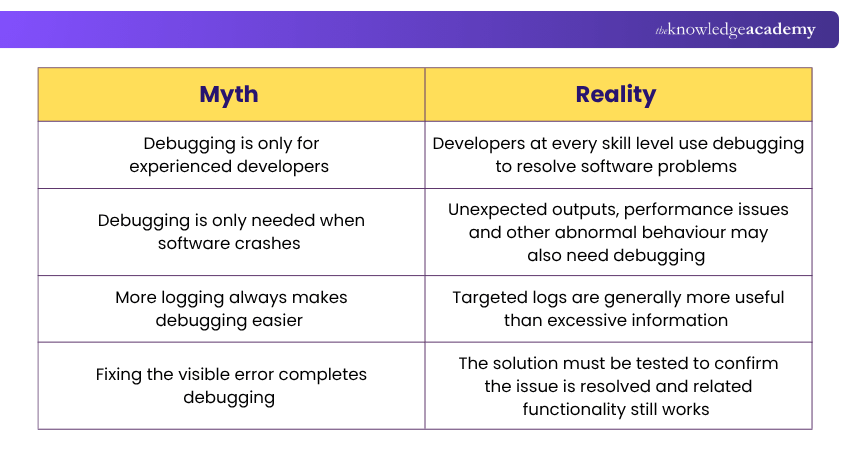
Here are some debugging-related myths you need to watch out for:
Errors that Require Debugging
Recognising the type of error can help developers choose the most efficient approach to fix the code. Some common types of bugs that require debugging include:
1) Semantic Errors
Semantic errors occur when code may be syntactically valid but its meaning or use is incorrect. For example, incompatible data types, incorrect operations or invalid use of variables can cause semantic problems.
Depending on the programming language and the error, they may be detected during compilation or become apparent when the program runs. Unlike syntax errors, semantic errors occur when code is grammatically correct but does not behave as intended, often producing incorrect or unexpected results.
2) Syntax Errors
These errors happen when a developer forgets or mistypes elements such as commas, brackets or parentheses. In programming, even a small typo can break execution entirely, unlike human language, where minor errors are still understandable.
3) Logical Errors
In this case, the syntax is correct, but the instructions lead to an unintended outcome. Since the program doesn’t crash, this type of bug is more difficult to detect and can take time to locate within the code.
4) Runtime Errors
These errors occur while a program is running, even if the code has compiled successfully. They can be caused by problems such as invalid memory access, division by zero, missing files, null references or insufficient system resources. Depending on the cause, the program may crash, freeze or behave unexpectedly.
Step into the role of a test leader with confidence. Sign up for our ISTQB Certified Tester Advanced Level Test Management Course now!
Types of Debugging Tools
Debugging tools play a vital role in software development, helping developers detect and fix errors quickly and accurately. These tools differ in features but typically provide interfaces, such as command-line or visual panels, to help identify and resolve issues. Below are some widely used types of debugging tools:
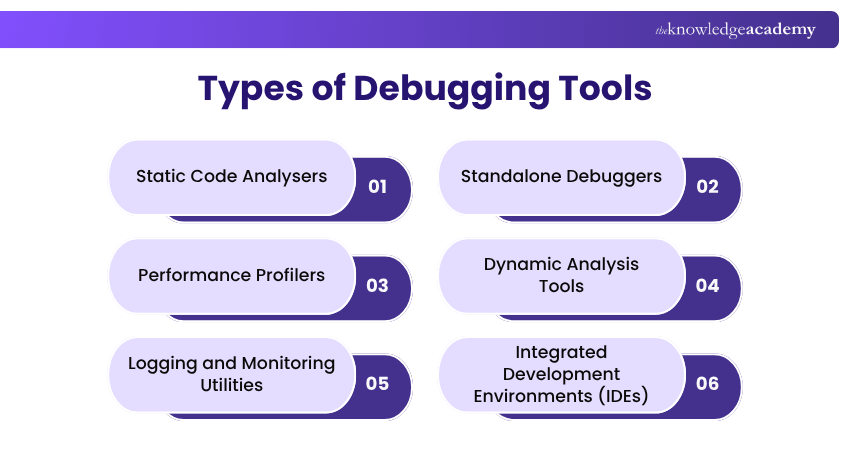
1) Static Code Analysers
These tools scan code without running it to detect errors, enforce standards and highlight potential risks. They help maintain code quality and consistency early in the development process.
2) Standalone Debuggers
Debuggers such as GNU Debugger (GDB) offer powerful capabilities, including:
1) Conditional breakpoints and watchpoints
2) Reverse debugging to trace execution backwards
3) These tools are highly effective but can be more complex to learn compared to IDE debuggers
3) Performance Profilers
Profilers help identify performance bottlenecks by tracking:
1) CPU consumption
2) Memory allocation
3) I/O activity
4) Dynamic Analysis Tools
Used during runtime, these tools detect issues such as resource leaks and concurrency errors. They uncover problems that static analysis may overlook, including memory leaks and buffer overflows.
5) Logging and Monitoring Utilities
Logging tools record the program’s behaviour at various execution points. This is especially useful for diagnosing issues that appear only in live or production environments.
6) Integrated Development Environments (IDEs)
Tools like Visual Studio, Eclipse and PyCharm include built-in debuggers that enable developers to:
1) Step through the code line by line
2) Set breakpoints to pause execution at key points
3) Inspect variables and memory states
4) They support multiple programming languages, often extended through plugins
Identify, analyse, and resolve software issues with Certified Software Testing Professional (CSTP) Training – Join now!

Nilotpal Sarmah is a Senior Content Writer with 11+ years of overall experience spanning engineering, operations and content development. His technical knowledge and extensive writing experience enable him to simplify specialised topics across IT and Tech, Business Skills, Project Management, Health and Safety, and ISO and Compliance.
View Detail

 If you wish to make any changes to your course, please


