


 Top Rated Course

We may not have the course you’re looking for. If you enquire or give us a call on 01344203999 and speak to our training experts, we may still be able to help with your training requirements.
What is a Sensor: Definition, Types and Benefits
Scarlett Adams 17 December 2025A Sensor is a device that responds to some type of input from the physical environment and converts it into signals for machines to process. It supports smarter decision-making across industries like healthcare, agriculture, smart home systems, and more. The automated reaction to changes enables real-time monitoring without human input.

Training Outcomes Within Your Budget!
We ensure quality, budget-alignment, and timely delivery by our expert instructors.
Table of Contents

Imagine a world where machines can see, feel, and respond just like us, but faster and more accurately. From your phone adjusting its brightness to cars knowing when to brake, this invisible sensing power is everywhere around us. But how do these smart reactions happen? The answer lies in Sensors. Sensors detect changes in the environment and instantly send signals that help systems make decisions, all without human help. In this blog, we’ll explore What is a Sensor, how it works, and the different types that make modern technology smarter and easier.
Table of Contents
1) What is a Sensor?
2) How Does a Sensor Work?
3) Different Types of Sensors
4) Application of Sensors
5) Advantages of Sensors
6) Disadvantages of Sensors
7) Conclusion
What is a Sensor?
A Sensor is a device that identifies changes in the physical environment, like temperature, light, pressure, or movement. Then, it will turn those changes into signals that a machine can understand or into a human-readable format.
A Sensor is like a machine’s sense organ. It helps the machine ‘feel’ what’s happening around it. For example, a Motion Sensor can detect when someone enters a room and immediately sends that information to turn on the lights or trigger security systems.
How Does a Sensor Work?
Sensors work by noticing changes in their surroundings and turning those changes into electrical signals. These signals can be shown on a screen, sent to another device, or used to make something happen. Good Sensors are capable of spotting and finding even small changes and are able to respond quickly. This helps devices like smart homes, weather tools, and machines work better with accuracy.
Different Types of Sensors
Different Type of Sensors are used in many shapes and forms. Each one is designed to detect something different. Here are some of its common types:
1) Photoelectric Sensors
These Sensors use light to detect objects. If something breaks or reflects a light beam, the Sensor will know that an object is there. They are used in factory machines and things like automatic doors. These Sensors are of three types:

1) Through-beam Sensors: When an object passes between the emitter and receiver, it blocks the light beam. The Sensor detects this and signals that something is there.
2) Retro-reflective Sensors: When something comes between the Sensor and the reflector, the light beam is interrupted, and the Sensor finds that there is an object.
3) Diffuse Sensors: When light reflects back to the Sensor, it knows something is in front of it and identifies it.
2) Proximity Sensors
These Sensors notice when something comes close without touching it. For instance, your phone screen turns off during a call, which uses a Proximity Sensor. They are also used in automobiles and robotics. The common specifications are:
1) Inductive Sensors: They create electromagnetic fields. When a metal object enters this field, it disrupts it. It is ideal for detecting metal.
2) Capacitive Sensors: They sense changes in electrical charge when any object gets close, not only metals. They detect plastic, wood, or glass.
3) Magnetic Sensors: These Sensors have a switch inside that closes when a magnet comes near. It is designed to sense magnets without any power.
Learn VR development lifecycle by registering for our Virtual Reality (VR) Training immediately!
3) Ultrasonic Sensors
These use sound waves that you can’t hear. The Sensor sends out sound, and when it bounces back from an object, it calculates how far away it is. They are most suitable for parking Sensors or checking liquid levels. Its types include:
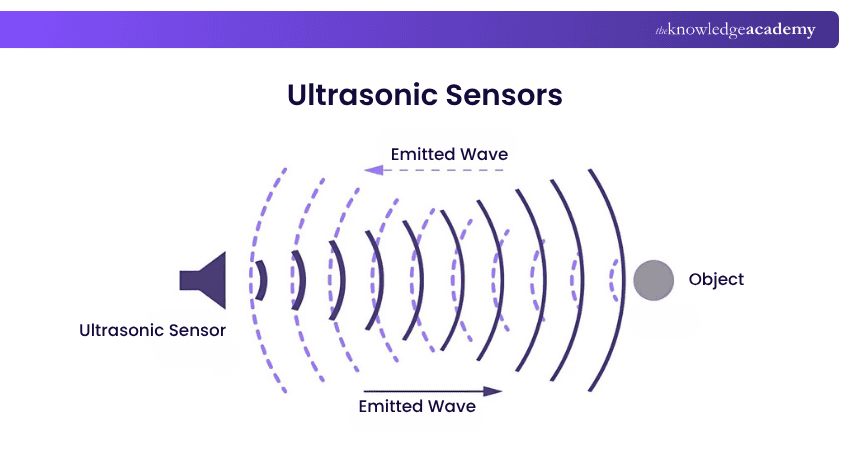
1) Single Transducer (Echo Type) Sensors: These use one transducer for both sending and receiving sound waves.
2) Dual Transducer Sensors: They have separate transmitter and receiver units to offer better accuracy and longer ranges.
3) Distance Measurement Sensors: These measure the exact distance between the Sensor and an object.
4) Pressure Sensors
These Pressure Sensors check how much force or pressure is being applied. Things like air in tyres or water in pipes are examples of this. They help find and control systems to keep everything safe, efficient, and working properly. Its types are:
1) Absolute Pressure Sensor: This measures pressure relative to a perfect vacuum (zero reference point).
2) Barometric Pressure Sensor: It is highly preferred to measure atmospheric pressure changes (often used in weather stations).
3) Vacuum Pressure Sensor: It is specifically suitable to measure pressures below atmospheric levels.
5) Temperature Sensors
The Temperature Sensors measure heat or cold. They are surrounded everywhere, from your oven, fridge, to the weather app on your phone. These Sensors play a vital role in IoT (Internet of Things) Devices by helping them know when to turn on, off, heat up, or cool down. The common types consist of:

1) Digital Temperature Sensors: They give temperature readings as digital numbers (instead of voltage).
2) Thermocouples: These are made from two types of metal joined together. When there is a change in temperature, it creates a small voltage to tell how hot or cold it is.
3) Thermistors: These are made up of materials that change resistance with temperature. They are used to measure temperatures from a lower to moderate range.
6) Light Sensors
A Light Sensor checks how bright or dark an area is. For instance, mobiles use it to adjust screen brightness, and streetlights use it to turn on at night. These Sensors help conserve energy by adjusting the light levels automatically. Its types are:
1) Ambient Light Sensors: They measure the overall light around them. This Sensor is found in phones to adjust screen brightness.
2) Infrared Sensor: It is created to sense invisible light, like from TV remotes. It is used in Motion Sensors and remote controls.
3) Photodiode Sensors: They change light into a small electric current. It produces electricity depending on the light it receives.
Boost your career in telecom, aerospace, or defence with our Satellite Communication Course – Join today!
7) Accelerometer
An accelerometer is used to sense movements or shaking. It knows when something is moving or falling. These are inside phones for screen rotation, fitness bands, and even car airbags. It also helps detect falls and motion in many smart devices. Its types include:
1) Capacitive Accelerometers: These use tiny moving parts to sense changes when a device tilts or moves. They measure how far the parts shift and give that as a signal.
2) Piezoelectric Accelerometers: These have special crystals that create a small electric charge when things shake or press. They are good at sensing strong or fast movements.
3) Piezoresistive Accelerometers: They sense movement by noticing changes in electrical resistance when something bends or shakes.
8) Humidity Sensors
The Humidity Sensor is also known as a hygrometer. It tells how much moisture is in the air. Knowing the humidity helps control temperature, stop mould, and keep the air comfortable and safe. The types of humidity Sensors are:
1) Capacitive Humidity Sensors: They are used to sense moisture by checking changes in electric charge. They are commonly used in homes and offices.
2) Resistive Humidity Sensors: They are capable of measuring how easily electricity flows through a moist material.
3) Thermal Humidity Sensors: These Sensors are helpful in comparing temperatures between dry and wet air to find moisture levels.
9) RTD Sensors
RTD means Resistance Temperature Detector. It is an accurate Sensor that measures temperature by changing its resistance when the temperature changes. It is known for being steady, reliable, and giving the same results over time. Its variants are:
1) Wire-wound RTD: It is made up of wrapping thin wire (usually platinum) around a core. It is very accurate and works in high or low temperatures.
2) Thin-film RTD: It is created by placing a thin layer of metal on a flat surface. Just like wire type, it measures temperature by checking how the metal’s resistance changes.
3) Coiled Element RTD: This is an upgraded version of the wire-wound type. The wire is coiled so it can stretch and shrink easily when the temperature changes.
Would you like to step into the world of Virtual Machines? Sign up for our Introduction to Virtualisation Technologies Course now!
Application of Sensors
You have been introduced to how Sensors work and their types. Apart from that, Sensors have many uses in daily life and across a wide range of industries. Let’s take a look at some examples:
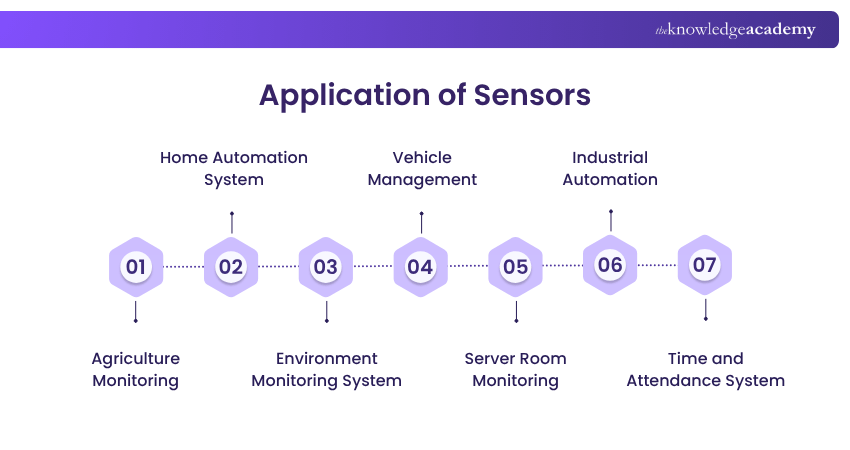
1) Agriculture Monitoring
1) Sensors check soil moisture, sunlight, water levels, and weather
2) Protect crops from pests or bad weather
3) Helps to save water, improve crop quality, and lower farming costs
2) Home Automation System
1) Control lights, fans, heating, and alarms automatically
2) Lights turn on automatically when someone enters a room
3) Used in security systems like doors, cameras, sound detectors, etc.
3) Environment Monitoring System
1) Measure air quality, water pollution, noise, and weather
2) Help Scientists and Governments track environmental changes
3) Plan priorly to emergencies and maintain public health
4) Vehicle Management
1) Oxygen Sensors manage fuel use
2) Tyre Pressure Sensors alert when tyres are low on pressure
3) Electric vehicles use Sensors to monitor the battery and improve safety
5) Server Room Monitoring
1) Sensors track temperature, humidity, and airflow in data centres
2) Alerts you if there is a problem like overheating
3) Help prevent system failures or hardware damage
6) Industrial Automation
1) Detect errors, count parts, and check pressure or temperature
2) Improve product quality and reduce downtime
3) Spot safety risks like gas leaks or overheating early
7) Time and Attendance System
1) Used in workplaces to record when employees arrive or leave
2) Make attendance tracking easy and accurate
3) Used in fingerprint readers, face scanners, or smart cards
Advantages of Sensors
Implementing Sensors for your business or daily life has many advantages, and here are some of them:
1) Machines respond quickly without any manual help
2) Most suitable for giving exact readings, helping machines work properly
3) By reducing waste and improving timing, you can save money in the long run
4) Sensors make systems smarter and easier to manage
5) Maintain consistent standards in products or processes
Disadvantages of Sensors
Sensors have their own challenges, too. Let's check what its disadvantages are:
1) Some Sensors need to be adjusted often to stay correct and get the output
2) Dust, heat, or water can make them work poorly or get it affected
3) Many Sensors need electricity or batteries to work
4) Good Sensors and setting them up can be expensive
5) They gather lots of data that is hard to handle without proper tools
Conclusion
Sensors are small devices with a big impact. They help machines "sense" the world and respond on their own, without needing constant human support. As the world becomes more automated and data-driven, knowing What is a Sensor will help you understand how it serves as the hidden connection between the real world and smart technology for your assistance.
Transform your ideas into smart applications with our Internet of Things IoT Systems and Applications Training – Start today!
Frequently Asked Questions
What is the Main Purpose of a Sensor?

The main purpose of a Sensor is to track the changes in our environment, like heat, light, or motion, and turn that into a signal a machine can understand. This allows the system to react like turning on a fan or sending an alert.
What is the Difference Between a Sensor and a Detector?
A Sensor measures things and gives signals continuously. A detector, on the other hand, notices a specific event like smoke or motion and sets off an alarm. Think of a Sensor as measuring, and a detector as an alerting device.
What are the Other Resources and Offers Provided by The Knowledge Academy?
The Knowledge Academy takes global learning to new heights, offering over 3,000 online courses across 490+ locations in 190+ countries. This expansive reach ensures accessibility and convenience for learners worldwide.
Alongside our diverse Online Course Catalogue, encompassing 19 major categories, we go the extra mile by providing a plethora of free educational Online Resources like Blogs, eBooks, Interview Questions and Videos. Tailoring learning experiences further, professionals can unlock greater value through a wide range of special discounts, seasonal deals, and Exclusive Offers.
What is The Knowledge Pass, and How Does it Work?
The Knowledge Academy’s Knowledge Pass, a prepaid voucher, adds another layer of flexibility, allowing course bookings over a 12-month period. Join us on a journey where education knows no bounds.
What are the Related Courses and Blogs Provided by The Knowledge Academy?
The Knowledge Academy offers various Advanced Technologies Courses, including Sensor and Data Fusion Training, Quantum Computing Training and Introduction to Virtualisation Technologies Training. These courses cater to different skill levels, providing comprehensive insights into Proximity Sensors.
Our Advanced Technology Blogs cover a range of topics related to Sensors, offering valuable resources, best practices, and industry insights. Whether you are a beginner or looking to advance your technology knowledge, The Knowledge Academy's diverse courses and informative blogs have got you covered.
Upcoming Advanced Technology Resources Batches & Dates
Date
 Sensor and Data Fusion Training
Sensor and Data Fusion Training
Fri 27th Mar 2026
Sensor and Data Fusion Training
Fri 19th Jun 2026
Sensor and Data Fusion Training
Fri 18th Sep 2026
Sensor and Data Fusion Training
Fri 18th Dec 2026

 If you wish to make any changes to your course, please


