


 Top Rated Course

We may not have the course you’re looking for. If you enquire or give us a call on 01344203999 and speak to our training experts, we may still be able to help with your training requirements.
What is a Router in Networking: Definition and How it Works
John Davies 16 July 2026A Router is a networking device that connects devices to the Internet, directs data traffic between networks and enables secure, efficient communication. It allows multiple devices to share a single Internet connection across a home, office, or business network while improving performance by sending data to the correct destination quickly.
Home
 Resources
IT Infrastructure & Networking
What is a Router in Networking: Definition and How it Works
Resources
IT Infrastructure & Networking
What is a Router in Networking: Definition and How it Works
Resources
IT Infrastructure & Networking
What is a Router in Networking: Definition and How it Works

Training Outcomes Within Your Budget!
We ensure quality, budget-alignment, and timely delivery by our expert instructors.
Table of Contents

Have you ever wondered how multiple devices can access the Internet at the same time without disrupting one another? Whether you are attending online meetings or browsing the web, a Router plays a crucial role in keeping everything connected. Understanding What is a Router is the first step towards understanding how modern networks operate efficiently.
As networks continue to support more devices and larger volumes of data, Routers have become an essential part of everyday connectivity. In this blog, you will learn how routers work, explore their different types, understand their key features, and discover why they matter in modern networking. Let’s begin!
Table of Contents
1) What is a Router?
2) How Does a Router Work?
3) Key Features of a Router
4) Different Types of Routers
5) What is the Difference Between a Router and a Modem?
6) Do You Need a Router if You Have Wi-Fi?
7) Can I Use my Internet Without a Router?
8) Conclusion
What is a Router?
A Router is a networking device that connects two or more networks, such as a home or office network, to the Internet. It directs data packets to the correct IP address, enabling multiple devices to share one Internet connection. Most modern Routers also create a Wireless Fidelity (Wi-Fi) network, allowing wireless access without cables.
Routers are used in networks of different sizes. To understand What is a Router, consider its role in both small and large setups. A Local Area Network (LAN) covers a small area such as a home or office and usually needs one Router, while a Wide Area Network (WAN) spans larger areas and uses multiple Routers and switches to connect several LANs efficiently.

How Does a Router Work?
A Router is a device that connects different networks and helps send information between them. Here is a simple way to understand how it works:
1) Receiving Data: When you browse the Internet, watch videos, or send messages, your device sends small pieces of data. These pieces first go to the Router.
2) Checking Where to Send Data: Each piece of data has a digital address. The Router reads this address to find out where the data needs to go, either to another device in your home or out to the Internet.
3) Choosing the Best Path: The Router chooses the best and fastest route for the data. If one route is slow or not working, it picks another option.
4) Sending the Data: Once the route is chosen, the Router sends the data along the path until it reaches the correct device or website.
5) Connecting Home and Internet: The Router links your home network to the Internet. It makes sure information moves safely and smoothly between your devices and the online world.
6) Sharing One Internet Connection: Many devices at home can use the same Internet connection. The Router makes this possible by giving each device its own private address inside the network.
Key Features of a Router
To understand how a Router manages traffic and security, it helps to review its main features, which support reliable performance and efficient data transfer. Key features include:
1) Routing Tables: Routers use routing tables to decide the best path for data packets, ensuring fast and efficient data delivery.
2) Network Address Translation (NAT): NAT lets multiple devices share one Internet connection by translating private IP addresses into a single public IP address. It also helps hide internal IP addresses from external networks.
3) Wireless Connectivity (Wi-Fi): Most modern home and office routers provide Wi-Fi, allowing devices to connect wirelessly without using physical cables.
4) Firewalls and Security: Built-in firewalls monitor network traffic and block unauthorised access, helping protect the network from cyber threats.
Gain hands-on experience with real-world Cisco collaboration technologies with the CCNP Collaboration Training – Join now!
Different Types of Routers
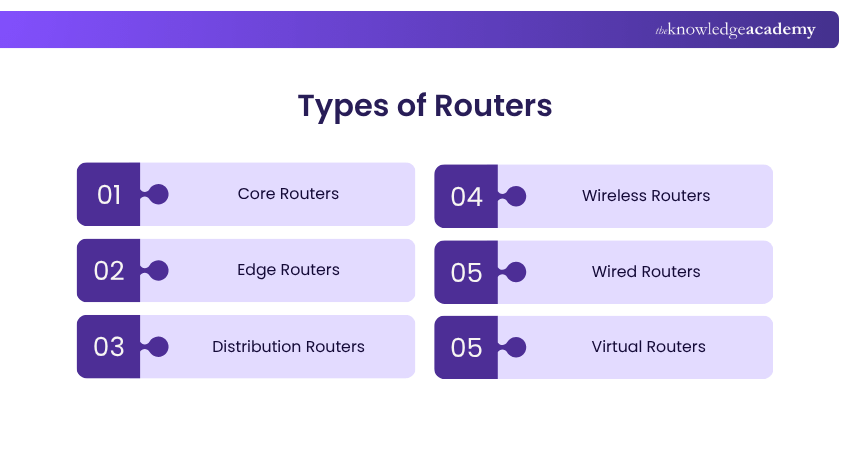
Routers are devices that send data between different networks, and they come in different types based on where and how they are used. The main types of Routers include:
1) Core Routers
Core Routers are used in very large networks, such as big companies or Internet service providers. They move large amounts of data inside the main network. They do not connect directly to home networks or the public Internet.
2) Edge Routers
Edge Routers sit at the border of a big network. They connect the internal network to the outside world, like the Internet or other networks. They help send and receive data between different networks.
3) Distribution Routers
Distribution Routers are used in large offices or buildings. They connect smaller networks (for example, each office floor) to the main network. They help direct data inside the company smoothly and securely.
4) Wireless Routers
Wireless Routers are common in homes and small offices. They connect to a modem and create a Wi-Fi network, allowing phones, laptops, and other devices to connect to the Internet without cables.
5) Wired Routers
A Wired Router connects to the Internet through a modem and uses cables to connect devices. It offers a fast, stable, and secure connection, often used in offices or places requiring reliable performance. However, it requires physical cables, which limit device movement.
6) Virtual Routers
A Virtual Router is not a physical device. It is software that works like a Router on a computer or server. If one virtual Router stops working, another one can take over to keep the Internet connection running without interruption.
Learn to import and export GNS3 projects quickly and efficiently with the GNS3 Training – Register today!
What is the Difference Between a Router and a Modem?
Routers and modems are essential networking devices, but they serve different purposes. Let’s look at the table below, which highlights the key differences between the two:
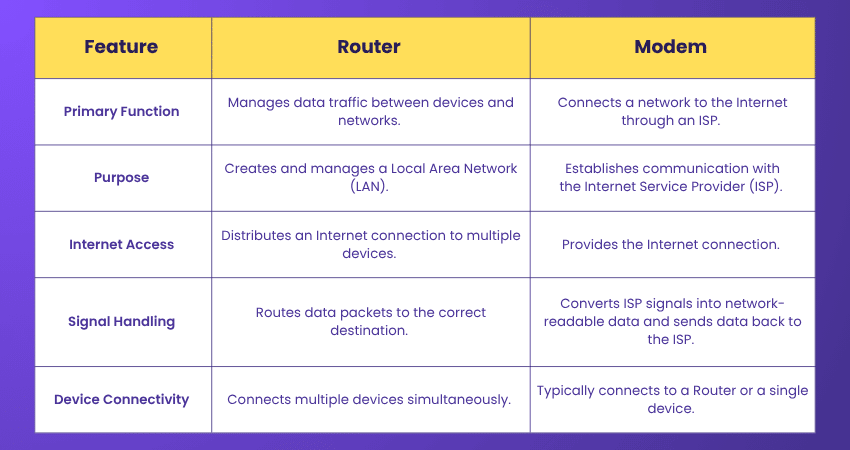
A Router creates and manages a local network and directs data between connected devices. It distributes the Internet connection provided by the modem to multiple devices like laptops, smartphones, and tablets.
In contrast, A Modem connects the network to the Internet by receiving signals from your Internet Service Provider (ISP) and turning them into a format that connected devices can understand. Without a Modem, a network cannot access the Internet, regardless of how many devices are connected.
Acquire the skills to design, configure, and troubleshoot network topologies with the Cisco Packet Tracer Course – Join today!
Do You Need a Router if You Have Wi-Fi?
Yes, a Router is needed to provide Wi-Fi in most home and office networks. It receives the Internet connection from a modem and broadcasts it wirelessly, allowing multiple devices to connect to the Internet simultaneously. Also, it manages network traffic and device connections.
In many cases, you may not need to buy a separate Router because Internet Service Providers (ISPs) often provide an all-in-one device that combines modem and Router functions. However, if your ISP supplies only a modem, a standalone Router is required to enable Wi-Fi and share the Internet connection across multiple devices.
Can I Use my Internet Without a Router?
Yes, it is possible to access the Internet without a Router in certain situations. For example, a single device can sometimes connect directly to a modem, or you can use a 4G/5G-enabled tablet, a USB Internet dongle, or a mobile hotspot. These options provide Internet access without relying on a traditional Router.
Also, you can share your smartphone's mobile data by creating a hotspot, allowing other devices to connect to the Internet. However, these alternatives are often best suited for temporary or individual use. For home or workplaces with multiple connected devices, a Router remains the most reliable and efficient solution for managing Internet access.
Conclusion
Understanding What is a Router is essential for anyone looking to build, manage, or troubleshoot a network. By directing data traffic, connecting devices, and enabling reliable Internet access, Routers play an important role in modern connectivity. Whether for home or business use, choosing the right Router can help improve network performance, security, and overall user experience.
Gain practical experience with Cisco tools used in real-world IT environments. Join the CCNA Training now!
Frequently Asked Questions
What are MAN and WAN?

Wide Area Network (WAN) and Metropolitan Area Network (MAN) are types of computer networks. A MAN connects computers within a city or a large campus, while a WAN spans a larger geographical area, like across states, countries or even continents.
Are a Router and Wi-Fi the Same Thing?
No, a Router and Wi-Fi are not the same. A Router is a networking device that directs data traffic between devices and the Internet, while Wi-Fi is the wireless technology that allows devices to connect to the Router without cables.

John Davies


Cyber Security Governance & Assurance Specialist
John Davies is a cybersecurity expert specialising in governance, risk management, and compliance. With over 15 years in the field, he has led enterprise-wide security programmes across finance, healthcare and public sector organisations. His content provides practical guidance on building secure environments, managing risk and aligning with regulatory frameworks.


 If you wish to make any changes to your course, please


