




We may not have the course you’re looking for. If you enquire or give us a call on +44 1344 203 999 and speak to our training experts, we may still be able to help with your training requirements.
What is Virtual Training: Meaning, Types, and Advantages
ByThe Knowledge AcademyLast updated on: 18 August 2026
Explore what Virtual Training means, how it works, its common formats, key advantages, challenges, and ways to make online learning more effective.

KEY TAKEAWAYS
1. Virtual Training delivers learning through digital platforms without requiring a physical classroom.2. It can include live sessions, self-paced learning, webinars, microlearning, and blended approaches.3. Virtual Training provides greater flexibility, accessibility, scalability, and geographical reach.4. Interactive tools such as polls, breakout rooms, quizzes, and discussions can improve engagement.5. Effective Virtual Training requires the right technology, content, interaction, and learning structure.
Your trainer is in London. Your colleague is in Dubai. You're sitting at home with a cup of coffee. Yet somehow, you're all in the same classroom.
Welcome to Virtual Training.
Instead of bringing everyone into one physical location, Virtual Training brings the learning experience to them. From live instructor-led sessions to self-paced courses and interactive activities, it makes learning possible across locations, schedules, and even time zones.
So, how does Virtual Training actually work, and when is it the right choice? Let's find out.
What is Virtual Training?
Virtual Training is a way of learning where trainers and delegates connect through digital platforms instead of meeting in a physical classroom. It makes training accessible from almost anywhere with the right technology and internet connection.
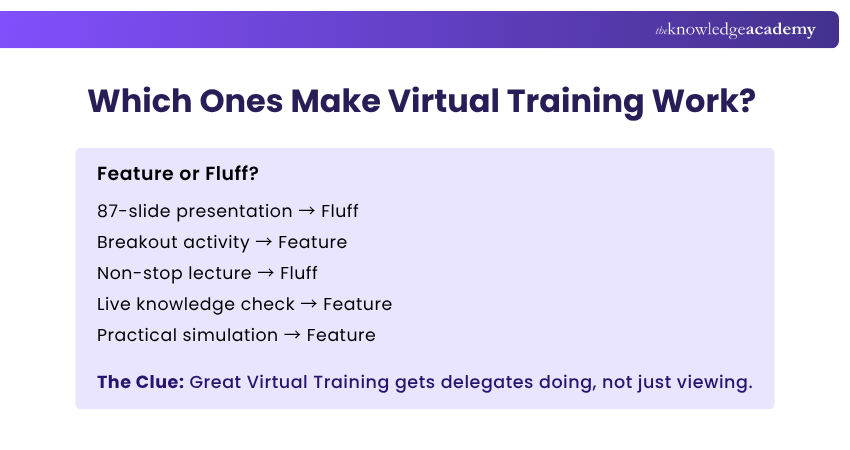
Sessions can happen live with an instructor, at the delegate's own pace, or through a combination of both. Depending on the training, this may involve video sessions, interactive activities, digital resources, quizzes, simulations, and collaborative exercises.
Did You Know?
Virtual Training is broader than simply joining a video call. Effective programmes can combine instruction, collaboration, practical activities, assessments, feedback, and independent learning.

How Does Virtual Training Work?
Virtual Training brings the essential parts of a learning experience into a digital environment. Delegates access a virtual platform where they can attend sessions, access learning materials and complete training activities remotely.
The experience depends on the format. Live Virtual Training happens at a scheduled time with real-time instruction and interaction, while self-paced training allows delegates to work through videos, exercises, quizzes and other resources at a suitable pace.
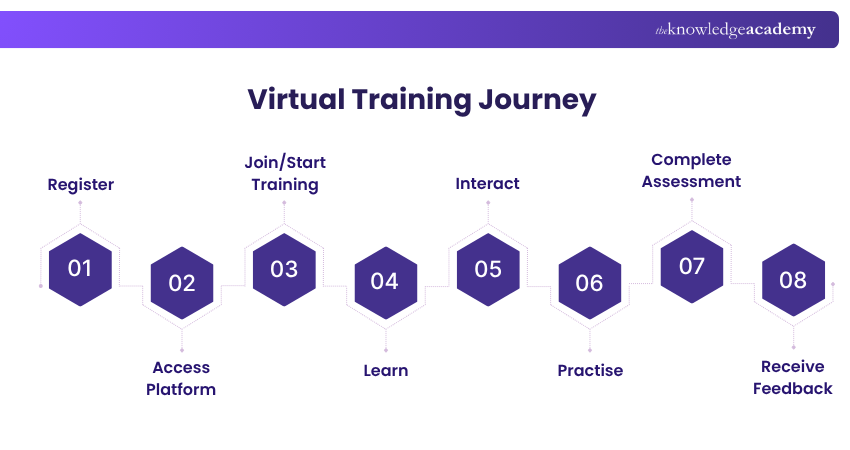
Throughout this journey, digital tools support communication, practical learning and progress from initial access through to assessment and feedback.
Virtual Training Bingo: How Many Have You Done?
If you've attended Virtual Training before, how many can you tick?
☐ Said “Can you see my screen?”☐ Joined a breakout room with complete strangers☐ Answered a live poll☐ Used the virtual “raise hand” button☐ Completed a quiz before the timer ran out☐ Typed an answer in the chat☐ Watched a live screen demonstration☐ Had someone say “You're on mute!”5+ boxes? You're officially a Virtual Training regular.
Types of Virtual Training
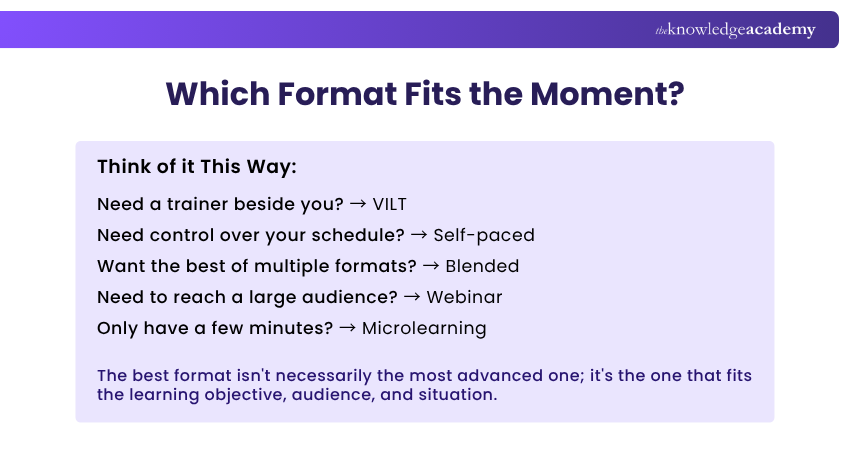
Virtual Training isn't a one-format-fits-all approach. It can use different delivery formats and learning approaches depending on the topic, audience, and learning objectives. Here are some of the most common types used in Virtual Training:
1) Virtual Instructor-led Training (VILT)
VILT brings the trainer-led classroom experience online through live, scheduled sessions. Delegates can ask questions, join discussions, work in breakout rooms, complete activities, and receive real-time guidance from the trainer.
Best suited for: Interactive learning, complex topics, and trainer-guided practice.
2) Self-paced Virtual Training
This format puts delegates in control of the learning schedule. They work through recorded lessons, digital resources, exercises, quizzes, and assessments independently, within any course access or completion requirements.
Best suited for: Flexible learning, independent study, and busy schedules.
3) Blended Training
Blended Training combines multiple learning formats rather than relying on a single delivery method. For example, delegates might complete digital learning independently before joining a live virtual or classroom session for discussion and practical application.
Best suited for: Learning that benefits from both flexibility and guided interaction.
4) Webinars
Webinars are live or recorded online sessions generally designed to share information with a larger audience. They commonly feature presentations, demonstrations, expert talks, Q&A sessions, polls, and live chat.
Best suited for: Knowledge sharing, demonstrations, updates, and large audiences.
5) Microlearning
Microlearning breaks a topic into short, focused learning units, each typically centred on a specific concept or skill. These can take the form of short videos, quizzes, scenarios, flashcards, infographics, or bite-sized lessons.
Best suited for: Quick learning, revision, and knowledge reinforcement.
6) Virtual Simulations
Virtual simulations place delegates in realistic digital scenarios where they can practise skills, make decisions, and experience the consequences of their choices in a controlled environment.
Best suited for: Practical skills, decision-making, scenario-based learning, and situations where real-world practice may be difficult or risky.
Key Features of Virtual Training
Virtual Training uses digital tools and platform capabilities to create structured learning experiences across different locations. While features vary by platform and training format, the following are commonly used:
1) Live Interaction
Video, audio, chat, Q&A, polls, and breakout rooms allow trainers and delegates to communicate and participate during live sessions.
2) Centralised Learning Resources
Presentations, videos, guides, worksheets, recordings, and other materials can be stored and accessed within a digital learning environment.
3) Multi-device Access
Many Virtual Training platforms support access through desktops, laptops, tablets, and mobile devices, depending on platform compatibility.
4) Interactive Learning Tools
Quizzes, digital whiteboards, simulations, polls, and collaborative activities can make sessions more participative and practical.
5) Progress Tracking
Digital learning platforms can track course completion, participation, assessment results, and other indicators of learning progress.
6) Recording and Playback
Where available, sessions can be recorded so delegates can revisit explanations, demonstrations, or other learning content later.
Advantages of Virtual Training
The features of Virtual Training can provide several practical benefits for both delegates and organisations. These advantages depend on the training format, technology, and learning design.
1) Greater Geographical Reach
Organisations can bring together delegates from different locations without requiring everyone to travel to the same training venue.
2) Greater Learning Flexibility
Self-paced formats allow delegates to learn around their schedules, while live sessions provide structured learning at scheduled times.
3) Reduced Travel and Logistics
Virtual delivery can reduce the time, cost, and coordination associated with travel, accommodation, training rooms, and other physical arrangements.
4) Easier Training Across Teams
Organisations can deliver training to distributed teams and departments without relying on additional physical classrooms in every location.
5) Easier Revision and Reinforcement
Access to digital resources and recordings can help delegates revisit key concepts and reinforce their learning after a session, where course access permits.
6) More Varied Learning Experiences
Virtual Training can combine live instruction, independent learning, discussions, quizzes, simulations, and practical activities to support different learning needs.
Build confidence and deliver engaging presentations with Presentation Skills Training - Join Now!
Trainer's Insight:
Don't measure Virtual Training by how closely it copies a classroom. Measure it by whether delegates can understand, practise, discuss, and apply what they learn.
Challenges of Virtual Training
Virtual Training offers flexibility, but it isn't without challenges. From unreliable technology to screen fatigue, recognising potential barriers early makes them much easier to manage.
1) Technology Can Get in the Way
Unstable internet, audio issues, software problems, or incompatible devices can interrupt sessions and disrupt learning.
Quick Fix: Test platforms, devices, and connections before the session begins.
2) Distractions Are One Click Away
Emails, notifications, background noise, and multitasking can quickly pull attention away from training.
Quick Fix: Encourage distraction-free learning spaces and use frequent interactive activities.
3) Human Interaction Can Feel Different
Virtual environments may offer fewer opportunities for spontaneous conversations, networking, and face-to-face connection.
Quick Fix: Build in breakout discussions, Q&A sessions, peer activities, and informal interaction.
4) Screen Fatigue Can Set In
Long periods of continuous screen time can affect concentration and engagement.
Quick Fix: Break learning into shorter sections and include regular pauses and activity changes.
5) Digital Confidence Varies
Some delegates may be less familiar with virtual platforms, collaborative tools, or online learning features.
Quick Fix: Provide simple joining instructions, platform guidance, and technical support where required.
The Virtual Training Trap
Training moved online ≠ Training designed for online
Simply taking an eight-hour classroom presentation and delivering it through a video call does not automatically create effective Virtual Training.Content, activities, session length, interaction, breaks, and assessments should all be designed for the virtual environment.
Virtual Training vs Classroom Training
Virtual and Classroom Training can both deliver effective learning, but they create different experiences. The right choice depends on what needs to be learned, where delegates are based, and how much hands-on or face-to-face interaction is required.
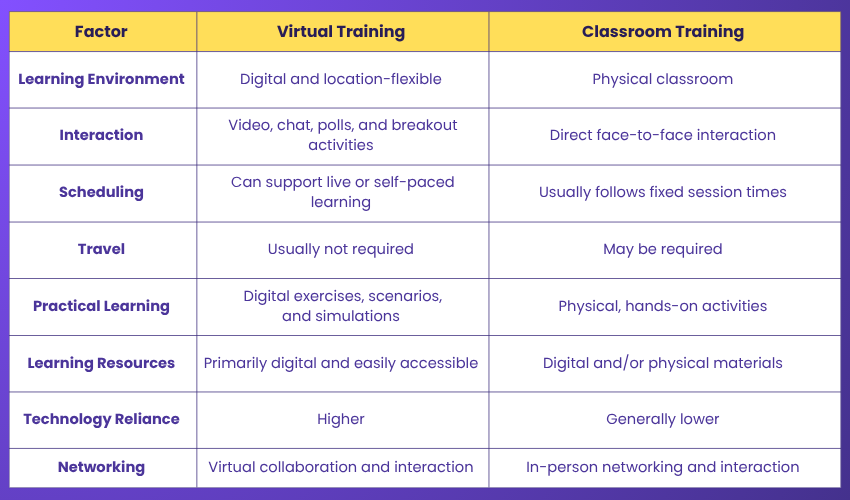
So, Which One Wins?
Neither automatically.
If delegates are geographically dispersed, Virtual Training may be the practical choice.
If physical equipment, hands-on supervision, or extensive face-to-face interaction is essential, classroom training may be more suitable.
And sometimes the answer is both. A blended approach can combine independent digital learning with live virtual or classroom activities.
Pro Tip: If delegates can complete an entire live Virtual Training session without speaking, responding, practising, or making a decision, the session may need more interaction.
The Future of Virtual Training
Virtual Training is moving from simply delivering learning online to creating smarter, more personalised learning experiences. Emerging technologies are changing how delegates practise, interact, receive feedback, and progress through training.
AI-supported systems can help personalise learning materials, activities, and feedback, while VR and immersive simulations can provide realistic environments for practising certain skills.
The next phase of Virtual Training is therefore not about replacing trainers with technology. It is about using technology to make training more adaptive, interactive, measurable, and relevant to each learner.
A Glimpse into the Virtual Classroom of Tomorrow
Today: Watch → Learn → CompleteTomorrow: Experience → Practise → Adapt → Get Instant Feedback → Improve
The screen may remain, but the learning experience behind it is becoming more adaptive, interactive, and data-informed.
Conclusion
Virtual Training makes learning possible beyond the boundaries of a physical classroom. Through live instruction, self-paced content, interactive tools and flexible learning approaches, it can help people develop knowledge and skills across different locations.
Its success, however, depends less on the platform and more on the learning design. Clear objectives, purposeful interaction, practical application and appropriate technology are what turn online delivery into an effective learning experience.
Strengthen your ability to guide, support, and develop others with Coaching and Mentoring Training - Join Now!

The Knowledge Academy develops accessible learning content across Project Management, IT, Cybersecurity, Data Science, Business Analysis, HR, Accounting and Finance, Leadership and Health and Safety. Its resources combine subject research with clear explanations to help professionals build practical knowledge across a wide range of disciplines.
View Detail

 If you wish to make any changes to your course, please


