




We may not have the course you’re looking for. If you enquire or give us a call on 01344203999 and speak to our training experts, we may still be able to help with your training requirements.
Top 8 UI Design Examples for 2026
ByThe Knowledge AcademyLast updated on: 26 February 2026
UI Design, or User Interface Design, is the art of crafting visually appealing and intuitive interfaces for digital platforms. It involves creating layouts, selecting colours, and designing interactive elements to enhance user experience. UI designers focus on making technology accessible and enjoyable by combining aesthetics with functionality for seamless user interaction. Read more to learn more about the best UI Design Examples!
In technology, UI Design is a key bridge between users and digital interfaces. The world of UI Design has witnessed a fascinating transformation marked by innovation, creativity and a relentless pursuit of user-centred excellence. This blog will journey through eight exceptional UI Design Examples. These exemplars not only showcase the latest trends but also demonstrate the profound impact of UI Design on user experiences.
Check out this blog to learn about the best UI Design Examples. These will inspire you for your next design project and aid in the growth of your company.
Table of Contents
1) Understanding UI Design
2) UI Design Examples you need to know
a) Minimalistic marvel: Clean and simple UI
b) Dark mode dominance: Accessibility and aesthetics
c) 3D immersion: Realism and engagement
d) Microinteractions: Delighting users
e) Voice User Interfaces (VUI): The future of interaction
f) Augmented Reality (AR) integration: Bridging the physical and digital worlds
g) Neumorphism: A fresh take on skeuomorphism
h) Sustainability-centric UI Design: Eco-friendly innovation
3) Conclusion
Understanding UI Design
UI (User Interface) Design is the art and science of creating digital interfaces that facilitate seamless and intuitive interactions between users and digital devices or applications. It encompasses the visual and interactive aspects of a user's experience, focusing on layout, typography, colour schemes, icons, buttons, and navigation menus.
UI Designers aim to optimise user experiences by crafting aesthetically pleasing, user-friendly, and efficient interfaces. This involves considering user preferences, behaviours, and expectations to ensure the design satisfies their requirements and goals. When preparing for UI Designer Interview Questions, it’s essential to demonstrate how your design decisions are based on understanding user needs and creating interfaces that enhance the overall user experience.
Effective UI Design is not just about making things look good; It is about making them work well. It involves meticulous attention to detail, usability testing, and constant refinement to create interfaces that engage users, guide them through tasks, and ultimately enhance their overall satisfaction and productivity. In essence, UI Design is the bridge that connects users with the digital world, making it an integral part of modern technology and user-centered design.

UI Design Examples you need to know
Let’s take a look at some of the popular trends, laced with examples that dictate the UI Design philosophy these days:
Minimalistic marvel: Clean and simple UI
Minimalistic marvels in UI design are a testament to the power of simplicity. This design approach strips away unnecessary clutter, presenting users with clean, uncluttered interfaces that emphasize essential content and functionality. Zero UI takes this concept even further by eliminating traditional interfaces entirely, relying on natural interactions like voice and gesture controls.
A clean and simple UI Design prioritises user-centered principles, making navigating and engaging with digital platforms easier for users. By reducing visual noise, such designs create a sense of clarity and focus. They employ a restrained colour palette, often favouring neutral tones, and use ample white space to guide the user's attention.
Typography plays a vital role in minimalist UIs, with designers choosing clear, legible fonts that enhance readability. Icons and graphics are carefully chosen for their ability to convey meaning with minimal detail.
One of the key benefits of minimalism is improved usability. Users can quickly grasp the purpose of the interface and navigate without distractions. UI Design Portfolio often showcases this approach, aligning with the "less is more" philosophy and creating a sense of elegance and sophistication.
But minimalistic does not mean devoid of personality. Designers infuse character through subtle animations and microinteractions, elevating the overall user experience.
Dark mode dominance: Accessibility and aesthetics
In recent years, dark mode has emerged as a dominant force in UI Design, seamlessly blending accessibility and aesthetics to redefine how we interact with digital interfaces. This trend, characterised by dark colour schemes predominantly featuring blacks, greys, and deep blues, has gained tremendous popularity for many reasons.

a) Accessibility: Dark mode is not merely a design choice but a significant accessibility feature. It reduces eye strain and minimises blue light exposure, making it easier on the eyes, particularly during extended use in low-light environments. For users with sensitivity to bright screens, dark mode becomes an essential accessibility feature, allowing them to engage with digital content more comfortably.
b) Aesthetic appeal: Beyond its accessibility benefits, dark mode offers a sleek and modern aesthetic that has captivated users and designers alike. The high-contrast colour schemes create a visually striking and sophisticated look, enhancing the overall user experience. Dark backgrounds make content and elements on the screen pop, resulting in a more immersive and engaging interface.
c) Energy efficiency: Dark mode is not just about style but also eco-friendly. It consumes less power on devices with OLED or AMOLED screens, as individual pixels can be turned off, reducing energy consumption and extending battery life. This sustainability aspect aligns with the growing emphasis on environmentally responsible design.
d) Personalisation: Many modern applications and operating systems allow users to toggle between light and dark modes, empowering them to choose their preferred interface based on personal preferences or lighting conditions. This customisation contributes to a more user-centric approach to design.
e) Focus on content: Dark mode excels at emphasising range. It places content at the forefront, ensuring images, text, and multimedia take centre stage. This focus on content improves readability and directs user attention effectively.
3D immersion: Realism and engagement
In the domain of UI Design, incorporating 3D elements has emerged as a game-changer, offering heightened realism and increased user engagement. This design trend utilises three-dimensional graphics, animations, and interactions to create immersive digital experiences that captivate users. Here is an in-depth look at the impact of 3D immersion on UI Design:

a) Realism: 3D immersion adds a layer of authenticity to user interfaces that were previously unattainable with traditional flat design. In Ecommerce Website Design, this realism can be particularly valuable, allowing designers to create interfaces that mimic real-world objects and environments by simulating depth, lighting, and textures. It enhances user experience in industries like e-commerce, where customers benefit from a more tangible and authentic visual experience.
b) Enhanced engagement: The three-dimensionality of UI elements naturally encourages user interaction. Users can manipulate and explore 3D objects, leading to higher engagement levels. This is especially beneficial for product presentations, as users can rotate and examine items from various angles, fostering a deeper understanding and connection.
c) Storytelling and Narratives: 3D immersion lends itself well to storytelling within interfaces. Designers can use 3D animations and environments to convey narratives, making the user experience functional and emotionally resonant. This is particularly effective in educational apps, interactive websites, and digital marketing campaigns.
d) Gamification: Gamification is a powerful tool for user engagement, and 3D elements elevate gamified interfaces to a whole new level. UI Developer Interview Questions often explore how developers implement such interactive elements. Game designers have long utilized 3D graphics to create rich, interactive environments, and this approach is now expanding into other sectors, such as e-learning and productivity apps.
e) User-centred design: While 3D immersion adds visual complexity, it should not compromise usability. User-centered design principles remain essential. Interfaces should be intuitive and user-friendly, with 3D elements enhancing the experience rather than confusing.
Microinteractions: Delighting users
Microinteractions are the small, often subtle animations or responses within a user interface that significantly enhance the overall user experience. These tiny details may seem inconsequential, but they profoundly impact user engagement and satisfaction. Here is a closer look at the significance of micro-interactions in delighting users:
a) Feedback and affordance: Microinteractions provide users with immediate feedback when interacting with an interface. Whether it is a button press, a hover effect, or a confirmation message, these visual cues reassure users that their actions have been recognised, enhancing the sense of control and understanding.
b) User guidance: Microinteractions guide users through complex processes. For instance, progress bars in web forms or loading animations communicate the system's status, reducing user anxiety and frustration.
c) Emotional connection: Well-designed micro-interactions can evoke emotions. A playful animation or a satisfying sound effect can make users feel accomplished and delighted upon completing a task.
d) Brand identity: Consistent microinteractions can reinforce a brand's identity. For example, the unique way a button animates can become a recognisable trademark of a product.
e) User engagement: By adding subtle elements of surprise and delight, micro-interactions keep users engaged and encourage them to explore further. This is especially valuable in applications where user retention is vital.
Are you ready to embark on a journey towards becoming a skilled app and web developer? Explore our comprehensive training courses in App & Web Development Training.
Voice User Interfaces (VUI): The future of interaction
Voice User Interfaces (VUI) represent a paradigm shift in human-computer interaction, paving the way for a future where speaking to digital devices is the norm. VUIs enable users to interact with technology using natural language, making technology more accessible, intuitive, and user centric.
a) Accessibility: VUIs break down barriers for individuals with disabilities, making technology accessible to a broader audience. This inclusive design is a significant step toward a more equitable digital world.
b) Convenience: Hands-free and eyes-free interaction allows users to multitask effortlessly. Whether controlling smart home devices, searching the web, or setting reminders, VUIs streamline tasks and enhance productivity.
c) Natural interaction: Speaking is the most natural way humans communicate. VUIs understand context, tone, and intent, making interactions feel more human and less machine-like.
d) IoT integration: VUIs are at the heart of the Internet of Things (IoT) revolution, seamlessly connecting and controlling various smart devices. This integration is transforming how we live and interact with our surroundings.
e) Enhanced user experience: With continuous advancements in speech recognition and machine learning, VUIs are becoming more accurate and personalised, leading to a more satisfying user experience.
Augmented Reality (AR) integration: Bridging the physical and digital worlds
Augmented Reality (AR) integration in UI Design has transcended novelty to become a powerful tool for seamlessly merging the physical and digital domains, creating immersive user experiences like never before.
a) Enhanced realism: AR overlays digital elements onto the real world, blurring the lines between physical and virtual. This heightened realism enables users to interact with digital content in their surroundings.
b) Interactive learning: In education, AR brings textbooks to life by adding 3D models, animations, and interactive elements. This engagement enhances learning, making complex concepts more digestible.
c) Retail revolution: AR allows customers to try products before purchasing. From virtual fitting rooms in fashion to visualising furniture in a space, AR transforms the retail experience, reducing uncertainty and boosting sales.
d) Navigation and wayfinding: AR-powered navigation apps provide real-time directions and points of interest overlaid onto the physical environment. This simplifies navigation and enhances exploration.
e) Entertainment and gaming: AR games like Pokémon GO pioneered this trend. Now, AR is transforming gaming, storytelling, and live events by blending digital experiences with the real world.
Neumorphism: A fresh take on skeuomorphism
Neumorphism, also known as "soft UI" or "neo-skeuomorphism," represents a design trend that takes inspiration from the familiar principles of skeuomorphism while infusing a fresh and contemporary aesthetic into user interfaces. This design approach gained traction by balancing realism and minimalism, creating a visually captivating and user-friendly style.
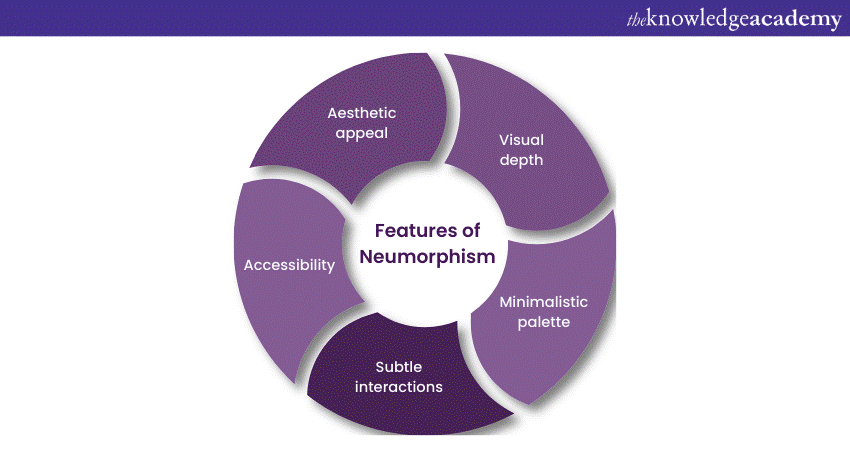
a) Visual depth: Neumorphism emphasises depth and realism, using subtle shadows and highlights to create the illusion of physicality. Elements appear slightly raised (embossed) or depressed (debossed) on the screen, making them feel tactile and interactive.
b) Minimalistic palette: While neumorphism incorporates elements of realism, it does so with a restrained colour palette, often favouring muted and soft hues. This minimalist approach ensures that the design remains clean and uncluttered.
c) Subtle interactions: Neumorphic interfaces feature delicate micro-interactions, like subtle button depressions or slight colour shifts on hover, adding a layer of interactivity that enhances the overall user experience.
d) Accessibility: The high contrast and clear distinctions between elements in neumorphism make it accessible and user-friendly.
e) Aesthetic appeal: Neumorphism offers a visually pleasing and modern look that aligns with contemporary design sensibilities. It balances the realism of skeuomorphism and the minimalism of flat design.
Sustainability-centric UI Design: Eco-friendly innovation
In an era of environmental consciousness, sustainability-centric UI Design has emerged as a powerful force in the digital realm. This design philosophy prioritises eco-friendly principles and innovation, contributing to a greener and more responsible digital landscape.
a) Energy efficiency: Sustainable UI Design strongly emphasises reducing energy consumption. Designers opt for energy-efficient colour schemes, layouts, and animations to minimise the carbon footprint of digital interfaces, which is especially crucial given the increasing energy demands of technology.
b) Minimised resource usage: Sustainable design aims to reduce the load on servers and data centres, minimising the energy required to maintain digital services. This includes optimising code, reducing unnecessary data requests, and adopting efficient server architectures.
c) Eco-friendly materials: Designers are increasingly considering the environmental impact of the materials used in hardware and devices, promoting eco-friendly materials in UI Design to reduce waste and pollution.
d) User awareness: Sustainable UIs educate users about eco-friendly practices, encouraging responsible behaviours such as reducing energy consumption, recycling, and sustainable product choices.
e) Green metrics: Sustainable UIs may include features that track and display eco-related metrics, such as reduced energy usage or carbon footprint, allowing users to see the positive impact of their choices.
Conclusion
The eight UI Design Examples we have explored offer a glimpse into the future of digital interactions, where simplicity, accessibility, realism, and innovation reign supreme. As we conclude our journey through these design marvels, we are reminded that UI Design Principles are not just about aesthetics but about crafting experiences that resonate, engage, and empower users.

The Knowledge Academy is a world-leading provider of professional training courses, offering globally recognised qualifications across a wide range of subjects. With expert trainers, up-to-date course material, and flexible learning options, we aim to empower professionals and organisations to achieve their goals through continuous learning.


 If you wish to make any changes to your course, please


