




We may not have the course you’re looking for. If you enquire or give us a call on 01344203999 and speak to our training experts, we may still be able to help with your training requirements.
Basic and Advanced SQL Functions
ByVishnu SankarLast updated on: 02 October 2026
SQL functions are essential tools for data manipulation and analysis. They allow you to perform a wide range of tasks, from simple calculations to complex data transformations. Learn the basics of SQL functions and take your skills to the next level with more advanced functions.

What's in This Blog
1. SQL functions help calculate, transform, summarise and analyse data.2. Aggregate functions such as COUNT(), SUM() and AVG() operate across sets of rows.3. Scalar functions transform individual values such as text, numbers or dates.4. Window functions perform calculations across related rows while retaining individual rows.5. Function names, syntax and behaviour can vary between SQL database systems.
In the realm of database management, Structured Query Language (SQL) and its functions are instrumental tools for extracting, manipulating, and analysing data. These SQL functions bolster the potential of SQL queries, empowering developers to accomplish intricate tasks effortlessly.
According to Statista, Oracle was the most popular Database Management System (DBMS) in the world as of July 2026, with a ranking score of 1247.52. If you wish to understand the core principles of functions in SQL and gain insights into their applications, this blog is the right choice for you. In this blog, you will learn about the core principles of basic and advanced SQL functions, which are extremely effective database tools.
What are SQL Functions?
SQL-based functions are essential components of the Structured Query Language, commonly known as SQL. These functions play a crucial role in database management systems, thus allowing users to perform various operations on the data stored in the databases. These functions enable users to manipulate, analyse, and extract data efficiently.
At its core, functions in SQL perform operations on input values and return a result. Common categories include aggregate functions, which perform calculations across multiple rows, and scalar functions, which operate on individual values. Many database systems also support other function types, such as window functions and user-defined functions.
These functions are incredibly versatile and enable developers, data analysts, and administrators to perform a wide range of tasks, including data summarisation, data transformation, and data manipulation. Understanding SQL functions such as COUNT(), SUM(), CONCAT(), and SUBSTRING() is crucial for working effectively with relational databases.

Basic SQL Functions
Basic SQL functions cover many everyday database operations, including counting rows, calculating totals and manipulating individual values. Two common categories covered here are aggregate functions and scalar functions. Here are some examples:
1) SQL Aggregate Functions
Aggregate functions process a set of rows and return a summarised result. They are particularly useful when analysing groups of records or generating summary information.
1) COUNT(): This function is used for counting the number of rows in a specified column or the entire table. It is valuable for obtaining the total number of records, identifying the size of result sets, and aggregating data for statistical analysis.
SELECT COUNT(CustomerID) AS TotalCustomersFROM Customers;
2) SUM(): It calculates the total sum of a numeric column. It is commonly used for financial data, sales records, or any other scenario where the sum of numeric values needs to be determined. The exact return type and behaviour can vary slightly between database systems, so it is useful to check the documentation for the DBMS you are using.
SELECT SUM(UnitPrice * Quantity) AS TotalRevenueFROM OrderDetails;
3) AVG(): It computes the average of values in a numeric column, which is a key function within the Components of SQL Server. It is beneficial for calculating average scores, ratings, or any other metric that requires averaging numerical data.
SELECT AVG(UnitPrice) AS AveragePriceFROM Products;
4) MIN(): It retrieves the smallest value from a column. It is useful for finding the minimum value in a set, such as the lowest price of products or the earliest date in a dataset.
SELECT MIN(UnitPrice) AS MinPriceFROM Products;
5) MAX(): It retrieves the largest value from a column. It is employed to find the maximum value in a set, such as the highest temperature recorded or the latest date in a dataset.
SELECT MAX(Quantity) AS MaxQuantityFROM OrderDetails;
2) SQL Scalar Functions
Scalar functions operate on individual values and return a value for each input. They are commonly used to transform or manipulate text and other data within a query. Here are some examples:
1) CONCAT(): CONCAT() combines two or more strings into a single string. It is helpful for creating new text values by joining multiple strings, such as creating full names from first and last names.
SELECT CONCAT(FirstName, ' ', LastName) AS FullNameFROM Customers;
2) SUBSTRING(): SUBSTRING() extracts a part of the string of objects based on the specified starting position and length. It is used to extract substrings from larger text data, like extracting area codes from phone numbers.
SELECT SUBSTRING(ProductName, 1, 3) AS ProductCodeFROM Products;
3) UPPER() and LOWER(): UPPER() converts a string to uppercase, and LOWER() converts it to lowercase. These functions are used to standardise the casing of text data, making it easier to search and compare.
SELECT UPPER(ProductName) AS UppercaseProductNameFROM Products;
4) LENGTH(): LENGTH() returns the number of characters in a string. It can be useful for checking or validating text length.
SELECT ProductName, LENGTH(ProductName) AS NameLengthFROM Products;
Take your first strong step into database management with the Introduction to MySQL Course – Sign up now!
Advanced SQL Functions
More advanced SQL functions and techniques are particularly useful when queries involve date calculations, text processing, numerical transformations, analytical calculations, or reusable logic. Here are some common examples:
1) SQL Date Functions
Date and time functions help retrieve, extract and calculate information from temporal data.
1) Current Date and Time: Database systems provide functions for retrieving the current date and time. For example, MySQL and PostgreSQL support NOW().
SELECT NOW() AS CurrentDateTime;
2) Extracting Date Parts: In SQL Server, DATEPART() extracts a specified component, such as the year, month, or day, from a date.
ELECT DATEPART(YEAR, OrderDate) AS OrderYearFROM Orders;
3) Calculating Date Differences: In SQL Server, DATEDIFF() calculates the difference between two dates according to a specified date part.
SELECT DATEDIFF(DAY, OrderDate, DeliveryDate) AS DeliveryDaysFROM Orders;
2) SQL String Functions
String functions help manipulate, search and transform text stored in a database.
1) REPLACE(): REPLACE() allows you to replace occurrences of a specified substring within a string with another string. It's useful for data cleansing, data transformations, and correcting typographical errors.
SELECT REPLACE(Description, 'Old', 'New') AS UpdatedDescriptionFROM Products;
2) String-position Functions: Functions can identify where particular text occurs within another string. For example, SQL Server provides CHARINDEX():
SELECT CHARINDEX('phone', ProductName) AS PhonePositionFROM Products;
3) LEFT() and RIGHT(): LEFT() extracts a specified amount of characters from the start of a string, while RIGHT() retrieves characters from the end. These functions are handy when you need to extract prefixes or suffixes from strings, such as area codes from phone numbers.
SELECT LEFT(PhoneNumber, 3) AS AreaCodeFROM Customers;
Pro Tip
Standardise text before comparing or grouping it when inconsistent capitalisation or formatting could affect your results.
3) SQL Numeric Functions
Numeric functions help perform calculations and transformations on numerical data.
1) ROUND(): ROUND() rounds a numeric value to a specified precision. It can be useful when displaying prices or calculated values.
SELECT ROUND(UnitPrice, 2) AS RoundedPriceFROM Products;
2) CEILING(): CEILING() returns the smallest integer greater than or equal to any given numeric value.
SELECT CEILING(TotalAmount) AS RoundedAmountFROM Invoices;
3) FLOOR(): FLOOR() returns the largest integer less than or equal to a given numeric value.
FLOOR(QuantityInStock) AS RoundedStockFROM Inventory;
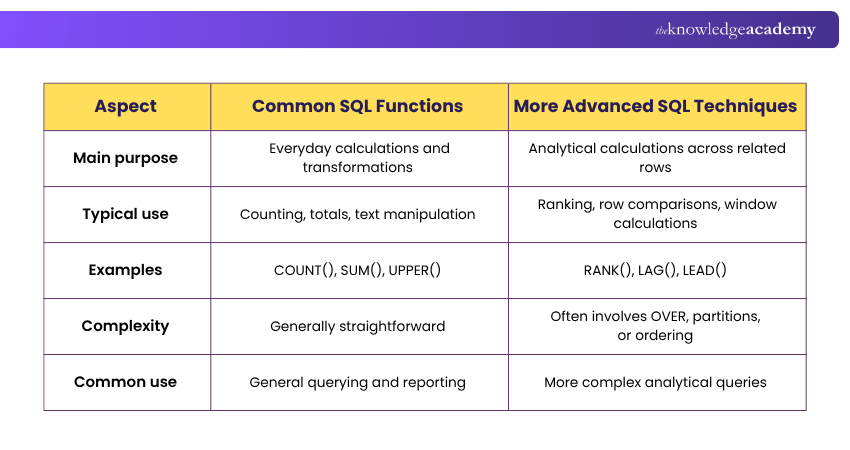
Here's a quick glimpse into the differences between basic and advanced SQL functions:
How to Use SQL Function in Queries?
Utilising functions in queries can substantially improve data output and analysis, offering valuable insights and simplifying complex operations. Some examples of using functions in queries are as follows:
1) SELECT statement with SQL Functions
Incorporate functions within the SELECT statement to transform or calculate values dynamically. Example:
SELECT ProductName, ROUND(UnitPrice * (1 - Discount), 2) AS DiscountedPriceFROM Products;
2) WHERE Clause with SQL Functions
Filter data based on specific conditions using a function or a subquery in the WHERE clause. For example, to find products priced above the overall average:
SELECT ProductName, UnitPriceFROM ProductsWHERE UnitPrice > (SELECT AVG(UnitPrice) FROM Products);
3) GROUP BY Clause with SQL aggregate functions
Combine GROUP BY with aggregate functions to group and summarise data. Example:
SELECT CategoryID, COUNT(ProductID) AS TotalProductsFROM ProductsGROUP BY CategoryID;
4) ORDER BY Clause with SQL Functions
Sort query results using a function in the ORDER BY clause. Example:
SELECT ProductNameFROM ProductsORDER BY LENGTH(ProductName) DESC;
Best Practices for Using SQL Functions
Follow these practices to keep queries clear and efficient:
1. Choose functions supported by your database system.2. Use meaningful aliases for calculated values.3. Check how functions handle NULL.4. Keep complex expressions readable.5. Use GROUP BY correctly with aggregate functions.6. Test functions on sample data before applying them to large datasets.7. Avoid unnecessary transformations in filtering conditions.8. Review execution plans when performance matters.
Implementing SQL Functions
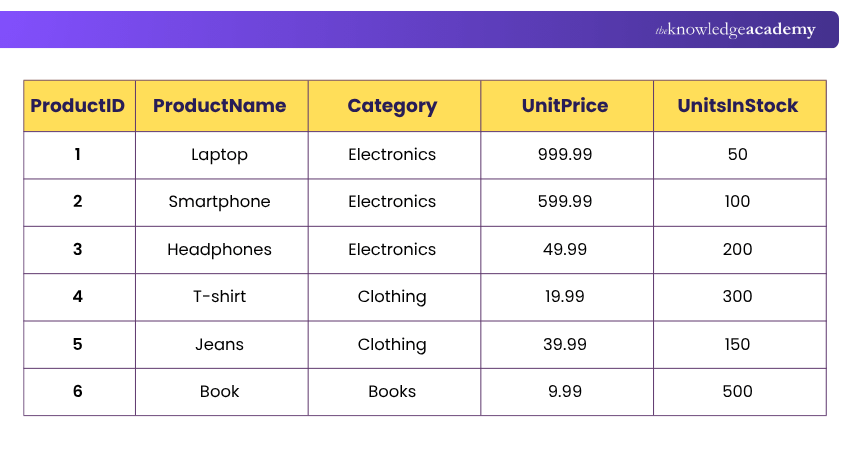
Here is an example of implementing SQL-based functions in a query within a database. In this example, we created a table named "Products" with columns. The query will return the desired results, showing the relevant information for the products in the specified category. Proper Normalisation in SQL ensures that this table is structured efficiently, avoiding redundancy.
1) Implementing Basic SQL-based Functions
Tables are the structured representations of data, organised with columns such as ProductID, ProductName, Category, UnitPrice, and UnitsInStock, each defining the type of information stored.
Rows in the table contain specific product data, such as laptop, smartphone, headphones, and their respective attributes. The "Products" table serves as the foundation for storing product information in an online store database, ensuring data integrity, easy retrieval, and efficient data management.
SQL Query:
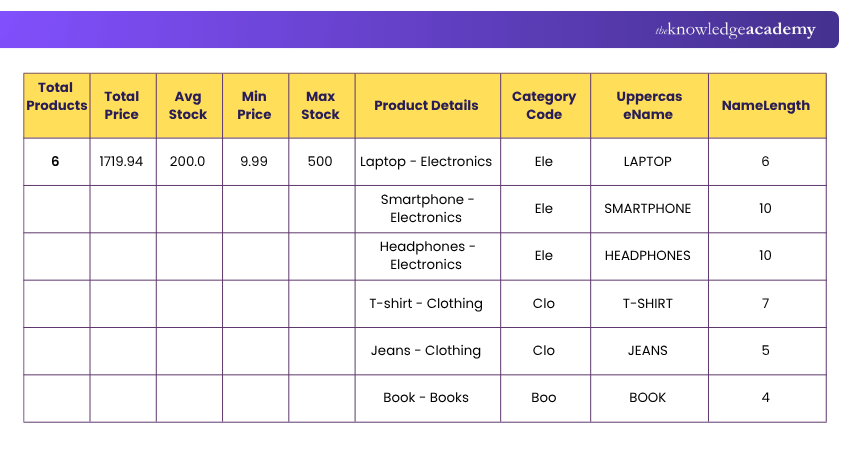
SELECTCOUNT(*) AS TotalProducts,SUM(UnitPrice) AS TotalPrice,AVG(UnitsInStock) AS AvgStock,MIN(UnitPrice) AS MinPrice,MAX(UnitsInStock) AS MaxStock,CONCAT(ProductName, ' - ', Category) AS ProductDetails,SUBSTRING(Category, 1, 3) AS CategoryCode,UPPER(ProductName) AS UppercaseName,LENGTH(ProductName) AS NameLengthFROM Products;
Resulting Table:
2) Implementing Advanced SQL-based Functions
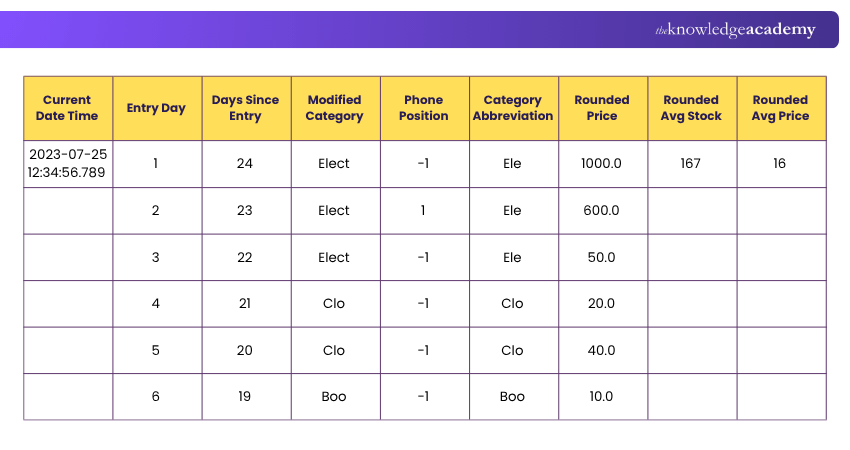
Advanced queries utilise a combination of basic and advanced SQL-based functions to perform intricate tasks. These queries retrieve data, calculate statistics like total units in stock or average unit price, filter products based on specific conditions, sort them by unit price, and perform string manipulations. Advanced queries provide valuable insights into the product inventory, sales, and trends, enabling informed decision-making and comprehensive data analysis in the online store business.
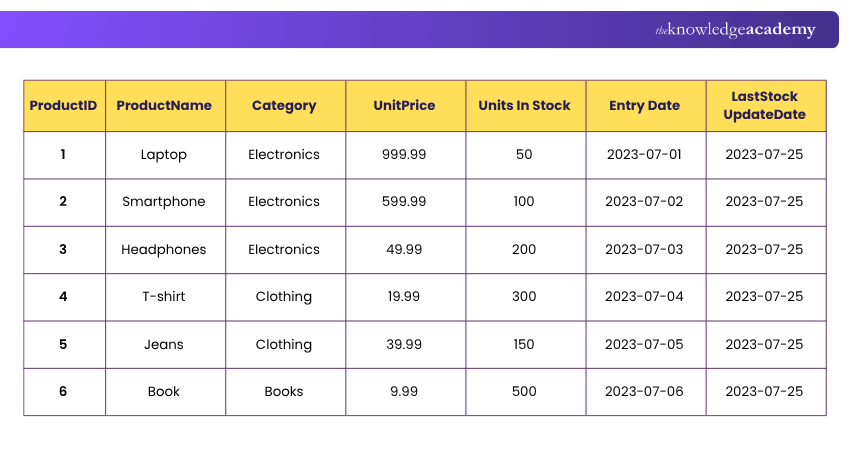
SELECTNOW() AS CurrentDateTime,DATEPART(DAY, EntryDate) AS EntryDay,DATEDIFF(DAY, EntryDate, NOW()) AS DaysSinceEntry,REPLACE(Category, 'Electronics', 'Elect') AS ModifiedCategory,CHARINDEX('phone', ProductName) AS PhonePosition,LEFT(Category, 3) AS CategoryAbbreviation,ROUND(UnitPrice, 1) AS RoundedPrice,CEILING(AVG(UnitsInStock)) AS RoundedAvgStock,FLOOR(AVG(UnitPrice)) AS RoundedAvgPriceFROM Products;
Resulting Table:
Become the data professional businesses rely on with the Advanced SQL Training – Sign up now!

Vishnu Sankar is a Senior Content Writer with 5+ years of experience across content development, software development, web development and system administration. His technical background and professional training support his expertise in IT and Tech, while his extensive research and writing experience covers Project Management and Health and Safety.
View Detail

 If you wish to make any changes to your course, please


