




We may not have the course you’re looking for. If you enquire or give us a call on 01344203999 and speak to our training experts, we may still be able to help with your training requirements.
Programming Fundamentals: Core Fundamentals Explained
ByGaurav KalitaLast updated on: 19 September 2026
Programming is the process of writing instructions in the form of code for computers to execute, enabling them to execute tasks and solve problems efficiently. This blog explores the programming fundamentals that will help you develop your coding abilities and apply them in real-world projects. Read on to learn more!
Quick Snapshot
1. Data Handling: Understand how data is stored, organised and accessed2. Program Flow: See how conditions and control structures guide program execution3. Debugging: Learn how programming errors are identified and fixed4. Code Structure: Explore OOP principles for organising and managing code5. Development Tools: Understand how IDEs support writing, testing and debugging code
Ever wondered what breathes life into the machines we interact with on a daily basis? The answer lies in the vibrant world of programming languages. This is where cold, hard logic meets creativity in transforming abstract concepts into tangible applications.
Having a firm grasp of programming fundamentals is your gateway to turning basic ideas into functional software. These foundational skills can help you think logically, approach coding challenges systematically and build programs with greater confidence. So, dive in!
Fundamental Programming Concepts
Programming fundamentals are like the foundation of a building, providing the essential concepts needed to create reliable and effective programs. Fundamental programming concepts guide coders through the complex maze of code and creativity, establishing the groundwork necessary for all programming endeavours.
1) Data Structures
A data structure provides an effective way to store and retrieve data. Computer programmers can use various data structures to complete tasks and run applications. These are some common data structures used in software development:
a) Arrays: Arrays organise data by storing similar elements in an indexed structure, often using contiguous memory locations.
b) Stacks: Stacks are linear structures that follow a last-in, first-out (LIFO) order for adding and removing elements.
c) Queues: Queues are linear structures that follow a first-in, first-out (FIFO) order for adding and removing elements.
d) Linked Lists: Linked lists use references or pointers to connect elements rather than storing them in contiguous memory locations. They can be used to implement structures such as stacks and queues.
e) Binary Trees: Binary trees are non-linear structures in which each node can have at most two children, commonly called the left and right children.
f) Graphs: Graphs consist of nodes (vertices) connected by edges and can be used to represent relationships in applications such as maps and social networks.
Trainer Insight
Don’t choose a data structure simply because it is familiar. Consider how frequently you need to access, insert, remove or organise data before selecting the most suitable structure.
2) Variable Declaration
Variables are containers for storing values, and a variable declaration introduces a variable to a program, often specifying information such as its name and, in statically typed languages, its data type. How memory is allocated and managed depends on the programming language and runtime environment.
In many programming languages, variable names can contain letters, digits and underscores, although naming rules vary between languages. Some common variable-related concepts and categories found across programming languages include:
a) Constant: A constant represents a value that is intended to remain unchanged during program execution, depending on the programming language.
b) Global Variable: A global variable is defined in a global or module-level scope and can generally be accessed from multiple parts of a program, depending on the programming language.
c) Class Variable: A class variable belongs to the class itself and is typically shared among its instances.
d) Instance Variable: An instance variable belongs to a specific object or instance of a class, allowing each instance to maintain its own value.
e) Local Variable: You can declare local variables within a limited scope, such as a function, method or block, depending on the programming language.
3) Debugging
Debugging is the process of identifying, analysing and fixing errors or defects in computer programs and enables software development and engineering teams to produce functioning software. Below is a list of potential programming errors:
a) Syntax Error: A syntax error occurs when characters, symbols or statements in the code violate the rules of a programming language.
b) Logical Errors: These occur when a flaw in the algorithm or logic of the code causes the program to produce incorrect or unintended results even though it may continue to execute.
c) Latent Errors: Also known as hidden errors, these are defects that may remain unnoticed during normal execution but appear under particular conditions, inputs or edge cases.
Quick Debugging Checklist
Read the error message carefully Identify where the problem occurs Check syntax and variable values Test smaller sections of code Try different inputs and edge cases Fix one issue at a time Test the program again
4) Object-Oriented Programming
Object-Oriented Programming (OOP) is an approach to programming where objects represent data and the behaviours associated with it. It's akin to organising a toolkit where each tool, or object, has specific functions and properties. Four commonly recognised principles of OOP are:
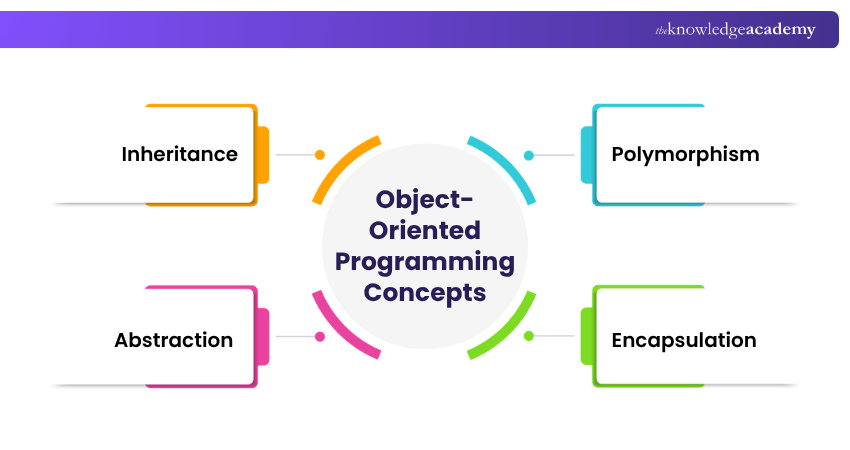
a) Inheritance: Allows a class to derive attributes and behaviours from another class.
b) Polymorphism: Allows a common interface or operation to produce different behaviours depending on the object or type involved.
c) Abstraction: Hides unnecessary implementation details and exposes the essential features needed to use an object or component.
d) Encapsulation: Groups data and related behaviour together while controlling access to an object's internal state.
OOP can support modularity and code reuse by organising related data and behaviour into objects and classes. Classes can define relationships through mechanisms such as inheritance, while polymorphism allows objects of different types to be treated through a common interface or base type.
For example, in game development, OOP allows for the creation of distinct classes such as "Player" and "Enemy." These classes might inherit from a broader "Character" class, sharing common traits while also introducing specific attributes and actions.
Grasping OOP is valuable for developing many sophisticated software applications as it fosters well-organised, abstracted, and maintainable code. By applying OOP principles, programmers can craft elegant, scalable, and adaptable solutions that effectively model real-world entities and their interactions. This makes OOP an important skill for programmers working with object-oriented software systems.
Learn OOP basics like encapsulation, abstraction, and modular design with our Object-Oriented Programming (OOPs) Course – Join now!
5) Control Structures
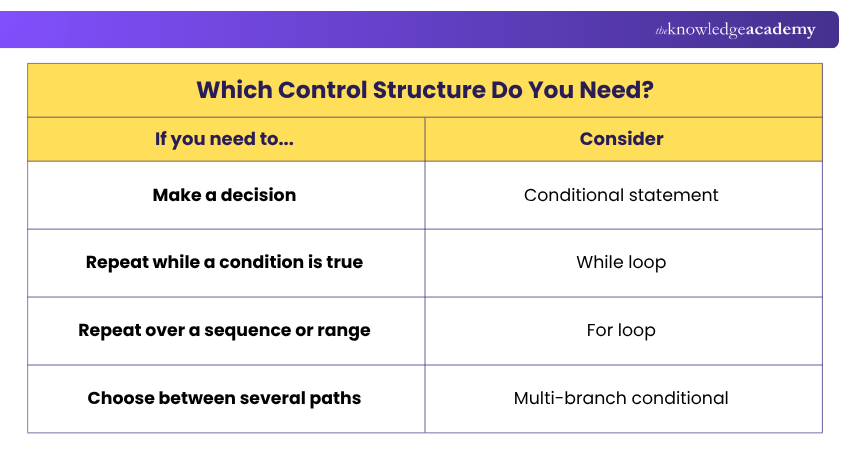
Control structures are programming constructs that determine the flow of execution in a program, allowing code to make decisions, repeat operations or follow different execution paths. For example, during program execution, a control structure can determine which instructions should run based on conditions defined by the programmer.
The code could repeat a certain block of code, execute different instructions based on a condition, or skip a block of code altogether.
6) Basic Syntax
Basic syntax in programming is akin to the grammar and punctuation rules used in written language, dictating the structure and composition of code within a specific programming language. It involves elements like keywords, operators, variables, and punctuation marks, which are used to form statements and expressions.
For instance, in the Python programming language, indentation is crucial for indicating code blocks, while statements are generally separated by new lines. Semicolons can be used to separate multiple simple statements on the same line but are not normally required to end statements.
Understanding basic syntax is vital for writing correct and readable code, as it governs how the computer interprets and executes instructions. By adhering to these syntax rules, programmers can effectively communicate their intentions, ensuring their code operates as expected.
Which Control Structure Do You Need?
7) IDEs and Coding Environments
An Integrated Development Environment (IDE) is an application that programmers use to write, edit, build, run and debug code. It increases a programmer’s productivity and efficiency through features such as code compilation, code completion, debugging, syntax highlighting, etc.
Some common examples of IDEs are:
a) Visual Studio
b) NetBeans
c) Eclipse
On the other hand, coding environments might offer a more lightweight and customisable setup, allowing programmers to select specific tools and configurations that best fit their preferences and project requirements.
Tips to Improve Programming Skills
Here are some tips to improve your programming skills:
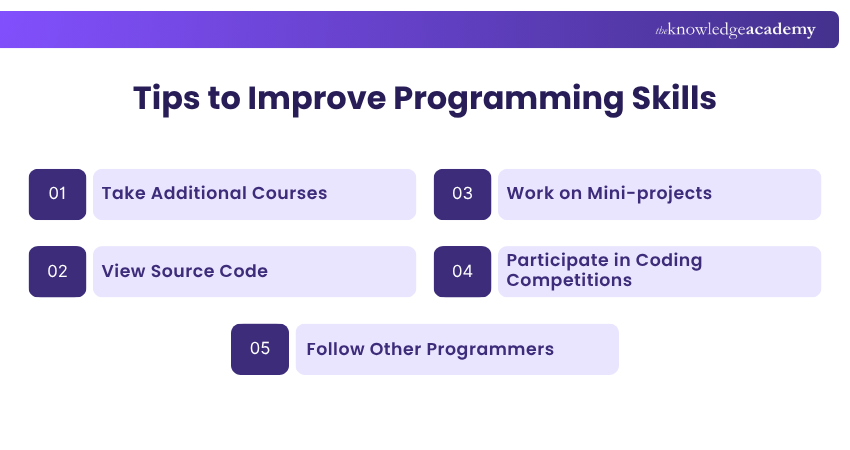
1) Take Additional Courses: Consider taking additional courses including practice tests, quizzes, and capstone projects to enhance your programming skills and credentials in the IT field.
2) View Source Code: It's highly recommended that you review source code from well-structured projects to gain deeper insight into their design, logic and implementation. This can help you understand coding practices and improve the way you structure your own programs.
3) Work on Mini-projects: By working on end-to-end projects, you learn the overall structure of a program, along with best coding practices and optimisation techniques. A project may involve various phases, such as planning, designing, coding, testing, debugging, and deployment.
4) Participate in Coding Competitions: Competitive coding can strengthen your algorithmic thinking and problem-solving abilities while giving you practical experience with algorithms and data structures.
5) Follow Other Programmers: You can review their codebases on various platforms, such as Kaggle or GitHub, letting you improve your programming skills and stay current with the latest IT developments.
Programming Practice Checklist
Before moving to more advanced programming topics, check whether you can:
Understand and write basic syntax Create and use variables Apply conditions and loops Work with basic data structures Identify common programming errors Debug simple programs Explain basic OOP concepts Build a small program independently
Learn to write clean, efficient code across web, app and software projects with our Coding Training – Join now!

Gaurav Kalita is a Content Writer with 2+ years of experience in content development, research and storytelling. His background in English literature and teaching, combined with his growing interest in AI and Machine Learning, supports his writing across Business Skills and IT and Tech.
View Detail

 If you wish to make any changes to your course, please


