


 Top Rated Course

We may not have the course you’re looking for. If you enquire or give us a call on 01344203999 and speak to our training experts, we may still be able to help with your training requirements.
Password Attacks: Definition, Types, and How to Prevent Them
Sophia Ellis 16 July 2026Password Attacks are attempts by cybercriminals to gain unauthorised access to systems or data by cracking or stealing user passwords through various methods. Common methods include phishing, brute force, credential stuffing, password spraying, and more. These attacks often lead to data breaches, financial loss, and privacy risks.
Home
 Resources
IT Security & Data Protection
Password Attacks: Definition, Types, and How to Prevent Them
Resources
IT Security & Data Protection
Password Attacks: Definition, Types, and How to Prevent Them
Resources
IT Security & Data Protection
Password Attacks: Definition, Types, and How to Prevent Them

Training Outcomes Within Your Budget!
We ensure quality, budget-alignment, and timely delivery by our expert instructors.
Table of Contents

You are always on watch, even if you secure your credentials. In today’s ultra-digital world, passwords are your first defence against cyber threats. However, at the same time, they are also a top target for hackers. One stolen password can expose all your personal data, financial accounts, or even an entire organisation's network.
So, what exactly are Password Attacks? How can you protect yourself or your business from that? Read on this blog to know what it is, its techniques, some real-world examples and cybersecurity best practices!
Table of Contents
1) What is a Password Attack?
2) Types of Password Attacks
3) How to Prevent Password Attacks?
4) How Damaging is a Password Attack?
5) Cybersecurity Best Practices to Reduce Password Attack Risks
6) Real-world Examples of Password Attacks
7) Conclusion
What is a Password Attack?
A Password Attack is a method used by Hackers to obtain unauthorised access to your systems, applications, or networks by cracking or stealing passwords. These attacks can be either manual or automated. It involves several techniques such as guessing, stealing, or intercepting passwords.
Cybercriminals use your valid login credentials and pretend to be you to access your emails, bank accounts, or files. These Hackers often exploit flaws in authentication systems or rely on targeting users who choose simple, easily guessed passwords.
Types of Password Attacks
There are many ways tired by the Hackers to steal passwords. Here are the most common types of Password Attacks:

1) Phishing
Phishing involves a Social Engineering attack where Hackers trick you into sharing your passwords. They pretend to be someone you trust, like your bank or a company, and ask you to log in to a fake website. They often send emails or messages for that.
Example: You get an email saying, “Your account is at risk, click here to log in.” But, in reality, the link will lead you to a fake website.
2) Brute Force Attack
In a brute force attack, the Hacker tries all the possible combination of letters, numbers, and symbols until they find the correct password. It’s like trying every key on a keychain until one fits the lock.
Example: Short and simple passwords like "1234" can be cracked in seconds. Instead, longer passwords are harder to guess.
3) Credential Stuffing
Credential stuffing involves using your previously stolen passwords from one website and trying them on multiple sites. This works because many users reuse the same password across different platforms.
Example: If your Netflix password is stolen, attackers might try the same one on your Gmail or Amazon Prime account.
4) Keylogger Attack
A keylogger is a type of malware that records everything you type on your keyboard. It is a sneaky program that records your passwords, too. Once installed on your device, it silently logs keystrokes and sends them to the attacker.
Example: It usually gets into your systems through unsafe downloads or clicking on suspicious links.
Acquire best practices for password security, safe browsing, and data protection with our Cyber Security Awareness Course – Register today!
5) Rainbow Table Attack
A rainbow table is a big list of passwords, and their encrypted forms are called hashes. Cyber attackers use it to match and find real passwords. This method helps them crack passwords quickly without guessing each time.
Example: Using a technique called salting, which adds random data to passwords before hashing, can neutralise rainbow table attacks.
6) Dictionary Attack
Unlike brute force, a dictionary attack in Password Attacks uses a list of commonly used passwords or phrases like "123456", "qwerty", or "password1" to guess your login credentials. It’s faster than brute force because it tries likely options instead of all possible ones.
Example: If your password is “98765,” a dictionary attack may crack it within seconds because it's a popular password included in many wordlists.
7) Man-in-the-Middle Attack
In a Man-in-the-Middle (MITM) attack, a Hacker secretly watches or changes the data sent between you and a website to steal your credentials. It usually occurs on insecure or public Wi-Fi connections or networks.
Example: You log in to your bank account on any shop's Wi-Fi, and an attacker intercepts the data mid-transmission.
8) Traffic Interception
This attack is like eavesdropping on your internet connection, like an MITM attack. If the website you visit doesn’t use secure encryption, Hackers might see your password as you type it. It will be visible to them as plain text itself.
Example: Always check for a padlock icon in HTTPS and use VPNs when on public networks.
9) Password Spraying
In password spraying, cyber criminals try a small set of common passwords on multiple accounts instead of targeting only one account with many guesses. This method helps avoid account lockouts.
Example: Using "Welcome123" or "Password!" on thousands of emails or personal accounts.
Develop skills in Reverse Engineering and Threat Detection with our Malware Analysis Training - Sign up immediately!
How to Prevent Password Attacks?
While the types of attacks may make it critical, following basic security practices can significantly lower your risk. Here are some of the preventive tips for you:
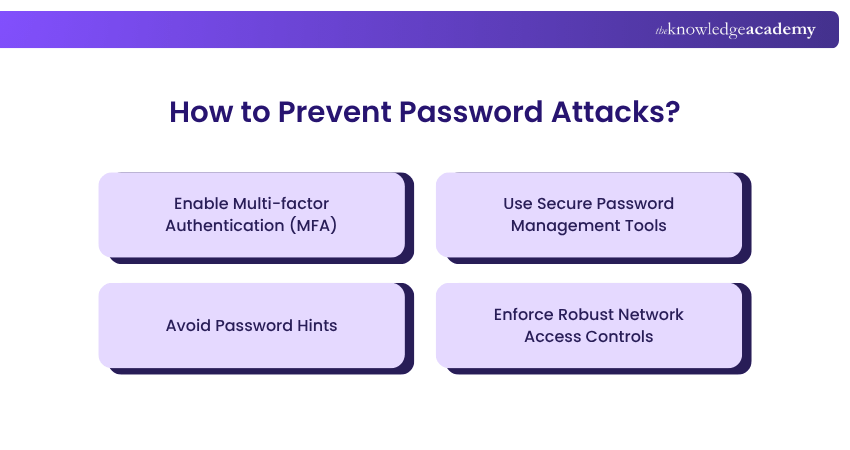
1) Enable Multi-factor Authentication (MFA)
Multi-factor Authentication (MFA) is like an extra shield of security by asking for a second step after entering your password. Even if a Hacker cracks your password, they can't log in without the second factor. Most common MFAs include:
1) An email confirmation
2) Fingerprint verification
3) Face recognition
2) Use Secure Password Management Tools
A password manager helps create and store strong, unique passwords for every account. You don’t have to remember all the passwords. Instead, you only need to remember one master password. Some password management tools include:
1) LastPass
2) Bitwarden
3) 1Password
3) Avoid Password Hints
Password hints can give clues to Hackers. Avoid using hints that are easy to guess, like your pet’s name, or your birthday, which are often available on Social Media. Because they gather information from your public profiles to guess based on your hints. Some hints include:
1) Favourite colour password: BlueSky2020
2) My pet's name password: fluffy123
3) Mobile number hint: Scot6894
4) Enforce Robust Network Access Controls
You can control access to your login systems using firewalls, Access Control Lists (ACLs), antivirus software, and Virtual Private Networks (VPNs). This helps detect and block threats like malware, keyloggers, or suspicious traffic. Here are some tips:
1) Use IP allow/block lists
2) Track unusual login behaviour
3) Set role-based access limits
How Damaging is a Password Attack?
Password attacks can have serious consequences, compromising sensitive data and disrupting business operations. The fallout often includes financial losses, reputational damage, and legal or regulatory repercussions.
1) Data Breaches: Hackers steal your files, contacts, or private messages.
2) Financial Loss: They buy things or steal directly from your bank.
3) Reputational Damage: They can shut down business systems or steal customer data. This will affect your customers’ trust in you.
4) Fines or Legal Trouble: Companies that don’t protect data can face big penalties for non-compliance.
5) Service Disruption: Downtime or access issues caused by unauthorised intrusion.
Secure critical data and assets through effective security measures with our Certified Cyber Security Professional (CCS-PRO) Course – Join now!
Cybersecurity Best Practices to Reduce Password Attack Risks
Here are general cybersecurity strategies that help reduce password-related risks:
1) Regularly update your passwords once every 60 to 90 days
2) Avoid using the same password across various platforms
3) Always use strong passwords with letters, numbers, and symbols
4) Turn on alerts for new logins or suspicious activity
5) Train employees on how to recognise phishing and suspicious links
6) Enable account lockout after numerous failed login attempts
7) Monitor login details for anomalies like foreign IPs or late-night logins
8) Don’t click on unknown or suspicious links in emails or texts
Real-world Examples of Password Attacks
Password Attacks have caused real damage to major organisations. Below are some notable cases that show how compromised or weak passwords and poor access controls can lead to serious breaches:
Microsoft Breach by Midnight Blizzard
In late 2023, Microsoft was targeted by Midnight Blizzard, a Russian state-sponsored threat group, through a password spray attack. They gained access through a legacy test account with weak credentials.
Once inside, they infiltrated sensitive corporate email accounts, including those belonging to senior leadership, legal, and cybersecurity teams, compromising internal communications and exposing confidential information.
MGM Resorts & Caesars Entertainment
In 2023, MGM Resorts was hit by a cyberattack after Hackers pretended to be employees and tricked IT staff into resetting passwords. This caused big problems like hotel key cards not working and slot machines shutting down, leading to a heavy loss.
The incident showed how easily attackers can get in by fooling support staff, putting customer data and trust at risk.
Conclusion
Passwords are a foundational part of digital security. However, they also present a significant risk when not managed properly, leading to Password Attacks. From brute force attacks to phishing, cybercriminals have numerous methods to steal credentials. The good news is that using tools like MFA, password managers, and staying alert, you can keep your accounts safe. Start protecting your credentials without a second thought!
Build strong authentication methods with our Introduction to System and Network Security Training – Register today!
Frequently Asked Questions
How are Passwords Hacked?

Hackers steal passwords through fake emails, guessing, or stealing from websites that were hacked. Using the same password everywhere makes it even easier for them.
What is Attack Mode?
Attack mode is the way a Hacker tries to break your password. Some use guessing like brute force while, others use stolen lists like a dictionary or credential stuffing.

 If you wish to make any changes to your course, please


