


 Top Rated Course

We may not have the course you’re looking for. If you enquire or give us a call on 01344203999 and speak to our training experts, we may still be able to help with your training requirements.
Modem vs Router: Understanding the Difference and Their Roles
John Davies 16 July 2026Modem vs Router: A modem links your home to your ISP, while a router distributes the connection to multiple devices via Wi-Fi or Ethernet. Understanding their roles helps you build a reliable, secure, and efficient network. Explore the key differences, functions, and benefits of each device to achieve seamless internet connectivity.
Home
 Resources
IT Infrastructure & Networking
Modem vs Router: Understanding the Difference and Their Roles
Resources
IT Infrastructure & Networking
Modem vs Router: Understanding the Difference and Their Roles
Resources
IT Infrastructure & Networking
Modem vs Router: Understanding the Difference and Their Roles

Training Outcomes Within Your Budget!
We ensure quality, budget-alignment, and timely delivery by our expert instructors.
Table of Contents

The quality of the internet connection is determined by proper networking equipment, but still, a lot of people use it without knowing what each device does. A comparison of Modem vs Router will prove how both these devices get the internet to your house and distribute it among different devices. Let us analyse the distinctions and functions of these devices in your network configuration.
Table of Contents
1) What is a Modem?
2) What is a Router?
3) Key Differences Between Modem and Router
4) Do You Need Both a Modem and a Router?
5) Modem Speed vs Router Speed
6) Conclusion
What is a Modem?
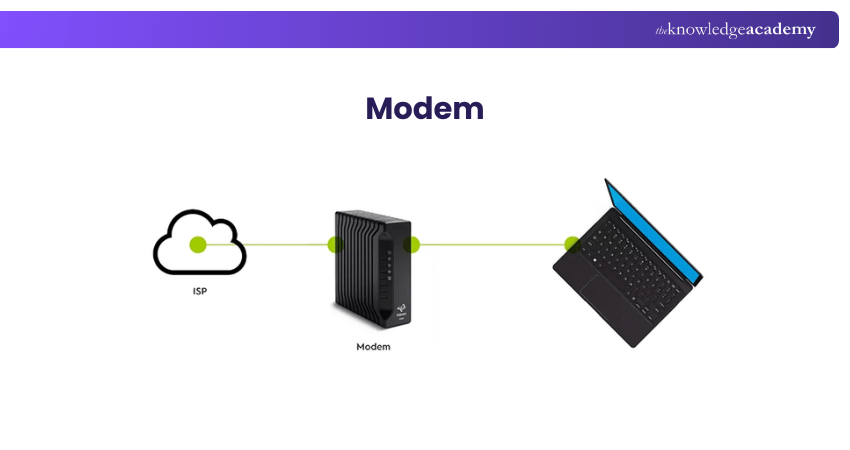
A Modem is a hardware device that connects your home or office to the internet by changing digital signals into network lines' transmit-ready format. It is the one and only link between your devices and the internet service provider, thus granting you access to all online services and communication.

What is a Router?
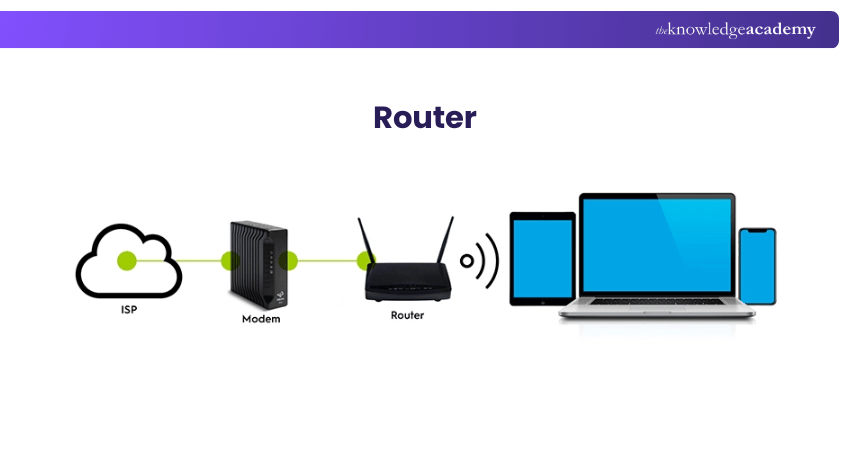
A Router is a type of network hardware that links several devices in a house or office and manages the data traffic flow not only among them but also to and from other network devices. It allows connected devices to share the same internet connection, manage communication efficiently, and often provides Wi-Fi and security for the local network.
Key Differences Between Modem and Router
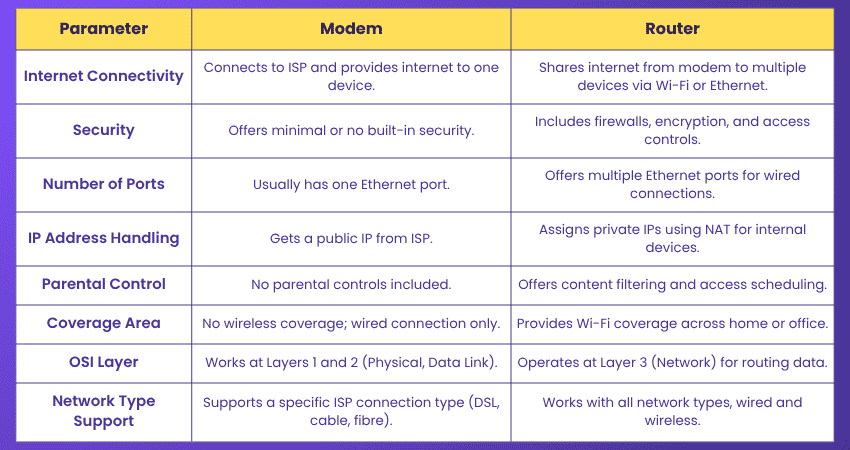
Let us compare the key differences between Modems and Routers to better understand how each functions within a network:
1) Internet Connectivity
Modem: Connects directly to your Internet Service Provider. It brings the internet into your home or office but only provides connectivity to a single device, usually a Router or computer.
Router: Distributes the internet from the Modem to multiple devices using Wi-Fi or Ethernet. It creates a local network that allows many devices to access the internet simultaneously.
2) Security
Modem: Has little to no built-in security features. It does not offer firewalls or encryption and relies on external security measures (like a Router or software firewalls).
Router: Comes with built-in security tools such as firewalls, WPA2/WPA3 encryption, and user access controls. These features help protect your entire network from external threats.
3) Number of Ports
Modem: Typically includes one Ethernet port. This is meant to connect to a single device, either a Router or a computer.
Router: Has multiple Ethernet ports, allowing various wired devices (like PCs, printers, or smart TVs) to connect to the local network.
4) IP Address Handling
Modem: Receives a public IP address directly from the ISP. This address is used to identify your network on the internet.
Router: Assigns private IP addresses to all devices within the network and uses Network Address Translation (NAT) to manage internet traffic using the single public IP provided by the Modem.
5) Parental Control
Modem: Lacks User Management features like parental controls. It simply passes internet access to a connected device.
Router: Most modern Routers offer parental controls that let you filter content, block websites, and set time limits on internet usage for particular devices.
6) Coverage Area
Modem: Only provides a wired internet signal. It doesn’t support wireless connectivity and can’t distribute internet to multiple devices on its own.
Router: Broadcasts a wireless signal (Wi-Fi) over a certain area, allowing multiple devices to connect to the internet without cables.
7) OSI Layer of Operation
Modem: Functions at the Physical Layer (Layer 1) as well as the Data Link Layer (Layer 2) of the OSI model. It handles signal conversion between your ISP’s line (e.g., cable, DSL) and your digital devices.
Router: It works at the Network Layer (Layer 3). It determines the best path for data packets and ensures they reach the correct device on your local network.
8) Network Type Support
Modem: Compatible with only one type of network connection (DSL, cable, or fibre), depending on what your ISP provides.
Router: Works with various network types and supports both wired and wireless connections. It’s more flexible in handling a range of devices and configurations.
Build strong networking foundations with the Interconnecting Cisco Networking Devices Part 1 Training - Sign up now!
Do You Need Both a Modem and a Router?
Most home networks require both a modem and a router. The modem connects your home to your Internet Service Provider (ISP), while the router distributes that internet connection to multiple devices through Wi-Fi or Ethernet.
Without a modem, your router cannot access the internet. Without a router, only one device can typically connect at a time. Many households now use modem-router combo devices that combine both functions into a single unit.
Modem Speed vs Router Speed
Modem speed and router speed serve different purposes within a network. A modem determines the maximum internet speed your home can receive from your Internet Service Provider (ISP), while a router controls how efficiently that connection is distributed to connected devices through Wi-Fi or Ethernet.
Even if you have a high-speed internet plan, an outdated router can limit wireless performance and reduce connection quality across devices. To achieve the best results, both the modem and router should support the speeds required by your broadband service and network usage.
Conclusion
Your internet experience is already decided even before you click on a browser or watch a video. Modem vs Router clears up the confusion with the devices operating in the background. We trust that this blog has helped clarify their roles and significance.
Start your networking journey with our comprehensive Cisco Packet Tracer Training - Join now and build confidence through real-world virtual labs!
Frequently Asked Questions
Do We Need a Router if We Have a Modem?

Yes, you need a Router if you want to connect multiple devices or use Wi-Fi. A Modem only provides internet to a single device, while a Router enables sharing that connection wirelessly or via Ethernet.
Do Modems Have Built in Routers?
Yes, some modems have built-in routers. These modem-router combo devices combine internet access and network distribution into a single unit, offering a convenient all-in-one networking solution.

John Davies


Cyber Security Governance & Assurance Specialist
John Davies is a cybersecurity expert specialising in governance, risk management, and compliance. With over 15 years in the field, he has led enterprise-wide security programmes across finance, healthcare and public sector organisations. His content provides practical guidance on building secure environments, managing risk and aligning with regulatory frameworks.


 If you wish to make any changes to your course, please


