


 Top Rated Course

We may not have the course you’re looking for. If you enquire or give us a call on 01344203999 and speak to our training experts, we may still be able to help with your training requirements.
Arithmetic Expression in Java: Explained in Detail
Richard Harris 20 August 2026Arithmetic Expressions in Java combine operands and operators to perform mathematical calculations. Learn how arithmetic operators, precedence, associativity, and parentheses determine how Java evaluates expressions.

Training Outcomes Within Your Budget!
We ensure quality, budget-alignment, and timely delivery by our expert instructors.
Table of Contents
Imagine building a shopping application that needs to calculate prices, quantities, discounts, and totals. Behind each calculation is an arithmetic expression telling Java which values to use and which mathematical operations to perform.
Understanding these expressions is one of the foundations of working with calculations in Java. This blog explains Arithmetic Expression in Java, arithmetic operators, operands, evaluation order, parentheses, and practical examples to help you use them confidently.
Key Takeaways
1. Each arithmetic operator tells Java which calculation to perform.2. Choose the right operator to perform the intended calculation.3. Java arithmetic operators turn numeric values into calculated results.4. One operator can change how Java calculates the same values.5. Operands provide the values; operators determine the calculation.
What is an Arithmetic Expression in Java?
Arithmetic Expressions in Java combine values, variables, and arithmetic operators to perform calculations and produce a result. For example, in 10 + 5, the numbers are operands and + is the operator. These expressions are commonly used for calculations ranging from simple addition to more complex mathematical operations.

Components of Arithmetic Expressions in Java
The two components of Arithmetic Expressions in Java are mentioned below:
Operands
Operands are the values, variables, or expressions on which an arithmetic operation is performed. They provide the data that an operator uses during a calculation.
For example:
int total = price + tax;
Here, price and tax are operands, while + performs the arithmetic operation. Operands can include variables, numeric literals, or other expressions.
Arithmetic Operators
Arithmetic operators are symbols that specify the mathematical operation Java should perform on operands. They include operators for addition, subtraction, multiplication, division, and remainder calculations. Each operator is explained in detail in the following section.
Arithmetic Operators in Java
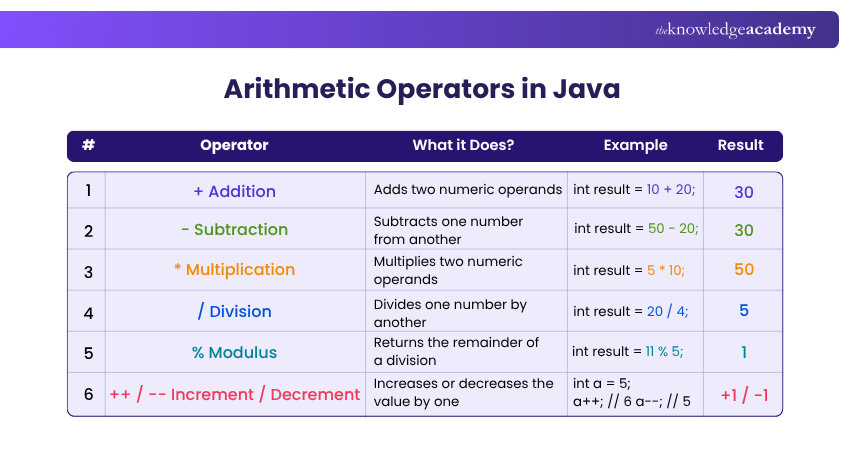
Here is a list of the arithmetic operators in Java, described in detail as follows:
1) Addition Operator
The addition operator (+) adds two numeric operands. It can also be used multiple times within an expression to calculate the sum of several values.
For example:
int result = 10 + 20;
Here, the + operator adds 10 and 20, producing 30, which is stored in result.
2) Subtraction Operator
The subtraction operator in Java symbolised as '-', is utilised to subtract one number from another in Java.
For example:
int result = 50 - 20;
The '-' operator subtracts 20 from 50, yielding 30, which is then stored in 'result'.
3) Multiplication Operator
The multiplication operator in Java is denoted by '*'. It's used to multiply two numbers.
For example:
int result = 5 * 10;
The '*' operator multiplies 5 by 10, yielding a result of 50, which is stored in the variable 'result'.
4) Division Operator
The division operator (/) divides one numeric operand by another. When both operands are integers, Java performs integer division, so any fractional part of the result is discarded. If either operand is a floating-point value, the result can retain its decimal portion.
For example:
int result = 20 / 4;
Here, 20 is divided by 4, producing 5.
Java Fact
5 / 2 and 5.0 / 2 do not produce the same result. Integer division gives 2, while using a floating-point operand allows a decimal result such as 2.5. Java determines the arithmetic operation after applying numeric promotion to the operands.
5) Modulus Operator
The modulus operator (%) in Java returns the remainder value from a division operation.
For example:
int result = 11 % 5;
The '%' operator will yield 1 because when 11 is divided by the integer 5, the remainder is 1.
6) Increment Operator and Decrement Operator
The increment (++) and decrement (--) operators change the value of a variable by one. The increment operator increases the value, while the decrement operator decreases it.
For example:
int a = 5;
a++; // a becomes 6
a--; // a becomes 5
These unary operators are commonly used when updating counters, particularly in loops.
Learn about the various data types, operators and methods for creating your web applications by signing up for the Java Programming Course now.
How are Arithmetic Expressions Evaluated in Java?
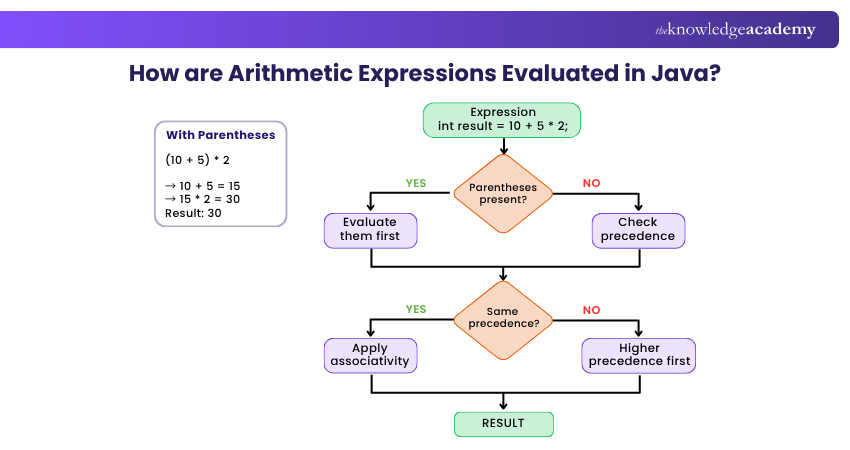
Follow the steps below to evaluate Arithemetic Expressions in Java:
1) Operator Precedence
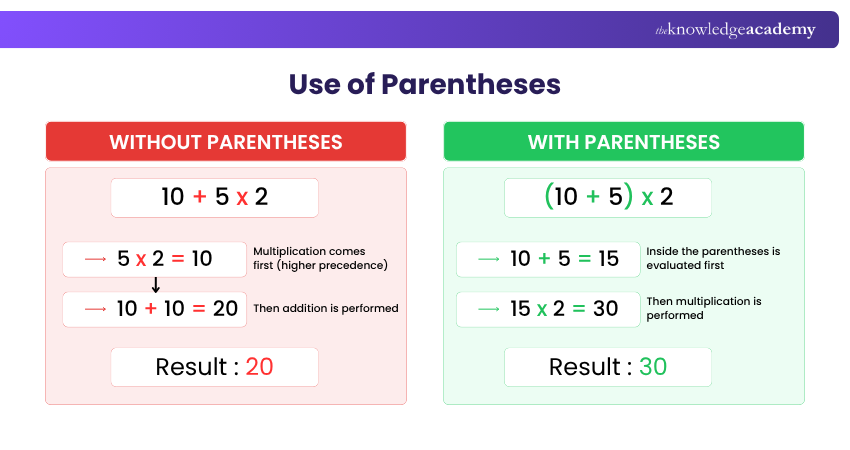
Operator precedence determines which operation Java evaluates first when an expression contains different operators. Multiplication, division, and modulus have higher precedence than addition and subtraction.
Consider this example:
int result = 10 + 5 * 2;
Java performs 5 * 2 first because multiplication has higher precedence than addition. It then adds 10, making the final value of result equal to 20.
Trainer's Insight
Don't rely on memory when an expression becomes complex. Even when you know Java's precedence rules, using parentheses can make the intended calculation immediately clear to anyone reading your code.
2) Associativity
Associativity determines the order of evaluation when operators have the same precedence. Most binary arithmetic operators are evaluated from left to right.
For example:
int result = 20 / 5 * 2;
Division and multiplication have the same precedence, so Java evaluates the expression from left to right:
20 / 5 = 4 4 * 2 = 8
Therefore, the final value of the result is 8.
3) Use of Parentheses
Parentheses can be used to control the order of evaluation. Expressions inside parentheses are evaluated before the surrounding arithmetic operations.
For example:
int result = (10 + 5) * 2;
Java first evaluates 10 + 5, producing 15. It then multiplies the result by 2, giving a final value of 30.
Using parentheses can also make complex expressions easier to understand, even when they do not change the final result.
Example of a Java Program to Perform Arithmetic Operations
Here is a basic Java program that uses Arithmetic Operators to perform operations on two integers. The program will add, subtract, multiply, divide, and find the modulus of these numbers:
This program begins with the declaration of two integer variables, 'num1' and 'num2'. Then it carries out each arithmetic operation using these numbers, outputting the result of each operation.
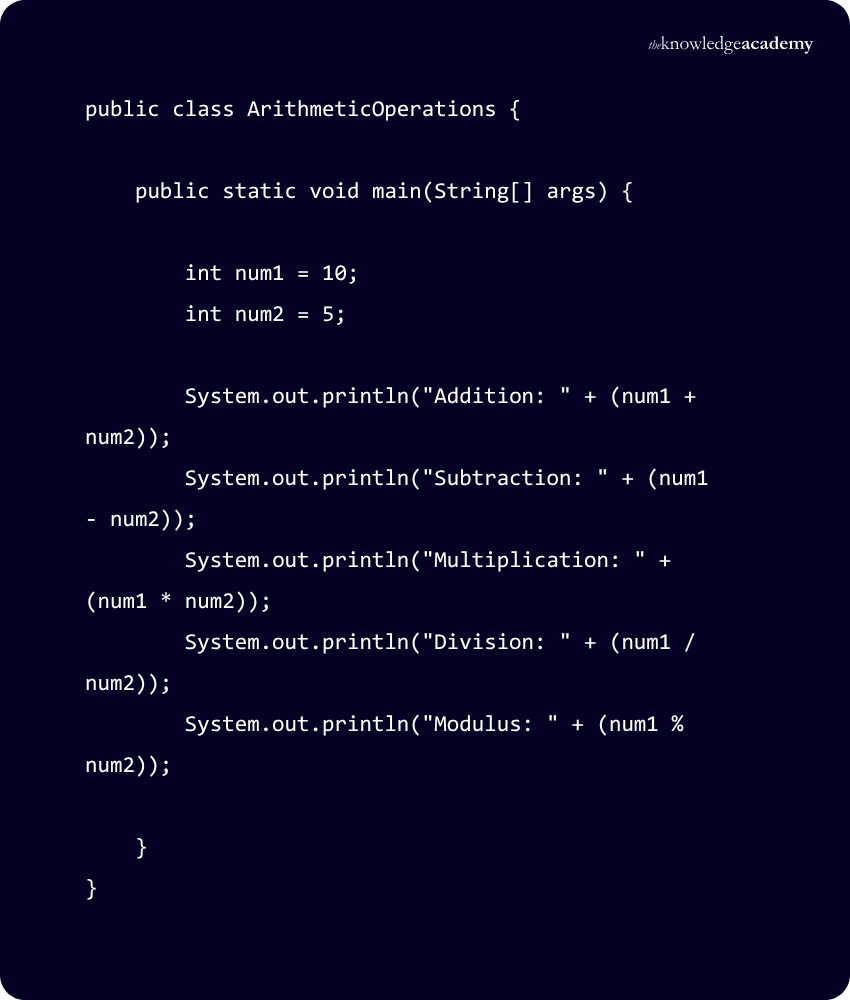
Now, let's check how we will receive the output:
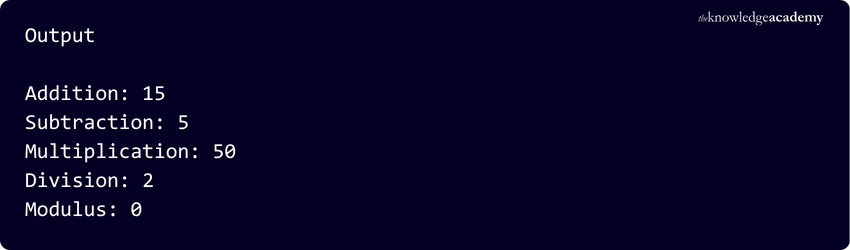
Explanation: You can see the result of each operation. For example, the addition of 'num1 (10)' and 'num2 (5)' results in 15, and the subtraction of 'num1' from 'num2' gives 5, and so forth. This simple example gives you an idea of how Arithmetic Operations work in Java.
Think Before You Run
What will Java return?
A. 10 + 4 * 2B. (10 + 4) * 2C. 20 / 5 * 2D. 7 / 2
Answers:A = 18B = 28C = 8D = 3
Score 4/4? You are ready to put Java arithmetic into a program. en:
Build smarter web solutions using java with our Web Development Using Java Training - Join now
Common Errors When Performing Arithmetic Operations in Java
Arithmetic operations are straightforward, but small mistakes involving data types, precedence, or division can produce unexpected results. Understanding these common errors can make Java calculations more reliable.
1) Unexpected Integer Division
Using two integer operands in a division operation produces an integer result.
int result = 7 / 2;
The result is 3, not 3.5.
Use a floating-point operand when a decimal result is required.
double result = 7.0 / 2;
In this case the result is 3.5
2) Dividing an Integer by Zero
Attempting integer division by zero causes an ArithmeticException.
int result = 10 / 0;
Check that the divisor is not zero before performing integer division.
3) Ignoring Operator Precedence
An expression may produce an unexpected result if the order of operations is misunderstood.
int result = 10 + 5 * 2;
The result is 20, not 30, because multiplication is evaluated before addition. Use parentheses when a different evaluation order is required.
4) Numeric Overflow
Integer types can store values only within specific ranges. If a calculation exceeds that range, the result can overflow and produce an unexpected value.
For calculations involving larger whole numbers, an appropriate wider numeric type such as long may be required.
5) Incorrect Type Casting
Casting a floating-point value to an integer removes its fractional part.
double value = 9.8; int result = (int) value;
Here, result becomes 9, not 10. Type conversions should therefore be used carefully when precision matters.
Conclusion
Arithmetic Expressions in Java provide a structured way to perform mathematical calculations using operands and operators. Understanding arithmetic operators, precedence, associativity, and common calculation errors can help you write clearer and more accurate Java code. Practising these concepts through simple programs also builds a strong foundation for working with more complex calculations.
Turn JavaScript Basics into Practical Skills with our JavaScript For Beginners Course – Join now!
Frequently Asked Questions
What are the Types of Expressions in Java?

An expression in Java is a combination of variables, operators, literals, and method calls that Java evaluates to produce a single value. Expressions can be classified based on the type of value they return or the operators involved.
What are the Eight Types of Operators in Java?
Java has Eight primary types of operators used to perform math, compare values, manage logic, and change variable data. They include:
1) Arithmetic
2) Assignment
3) Relational
4) Logical
5) Unary
6) Bitwise
7) Shift
8) Ternary operators
What is Java in 100 words?
Java is a high-level, object-oriented programming language introduced by Sun Microsystems in 1995. It follows the “Write Once, Run Anywhere” principle, where compiled Java code becomes bytecode that can run on any system with a Java Virtual Machine (JVM).

Richard Harris


Senior Full Stack Developer and Technology Educator
Richard Harris is a highly experienced full-stack developer with deep expertise in both frontend and backend technologies. Over his 12-year career, he has built scalable web applications for startups, enterprises and government organisations. Richard’s writing combines technical depth with clear explanations, ideal for developers looking to grow in modern frameworks and tools.


 If you wish to make any changes to your course, please


