


 Top Rated Course

We may not have the course you’re looking for. If you enquire or give us a call on 01344203999 and speak to our training experts, we may still be able to help with your training requirements.
How to Hard Reset iPhone? All You Need to Know
Richard Harris 16 February 2026Smartphones have become an indispensable part of our lives as they keep us connected, informed, and entertained. However, like any technological device, they can sometimes encounter issues. This blog focuses on "How to Hard Reset iPhone?”, a crucial skill for efficiently tackling situations where the device becomes unresponsive.

Training Outcomes Within Your Budget!
We ensure quality, budget-alignment, and timely delivery by our expert instructors.
Table of Contents
In the world of iPhone troubleshooting, understanding "How to Hard Reset iPhone" can be a lifeline for resolving some of the most persistent device issues. This technique, a critical skill for any iPhone user, allows for a swift intervention that can bring an unresponsive device back to life. As we delve deeper into the digital age, encountering occasional glitches on our iPhones is inevitable. This blog aims to identify the various reset methods available, including the Soft Reset, Force Restart (Hard Reset), and Factory Reset, providing detailed insights on when and how to utilise each. Additionally, if you're looking to streamline your iPhone experience, learning about Turning Off iPhone features might help you avoid some common problems. We ensure you will be well-prepared to tackle any issues your iPhone might throw your way. We ensure you will be well-prepared to tackle any issues your iPhone might throw your way.
Table of Contents
1) What is Hard Reset?
2) Difference between a Soft Reset, a Force Restart and a Factory Reset
3) Steps required to Hard Reset an iPhone
4) Conclusion
What is Hard Reset?
A Hard Reset, also known as a Force Restart, is a process that forcefully reboots an iPhone without deleting any data. It is similar to restarting a computer when it is acting sluggish or not responding. This method is particularly useful for solving minor software glitches and does not affect personal data or settings.
Difference between a Soft Reset, a Force Restart and a Factory Reset
When comparing the different methods of resetting an iPhone, it is essential to understand their distinct purposes and the specific scenarios in which they are most effectively employed. Let’s discuss in detail:
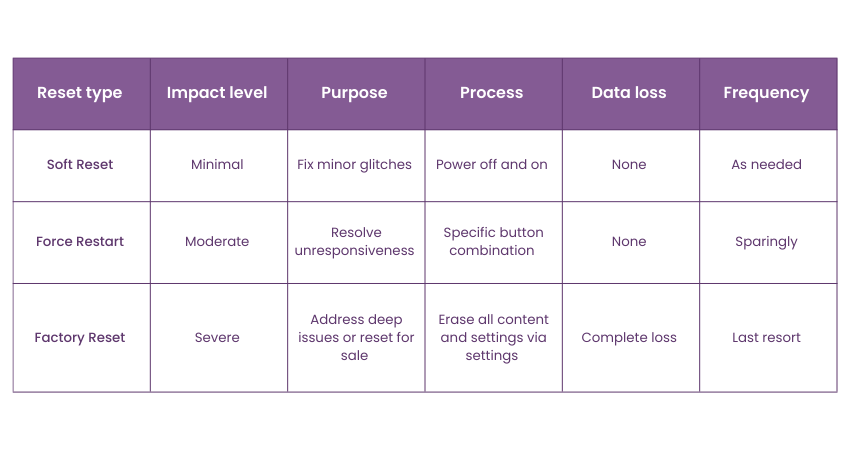
Soft Reset:
a) Impact level: It is the gentlest form of reset, causing no disruption to personal data or settings.
b) Purpose: It addresses minor software issues like app crashes or temporary glitches.
c) Process: It involves turning the iPhone off and then turning it back on.
d) Data loss: It does not affect personal data or system settings.
e) Frequency of use: it can be performed regularly without any risk.
Force Restart (Hard Reset):
a) Impact level: It tackles more stubborn issues that a Soft Reset cannot fix.
b) Purpose: It is used for more significant software issues when the iPhone is unresponsive.
c) Process: It requires a specific combination of button presses that depend on the iPhone model.
d) Data loss: It does not erase data or change settings permanently.
e) Frequency of use: It should be used only when necessary, as it is more invasive than a Soft Reset but does not lead to data loss.
Factory Reset:
a) Impact level: This is the most drastic action that can be taken on an iPhone, effectively wiping it clean.
b) Purpose: It resolves deep-rooted software issues, prepares the device for sale, or starts fresh by removing all content.
c) Process: It can be initiated from the iPhone's settings. It completely erases all data, apps, settings, and personal information.
d) Data loss: All personal data, apps, and settings are permanently erased.
e) Frequency of use: It should be used only when necessary, given its irreversible nature and the complete erasure of all data.
Understand mobile app creation with our Android App Development Course – register today!
Steps required to Hard Reset iPhone
A hard reset on an iPhone doesn’t delete any data from the device. Instead, it acts more like a power cycle that can help resolve issues such as frozen apps or unresponsive screens. If you're also wondering about how to deactivate voicemail in iPhone, it's important to note that this process is unrelated to a hard reset. The steps to perform a hard reset vary based on the iPhone model. Here’s how to do it for different models:
iPhone 7 and iPhone 7 Plus:
a) Press the following two buttons simultaneously: Side button and Volume Down button.
b) Hold down the buttons until the Apple logo appears.
c) Let go off the buttons and allow the iPhone to restart.
iPhone 8, iPhone 8 Plus, iPhone X and later models:
a) Press and release the Volume Up button.
b) Press and release the Volume Down button.
c) Press and hold the Side button.
d) Keep holding the Side button even after the "slide to power off" slider appears.
e) Let go off the Side button when the Apple logo appears.
Gain knowledge on how to increase the speed of web development with our Symfony Web Development Course – join today!
Conclusion
Knowing "How to Hard Reset iPhone?" along with when to employ a Soft Reset or a Factory Reset, empowers you to effectively troubleshoot issues. It also preserves your data's integrity and keeps your device running smoothly. Similarly, understanding how to manage your apps, such as learning How to Hide Apps on iPhone, can help you maintain a more organized and efficient home screen. Remember, while a Hard Reset can solve many problems without data loss, always ensure your data is backed up before considering a Factory Reset. This deep knowledge can help you navigate the complexities of iPhone maintenance and customization with confidence.
Learn the concepts of iOS app development with our IOS App Development Course – join today!
Frequently Asked Questions
What happens to my data if I perform a Hard Reset on my iPhone?

Performing a Hard Reset does not erase any of your personal data or settings. It simply reboots your device to resolve issues like freezing or unresponsiveness.
How often can I Hard Reset my iPhone without causing damage?
You can securely execute a Hard Reset on your iPhone whenever the need arises. While it is safe to use as needed, it is best to use this method sparingly and only when softer reset methods do not resolve the issue.
What are the other resources and offers provided by The Knowledge Academy?
The Knowledge Academy takes global learning to new heights, offering over 3,000+ online courses across 490+ locations in 190+ countries. This expansive reach ensures accessibility and convenience for learners worldwide.
Alongside our diverse Online Course Catalogue, encompassing 19 major categories, we go the extra mile by providing a plethora of free educational Online Resources like Blogs, eBooks, Interview Questions and Videos. Tailoring learning experiences further, professionals can unlock greater value through a wide range of special discounts, seasonal deals, and Exclusive Offers.
What is the Knowledge Pass, and how does it work?
The Knowledge Academy’s Knowledge Pass, a prepaid voucher, adds another layer of flexibility, allowing course bookings over a 12-month period. Join us on a journey where education knows no bounds.
What are related courses and blogs provided by The Knowledge Academy?
The Knowledge Academy offers various App & Web Development Training, including Mobile App Development Training, IOS App Development Training and Symfony Web Development Training. These courses cater to different skill levels, providing comprehensive insights into What is HTML?
Our Programming & DevOps cover a range of topics offering valuable resources, best practices, and industry insights. Whether you are a beginner or looking to advance your IT Security skills, The Knowledge Academy's diverse courses and informative blogs have you covered.

Richard Harris


Senior Full Stack Developer and Technology Educator
Richard Harris is a highly experienced full-stack developer with deep expertise in both frontend and backend technologies. Over his 12-year career, he has built scalable web applications for startups, enterprises and government organisations. Richard’s writing combines technical depth with clear explanations, ideal for developers looking to grow in modern frameworks and tools.

Upcoming Programming & DevOps Resources Batches & Dates
Date
 Mobile App Development Training Using Flutter
Mobile App Development Training Using Flutter
Fri 17th Apr 2026
Mobile App Development Training Using Flutter
Fri 17th Jul 2026
Mobile App Development Training Using Flutter
Fri 16th Oct 2026

 If you wish to make any changes to your course, please


