




We may not have the course you’re looking for. If you enquire or give us a call on +49 8000101090 and speak to our training experts, we may still be able to help with your training requirements.
Home
 Resources
Office Applications
Differences Between Flowchart and Pseudocode: A Detailed Comparison
Resources
Office Applications
Differences Between Flowchart and Pseudocode: A Detailed Comparison
Resources
Office Applications
Differences Between Flowchart and Pseudocode: A Detailed Comparison
Differences Between Flowchart and Pseudocode: A Detailed Comparison
ByThe Knowledge AcademyLast updated on: 02 October 2026
Clarity and simplicity are key when designing algorithms or processes. Two common tools for this purpose are flowcharts and pseudocode, which offer unique benefits. A flowchart visually represents a process using diagrams, while pseudocode is a text-based way to write algorithms.

Struggling to decide between visual and text-based tools for designing algorithms? Understanding the difference between flowchart vs pseudocode can help you choose the right approach. The choice often depends on whether you need to map the sequence of actions and decisions or organise detailed logic before coding.
Both tools have their strengths depending on your project needs. By comparing flowchart vs pseudocode, you can identify whether to use one method or combine them for stronger algorithm design.
What is Flowchart?
A flowchart refers to a graphical tool used to represent a program, system, algorithm, or process. It outlines the sequential steps required to achieve a desired outcome. A flowchart is commonly used in computer programming. It is also valuable for those without a programming background to understand process control flow.
Visuals can make sequences and decision paths easier to understand, contributing to the widespread use of flowcharts. They enhance the clarity of case studies or algorithm designs and simplify documentation. Consequently, professionals across various fields use flowcharts to facilitate easier comprehension. Understanding the different types of flowcharts can further enhance their effectiveness, as each type serves a unique purpose in illustrating processes, decisions, and data flow, making complex information more accessible.

What is Pseudocode?
Pseudocode is a method to describe how an algorithm, process, or program works using structured, human-readable language. It helps outline the steps to solve a problem before writing the actual code. Pseudocode is common in computer programming and helps programmers communicate their logic clearly before they write code.
When writing pseudocode, there is no need to follow the exact syntax of a programming language, although the logic and naming should remain clear and consistent. You might wonder why we use pseudocode instead of starting with coding. Pseudocode makes the process easier. It gives a clear plan for the programmer, who can then turn the structured steps into actual code using the programming language syntax.
Learn to create powerful reports and dashboards with the Microsoft Power BI Training - Start your training now!
Differences Between Flowchart and Pseudocode
Flowcharts and pseudocode are tools used to plan and describe algorithms. They help in understanding and communicating how a process works.
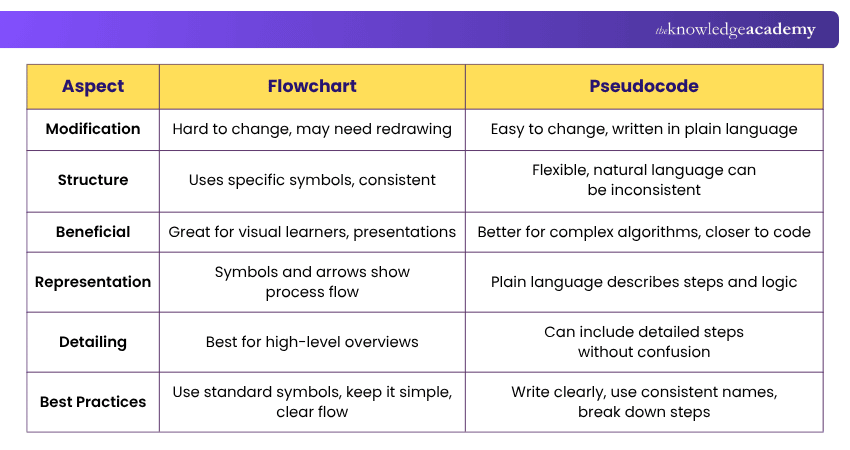
1) Modification
a) Flowchart: Changing a flowchart can be difficult, especially if it is complex. You might need to redraw parts of it. Changes to one step may also require adjusting connected symbols, arrows or decision paths to maintain a clear flow.
b) Pseudocode: Pseudocode is easier to change. You can quickly add or remove steps because it is written in plain language. This flexibility makes it convenient when algorithm logic needs frequent revisions during planning or development.
2) Structure
a) Flowchart: Flowcharts use specific symbols to represent different actions. This makes them consistent and easy to understand. For example, different shapes can represent processes, decisions and start or end points, while arrows indicate the direction of flow.
b) Pseudocode: Pseudocode does not have a single universal standard. It is flexible and often uses structured statements or programming-style keywords, but this can lead to inconsistencies if it is not written clearly.
3) Beneficial
a) Flowchart: Flowcharts are great for visual learners. They are useful for showing simple processes and are good for presentations. They can also help users understand the overall sequence and identify important decision points without reading detailed instructions.
b) Pseudocode: Pseudocode is often more suitable for complex algorithms. It can be detailed and is closer to actual code, making it easier to convert into a programming language. Programmers can use it to organise their logic before focusing on the exact syntax required by a programming language.
4) Representation
a) Flowchart: Flowcharts use symbols and arrows to show the flow of control in a process. This visual representation makes relationships between actions, decisions and alternative paths easier to see.
b) Pseudocode: Pseudocode uses plain language to describe the steps and logic of an algorithm. It presents instructions in a structured sequence, making the logic easier to review before writing actual code.
Pro Tip
For complicated problems, sketch the overall flowchart first and then write pseudocode for the detailed logic within important sections.
5) Detailing
a) Flowchart: Too much detail can make a flowchart hard to read. It is best for high-level overviews. Keeping each symbol focused on an important action or decision can prevent the diagram from becoming overcrowded.
b) Pseudocode: Pseudocode can include more detail than a flowchart, but it still needs clear structure to remain easy to follow. It allows for a thorough description of each step. This makes it useful for representing detailed conditions, loops and other algorithmic logic before coding begins.
Every successful business has a story hidden in its data. Learn how to uncover it with the Business Intelligence Analyst Course – Sign up now!
6) Best Practices
1) Flowchart:
a) Use Standard Symbols: Use recognised flowchart symbols consistently so readers can understand what each element represents.
b) Keep it Simple: Avoid adding unnecessary information that could make the diagram crowded or difficult to follow.
c) Make Sure the Flow is Clear: Arrange steps logically and use arrows consistently so readers can easily follow the process from beginning to end.
d) Use Connectors to Avoid Crossing Lines: Connectors can keep complex diagrams organised by reducing overlapping or crossing flow lines.
Bonus Tip
Review your flowchart or pseudocode by tracing a few sample inputs through it. Check whether every decision, loop and possible outcome follows the intended logic.
2) Pseudocode:
a) Write Clearly and Concisely: Keep each instruction straightforward so the intended action is easy to understand.
b) Use Consistent Names for Variables and Functions: Consistent naming makes it easier to track how different elements are used throughout the algorithm.
c) Break Down Complex Steps: Divide complicated operations into smaller logical steps so the overall process remains manageable.
d) Make it Easy to Translate Into Code: Organise the pseudocode logically so programmers can convert each step into suitable programming-language constructs.
Both tools are useful in their own ways and can be used together to complement each other in software development.
Flowchart vs Pseudocode: Which One Should You Use?
Before choosing, ask:
☐ Do I need to show the overall process visually? → Flowchart☐ Are there several decisions or alternative paths to illustrate? → Flowchart☐ Will non-technical readers need to understand the process quickly? → Flowchart☐ Do I need to describe detailed algorithm logic? → Pseudocode☐ Will the logic need frequent modification? → Pseudocode☐ Am I preparing the logic before translating it into code? → Pseudocode☐ Do I need both an overview and detailed logic? → Use both
Enhance your decision-making skills with the expert Business Intelligence Reporting Training – Register today!

The Knowledge Academy develops accessible learning content across Project Management, IT, Cybersecurity, Data Science, Business Analysis, HR, Accounting and Finance, Leadership and Health and Safety. Its resources combine subject research with clear explanations to help professionals build practical knowledge across a wide range of disciplines.
View Detail

 If you wish to make any changes to your course, please


