




We may not have the course you’re looking for. If you enquire or give us a call on 01344203999 and speak to our training experts, we may still be able to help with your training requirements.
What is Exploratory Data Analysis? Importance, Types, and Process
By Lily TurnerLast updated on: 31 August 2026
Exploratory Data Analysis (EDA) is the process of examining datasets to summarise their main characteristics, often using visual methods. It helps uncover patterns, spot anomalies, test hypotheses, and check assumptions. EDA lays the foundation for deeper Data Analysis, ensuring better insights and informed decision-making.
Home
 Resources
Data, Analytics & AI
What is Exploratory Data Analysis? Importance, Types, and Process
Resources
Data, Analytics & AI
What is Exploratory Data Analysis? Importance, Types, and Process
Resources
Data, Analytics & AI
What is Exploratory Data Analysis? Importance, Types, and Process

Have you ever looked at a massive spreadsheet and thought, “Where do I even start?” You are not alone, and that is exactly where Exploratory Data Analysis (EDA) comes to the rescue. Think of it like getting to know a new friend. Before you trust them, you ask questions, spot quirks, and find common ground.
Exploratory Data Analysis (EDA) works the same way with data. It helps you dig deeper, spot patterns, catch anything odd, and understand the real story hiding behind the numbers. Before jumping into big models or bold conclusions, EDA makes sure you are not missing something important. In this blog, we will break down what EDA really means, why it matters, and how you can master it step-by-step.
Table of Contents
1) What is Exploratory Data Analysis (EDA)?
2) Types of Exploratory Data Analysis
3) Process of Conducting Exploratory Data Analysis
4) Exploratory Data Analysis Techniques and Tools
5) Exploratory Data Analysis Example
6) Conclusion
What is Exploratory Data Analysis (EDA)?
Exploratory Data Analysis or EDA is a critical approach in data science that involves summarising the main characteristics of a dataset, often through visualisation methods. The goal is to get a ‘first look’ at the data before applying formal models or algorithms.
EDA is not just about statistics; it's about storytelling. You examine the data to understand what’s happening behind the numbers, how variables interact, and whether any unusual values or trends stand out. In simpler terms, it’s about “getting to know your data.”

Why is Exploratory Data Analysis Important?
Before making business decisions or building machine learning models, you need to understand your dataset. Here’s why EDA plays a pivotal role:
1) Detects anomalies like outliers or incorrect data entries
2) Highlights patterns that might influence decisions or predictions
3) Confirms assumptions needed for statistical modelling
4) Guides data cleaning by showing where values might be missing or inconsistent
5) Supports model selection by identifying relationships between variables
6) Enables faster iteration by highlighting important variables early on
Skipping EDA is like baking without checking the ingredients. It might work, but the result could be far from what you expected.
Types of Exploratory Data Analysis
EDA isn’t a one-size-fits-all process. Depending on the type and number of variables involved, it can be classified into different types:
1) Univariate Non-Graphical
This involves analysing a single variable without visualisation. The focus is on summary statistics like:
a) Mean
b) Median
c) Mode
d) Standard deviation
e) Range
f) Percentiles
These measures help you understand the distribution and spread of your variable.
2) Univariate Graphical
Here, visual tools like histograms, box plots, or density plots are used to explore one variable. For instance, a histogram can quickly tell you whether the data is normally distributed or skewed.
3) Multivariate Non-Graphical
When dealing with multiple variables, summary statistics can reveal correlations and relationships. For example, a correlation matrix shows how variables interact with one another numerically.
4) Multivariate Graphical
This type uses visualisation to examine relationships between two or more variables. Common examples include:
a) Scatterplots
b) Heatmaps
c) Pair plots
d) Bubble charts
These visuals provide intuitive insights into patterns and potential causal relationships.
Transform spreadsheets into smart strategies. Our Data Analysis Training using MS Excel Course helps you discover insights that drive real success.
Process of Conducting Exploratory Data Analysis
A good EDA follows a step-by-step process. Let’s break it down.
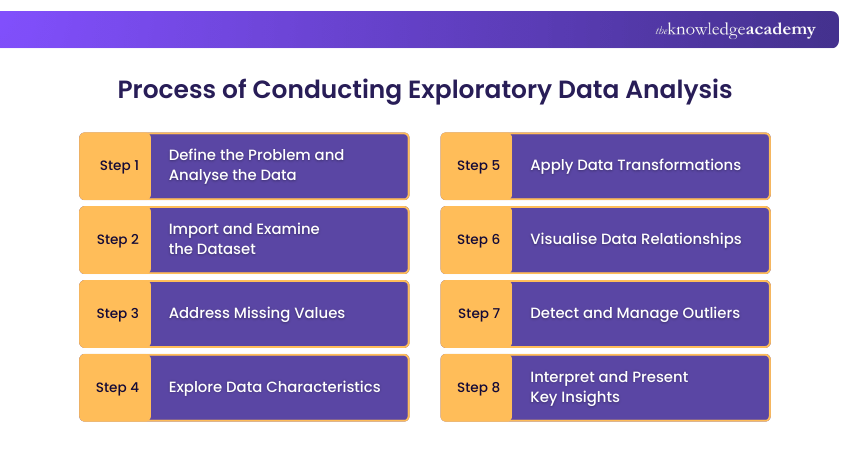
Step 1: Define the Problem and Analyse the Data
Start with a clear question. Are you trying to predict something? Understand customer behaviour? Reduce churn? A defined goal helps guide your Analysis.
Know your audience too. A financial analyst may focus on profit trends, while a marketer may care more about customer engagement rates.
Step 2: Import and Examine the Dataset
Load your dataset using tools like Python (Pandas) or R. Use .head() and .info() to get a quick overview:
a) What are the data types?
b) How many rows and columns are there?
c) Are there any strange values or column names?
Step 3: Address Missing Values
Missing data can skew your Analysis. Decide whether to:
a) Drop missing rows
b) Impute values (mean, median, or mode)
c) Use predictive models to fill gaps
The decision depends on the type of data and your specific use case.
Step 4: Explore Data Characteristics
Use summary statistics to understand key metrics. This includes:
a) Mean, median, mode
b) Min and max values
c) Variance and standard deviation
Check for skewness, kurtosis, and whether the data is normally distributed.
Step 5: Apply Data Transformations
Sometimes, the raw data needs transforming for better insight. This could involve:
a) Log transformation to handle skewed data
b) Normalisation or standardisation
c) Binning continuous data into categories
Transformations help smooth noise and bring consistency.
Step 6: Visualise Data Relationships
Create visualisations to better understand how variables relate:
a) Histograms and boxplots for single variables
b) Scatterplots for pairs of variables
c) Pair plots for multi-dimensional views
Good visuals reveal hidden patterns and are often easier to interpret than tables.
Step 7: Detect and Manage Outliers
Outliers can distort your Analysis or model. Use:
a) Boxplots
b) Z-scores
c) Interquartile range (IQR)
Depending on the context, you may remove, transform, or keep these values.
Step 8: Interpret and Present Key Insights
Finally, summarise your findings. Use dashboards or reports with clear visuals and bullet points. Tell a story with your data:
a) What’s the big picture?
b) What recommendations can you offer based on your EDA?
Exploratory Data Analysis Techniques and Tools
With the process in place, let’s talk about tools and techniques that make EDA faster and smarter.
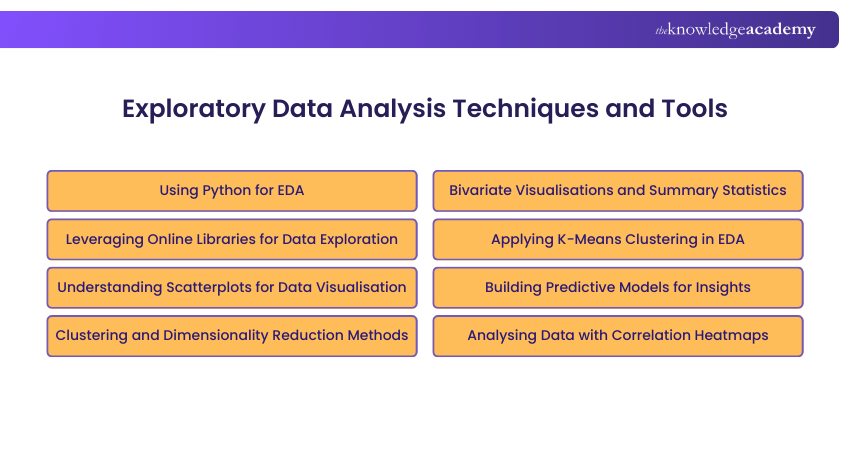
1) Using Python for EDA
Python is a go-to language for EDA. Libraries like Pandas, NumPy, and Matplotlib offer everything you need:
a) Pandas for data manipulation
b) NumPy for numerical Analysis
c) Matplotlib and Seaborn for visualisations
2) Leveraging Online Libraries for Data Exploration
Apart from Python, tools like:
a) Tableau
b) Power BI
c) Google Data Studio
Offer drag-and-drop simplicity for those less comfortable with code but still want deep insights.
3) Understanding Scatterplots for Data Visualisation
A scatterplot is a simple yet powerful tool. It shows the relationship between two variables and is perfect for spotting clusters, trends, and outliers.
4) Clustering and Dimensionality Reduction Methods
To deal with high-dimensional data, techniques like:
a) K-Means clustering
b) PCA (Principal Component Analysis)
Can group similar data points and reduce noise, helping you focus on what truly matters.
5) Bivariate Visualisations and Summary Statistics
Combining two variables in a plot (e.g., boxplots grouped by category) often reveals interesting contrasts. Summary stats like correlation coefficients also quantify these relationships.
6) Applying K-Means Clustering in EDA
K-Means helps you discover hidden groupings in your data. It’s widely used in customer segmentation, fraud detection, and market research.
7) Building Predictive Models for Insights
While EDA is pre-model, sometimes building quick models like decision trees helps uncover variable importance or trends. It can also validate some of your assumptions.
8) Analysing Data with Correlation Heatmaps
Heatmaps display correlations between variables in a matrix. The colour-coded grid makes it easy to spot highly correlated pairs, either positive or negative.
Are you ready to decode big data? Join our Big Data Analysis Course and turn massive datasets into powerful insights that drive smarter decisions!
Exploratory Data Analysis Example
To truly understand how EDA works in action, let’s walk through a practical example using a retail dataset.
1) Univariate Analysis
Start with customer age. A histogram shows most customers fall between 25 and 40 years old. This suggests the business appeals primarily to young and middle-aged adults.
Knowing the age distribution helps tailor products, services, and messaging to the dominant customer group.
2) Bivariate Analysis
Now add average monthly spending. A scatterplot reveals that spending increases with age, peaking around 40, then tapering off. This trend suggests that people in their mid-career stage may have more disposable income. Targeted campaigns or premium offerings can be directed at this high-spending segment.
3) Multivariate Analysis
Introduce location and loyalty status. A pair plot shows that urban customers enrolled in the loyalty programme spend the most, while rural customers spend less regardless of loyalty. This could indicate that urban loyalty schemes are more effective due to higher store engagement or digital touchpoints. Businesses could consider customising rewards or communication strategies based on geography and membership.
Descriptive vs Exploratory Data Analysis
It is easy to get confused between Descriptive and Exploratory Analysis, but they serve very different purposes.
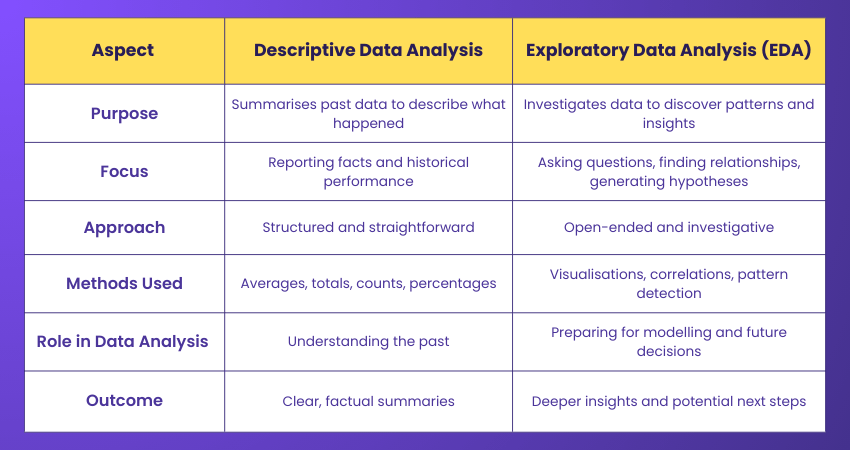
Descriptive Analysis is about summarising and organising historical data into clear insights. It focuses on reporting facts, such as averages, totals, percentages, and trends, helping you understand what has already happened. It answers questions like, “What were the sales figures last year?” or “How many customers visited the store?”
Exploratory Data Analysis (EDA), on the other hand, goes much deeper. It looks for patterns, relationships, and hidden insights within the data. EDA helps you ask new questions, uncover surprises, generate hypotheses, and decide what steps to take next. It is an open-ended process designed to make sense of the unknown.
Conclusion
Exploratory Data Analysis is like the warm-up before the big game. You get to know the players (your variables), identify weaknesses, and create a strategy before moving to modelling or predictions. It's a fundamental part of any data-driven project and shapes every decision that follows. With the right mindset, tools, and process, EDA empowers you to transform raw data into real insight. So, the next time you open a dataset, don’t dive straight into algorithms.
Master Data Analysis and Visualisation with Python Course and turn numbers into powerful stories. - Register now!

Lily Turner


Senior AI/ML Engineer and Data Science Author
Lily Turner is a data science professional with over 10 years of experience in artificial intelligence, machine learning, and big data analytics. Her work bridges academic research and industry innovation, with a focus on solving real-world problems using data-driven approaches. Lily’s content empowers aspiring data scientists to build practical, scalable models using the latest tools and techniques.
View Detail

 If you wish to make any changes to your course, please


