




We may not have the course you’re looking for. If you enquire or give us a call on 01344203999 and speak to our training experts, we may still be able to help with your training requirements.
What is Encapsulation in Java: A Complete Explanation
ByNilotpal SarmahLast updated on: 10 October 2026
Encapsulation in Java is the foundation of data security, restricting direct access while allowing controlled modifications. By bundling data and methods, it enhances code maintainability and reusability. This core OOP principle simplifies debugging, improves scalability, and keeps code organised for efficient Software Development.

Encapsulation in Java is one of four core concepts available in Object Oriented Programming Languages. The four Object-Oriented Programming (OOP) concepts are Abstraction, Inheritance, Polymorphism and Encapsulation. These concepts make OOP languages like Java extremely popular among Developers. Java’s features, like platform independence, robustness and security, make it popular worldwide among Developers.
According to Statista, 30.3% of developers worldwide use Java. Its popularity is thanks to its Object-Oriented concepts like Encapsulation, providing Developers various benefits. Read this blog to learn about Encapsulation in Java, its advantages, and the need for Encapsulation. Let’s dive in to learn more!
What is Encapsulation in Java?
Encapsulation in Java is a fundamental OOP concept that restricts direct access to an object's data by bundling variables and methods within a class. It enhances security by using private fields and public getter/setter methods, ensuring controlled data access and modification while maintaining code flexibility and reusability.

Access Modifiers
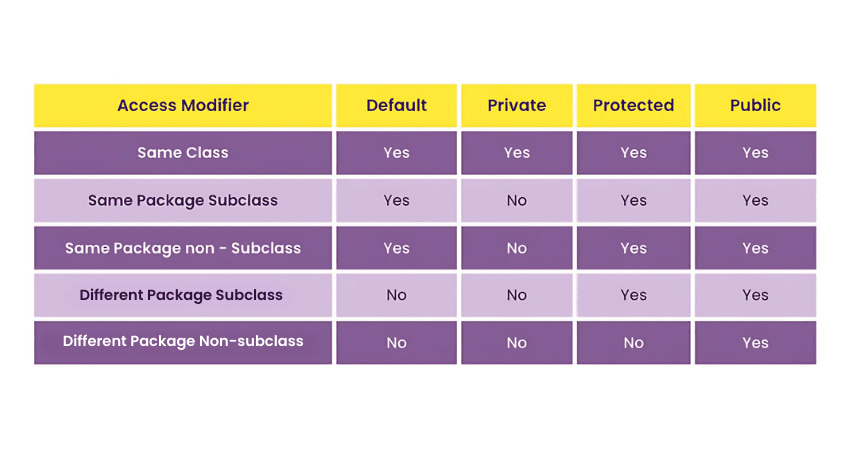
Access Modifiers are used to limit the access of data within a class only to a certain degree. The level of access and privacy imposed on the class depends on the type of Access Modifier used in a program. Java has four kinds of Access Modifiers in it, which are as follows:
1) Public:
Public class is the most commonly used Access Modifier in Java programming. Any data, method or class declared public can be accessed from anywhere, whether within the same or outside the class. It is accessible to both classes within the package it was declared in and outside the package. The keyword for the public Access Modifier is public, and it has the widest scope out of all Access Modifiers.
2) Protected:
The protected access modifier can be applied to fields, methods, and constructors but not to top-level classes. It allows access within the same package and also in subclasses, even if they are in different packages. This makes it particularly useful for inheritance, enabling child classes to access protected members of their parent class while still restricting direct access from non-subclassed external classes.
3) Default:
Default allows access to methods and data declared within the package, only limiting the access for members in other packages. The default Access Modifier is automatically allotted to a class in Java if no other Access Modifier is specified.
4) Private:
The private access modifier restricts access to fields, methods, and inner (nested) classes, ensuring that they are accessible only within the same class. It cannot be applied to top-level classes. private is commonly used for data hiding and encapsulation, preventing direct modification of class members from outside the class and enforcing controlled access through getter and setter methods.
Uses of Encapsulation in Java
Encapsulation is one of the four core principles of OOPs and is used frequently in OOP-based languages. Encapsulation in Object-Oriented Programming languages like Java enables data hiding and controlled access, which is more structured than in procedure-based languages like C. Some such feats of Encapsulation in Java programming are as follows:
1) Data Privacy:
Encapsulation helps achieve data privacy by restricting direct access to class members using access modifiers. While it complements abstraction, it serves distinct purposes—encapsulation hides implementation details, while abstraction focuses on exposing only relevant information.
2) Modularity:
Encapsulation in Java allows you to use read and write-only classes based on your needs selectively. A Java program uses getter and setter methods to read and write data, creating a read-only or write-only class.
If you wish to create a read-only Java program, the general requirement is to avoid using the setter method. Some examples of setter methods will be setSalary(), setAllowance(), etc. Similarly, if you wish to create write-only classes, you must omit getter methods like getSalary(), getAllowance(), etc.
3) Reusable:
Encapsulation allows you to reuse your previous data or Java codes in a new context. This is done with Inheritance, where new classes inherit properties of the encapsulated classes.
Efficient testing: Encapsulation allows for more efficient testing of an individual component within a software application. This form of testing is referred to as Software Unit Testing, and it involves checking small blocks of code, one at a time.
4) Efficient Testing
Encapsulation allows for more efficient testing of an individual component within a software application. This form of testing is referred to as unit testing, and it involves checking small blocks of code, one at a time.
Try our Java Programming Course to make use of benefits like Encapsulation!
Java Programs Using Encapsulation
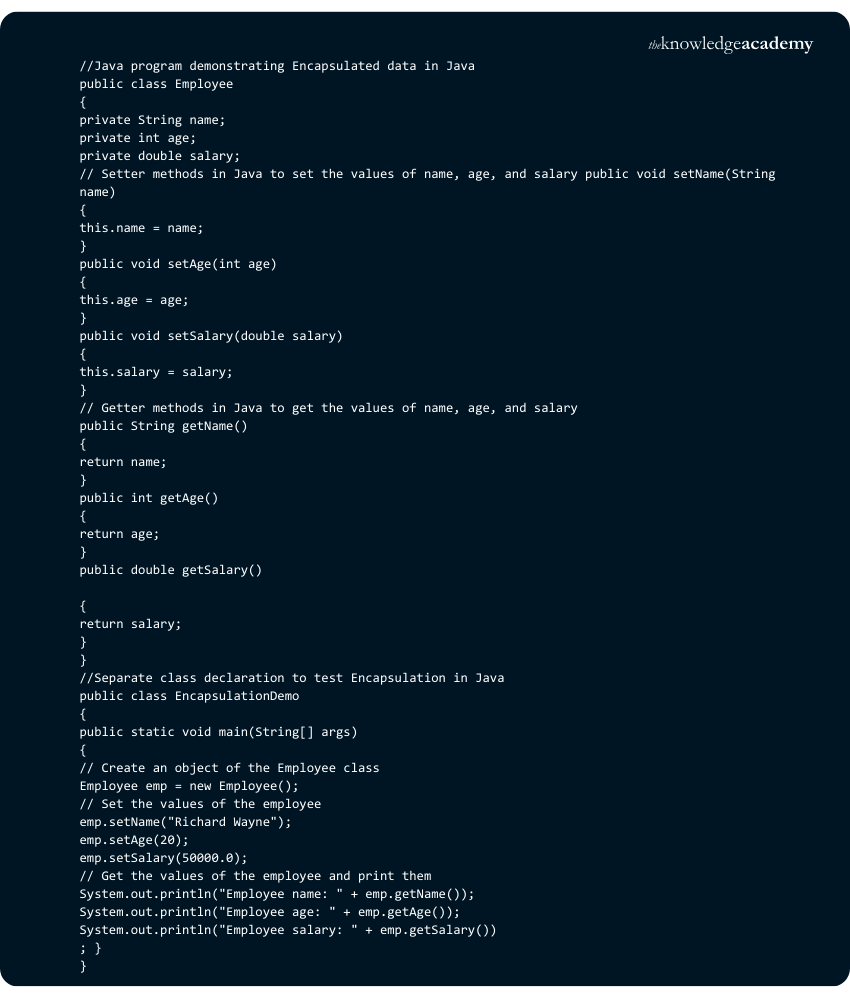
Here are a few examples of Encapsulation in a Java program. Following the first example, you’ll start by declaring a public class Employee. As you declare three variables within the said class, “name”, “age”, and “salary”. You will use setter methods to allot values to those respective variables.
Read and Write Program
Java Program Example 1: Here in this Java program, you’ll find the use of three setter methods declared, namely setName(), setAge() and setSalary() methods. This is due to the Access Modifier encapsulating the class, thus controlling how the data within it can be changed. To read those values and print out the output, we’ll use the getter method in the program. Here you should use the getName(), getAge() and getSalary() methods to get the output in a separate class EncapsulationDemo.
Output:

Java Program Example 2: Here is another program demonstrating Encapsulation in Java. In this Java program, a rectangle class has two instances, length and breadth. These variables are declared private; hence, they can only be accessed or modified by using getter and setter methods. In this case, you will find the use of getLength() and getWidth() getter methods, as well as setLength() and setWidth() setter methods, respectively.
The getArea() method in the Program uses the mathematical formula of an area of a rectangle. The Java program uses previously declared variables for length and width as respective values. Finally, we print out our statement using system.out.println statement in Java.

Output:

Become a Web Developer! Try our course, Web Development Using Java Training!
Read-only Program
Java Program Example 3: Let's see an example of a Read-only encapsulated program, also referred to as immutable objects. It is a programming technique where an object can’t be written or modified once created. In Java, this can be achieved by declaring the object's fields as private and only providing public methods to access those fields.
In this program, you will need to declare a class, such as, a Car class. You'll need to declare some variables within that class; in this instance, they are make, model and year. You will need to use methods to display and print the values of these variables. Here the methods are getMake(), getModel(), and getYear() in the program. As you will see, this program does not use any setter method, making it possible to get outputs but not change them.

Output:

Write-only Program
Java Program Example 4: Lastly, you will see an example of a write-only Encapsulation program. In this case, the class BankAccount has the variable balance declared within it. Later in the Main class, you’ll need to create an instance of the BankAccount class. Lastly, you’ll need to use methods to rewrite or initialise the variable’s value.
In this Java program, you’ll use setBalance() as a setter method to declare the value for the variable Balance. It is important to remember that while creating a read-and-write-only Program in Java is possible, It is rarely useful. These can be utilised in very particular instances; however, they rely on each other for greater efficiency.
Due to this Program being a write-only class, the changes will be made in the initial class, but no output will appear.

Output: This program will have no output, being a write-only class.
Benefits of Encapsulation in Java
Encapsulation in Java, a crucial concept for effective real-time programming, offers several key benefits. Let's explore some of them:
1) Control Over Data: Classes gain complete control over data members and methods, often setting them as read-only. This control ensures data integrity and prevents unintended modifications.
2) Data Hiding: Simplifies user interaction by hiding complex code implementations, thereby reducing the likelihood of errors and enhancing user experience.
3) Flexible Data Access: Enables setting class variables as read-only or write-only, tailored to specific requirements. This flexibility is crucial for protecting sensitive data while allowing necessary access.
4) Code Reusability: Encapsulation facilitates the reuse of existing code, saving time and resources in developing new applications.
5) Ease of Modification: It makes updating existing code more straightforward and less error-prone. This is essential for maintaining and scaling complex software systems.
6) Simplified Testing: Unit testing becomes more straightforward with encapsulated code. This will lead to more reliable and maintainable software.
7) IDE Support: Common IDEs support getters and setters, accelerating the coding process and improving Developer productivity.
What is Data Encapsulation in Java?
Data Encapsulation in Java is the process of wrapping data (variables) and code (methods) into a single unit, known as a class. It restricts direct access to the data by making variables private and providing public getter and setter methods. This improves security, modularity, and code maintainability.
What are the Three Types of Encapsulations?
The three types of Encapsulations are:
1) Member Variable Encapsulation: Declaring variables as private and using getters/setters.
2) Method Encapsulation: Restricting access to methods using access modifiers.
3) Class Encapsulation: Keeping related data and methods together within a class to promote reusability and security.

Nilotpal Sarmah is a Senior Content Writer with 11+ years of overall experience spanning engineering, operations and content development. His technical knowledge and extensive writing experience enable him to simplify specialised topics across IT and Tech, Business Skills, Project Management, Health and Safety, and ISO and Compliance.
View Detail

 If you wish to make any changes to your course, please


