


 Top Rated Course

We may not have the course you’re looking for. If you enquire or give us a call on 01344203999 and speak to our training experts, we may still be able to help with your training requirements.
Difference Between Hub and Switch: A Detailed Comparison
John Davies 16 July 2026Curious about the Difference Between Hub and Switch? Hubs broadcast data to all connected devices, while Switches send data to specific devices. This blog compares their functions, performance, and ideal use cases to help you choose the right networking solution for your needs. Read ahead to gather further insights!
Home
 Resources
IT Infrastructure & Networking
Difference Between Hub and Switch: A Detailed Comparison
Resources
IT Infrastructure & Networking
Difference Between Hub and Switch: A Detailed Comparison
Resources
IT Infrastructure & Networking
Difference Between Hub and Switch: A Detailed Comparison

Training Outcomes Within Your Budget!
We ensure quality, budget-alignment, and timely delivery by our expert instructors.
Table of Contents

Imagine an office where every device connects to a single network point. The more emails sent and files shared, the slower everything becomes. Why? The choice between a Hub or a Switch can make all the difference. Understanding the Difference Between Hub and Switch is crucial for efficient networking.
Wondering if Hubs are too outdated for modern demands? Can Switches handle your network’s complexity? This blog dives into the Difference Between Hub and Switch, exploring their features, distinctions, and ideal use cases to help you make the best choice for your setup.
Table of Contents
1) What is Hub?
2) What is Switch?
3) Hub vs Switch: What’s the Difference?
a) Operating Layer
b) Functionality
c) Port Count
d) Collision Domains
e) Device Type
f) Speed
g) ransmission Type
h) Usage
i) Spanning Tree Protocol
j) Vulnerability to Hacking
4) Conclusion
What is Hub?
A Hub is a straightforward networking device that connects multiple computers or devices within a Local Area Network (LAN). Acting as the central connection point, a Hub receives Data from one device and broadcasts it to all others on the network, regardless of the intended recipient.
Working at the physical layer (Layer 1) of the OSI model, Hubs lack the intelligence to determine the destination of the data. This simplicity makes them cost-effective but far less efficient in managing network traffic.
Applications of a Hub
a) Small-Scale Networks: Hubs are often found in smaller networks where simplicity and affordability take precedence over performance.
b) Legacy Systems: Older networks that don’t require advanced features may rely on Hubs for connectivity.
c) Temporary Networking: Hubs are handy in temporary setups or testing environments where advanced capabilities are unnecessary.

What is Switch?
A Switch is a more sophisticated networking device that connects devices within a network while efficiently managing data flow. Unlike a Hub, a Switch operates at the data link layer (Layer 2) or sometimes the network layer (Layer 3) of the Open Systems Interconnection (OSI) model.
It uses Media Access Control (MAC) addresses to identify devices and ensures data packets reach their specific destination. This targeted communication minimises unnecessary traffic and enhances overall network performance.
Applications of a Switch
a) Corporate Networks: Switches are integral to Business Environments, providing reliability and efficiency.
b) Scalable Networks: Ideal for setups requiring growth and flexibility, Switches can adapt to increasing demands.
c) High-performance Environments: For networks handling substantial data loads, Switches offer the bandwidth management needed to avoid congestion.
Supercharge your website’s speed and security – join our CloudFare Training today!
Hub vs Switch: What’s the Difference?
Understanding the Differences Between a Hub and a Switch is crucial for optimising your network's performance and efficiency. Here are the key distinctions:
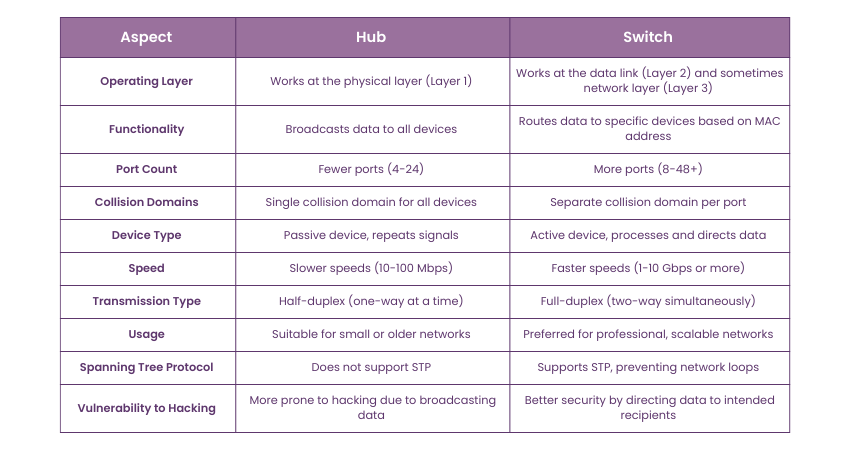
1) Operating Layer
a) Hub: Functions at the physical layer (Layer 1) of the OSI model
b) Switch: Runs at the data link layer (Layer 2) and occasionally at the network layer (Layer 3).
Equip your team with the current IT skills and solutions – join our IT Support and Solution Training now!
2) Functionality
a) Hub: Broadcasts incoming data to each connected device indiscriminately
b) Switch: Routes data specifically to the target device based on its MAC address, reducing unnecessary traffic.
3) Port Count
a) Hub: Typically provides fewer ports, ranging from 4 to 24
b) Switch: Offers a broader range of ports, often from 8 to 48 or more, making it suitable for larger networks.
4) Collision Domains
a) Hub: All connected devices share a single collision domain, leading to frequent data collisions in busier networks.
b) Switch: Every port represents a separate collision domain, significantly minimising collision risks.
5) Device Type
a) Hub: A passive device that simply repeats signals without any processing
b) Switch: An active device that processes and intelligently directs data packets
6) Speed
a) Hub: Limited to lower speeds like 10 Mbps or 100 Mbps
b) Switch: Supports higher speeds, commonly ranging from 1 Gbps to 10 Gbps or more, catering to modern network demands.
7) Transmission Type
a) Hub: Operates in half-duplex mode, allowing data to travel in only one direction at a time.
b) Switch: Enables full-duplex communication, allowing simultaneous two-way data transfer.
8) Usage
a) Hub: Best suited for basic connectivity in small or older networks
b) Switch: Preferred in professional environments that require efficient data handling and scalability.
Detect and prevent network intrusions with ease – sign up for our Snort Course now!
9) Spanning Tree Protocol
a) Hub: Does not support the Spanning Tree Protocol (STP)
b) Switch: Supports STP, preventing network loops and ensuring redundancy in complex networks.
10) Vulnerability to Hacking
a) Hub: More susceptible to Hacking, as it broadcasts data to all connected devices, making interception easier.
b) Switch: Provides better security by directing data only to the intended recipient, reducing the risk of unauthorised access.
Conclusion
The Difference Between Hub and Switch goes beyond mere functionality—it shapes how efficiently your network operates. Hubs, though simple and cost-effective, fall short in modern scenarios, while Switches provide the intelligence and speed today’s networks demand. Choosing the right device isn’t just a technical decision; it’s the foundation of a reliable and future-proof network.
Develop the essential skills to excel in the tech world – register for our IT Fundamentals Training!
Frequently Asked Questions
What are the two Advantages of a Hub?

Hubs are inexpensive and straightforward to use, making them suitable for small or temporary networks. They provide basic connectivity without the need for complex configurations, offering a simple solution for quick setups.
What are the Four Types of Hub?
There are four primary types: passive Hubs, which connect devices without amplifying signals; active Hubs, which strengthen signals for improved transmission; intelligent Hubs, which include monitoring and management features; and Switching Hubs, which efficiently direct data similar to basic Switches.

John Davies


Cyber Security Governance & Assurance Specialist
John Davies is a cybersecurity expert specialising in governance, risk management, and compliance. With over 15 years in the field, he has led enterprise-wide security programmes across finance, healthcare and public sector organisations. His content provides practical guidance on building secure environments, managing risk and aligning with regulatory frameworks.


 If you wish to make any changes to your course, please


