




We may not have the course you’re looking for. If you enquire or give us a call on 01344203999 and speak to our training experts, we may still be able to help with your training requirements.
Top Demo Websites for Automation Testing Practice
ByThe Knowledge AcademyLast updated on: 03 October 2026
Explore the significance of having a demo website for automation testing and how it can enhance your testing processes. Dive into the list of useful demo websites for automation testing. Uncover the numerous benefits that arise from using such demo websites in your testing endeavours.

What's Coming Up
1. Demo websites provide controlled environments for practising automation testing without affecting live applications.2. Different practice sites are suitable for Web UI, API, e-commerce, form and end-to-end automation scenarios.3. Beginners can start with basic interactions before progressing to dynamic elements, APIs and complex workflows.4. Using different demo environments can help testers practise test design, scripting, validation and debugging.5. Choosing a demo website based on your learning objective can make automation testing practice more focused and effective.
In software development, automation testing has emerged as a crucial practice that helps teams assess application quality, reliability and performance. Demo websites are crucial in honing automation testing skills and providing real-world scenarios to test various tools and frameworks.
In this blog, we will explore the best demo websites for automation testing and explain why they matter and the benefits of using them.
Why is a Demo Website for Automation Testing Important?
Automation testing has emerged as a crucial practice that helps teams assess application quality, reliability and performance. Demo websites play a vital role in shaping the skills and expertise of automation testers, offering a controlled environment for experimentation, learning, and skill enhancement. We'll explore the key benefits in detail later.

Best Demo Websites for Automation Testing
These websites offer a comprehensive array of scenarios, environments, and challenges. They allow testers to refine their automation skills and enhance their problem-solving abilities, ultimately contributing to their expertise in software testing. Let's explore them in detail:
Trainer’s Insight
Don't try to automate all websites at once. Choose one that matches your current skill level, automate a small workflow successfully and then gradually increase the complexity.
1) SauceDemo – Swag Labs (Web UI)
SauceDemo provides the Swag Labs e-commerce demo application for practising web UI automation. Testers can automate scenarios such as login, product browsing, sorting, cart management and checkout.
2) UltimateQA /Automation (Web UI)
The UltimateQA automation website provides practice pages for web UI automation, including forms, login scenarios, simple elements and pages containing multiple UI elements. These exercises allow testers to practise common browser automation interactions.
3) UI Testing Playground (Web UI)
UI Testing Playground is a demo website designed to help testers practise web UI automation. It includes scenarios involving dynamic IDs, hidden layers, AJAX data, text input and other common challenges that can help testers improve the reliability of their automated tests.
4) Cypress Real World App (Web UI, API)
Cypress Real World App offers a practical playground for testers using the Cypress framework. It is a full-stack payment application created for demonstration and educational purposes, allowing testers to practise realistic testing patterns, workflows, authentication and end-to-end scenarios.
Unleash your cyber security prowess – Join our Kali Linux Fundamentals Course now!
5) GitHub Users Search (Web UI, API)
GitHub Users Search is a React-based practice application that uses the GitHub API, allowing testers to practise both web UI and API automation. Testers can automate user searches and validate the data returned through the application's API-backed functionality.
6) Contact List Web and API (Web UI, API)
Contact List App provides testers with a practical testing environment for both web UI and REST API automation. Testers can practise workflows such as creating users, logging in, managing contacts and working with authenticated API requests.
7) RealWorld Demo Apps (Web, Multiple Technology Stacks)
RealWorld provides implementations of the same application specification across different front-end and back-end technologies. These projects can be useful for exploring how similar workflows are implemented and tested across technology stacks, although the maintenance status of individual implementations can vary.
8) Telerik UI Demos (Web UI)
Telerik provides web UI component demos that testers can use to explore and automate different interface elements and behaviours across supported web technologies.
9) Webdriveruniversity.com (Web UI)
Webdriveruniversity.com serves as an interactive learning platform for automation testing. With tutorials, coding challenges, and real-time feedback, testers can practice automation concepts in a controlled environment – reinforcing their skills and knowledge.
10) ACME Banking Demo by Applitools (Web UI)
ACME Demo Banking provides a simulated banking interface for web UI testing. Testers can practise scenarios involving login, navigation and other common UI interactions in a banking-style application.
11) The Internet (Web UI)
The Internet provides a collection of web UI scenarios for automation testing practice. Testers can practise working with authentication, dynamic elements, dropdowns, alerts and other common browser interactions.
12) P ParaBank (Web UI, API)
ParaBank Site encompasses web and API testing, allowing testers to evaluate interactions across different layers. This demo offers a comprehensive testing environment for automation testers, from web UI navigation to API requests.
13) Restful-Booker (API)
Restful-Booker is an API testing playground that provides endpoints for practising CRUD operations and authentication. It also contains intentional bugs, allowing testers to practise identifying unexpected API behaviour.
14) JSONPlaceholder (API)
JSONPlaceholder provides a fake REST API for testing and prototyping, enabling testers to practise different API interactions, including retrieving and sending data.
15) HTTPBin.org (API)
HTTPBin.org offers a range of HTTP request and response scenarios for API testing. Testers can engage with various request types, headers and parameters, allowing them to inspect and validate HTTP request and response behaviour.
16) Swagger Petstore (API)
Swagger Petstore is a sample API based on the OpenAPI specification. Testers can practise API operations involving pets, store orders and users, including creating, retrieving, updating and deleting data.
Pro Tip
When practising API automation testing, consider validating the response status, returned data and behaviour for both valid and invalid requests.
17) Automation Exercise (Web UI, API)
Automation Exercise is a practice website for automation testers that provides e-commerce workflows, predefined test cases and API testing scenarios. Testers can practise interactions involving products, user accounts, carts and other common e-commerce functions.
18) DemoQA (Web)
DemoQA is a web UI demo platform that covers forms, elements, widgets and interactions. It also includes a Book Store Application with user account, book listing and profile-related scenarios that can support UI and API testing practice.
19) Compendiumdev.co.uk (Web)
CompendiumDev provides test applications and practice resources that testers can use to automate common web interactions and experiment with different testing approaches.
20) React Shopping Cart (Web UI)
The React shopping cart demo offers a focused testing environment for web UI interactions. Testers can navigate a shopping cart interface, validate product additions, and assess cart functionality.
21) OrangeHRM (Web UI)
OrangeHRM is a demo platform for human resource management systems. Testers can navigate through employee profiles, leave requests and other HR functionalities, allowing them to practise automating common HR-related workflows.
22) Expand Testing Practice Website (Web UI, API)
Expand Testing provides a practice website for web UI and API automation. Testers can practise scenarios involving forms, authentication, dynamic tables, drag and drop, Shadow DOM, alerts, iframes and other common automation challenges.
Automation Testing Practice Checklist
Before finishing a practice project, check whether you have:
□ Defined what you want to test□ Selected a suitable demo website□ Understood the main user journey□ Created positive test scenarios□ Considered negative and edge-case scenarios□ Chosen suitable element locators□ Added relevant assertions□ Handled waits and dynamic behaviour appropriately□ Reviewed failures before changing the script□ Reduced unnecessary repeated code□ Re-run tests after making changes
Master software quality and efficiency – Join our Fundamentals of Test Automation Course now!
Benefits of Using a Demo Website for Automation Testing
Demo websites offer several benefits for automation testing, giving testers a practical, controlled environment to hone their skills and build proficiency. Some of them are listed as follows:
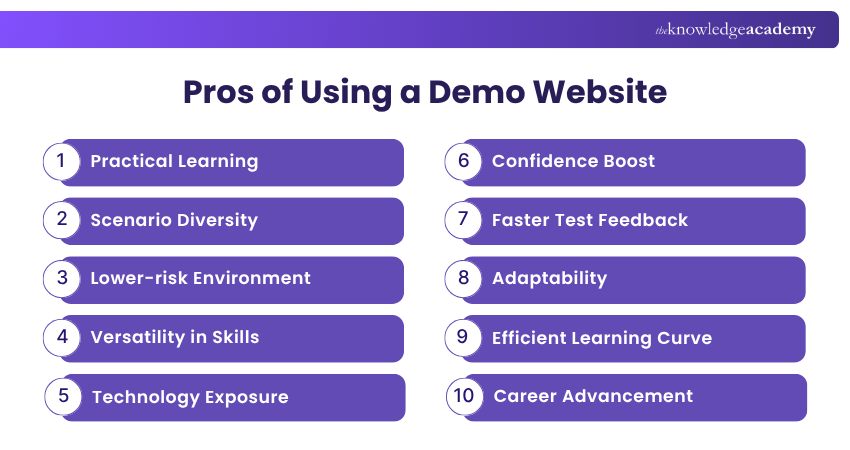
1) Practical Learning
Demo websites provide hands-on experience, translating theoretical knowledge into practical skills. This helps testers understand how automation concepts work in realistic testing scenarios.
2) Scenario Diversity
Testers encounter a variety of scenarios, enhancing their ability to handle real-world challenges. Practising different scenarios also develops stronger problem-solving and testing skills.
3) Lower-risk Environment
Experimentation and learning occur without impacting live applications, mitigating risks. This allows testers to try different approaches and learn from mistakes safely.
4) Versatility in Skills
Testers engage with different functionalities, improving their scripting, execution, and defect detection skills. This broader experience helps them become more capable across different testing situations.
5) Technology Exposure
Demo websites expose testers to different interfaces, application behaviours and testing scenarios, preparing them for diverse automation environments. This exposure helps them become familiar with different interfaces, applications and testing environments.
6) Confidence Boost
Successfully navigating challenges on demo platforms enhances testers' self-assurance in complex situations. Regular practice also helps them approach more advanced automation tasks with greater confidence.
7) Faster Test Feedback
Running automated tests against demo websites allows testers to review test results and failures quickly, helping them identify issues in their scripts and refine their testing approach.
8) Adaptability
Exposure to multiple scenarios fosters adaptability, enabling testers to handle evolving automation requirements. It also helps them adjust their testing approach when application behaviour or requirements change.
9) Efficient Learning Curve
Practical exercises on demo sites accelerate learning and comprehension of automation concepts. Repeated practice reinforces these concepts and helps testers apply them more effectively.
10) Career Advancement
Experience gained can contribute to a testing portfolio and provide practical examples that demonstrate automation testing skills to potential employers.
Trainer’s Insight
Treat your practice project like a real automation project. Aim for readable, reusable and maintainable tests instead of creating one large script that performs every action.
How to Practise Automation Testing Using Demo Websites
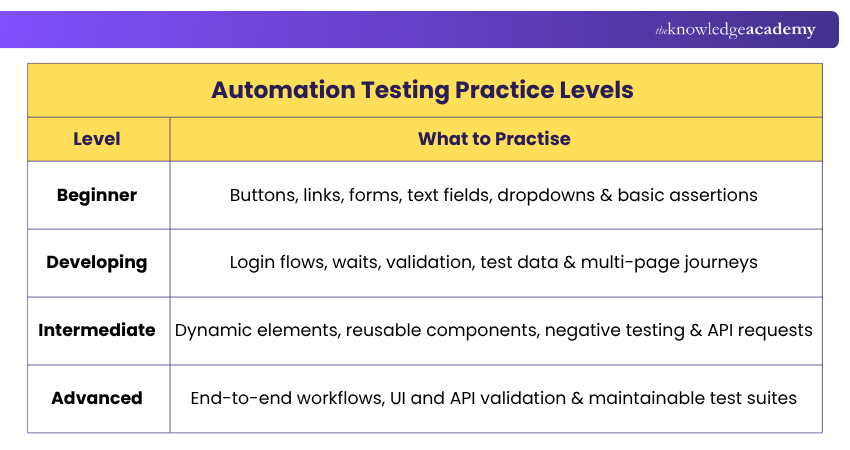
Simply opening a demo website is not enough. A structured practice approach can help you gradually move from simple automation tasks to more complex scenarios.
1) Start With a Clear Objective: Decide what you want to practise before choosing a website. For example, your objective might be automating a login flow, testing an API endpoint or validating an e-commerce journey.
2) Understand the Manual Workflow: Complete the scenario manually before automating it. This helps you understand the expected behaviour, steps and results.
3) Start With Basic Test Cases: Begin with straightforward positive scenarios. Once these work reliably, introduce negative cases, alternative inputs and edge cases.
4) Add Suitable Validations: Your test should confirm whether the expected result occurred. Add relevant assertions rather than simply automating clicks and inputs.
5) Debug Failed Tests: When a test fails, investigate the reason before modifying the automation code.
6) Refactor Your Tests: As your automation project grows, identify repeated steps and organise your code so that common functionality can be reused where appropriate.
7) Build Towards Complete Workflows: Once individual interactions work reliably, combine them into broader user journeys or testing scenarios.
Master industry-leading penetration testing tools and techniques with our Tools and Techniques for Penetrating Testing Training – Sign up now!

The Knowledge Academy develops accessible learning content across Project Management, IT, Cybersecurity, Data Science, Business Analysis, HR, Accounting and Finance, Leadership and Health and Safety. Its resources combine subject research with clear explanations to help professionals build practical knowledge across a wide range of disciplines.
View Detail

 If you wish to make any changes to your course, please


