




We may not have the course you’re looking for. If you enquire or give us a call on 01344203999 and speak to our training experts, we may still be able to help with your training requirements.
Comments in Python: A Complete Guide for Beginners
ByGaurav KalitaLast updated on: 18 September 2026
Comments in Python are notes in the code ignored by the interpreter. They help explain logic, improve readability, and make code easier to maintain.By improving readability and maintainability, comments make collaboration easier and ensure long-term understanding of the training’s structure and purpose.

Python’s charm lies in its simplicity, yet it can sometimes seem like a cryptic script. Ever stumbled upon lines in a Python script that seem out of place? Those are Comments in Python—the programmer’s secret notes, invisible to the computer but invaluable to us.
According to Statista, Python stands in the top five Programming Languages around the world. One of the features of Python is Comments in Python; a type of textual annotation used for adding information, explanations, or warnings to the source code of Python programming. Join us on an enlightening expedition through Comments in Python. We’ll decode their purpose, uncover their significance, and master the art of using them effectively. Let’s turn those cryptic lines into clear signposts for success in coding.
What are Comments in Python?
Comments in Python are notes for humans, ignored by the interpreter. They begin with a hash symbol (#) and run to the end of the line; a # inside a string is not a comment. You can write comments on their own line, place them inline beside a statement, or create multi-line blocks with consecutive commented lines. Well-written comments increase readability, explain intent to teammates, help you understand code after a long gap, point to external resources, and support reuse by clarifying how to adapt or extend existing logic.

Types of Comments in Python

Let's explore the various types of Comments in Python with detailed examples to help you understand their purpose and usage.
Single-Line Comments
Single-Line Comments in Python are short, one-line explanations or notes that are added to clarify a specific line of code. They are created by placing the "#" symbol at the beginning of the line. Anything following the "#" symbol on the same line is treated as a Comment and is ignored by the Python interpreter.
Example 1:
# This is a single-line comment

Single-Line Comments are ideal for providing brief Comments or context for a single line of code. They serve to enhance code readability by explaining the purpose or intent of the code.
Example 2:
# Check if the user is logged in

Multi-Line Comments (Using Triple-Quotes)
Python doesn't have a built-in syntax for Multi-Line Comments, but developers often use Triple-Quoted Strings (enclosed in triple single-quotes ''' or triple double-quotes """) to create Comment blocks that span multiple lines. While not Traditional Comments, these Python String formats are used for providing extensive explanations, documenting functions, modules, or classes, and temporarily Commenting out larger sections of code.
Example:
'' This is a multi-line comment or documentation string. It can span over multiple lines. Use it to describe the purpose of functions, modules, or significant code sections. ''

In the example above, the triple-quoted Comment block serves as a detailed explanation or documentation for the some_function. While comments are not true, they offer flexibility for documenting code sections.
Inline Comments
Inline Comments are used to provide concise explanations or data annotations within the same line of code. They are placed immediately beside the code they reference and offer brief clarifications.

Inline Comments are particularly helpful when you need to provide quick context or explanations for specific lines of code without cluttering the code structure.
Example:

Docstrings (not Traditional Comments)
Docstrings are not Traditional Comments but serve as documentation strings in Python. They are enclosed in triple quotes and are used to provide detailed explanations for functions, modules, or classes. Python treats Docstrings as a special form of string literal and can access them using the help() function. Docstrings are invaluable for creating comprehensive documentation.
Example:
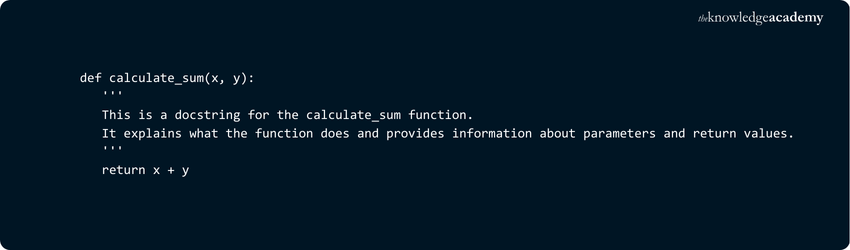
In the example above, the Docstring is used to document the calculate_sum function, describing its purpose, parameters, and return values.
Code your future, boost your career in tech - Join our Python Course and start building now!
What Are Comments in Python Used For?
In Python, comments start with the hash symbol # and continue until the end of the line. They are ignored by the interpreter, making them useful for notes, explanations, or reminders within code. You can place comments on a separate line, beside a statement, or write them as multi-line blocks.
Comments serve many purposes, such as:
1) Improving readability
2) Explaining code to others
3) Making old code easier to understand later
4) Adding helpful resources or references
5) Supporting code reusability
Best Practices of Writing Python Comments
Effective comments explain why the code exists, the constraints it satisfies, and the trade-offs made. Keep them brief, accurate, and aligned with the code so readers quickly grasp intent without re-reading the implementation.
1) Explain the “why,” not the obvious “what”
Comments should capture intent, assumptions, and trade-offs. Avoid narrating code that already reads clearly. Focus on context the code cannot express, such as business rules, edge cases, or reasons a simpler approach was rejected.

2) Be concise and clear
Use short, plain-English sentences that give a high-level summary. Do not restate formulas or duplicate the control flow. If the code names are good, your comment can stay brief while still guiding the reader to the purpose.

Prefer one crisp sentence over a paragraph of detail. If extensive explanation is required, consider a docstring or design note instead.
3) Match identifiers exactly
Use the same variable, function, and class names as the code, including case. Misnaming identifiers causes confusion during refactors and code reviews. Keep the language aligned with the current API.

4) Keep comments DRY
Avoid repeating the same idea in multiple scattered comments. Combine related thoughts into a single, focused remark placed at the right level. This keeps maintenance low and reading fast.
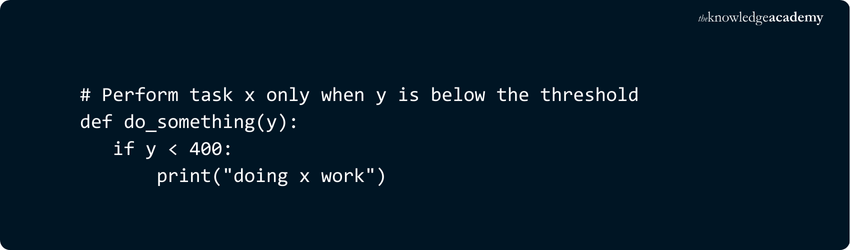
If multiple lines share the same rationale, place one summary comment above the block rather than line-by-line notes.
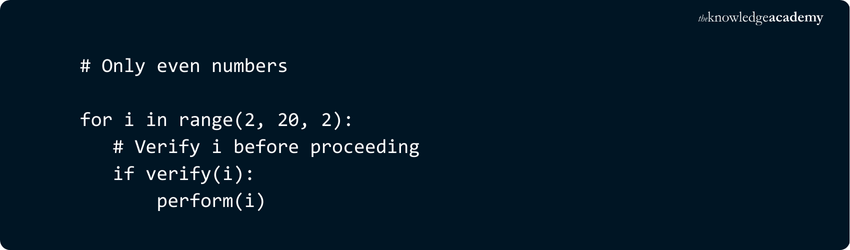
5) Align comments with code
Indent comments to the same level as the code they describe and keep inline comments close to the expression they qualify. Good placement makes scanning effortless and prevents misinterpretation.
Unlock the power of Python in Machine Learning – Start your training journey today with our Machine Learning with Python Training!
Python Commenting Worst Practices
Even well-intended comments can harm clarity if used poorly. Avoid the patterns below to keep your code readable, professional, and genuinely helpful.
Avoid: W.E.T. Comments
Comments should not repeat what the code already makes obvious. If a line clearly shows what it does, do not restate it in a comment. Prioritise intent and rationale over narration. After implementing a feature, remove any planning notes or redundant remarks so your comments stay D.R.Y. and useful.
Avoid: Smelly Comments
Heavy commenting often signals deeper issues. If you need long explanations to justify confusing code, refactor first: choose clearer names, simplify logic, and split complex steps. Comments should complement clean code, not hide design flaws. In general, comments must be shorter than the code they explain.
Avoid: Rude Comments
Unprofessional or sarcastic remarks erode team trust and can leak into production. Keep comments respectful, neutral, and focused on technical facts. Assume teammates and clients will read them later. Professional tone protects collaboration and your reputation.
Advantages of Comments in Python
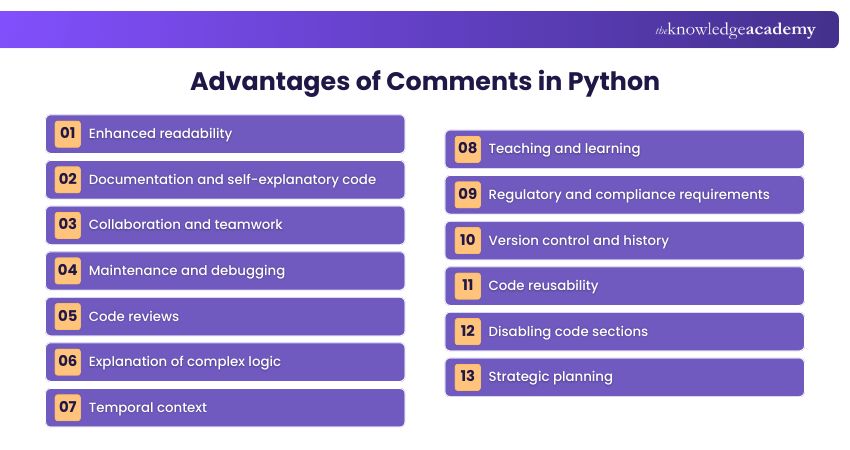
Comments in Python, like in any programming language, offer several advantages that contribute to code quality, maintainability, and collaboration. Here are some key advantages of using Comments in Python:
a) Enhanced readability:
Code Comments provide context and explanations, making the code easier to follow.
b) Documentation and self-explanatory code:
Well-written Comments serve as documentation for the code. They explain how and why certain decisions were made during development. This documentation is especially valuable when other developers work on the code or when you revisit your own code after a long time.
c) Collaboration and teamwork:
In collaborative software development, Comments act as a form of communication among team members. They help others understand your code, your intentions, and any considerations or assumptions you made during development. This promotes smoother teamwork and knowledge sharing.
d) Maintenance and debugging:
Comments can be invaluable during code maintenance and debugging. They provide hints about the code's behaviour, reducing the time and effort required to identify and fix issues or make updates.
e) Code reviews:
Comments are crucial during code reviews. They allow reviewers to understand the purpose of code changes and make informed judgments about the quality of the code.
f) Explanation of complex logic:
Comments can clarify complex or non-intuitive sections of code. They help break down intricate algorithms or logic into simpler, understandable steps.
g) Temporal context:
Comments provide a temporal context for code. They explain why certain decisions were made at the time of development, which may not be evident when reviewing the code in the future.
h) Teaching and learning:
Comments serve as educational tools. They can help beginners or learners understand how different Python features are used and why specific approaches are chosen in code.
i) Regulatory and compliance requirements:
In certain industries, like finance or healthcare, there are strict regulatory requirements for code documentation. Comments are essential for compliance with these standards.
j) Version control and history:
Comments can be used to annotate code changes and commit in version control systems (e.g., Git). This allows for better tracking and understanding of code evolution over time.
k) Code reusability:
Comments can indicate how to use and interact with certain functions or modules, promoting code reusability. They provide insights into the intended purpose and usage of code elements.
l) Disabling code sections:
Comments can temporarily disable or "Comment out" sections of code. This can be useful for testing alternative solutions or isolating issues without removing the code entirely.
m) Strategic planning:
Comments can be used to outline the plan or strategy behind a project or module. They provide a roadmap for the development process.
Code the smart way – Our Visual Basic Course is your gateway to software greatness!
Difference between Docstrings and Comments in Python
Docstrings and comments both explain code, but they serve different audiences and lifecycles. Use docstrings to document public interfaces, and comments to capture intent or context that code cannot show.
The table below highlights the key differences.

Unlock the power of Python with our hands-on scripting training and supercharge your coding skills with our Python Scripting Training today!

Gaurav Kalita is a Content Writer with 2+ years of experience in content development, research and storytelling. His background in English literature and teaching, combined with his growing interest in AI and Machine Learning, supports his writing across Business Skills and IT and Tech.
View Detail

 If you wish to make any changes to your course, please


