




We may not have the course you’re looking for. If you enquire or give us a call on 01344203999 and speak to our training experts, we may still be able to help with your training requirements.
What is a Chart of Accounts and Why is it Important?
ByOlivia TaylorLast updated on: 16 July 2026
A Chart of Accounts is an organised list of all accounts used in a company's financial system to classify and record transactions for accurate reporting. It includes categories like assets, liabilities, income, and expenses, helping businesses track money. A well-structured chart supports better budgeting, tax filing, and decision-making.

You don’t need to be an accountant to understand your entire business’s finances. All you might need is just one simple step. In fact, it can be a simple list that can give you a complete view of where your money comes from, where it goes, and how well your business is really doing.
Are you wondering what it would be? It is the Chart of Accounts (COA) that helps you stay in control without diving deep into accounting jargon. In this blog, you can explore what COA is, why it matters, how it works, and how you can set one up or improve the one you already have. Let's delve in!
Table of Contents
1) What is the Chart of Accounts?
2) Why is a Chart of Accounts Important?
3) Structure of Chart of Accounts
4) How the Chart of Accounts Works?
5) What is a Chart of Accounts Used For?
6) How to Adjust a Chart of Accounts?
7) Best Practices for Managing Your Chart of Accounts
8) Examples of a Chart of Accounts
9) Conclusion
What is the Chart of Accounts?
A Chart of Accounts (COA) is a complete list of all the accounts your business uses to record its financial transactions. It serves as the backbone of your accounting system, ensuring every transaction is recorded in the right place. These accounts are grouped under key categories such as:
1) Assets (what your business owns)
2) Liabilities (what your business owes)
3) Equity (the remaining value after debts)
4) Income or Revenue (money coming in)
5) Expenses (money going out)
Each account has a unique number and description to make tracking and reporting easier. In simple terms, it is a financial map that helps you know where your money is coming from and where it is going.

Why is a Chart of Accounts Important?
Using a Chart of Accounts gives you a clear picture of your business finances. Here’s why it’s important:
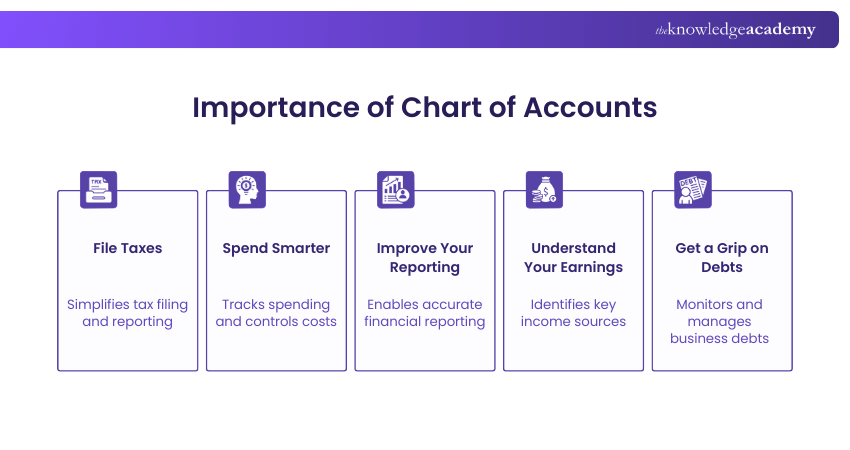
1) File Taxes
A well-organised COA makes tax filing much easier. It helps categorise expenses and income, reducing errors and saving time. You can quickly pull out the right reports when needed.
2) Spend Smarter
By looking at your COA regularly, you can see which areas are costing your budget. It helps control spending and manage your business costs more wisely.
3) Improve Your Reporting
Financial reports like the profit and loss statement or balance sheet pull data directly from your COA. A well-prepared COA gives accurate reports, helping you track performance and make better decisions.
4) Understand Your Earnings
Your income accounts in the COA show how much money you are making and from what sources. This helps you spot your best income sources and build strategies around them.
5) Get a Grip on Debts
The COA helps in knowing the loans and other things you owe. With a COA, it will be easier to track how much you owe, when to repay it, and understand how this debt is affecting your financial health.
Structure of Chart of Accounts
While preparing a Chart of Accounts for your business, a clear structure helps you keep records clean, reduces errors, and makes reporting and auditing much easier. A typical Chart of Accounts is split into two broad sections:
1) Balance Sheet Accounts
2) Income Statement Accounts
Let’s look at each of them in more detail:
1) Balance Sheet Accounts
The balance sheet accounts show the financial position of the business at a specific point in time. It is further classified as assets, liabilities and equity.
Asset Accounts
These asset accounts track what your company owns. Examples include:
1) Cash
2) Accounts receivable
3) Inventory
4) Equipment
Liabilities
The liabilities show what your company owes. Common liability accounts include:
1) Accounts payable
2) Loans
3) Credit card balances
4) Tax obligations
Shareholders Equity
This section records the owner's stake in the company. It reflects the net worth of the business after subtracting liabilities from assets. It includes:
1) Common stocks
2) Retained earnings
3) Owner investments
4) Dividends
Learn budgeting, cost control, and financial analysis with our Management Accounting (MA) Course – Register today!
2) Income Statement Accounts
These accounts show your company’s financial performance over time (month, quarter, or year). It contains the details of the income and expenses.

Income/Revenue
Revenue accounts record money earned from your business operations. For example:
1) Product sales
2) Service income
3) Interest income
4) Commission income
Expenses
Expense accounts track the money spent to run the business. Common examples include:
1) Rent
2) Payroll
3) Marketing
4) Utilities
How the Chart of Accounts Works?
The Chart of Accounts works using the principle of double-entry accounting, which is a standard method in financial reporting. This ensures that for every transaction recorded, two accounts are affected: one is debited, and the other is credited. This keeps your books balanced and accurate.
Example:
Let’s say your business buys a new laptop for an employee for £800. This is how that would be recorded in the COA:
1) You spend £800, so your cash account goes down. It becomes a debit of £800.
2) At the same time, your computer equipment account goes up because you now own a new laptop. It becomes a credit of £800.
Even though both accounts are asset types, one is increasing while the other is decreasing. The sum of the debit and credit is always zero, keeping the books balanced. Over time, these entries build up and are added to your company’s main financial reports.
What is a Chart of Accounts Used For?
A COA is used for varied purposes. Here are some of the instances where it is used:
1) Recording Transactions: Every financial transaction is posted to a COA account. It includes sales, payments, bills and more.
2) Creating Reports: It powers key financial reports like balance sheets and profit/loss statements.
3) Budgeting: You can compare current expenses to past periods using account histories.
4) Auditing: A detailed COA makes it easy for auditors to verify transactions during any audits.
5) Strategic Planning: Decision-makers use the COA to see how money flows through the business.
Enhance your expertise in auditing, tax preparation, and financial analysis with our Accounting Courses – Sign up soon!
How to Adjust a Chart of Accounts?
Since we are in a dynamic world, businesses tend to change often with new products, services, or departments. This requires you to update your accounts, too. You can adjust your COA in two ways, as detailed below:
Adding New Account Lines
You might need to add a new account when:
1) You launch a new product or service
2) You need to track income or expenses in more detail
3) Reporting requirements change
Tip: Keep new accounts grouped with similar ones and number them accordingly.
Reallocating Balances
Sometimes you may find that some transactions were recorded under the wrong account. You can reallocate balances by making entries to move them to the correct account. This keeps your books accurate while reflecting the new, more detailed account setup.
Tip: Always document why you made the change to avoid confusion during audits.
Best Practices for Managing Your Chart of Accounts
A well-structured Chart of Accounts keeps your reports clean, reduces errors, and makes everything easier to manage, especially as your business grows. So, here are the best practices for managing it:
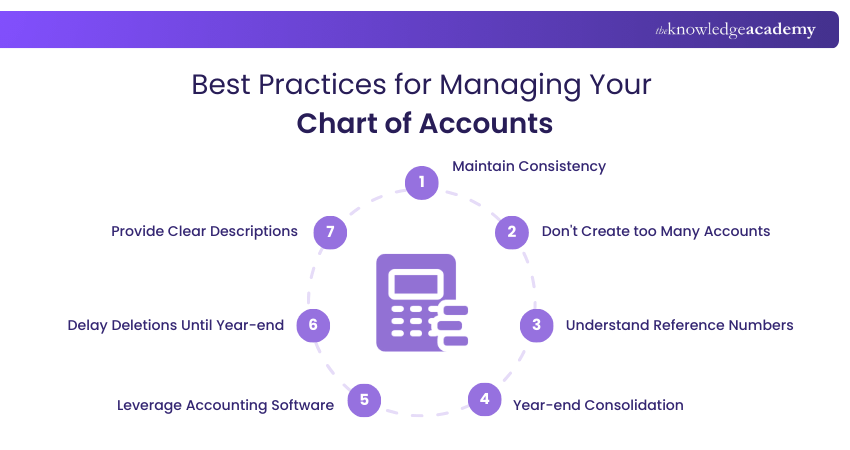
1) Maintain Consistency
In order to compare and analyse your accounts, it is suggested not to make big changes to your Chart of Accounts every year. This is because you might lose historical data from changed or deleted accounts. It makes it harder to compare performance over time.
Generally Accepted Accounting Principles (GAAP) and the Financial Accounting Standards Board (FASB) also recommend consistency as a core accounting rule.
2) Don't Create too Many Accounts
Avoid creating too many detailed accounts that won’t be used often. This can make your books messy and harder to read. Try to keep your COA simple and practical. In general, you don’t need a new account for every single type of transaction.
For example, you can group small, infrequent expenses under one category like “Miscellaneous Expenses.”
3) Understand Reference Numbers
Most accounting systems assign reference numbers to each account to help organise and sort them properly. Therefore, use a logical numbering system. This allows you to sort and find your accounts during the reports.
This can be highly beneficial if you are working with accounting software for your Chart of Accounts.
4) Year-end Consolidation
Before closing your books at the end of the year, review and combine inactive or duplicate accounts that are too specific or no longer needed. This helps keep your COA structure clear and efficient.
A shorter, cleaner COA improves reporting, reduces errors, and saves time. With a smart naming system, you don’t need dozens of accounts to track your finances well.
5) Leverage Accounting Software
While spreadsheets like Excel or Google Sheets work for very small businesses, they have limits. As your company grows, consider switching to dedicated accounting software like QuickBooks, Xero, Zoho Books, or Sage.
These tools help automate entries, assign and manage account numbers, reporting, preventing errors and also offer compliance support.
Experience with real-world Accounting Software tools with our Accounting Software Training – Explore now!
6) Delay Deletions Until Year-end
Avoid deleting or renaming accounts in the middle of the financial year, as this can break reports. It may create confusion during tax season and make it harder to reconcile your books. You can wait until the end of the financial year for transactions to be reconciled.
If you need to add a new account mid-year, that is fine. But don’t remove or rename existing ones until after year-end reporting is done.
7) Provide Clear Descriptions
Every account in your COA should have a short and clear description next to the name. This helps everyone understand what the account is used for. This is also helpful for new team members and external auditors.
Without good descriptions, it is easy to misplace transactions or make mistakes in financial reports. That can lead to wrong decisions, accounting errors, and tax or compliance issues.
Examples of a Chart of Accounts
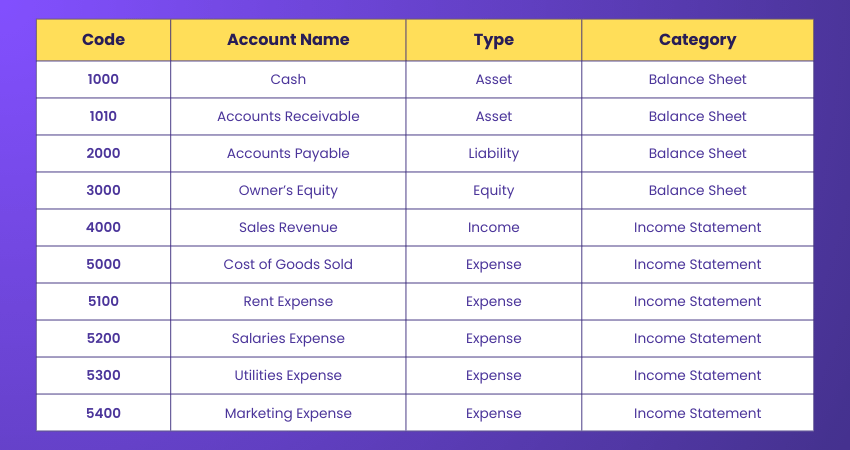
Here's an example of a Chart of Accounts for your reference:
Conclusion
A well-designed Chart of Accounts is the foundation of every effective accounting system. It helps you keep track of income, spending, assets, and debts. It also makes it easier to do taxes, create reports, and make smart decisions. As your business grows, make sure your COA grows too. Keep it simple and updated to know what is happening with your money.
Execute your dream of becoming an ACCA-qualified professional! Begin your ACCA Applied Knowledge Courses journey today!

Olivia Taylor is a qualified chartered accountant with over a decade of experience in financial management, auditing and corporate reporting. Having worked with leading firms in both the public and private sectors, Olivia brings clarity to complex financial topics. Her writing focuses on helping professionals build confidence in key areas of accounting, compliance and financial planning.
View Detail

 If you wish to make any changes to your course, please


