




We may not have the course you’re looking for. If you enquire or give us a call on +44 1344 203 999 and speak to our training experts, we may still be able to help with your training requirements.
Microsoft 365 Security Benefits in 2026: A Comprehensive Guide
ByNilotpal SarmahLast updated on: 17 September 2026
Microsoft 365 Security provides capabilities that help organisations protect identities, email, devices and sensitive information. When configured well, these security measures can reduce data exposure.
Every email, login and shared document creates an interaction that needs to be protected. Imagine an employee receiving what appears to be an urgent message from a trusted colleague. They click the link and enter their credentials, only to discover later that the email was a phishing attempt! A simple email has now become a potential security incident.
Microsoft 365 Security provides multiple layers of protection designed to reduce risks like these. From identity and email protection to data controls and security monitoring, its capabilities help organisations build a more secure digital workplace.
What is Microsoft 365 Security?
Microsoft 365 Security refers to the security capabilities available across the Microsoft 365 environment to help protect users, identities, devices, applications and information. Rather than relying on a single security measure, organisations can use multiple controls together.
These can include authentication, access management, email threat protection, data loss prevention, encryption, device security and monitoring. The exact capabilities available to an organisation can vary depending on its Microsoft 365 products, licences and configuration.

How Does Microsoft 365 Security Work?
Microsoft 365 Security uses multiple layers of protection rather than relying on a single defensive measure. Here are some of the main security layers:
1) Identity and Access Protection: Authentication and access controls help organisations verify users and determine whether they should be allowed to access particular resources. Measures such as Multi-factor Authentication (MFA), Conditional Access and privileged access controls can provide additional protection.
2) Email and Threat Protection: Email is a common route for phishing, malicious links and harmful attachments. Security capabilities can analyse messages, links and attachments to identify and respond to potential threats.
3) Data Protection: Encryption and data protection controls can help organisations protect sensitive information while it is stored, accessed or shared. Data Loss Prevention (DLP) policies can also help identify and manage situations where sensitive information may be shared inappropriately.
4) Device Protection: Organisations can establish security requirements for devices accessing company resources. Depending on the tools and configurations in use, controls can help manage device access and protect organisational information.
5) Monitoring and Security Visibility: Monitoring, alerts, audit information and security recommendations can help Administrators identify suspicious activity and areas where security configurations may need attention.
Benefits of Microsoft 365 Security
Microsoft 365 Security includes several security measures that help protect users, data and devices from online threats. Here are the key benefits of Microsoft 365 Security:
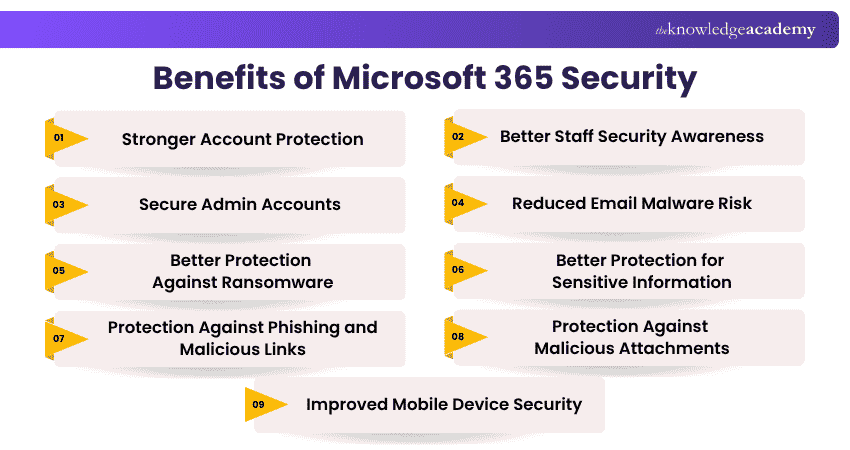
1) Stronger Account Protection
Microsoft 365 Security helps protect user accounts by adding extra checks during sign-in. Features such as Multi-factor Authentication make it harder for attackers to access an account even if they obtain the password.
2) Better Staff Security Awareness
Some Microsoft 365 security plans provide tools that can help organisations train employees to recognise phishing and other email threats. Regular awareness activities can help users identify suspicious messages and avoid common security risks.
3) Secure Admin Accounts
Administrator accounts have greater access to Microsoft 365 services, so they require stronger protection. Microsoft 365 Security can help limit privileged access, apply stronger authentication and reduce unnecessary administrator permissions.
4) Reduced Email Malware Risk
Microsoft 365 Security can help detect malicious links and attachments in emails before they affect users. This reduces the risk of employees opening harmful content that could compromise devices or company information.
5) Better Protection Against Ransomware
Microsoft 365 security capabilities can help detect and block ransomware-related threats. Recovery features in services such as OneDrive and SharePoint can also help restore files after certain unwanted changes or security incidents.
6) Better Protection for Sensitive Information
Encryption and information protection controls can help keep sensitive business information secure when it is stored, accessed or shared. This helps organisations reduce the risk of confidential information being exposed to unauthorised users.
7) Protection Against Phishing and Malicious Links
Microsoft 365 Security can help detect phishing emails, suspicious senders and harmful links. With Microsoft Defender for Office 365, Safe Links can also check URLs and warn or block users when a link is identified as malicious.
Pro Tip
Microsoft 365 Security should not be treated as “set and forget”. Regularly review identities, permissions, devices, policies, alerts and security recommendations as your users, technology and risks change.
8) Protection Against Malicious Attachments
Security capabilities can scan email attachments for harmful content before users open them. If an attachment is identified as unsafe, it can be blocked or handled according to the organisation's security policies.
9) Improved Mobile Device Security
Microsoft 365 can help organisations apply security requirements to phones and tablets that access company information. Depending on the licences and tools in use, organisations can manage device access, apply security policies and protect business data on mobile devices.
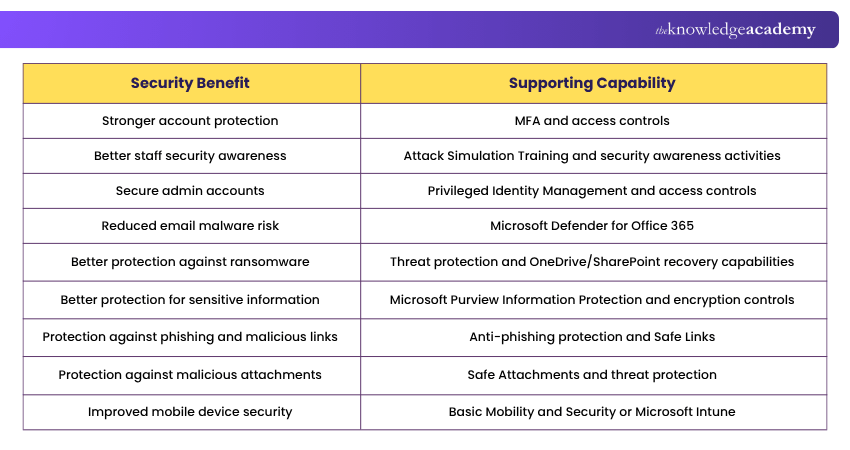
Here’s a gist of the Microsoft 365 Security Benefits and capabilities:
Features of Microsoft 365 Security
Microsoft 365 Security includes several advanced features designed to protect data, users and systems. These are the key features of Microsoft 365 Security:
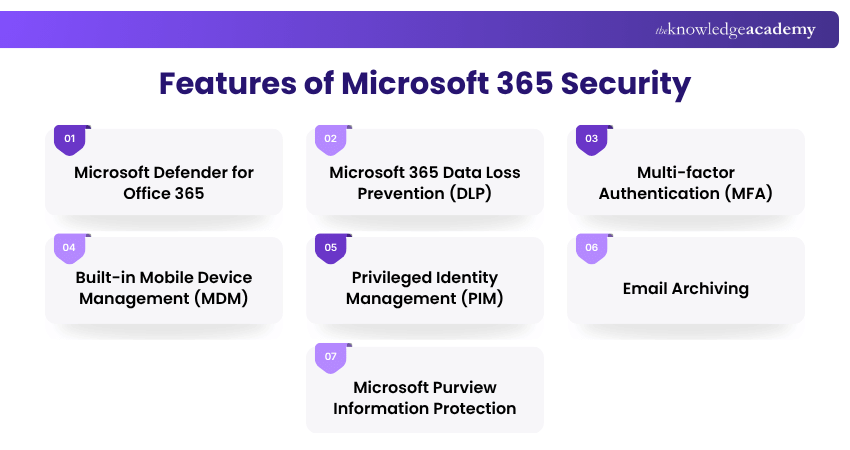
1) Microsoft Defender for Office 365
Microsoft Defender for Office 365 Security protects emails, files, and tools from online threats. It provides real-time security against phishing, malware and unsafe links. It also helps teams identify issues quickly and prevent similar risks in the future.
2) Microsoft 365 Data Loss Prevention (DLP)
Data Loss Prevention stops important information from being shared by mistake. For example, if someone sends a file with customer card details, it can block or warn the user. This helps keep sensitive data safe and follow rules without slowing down work.
3) Multi-factor Authentication (MFA)
MFA in Microsoft 365 Security checks each login using more than one step, like a password and a phone code. It is simple and effective, helping stop unauthorised access and ensuring only trusted users can open important files, apps or emails.
4) Built-in Mobile Device Management (MDM)
Microsoft 365 can provide mobile device management through Basic Mobility and Security or Microsoft Intune, depending on the subscription. These tools can enforce device policies, control access to organisational resources and support remote wipe capabilities on managed devices.
5) Privileged Identity Management (PIM)
PIM helps manage and control access to important admin roles. It gives users temporary access only when needed and keeps a record of all activities. This reduces the risk of attackers getting long-term access and helps maintain better visibility and security.
Manage users and optimise services with greater efficiency. Sign up for our Microsoft 365 Administrator Training MS102 now!
6) Email Archiving
Microsoft 365 supports online archiving for eligible Exchange Online mailboxes, helping organisations retain and manage older email content. Retention and preservation requirements depend on the archive, retention and compliance policies configured by the organisation.
7) Microsoft Purview Information Protection
Microsoft Purview Information Protection helps organisations classify and protect sensitive documents and emails using sensitivity labels, encryption and related information-protection controls. This ensures only authorised users can open, edit or share the content. It works smoothly across Microsoft apps to maintain privacy and safeguard sensitive data.
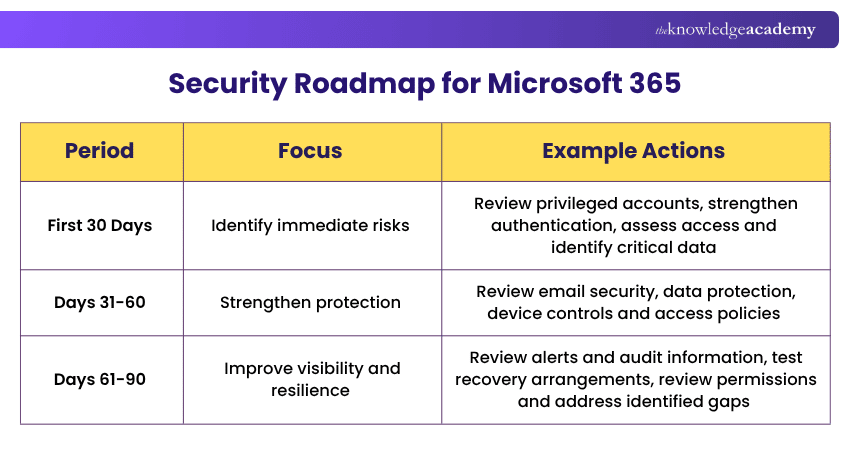
Here’s a simple 30-60-90 day security roadmap to boost your security posture:
Microsoft 365 Security Best Practices
To get the most from Microsoft 365 Security, businesses should follow a few best practices:
1) Enable Multi-factor Authentication (MFA): Always activate MFA for all users, especially Administrators.
2) Keep Software Updated: Regularly install updates to close any security gaps.
3) Train Employees: Offer continuous training so employees recognise phishing and other threats.
4) Use Strong Password Policies: Encourage long, unique passwords, block weak or compromised passwords and avoid unnecessary periodic password changes unless there is evidence of compromise.
5) Set Role-based Access: Give users only the permissions they need for their job.
6) Plan for Data Recovery: Use appropriate Microsoft 365 recovery, retention and backup capabilities according to your organisation’s recovery requirements.
7) Review Security Reports: Use Microsoft Secure Score to track and improve your organisation’s security health.
8) Enable Device Encryption: Protect data on all devices used to access Microsoft 365 Security.
9) Use Conditional Access Policies: These policies allow or block logins based on device type, location or risk level.
10) Monitor Suspicious Activity: Use Microsoft Defender and audit logs to track unusual behaviour.
Trainer Insight
Privileged accounts require stronger protection than standard user accounts. Limit administrative access, use strong authentication and regularly review who still needs elevated permissions.
Common Microsoft 365 Security Mistakes to Avoid
Avoid these common problems to harness the full Microsoft 365 Security Benefits:
1) Relying solely on passwords
2) Giving users unnecessary permissions
3) Leaving privileged access permanently assigned
4) Applying security policies without adequate testing
5) Ignoring unmanaged or outdated devices
6) Failing to review alerts and security recommendations
7) Relying on technology without user security awareness
8) Treating security configuration as a one-time task
Gain the skills that modern workplaces demand with our comprehensive Microsoft 365 Training - Sign up now!

Nilotpal Sarmah is a Senior Content Writer with 11+ years of overall experience spanning engineering, operations and content development. His technical knowledge and extensive writing experience enable him to simplify specialised topics across IT and Tech, Business Skills, Project Management, Health and Safety, and ISO and Compliance.
View Detail

 If you wish to make any changes to your course, please


