




We may not have the course you’re looking for. If you enquire or give us a call on 01344203999 and speak to our training experts, we may still be able to help with your training requirements.
Home
 Resources
Project Management
Top 25 Project Planning Software Tools: Features and Best Practices
Resources
Project Management
Top 25 Project Planning Software Tools: Features and Best Practices
Resources
Project Management
Top 25 Project Planning Software Tools: Features and Best Practices
Top 25 Project Planning Software Tools: Features and Best Practices
ByThe Knowledge AcademyLast updated on: 17 September 2026
Explore 25 project planning software tools designed for different teams, workflows and project complexities. Compare their primary capabilities and intended uses to identify an option that aligns with your planning, collaboration, scheduling and resource-management needs.

A project can have a clear goal and a capable team yet still lose direction when plans are scattered or difficult to follow. The right software brings order to this process, but choosing one is not always straightforward.
A platform that works well for a small creative team may not meet the demands of a complex construction or software project. In fact, finding the right tool can become a project of its own. So, which option matches the way your team works? Let’s explore 25 project planning software tools and find out.
What is Project Planning Software?
Project planning software is a digital tool that helps teams organise, schedule, and manage project activities from one place. It provides greater visibility into tasks, deadlines, responsibilities, resources, and overall project progress.
Depending on the tool, it may include features such as task management, Gantt charts, timelines, dependencies, resource planning, collaboration, reporting, and workload tracking. These capabilities help teams create structured plans, coordinate work, monitor progress, and respond to changes throughout a project.

Top 25 Project Planning Software Tools
The following selection includes dedicated scheduling applications, collaborative work management platforms, Agile tools and enterprise portfolio management solutions. Each supports project planning differently, so the right option depends on the project’s size, workflow and complexity.
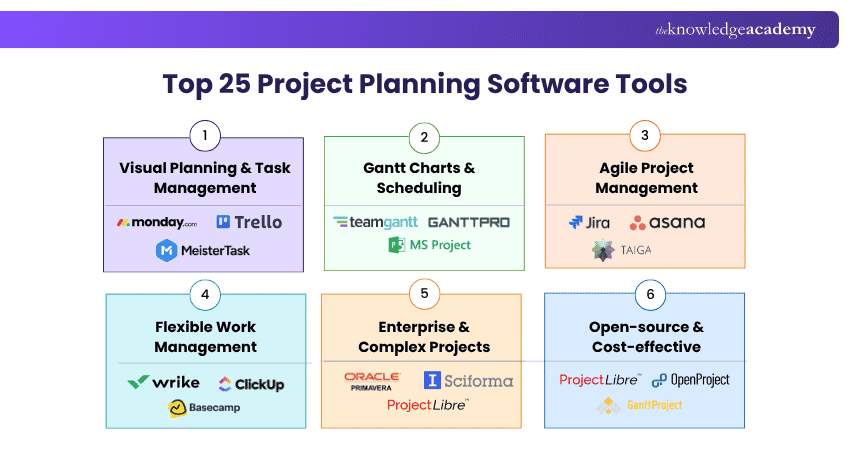
1) Microsoft Planner and Project
Microsoft Planner and Project support different levels of project complexity. Planner is suited to collaborative team workflows, while the Project desktop application is designed for more detailed and structured planning.
Key Features Include:
1) Task assignment and progress tracking
2) Board, grid and timeline views
3) Task dependencies and milestones
4) Resource and workload planning
5) Project baselines and reports
2) Trello
Trello is a visual work management platform suited to individuals and teams that prefer a simple, card-based approach. It works particularly well for straightforward projects and recurring workflows.
Key Features Include:
1) Customisable Kanban boards
2) Task cards and checklists
3) Due dates and reminders
4) Workflow automation
5) Templates and app integrations
3) Asana
Asana is a collaborative work management platform suitable for coordinating projects across teams and departments. Its flexibility makes it useful for both routine processes and multi-stage initiatives.
Key Features Include:
• List, board and timeline views
• Task dependencies and milestones
• Workflow rules and automation
• Forms for work requests
• Project dashboards and reporting
4) monday.com
monday.com is a configurable work management platform that can be adapted to different industries and workflows. It is suitable for teams that want to build customised project processes without extensive technical knowledge.
Key Features Include:
1) Customisable project boards
2) Timeline and Gantt views
3) Workflow automation
4) Workload visibility
5) Dashboards and integrations
5) Smartsheet
Smartsheet combines a familiar spreadsheet-style interface with structured work management capabilities. It is particularly useful for teams that need flexibility alongside formal schedules and project controls.
Key Features Include:
1) Grid, Gantt and calendar views
2) Task dependencies and critical paths
3) Resource management capabilities
4) Automated workflows and alerts
5) Dashboards and reports
6) Wrike
Wrike is a collaborative work management platform designed for teams overseeing multiple projects and workflows. It is particularly suited to organisations that require cross-project visibility and structured approval processes.
Key Features Include:
1) Interactive Gantt charts
2) Workload and resource views
3) Custom request forms
4) Proofing and approval workflows
5) Cross-project dashboards
7) Basecamp
Basecamp brings project communication and coordination into a central workspace. It is best suited to teams that value simplicity and transparency over advanced scheduling and resource-planning capabilities.
Key Features Include:
1) To-do lists and assignments
2) Message boards
3) Project schedules
4) File and document sharing
5) Automatic progress check-ins
8) TeamGantt
TeamGantt is a visual scheduling platform developed around the Gantt chart format. It is suitable for teams that want to build and communicate project schedules without using highly complex planning software.
Key Features Include:
1) Drag-and-drop Gantt charts
2) Task dependencies and milestones
3) Resource workload views
4) Baseline comparisons
5) Portfolio and progress views
9) ClickUp
ClickUp is an all-in-one productivity and work management platform for teams seeking extensive flexibility. It can support anything from personal task planning to coordinated cross-functional projects.
Key Features Include:
1) Multiple project views
2) Task dependencies and priorities
3) Time tracking and estimates
4) Goals and milestone tracking
5) Dashboards and automation
10) Jira
Jira is a project and work management platform closely associated with software development and Agile delivery. It is best suited to teams working with Scrum, Kanban or customised development workflows.
Key Features Include:
1) Scrum and Kanban boards
2) Product and sprint backlogs
3) Custom issue workflows
4) Roadmaps and release planning
5) Agile reports and dashboards
11) ProjectLibre
ProjectLibre is an open-source project management application designed for structured project planning and scheduling. It is a practical alternative to Microsoft Project for individuals and teams that need essential planning capabilities without subscription-based software.
Key Features Include:
1) Gantt charts and project timelines
2) Task dependencies and milestones
3) Work breakdown structures
4) Resource allocation and costing
5) Critical path analysis
12) MeisterTask
MeisterTask is a visual task and project management platform built around accessible project boards. It is best suited to teams coordinating straightforward processes and day-to-day activities.
Key Features Include:
1) Customisable project boards
2) Task assignments and checklists
3) Workflow automation
4) Time tracking
5) Reports and activity insights
Make every project plan count with our Project Planning and Control™ (PPC) Foundation And Practitioner Course – Join now!
13) GanttPRO
GanttPRO is an online planning platform centred on Gantt charts and structured project schedules. It is suitable for teams that need clearer control over timelines, dependencies and assigned resources.
Key Features Include:
1) Interactive Gantt charts
2) Task dependencies
3) Milestone management
4) Resource allocation
5) Baseline and critical-path tracking
14) Zoho Projects
Zoho Projects is a project management platform suited to teams already using Zoho applications or seeking an integrated business ecosystem. It can support both structured project plans and ongoing team coordination.
Key Features Include:
1) Gantt charts and dependencies
2) Task and milestone management
3) Time tracking and timesheets
4) Workflow automation
5) Project reports and dashboards
15) Hive
Hive is a collaborative work management platform designed to support flexible team workflows. It is particularly suitable for teams that want to combine project coordination, communication and approval processes.
Key Features Include:
1) Gantt, board and calendar views
2) Task dependencies
3) Time tracking and timesheets
4) Proofing and approvals
5) Project analytics
16) ProWorkflow
ProWorkflow is a project management platform aimed primarily at professional services and small to medium-sized teams. It helps organisations coordinate client work while maintaining visibility over time and costs.
Key Features Include:
1) Task and milestone management
2) Time and expense tracking
3) Staff workload views
4) Project templates
5) Reports and invoicing support
17) OpenProject
OpenProject is an open-source project management platform suitable for organisations wanting greater control over their software and data. Its Community edition is self-hosted and free, while hosted and Enterprise versions are paid.
Key Features Include:
1) Gantt charts and timelines
2) Task and issue tracking
3) Agile boards
4) Time and cost reporting
5) Project wikis and documents
18) GanttProject
GanttProject is a free, open-source desktop application for straightforward project scheduling. It is most suitable for individuals and smaller teams that do not require extensive cloud collaboration or portfolio management.
Key Features Include:
1) Gantt chart creation
2) Task dependencies
3) Resource assignments
4) Critical-path calculation
5) Project file export
19) Taiga
Taiga is an open-source project management platform created for Agile teams. It is well suited to software, product and cross-functional teams following Scrum or Kanban practices.
Key Features Include:
1) Sprint planning
2) Product backlogs
3) User story management
4) Kanban boards
5) Issue tracking
20) Redmine
Redmine is an open-source project and issue-tracking platform primarily suited to software and technical teams. Its extensive configuration options are valuable for organisations with the expertise to install and maintain it.
Key Features Include:
1) Issue and task tracking
2) Gantt charts and calendars
3) Project wikis and documents
4) Time tracking
5) Source-code repository integration
21) Toggl 2.0
Toggl 2.0 combines planning with time intelligence to help teams create more realistic schedules. It is especially useful for service teams and organisations that need to compare estimated effort with actual working time.
Key Features Include:
1) Timeline, Kanban and calendar views
2) Integrated time tracking
3) Capacity and workload planning
4) Planned-versus-actual comparisons
5) Utilisation and profitability reports
22. Primavera P6
Primavera P6 is an enterprise project planning and scheduling platform widely used in construction, engineering and infrastructure. It is intended for organisations managing complex schedules, programmes and large numbers of project activities.
Key Features Include:
1) Critical-path scheduling
2) Work breakdown structures
3) Resource and cost management
4) Multi-project planning
5) Baseline and progress analysis
23) Merlin Project
Merlin Project is a project management application developed primarily for users in the Apple ecosystem. It is suitable for professionals who need detailed scheduling capabilities across Mac, iPad and iPhone devices.
Key Features Include:
1) Gantt charts and network plans
2) Task dependencies and milestones
3) Resource and cost planning
4) Mind maps and Kanban boards
5) Budget and progress tracking
24) Sciforma
Planview ProjectAdvantage, formerly Sciforma, is a project and portfolio management platform intended for growing PMOs. It helps organisations standardise delivery and gain visibility across multiple projects and initiatives.
Key Features Include:
1) Project portfolio planning
2) Demand and resource management
3) Financial planning
4) Risk and performance monitoring
5) Portfolio reports and dashboards
25) Notion
Notion is a connected workspace that allows teams to construct flexible project environments around their existing processes. It is best suited to teams that want documents, project information and lightweight planning in one place.
Key Features Include:
1) Board and timeline views
2) Task dependencies and subtasks
3) Custom project databases
4) Collaborative documents and wikis
5) Templates and workflow automation
Learn proven project planning methods for better business outcomes. Register for our Project Planning And Control™ (PPC) Practitioner Course now!
Factors to Consider When Choosing Project Planning Software
When selecting the right project planning software for your specific needs, several critical factors should be considered to make an informed choice:
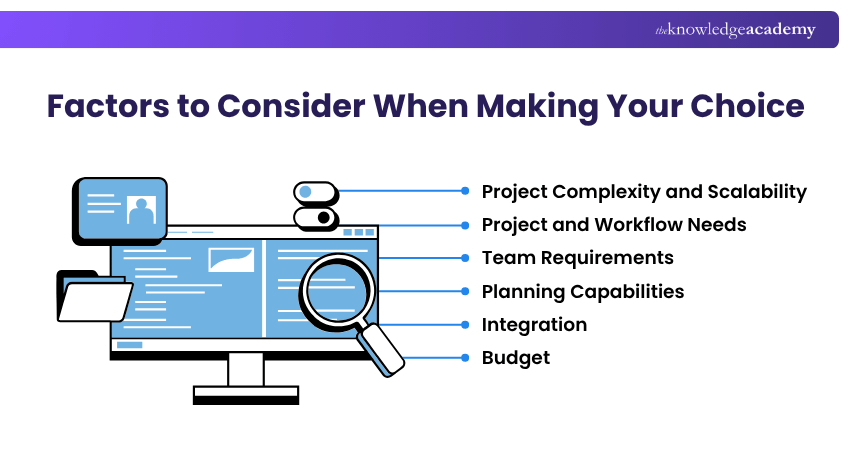
1) Project Complexity and Scalability: Choose software that can handle your current project size and scale as requirements grow.
2) Project and Workflow Needs: Consider your industry, project type, methodology, and the level of customisation required.
3) Team Requirements: Look at team size, ease of use, communication needs, and collaboration features.
4) Planning Capabilities: Check whether you need resource management, scheduling, reporting, or analytics.
5) Integration: Ensure the software works effectively with the tools and systems your team already uses.
6) Budget: Compare the cost with the features, team size, and level of functionality you actually need.
Best Practices for Implementing Project Planning Software
Effective implementation helps teams gain greater value from project planning software and integrate it smoothly into existing workflows. Consider these key practices:
a) Define Clear Objectives: Identify the project challenges the software should address and the improvements you expect.
b) Choose the Right Tool: Select software that matches your project requirements, team size, workflows, and budget.
c) Configure Workflows: Set up workflows, templates, fields, and collaboration features to reflect how your team manages projects.
d) Support User Adoption: Provide training, guidance, and documentation to help teams use the software consistently and confidently.
e) Manage Data and Access: Plan data migration, integrations, user permissions, and security controls to protect project information.
f) Review and Improve: Gather user feedback, monitor software usage, and refine processes as project needs and features evolve.
Turn project plans into clear action with our Project Planning and Control™ (PPC) Foundation Course – Register now!

The Knowledge Academy develops accessible learning content across Project Management, IT, Cybersecurity, Data Science, Business Analysis, HR, Accounting and Finance, Leadership and Health and Safety. Its resources combine subject research with clear explanations to help professionals build practical knowledge across a wide range of disciplines.
View Detail

 If you wish to make any changes to your course, please


