




We may not have the course you’re looking for. If you enquire or give us a call on 01344203999 and speak to our training experts, we may still be able to help with your training requirements.
Top 10 NLP Tools: Features and Practical Uses
ByThe Knowledge AcademyLast updated on: 25 November 2026
Natural Language Processing (NLP) tools help computers analyse human language and extract useful information from text. Explore 10 NLP libraries, frameworks and cloud services, their essential features and practical uses, and learn how to choose the right option for your project.
At a Glance
1. Different Tool Types: NLP options range from Python libraries and Java toolkits to managed cloud services.2. Development Requirements: Some tools provide ready-to-use APIs, while others require model selection, training or configuration.3. Language Support: Available models, supported languages and accuracy can differ considerably between platforms.4. Choosing a Tool: Consider your NLP task, programming environment, data sensitivity and deployment requirements.
A company receives hundreds of customer reviews every day. Some highlight delivery delays, others praise product quality, and a few raise complaints that need immediate attention. Reading every review manually can become difficult as the volume grows.
The bigger challenge is identifying which concerns appear most often and which ones need attention first. NLP tools can help organise and analyse this feedback, making it easier to recognise recurring patterns. But with different tools suited to different tasks, which ones should you explore? Let's take a closer look.
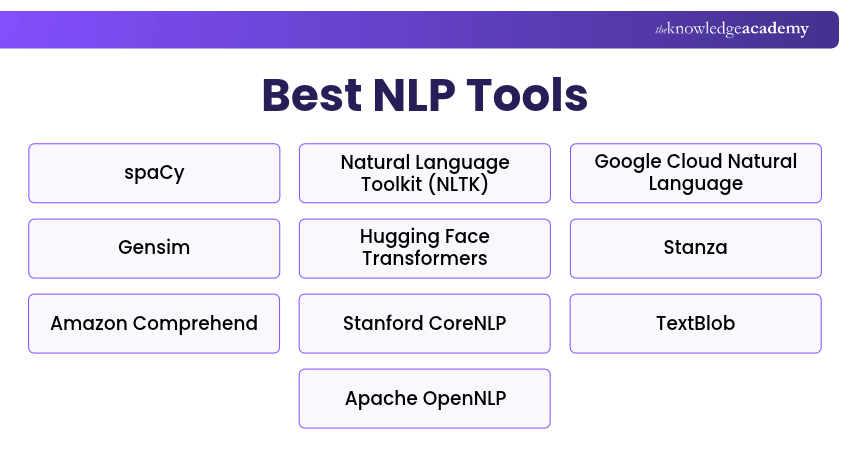
Best NLP Tools
The following tools support different approaches to language processing, from linguistic analysis and topic modelling to cloud-based text analytics. Explore their features and practical applications to identify suitable options for your projects.
1) spaCy
spaCy is an open-source Python library designed for advanced natural language processing. It helps developers build structured language-processing workflows for analysing and extracting information from text.
spaCy also supports trainable pipelines for tasks such as text classification and entity recognition. It is designed for production applications and can process large collections of text efficiently.
Key Features:
1) Text Processing: Supports tokenisation, tagging and dependency parsing.
2) Entity Recognition: Identifies names, organisations and locations.
3) Customisable Pipelines: Supports trainable components for specific NLP tasks.
Practical Uses:
1) Extracting skills and qualifications from CVs.
2) Classifying customer feedback into relevant categories.

2) Natural Language Toolkit (NLTK)
Natural Language Toolkit (NLTK) is an open-source Python library used for natural language processing and computational linguistics. It provides a flexible environment for exploring language structure and experimenting with text-analysis methods.
Its extensive learning resources make it particularly useful for understanding NLP concepts and conducting linguistic research.
Key Features:
1) Text Processing: Supports tokenisation, stemming and tagging.
2) Text Classification: Provides methods for categorising text.
3) Language Resources: Offers corpora and lexical resources, including WordNet.
Practical Uses:
1) Preparing text for analysis and classification.
2) Studying sentence structures and linguistic patterns.
3) Google Cloud Natural Language
Google Cloud Natural Language is an AI-powered service that helps developers analyse and understand unstructured text. It provides capabilities such as sentiment analysis, entity recognition, entity sentiment analysis, and syntactic analysis.
The service can be integrated into applications through APIs, making it useful for organisations that need to analyse text without building every language-processing model from scratch.
Key Features:
1) Sentiment Analysis: Measures sentiment using score and magnitude values.
2) Entity Recognition: Identifies people, organisations and locations.
3) Syntactic Analysis: Examines grammatical structures and relationships.
Practical Uses:
1) Analysing sentiment in customer reviews.
2) Extracting relevant entities from business documents.
4) Gensim
Gensim is an open-source Python library focused on unsupervised topic modelling and natural language processing. It provides an efficient way to work with word embeddings, topic models, document similarity, and vector representations.
Gensim is particularly useful for analysing large collections of documents and discovering patterns in textual information. Its capabilities support academic research, business intelligence and text analytics applications.
Key Features:
1) Topic Modelling: Identifies recurring themes in document collections.
2) Word Embeddings: Supports Word2Vec and FastText models.
3) Document Similarity: Compares documents using vector representations.
Practical Uses:
1) Discovering common topics in customer feedback.
2) Finding similar articles and documents.
5) Hugging Face Transformers
Hugging Face Transformers is an open-source library that provides access to pretrained transformer-based models for natural language processing and other AI tasks. It supports text classification, summarisation, question answering, translation, and text generation.
The library works with popular deep learning frameworks and allows developers to use existing models or fine-tune them for specific applications.
Key Features:
1) Pretrained Models: Provides models for various NLP tasks.
2) Model Fine-tuning: Adapts compatible pretrained models using task-specific datasets.
3) Text Summarisation: Generates shorter versions of documents using suitable models.
Practical Uses:
1) Summarising lengthy reports.
2) Developing question-answering applications.
Discover how machines identify language patterns with our Machine Learning Course – Register now!
6) Stanza
Stanza is an open-source Python library developed by the Stanford NLP Group. It provides pretrained neural network pipelines for linguistic analysis across numerous languages, making it useful for multilingual NLP applications.
Key Features:
1) Multilingual Processing: Analyses text using language-specific models.
2) Entity Recognition: Identifies named entities in supported languages.
3) Dependency Parsing: Examines grammatical relationships between words.
Practical Uses:
1) Analysing multilingual documents.
2) Studying sentence structures for linguistic research.
7) Amazon Comprehend
Amazon Comprehend is a cloud-based natural language processing service from Amazon Web Services (AWS). It uses machine learning to identify information and patterns in unstructured text, including entities, key phrases, sentiment and language.
Amazon Comprehend supports real-time text analysis and asynchronous processing of large document collections. It also allows organisations to develop custom text classification and entity recognition models.
Key Features:
1) Sentiment Analysis: Identifies positive, negative, neutral and mixed sentiment.
2) Entity and Key Phrase Extraction: Detects named entities and important phrases in text.
3) Custom Classification: Categorises documents using trained models.
Practical Uses:
1) Analysing customer reviews and feedback.
2) Classifying customer support tickets.
Pro Tip
Before choosing an NLP tool, test it using a small sample of your actual text data. A tool that performs well on general examples may struggle with industry-specific terminology, abbreviations or informal language.
8) Stanford CoreNLP
Stanford CoreNLP is an open-source natural language processing toolkit developed primarily in Java. It provides tools for common NLP tasks, such as tokenisation, part-of-speech tagging, named entity recognition, dependency parsing, sentiment analysis and coreference resolution.
Stanford CoreNLP is suitable for applications that require detailed linguistic analysis and can be integrated into different software environments through its server interface.
Key Features:
1) Linguistic Analysis: Supports tagging and syntactic parsing.
2) Coreference Resolution: Identifies references to the same entity.
3) Sentiment Analysis: Classifies sentiment using supported models.
Practical Uses:
1) Analysing grammatical structures in documents.
2) Connecting references to the same person or organisation.
9) TextBlob
TextBlob is an open-source Python library for natural language processing. It offers a simple interface for performing common NLP tasks, including tokenisation, part-of-speech tagging, noun phrase extraction, sentiment analysis, and spelling correction.
TextBlob uses established Python NLP libraries and is particularly suitable for beginners, researchers and developers creating straightforward text analysis applications.
Key Features:
1) Sentiment Analysis: Measures text polarity and subjectivity.
2) Noun Phrase Extraction: Identifies important noun phrases.
3) Spelling Correction: Suggests possible spelling corrections.
Practical Uses:
1) Analysing sentiment in product reviews.
2) Extracting noun phrases from short documents.
10) Apache OpenNLP
Apache OpenNLP is an open-source, Java-based machine learning toolkit for processing natural language text. It provides tools for sentence segmentation, tokenisation, part-of-speech tagging, named entity recognition, chunking, parsing and language detection.
Apache OpenNLP is suitable for developers building applications that require structured language analysis. Its modular design allows different NLP components to be integrated into existing Java applications.
Key Features:
1) Text Segmentation: Detects sentences and tokenises text.
2) Entity Recognition: Identifies names and locations using suitable models.
3) Language Detection: Identifies the language of text using an appropriate model.
Practical Uses:
1) Extracting named entities from business documents.
2) Building text-processing components for Java applications.
Trainer's Insight
A common mistake in NLP projects is selecting a sophisticated model before defining the required outcome. For example, identifying product complaints may require a targeted classification model rather than a general-purpose language model.
How to Choose the Right NLP Tool
Different NLP tools can address similar tasks, but their development requirements and capabilities vary. Evaluate these factors to determine which NLP tool best meets your project's needs.
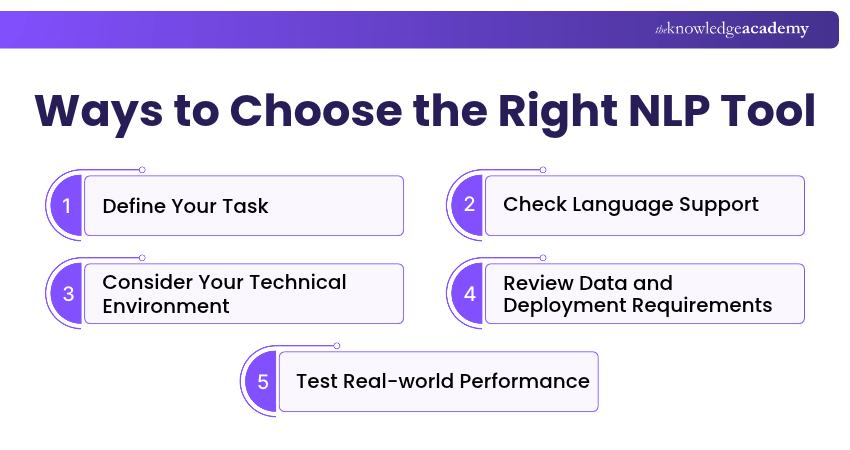
1) Define Your Task: Identify whether you need entity recognition, classification, topic modelling, summarisation or detailed linguistic analysis.
2) Check Language Support: Verify that suitable models exist for your target languages and the specific features you require.
3) Consider Your Technical Environment: Choose between Python libraries, Java toolkits and cloud APIs based on your development resources.
4) Review Data and Deployment Requirements: Consider data sensitivity, infrastructure, processing costs and whether text can be sent to an external service.
5) Test Real-world Performance: Compare outputs using representative text and evaluate accuracy, speed and the effort required to maintain the solution.
Keep This in Mind
The most advanced NLP tool is not always the most suitable. Focus on the accuracy, language support and deployment requirements that matter to your project rather than choosing a tool based on its range of features alone.
Acquire thorough knowledge of deep learning and neural networks with our Neural Networks with Deep Learning Training – Join now!

The Knowledge Academy develops accessible learning content across Project Management, IT, Cybersecurity, Data Science, Business Analysis, HR, Accounting and Finance, Leadership and Health and Safety. Its resources combine subject research with clear explanations to help professionals build practical knowledge across a wide range of disciplines.
View Detail

 If you wish to make any changes to your course, please


