




We may not have the course you’re looking for. If you enquire or give us a call on 01344203999 and speak to our training experts, we may still be able to help with your training requirements.
Top Microsoft Azure Tools and What They Are Used For
ByVishnu SankarLast updated on: 17 September 2026
Microsoft Azure tools help develop applications, automate deployments, manage infrastructure, monitor workloads, and improve security. Explore the leading Azure tools and learn where each fits within a modern cloud workflow.
Managing an Azure environment rarely involves a single tool. A developer might use Azure Developer CLI to deploy an application, Bicep to define its infrastructure, Azure Monitor to track performance, and Key Vault to protect secrets.
The challenge is not learning every Azure service, but understanding which tools solve which problems and how they work together. This blog groups key Microsoft Azure Tools by use case to help you identify the right options for your cloud workflow.
What are Microsoft Azure Tools?
Microsoft Azure tools are services, platforms, command-line utilities and development technologies used to create, deploy, administer, automate, monitor and secure workloads running on Azure.
Some tools provide different ways of performing similar tasks. For example, Azure CLI and Azure PowerShell both support command-line administration, while Azure Cloud Shell provides a browser-accessible environment containing both. Others address specialised requirements such as container orchestration, data integration, or application monitoring.
Rather than selecting tools individually, organisations can combine them into a connected cloud toolchain based on their applications, infrastructure and operational requirements.

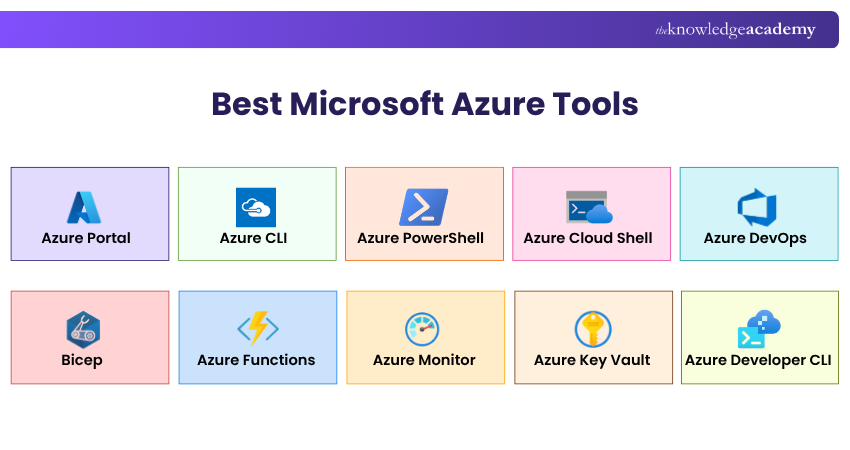
Microsoft Azure Tools at a Glance
The following visual provides a quick overview of commonly used Microsoft Azure tools and their primary uses:
Top Microsoft Azure Tools by Use Case
Different Azure tools address different parts of the cloud lifecycle. Here are the main categories and the tools worth knowing within each.
1) Azure Tools for Managing Cloud Resources
These tools help teams create, configure and manage Azure resources through visual interfaces, command-line utilities and browser-based environments.
a) Azure Portal: It provides a browser-based interface for viewing, creating and managing Azure resources. It is particularly useful for visual administration, exploring subscriptions and checking individual resource configurations.
b) Azure CLI: It provides cross-platform command-line commands for managing Azure, while Azure PowerShell: It offers Azure administration through PowerShell cmdlets. The choice often depends on the scripting environment and skills already used by the team.
c) Azure Cloud Shell: It provides an authenticated browser-accessible terminal with Bash and PowerShell, allowing users to manage resources without first configuring a local command-line environment.
2) Azure Tools for Application Development and Deployment
These tools support application development, hosting, provisioning, and deployment across different Azure workloads.
a) Azure Developer CLI (azd): This one is designed around the application development lifecycle. Its commands support activities such as initialising projects, provisioning infrastructure, and deploying code.
b) Azure App Service: It is a managed platform for hosting web applications, REST APIs and mobile back ends without directly managing the underlying infrastructure.
c) Azure Functions: It supports serverless and event-driven development. Functions can respond to events such as file uploads, scheduled tasks, HTTP requests or database changes while reducing the infrastructure developers need to manage.
d) Azure Container Apps: It provides a serverless platform for containerised applications and is suited to scenarios such as APIs, background jobs, event-driven processing and microservices.
3) Azure Tools for DevOps and Automation
These tools help teams automate infrastructure, manage development workflows and build repeatable delivery processes.
a) Azure DevOps: It brings together services for planning work, managing repositories, creating build and deployment pipelines, testing and managing development artefacts.
b) Bicep: It enables teams to define Azure infrastructure using a purpose-built language. Microsoft recommends considering Bicep when choosing between Bicep and JSON-based ARM templates because it provides the same Azure Resource Manager capabilities with simpler syntax.
c) ARM templates: This remains as core Infrastructure as Code option. They are JSON files that define the Azure resources and configuration required by a solution.
4) Azure Tools for Containers and Kubernetes
These tools support containerised applications, Kubernetes workloads and the storage and deployment of container images.
a) Azure Kubernetes Service (AKS): It is Microsoft's managed Kubernetes service for deploying and operating containerised applications at scale. AKS currently provides Automatic and Standard cluster modes for different levels of operational control.
b) Azure Container Registry (ACR): It provides managed storage for container images and related artefacts, allowing development and deployment pipelines to push, store and retrieve images.
c) Azure Container Apps: It is useful where teams want container benefits without directly managing Kubernetes clusters. This makes it particularly suitable for many serverless container and microservice workloads.
5) Azure Tools for Data and Databases
These tools help organisations store, integrate, manage and process data across Azure environments.
1) Azure Storage Explorer: It is a standalone application for working with Azure Storage data on Windows, macOS and Linux. It provides a visual way to connect to and manage Azure storage accounts.
2) Azure Data Factory: A managed data integration service used for ETL, ELT and data orchestration across cloud and on-premises sources. Microsoft now describes Data Factory in Microsoft Fabric as its next-generation data integration experience for organisations starting new data integration work.
3) Azure SQL Database: A fully managed PaaS database engine in which Microsoft handles many infrastructure-level tasks such as patching, backups, and upgrades.
4) Azure Cosmos DB: It is designed for scalable NoSQL applications and supports use cases including web, mobile, gaming and IoT applications where distributed data and responsive performance are important.
Learn data fundamentals and concepts pertaining to Azure with our DP-900 Azure Data Fundamentals Course - Sign up today!
6) Azure Tools for AI and Machine Learning
These tools support the development, training, deployment, and management of Machine Learning and AI solutions.
a) Azure Machine Learning: Supports the machine learning lifecycle, including model training, deployment, and ML Ops. It is primarily aimed at data scientists, machine learning engineers, and teams bringing ML workloads into production.
b) Microsoft Foundry: Formerly associated with Azure AI Foundry naming, brings models, agents and development tools into a unified platform. It supports building and managing AI applications while providing common controls for areas such as access, networking, governance, and observability.
7) Azure Tools for Monitoring and Observability
These tools help teams monitor application and infrastructure health, analyse telemetry and investigate performance issues.
a) Azure Monitor: Microsoft's unified observability service for collecting and analysing metrics, logs, traces and events from Azure and hybrid environments.
b) Application Insights: Part of Azure Monitor focuses on application performance monitoring and helps teams investigate application health, performance and failures.
c) Log Analytics: It provides tools for exploring and querying Azure Monitor log data. Advanced queries can be written using Kusto Query Language (KQL).
8) Azure Tools for Security
These tools help protect Azure environments through secrets management, security monitoring, threat detection and network protection.
a) Azure Key Vault: Securely stores and controls access to secrets, encryption keys and certificates, helping applications avoid storing sensitive credentials directly in code or configuration files.
b) Microsoft Defender for Cloud: Supports cloud security posture management and workload protection across Azure, hybrid and multicloud environments.
c) Microsoft Sentinel: A cloud-native Security Information and Event Management (SIEM) solution for collecting security data, detecting threats, investigating incidents and supporting response activities.
d) Azure Firewall: It provides managed network traffic filtering and centralised security policy enforcement for Azure virtual networks.
Myth vs Fact
Myth: Azure-native tools are always the best choice for every Azure workload.Fact: Azure environments can also use third-party tools such as Terraform, Docker and Ansible when they better fit existing workflows, multi-cloud requirements or team expertise.
Third-party Tools Commonly Used with Azure
Azure environments also frequently incorporate non-Microsoft technologies. These should be distinguished from Azure-native tools:
|
Tool
|
Common Azure Use
|
|
Terraform
|
Infrastructure as Code and multi-cloud provisioning
|
|
Docker
|
Building and running containerised applications
|
|
Postman
|
Developing and testing APIs hosted on Azure
|
|
Ansible
|
Configuration management and infrastructure automation
|
These tools can complement Azure-native capabilities where organisations already use them across broader development or multicloud environments.
Learn how Cloud Computing works with Microsoft Azure Fundamentals AZ900 Certification - Register now!
How to Choose the Right Azure Tools?
Choosing a tool should begin with the problem rather than its popularity. For example, visual resource management may call for Azure Portal, repeatable administration may be better suited to CLI or PowerShell, while repeatable infrastructure deployment may justify Bicep.
Selection should also consider integration with existing systems, security requirements, cost, workload scale, automation potential and the technical expertise available within the team.
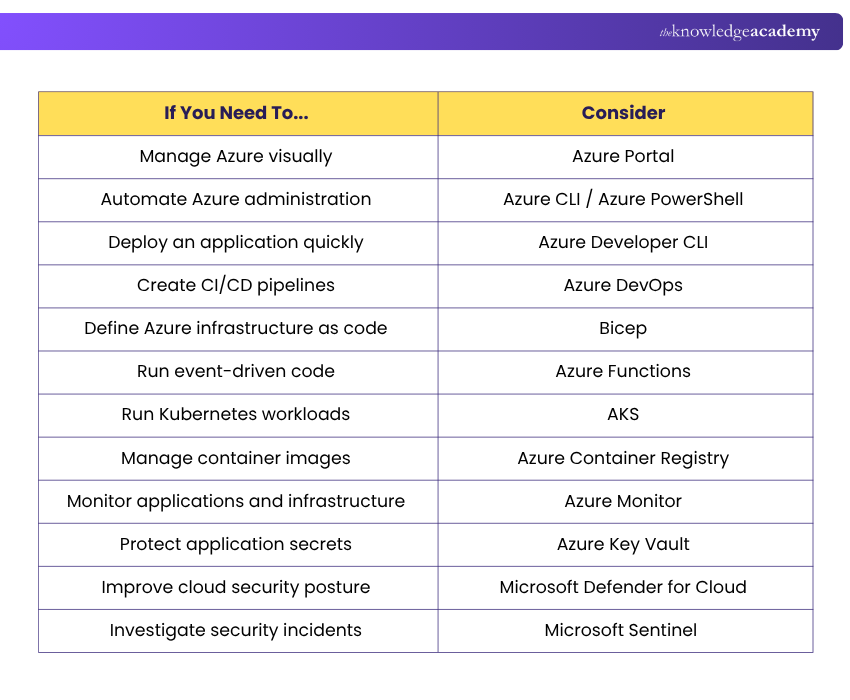
Use this quick decision guide when the requirement is already clear:
Trainer's Pro Tip
Start with the workflow, not the tool name. Identify what needs to be managed, automated or monitored first, then choose the Azure tool that fits that requirement.
Best Practices for Building an Azure Toolchain
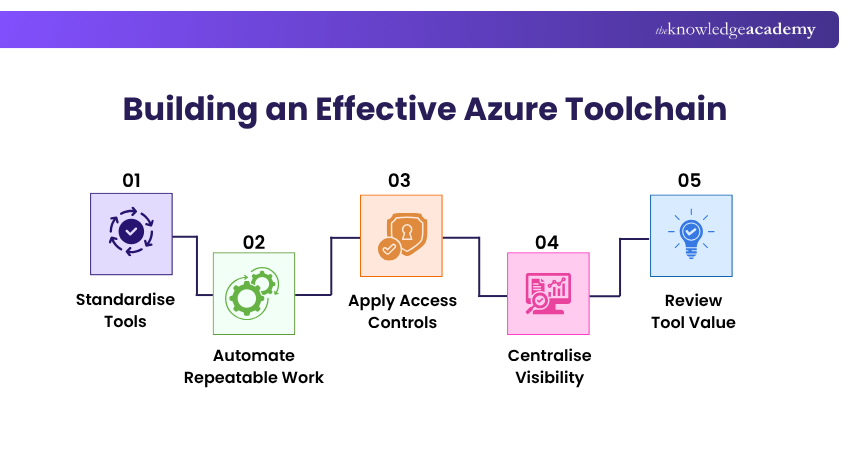
An effective Azure toolchain should remain manageable rather than simply contain as many products as possible. Standardise tools where possible so teams follow consistent deployment, monitoring and security processes. Automate repeatable infrastructure and application tasks, apply appropriate access controls, centralise operational visibility and regularly review whether each tool continues to solve a useful problem.
Tool overlap should also be considered. Azure Portal, CLI and PowerShell may manage many of the same resources, for example, but each suits a different working style. Selecting clear use cases prevents unnecessary tooling complexity.
Did You Know?
Microsoft Azure spans more than 70 regions worldwide, giving organisations a broad global footprint for deploying cloud workloads closer to users and supporting different geographic requirements.
Strengthen your Azure security expertise with Microsoft Azure Security Technologies AZ500 Training – Register today!

Vishnu Sankar is a Senior Content Writer with 5+ years of experience across content development, software development, web development and system administration. His technical background and professional training support his expertise in IT and Tech, while his extensive research and writing experience covers Project Management and Health and Safety.
View Detail

 If you wish to make any changes to your course, please


