






We may not have the course you’re looking for. If you enquire or give us a call on 01344203999 and speak to our training experts, we may still be able to help with your training requirements.
Kubernetes Tools to Boost Your Productivity
ByThe Knowledge AcademyLast updated on: 17 September 2026
Explore essential Kubernetes Tools for managing, deploying, monitoring, securing, and optimising containerised applications, along with how to choose the right ones and the alternatives available.
A successful Kubernetes deployment is rarely powered by Kubernetes alone. Imagine an e-commerce company preparing for its biggest sale of the year. Thousands of customers are expected to visit the platform simultaneously, placing orders, making payments and tracking deliveries.
While Kubernetes provides the foundation for container orchestration, the real challenge lies in monitoring performance, managing deployments and troubleshooting issues before they impact customers.
This is where Kubernetes Tools become indispensable. Tools like kubectl and Helm simplify cluster management and deployments, while Prometheus and Grafana offer real-time visibility to catch issues early. Together, they turn Kubernetes from a foundation into a fully operational system.
Different Types of Kubernetes Tools
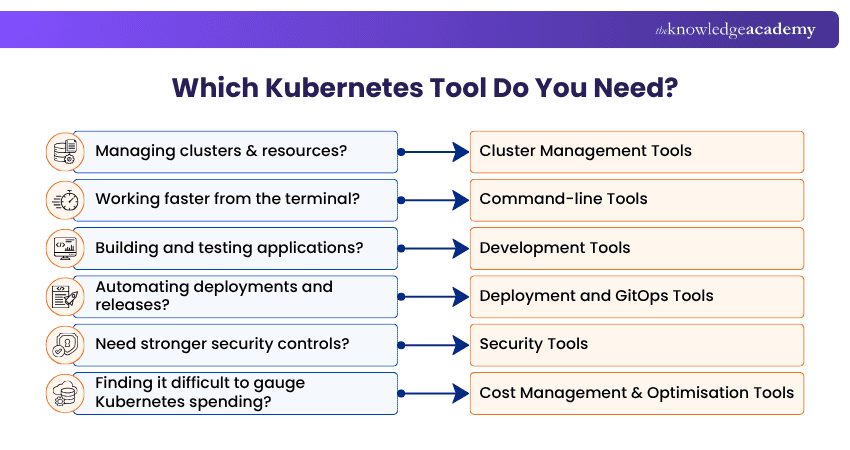
Kubernetes Tools can be grouped according to the operational challenges they solve. Some simplify day-to-day cluster administration, while others focus on development, deployment, networking, observability, security or cost management. The main categories include:
1) Cluster Management Tools: These help provision, administer and manage Kubernetes clusters.
2) Command-line Tools: These enable Developers and Administrators to interact with Kubernetes environments through terminal-based interfaces.
3) Development Tools: These simplify building, testing and iterating on applications for Kubernetes.
4) Deployment and GitOps Tools: These automate application packaging, deployment and synchronisation.
5) Networking and Service Mesh Tools: These manage network connectivity, traffic and service-to-service communication.
6) Monitoring and Observability Tools: These provide metrics, dashboards and insights into application and cluster health.
7) Security Tools: These help identify misconfigurations, enforce policies and detect security threats.
8) Cost Management Tools: These provide visibility into resource consumption and Kubernetes-related spending.
9) Backup and Disaster Recovery Tools: These protect Kubernetes resources and support recovery following failures or accidental changes.

Best Kubernetes Cluster Management Tools
Cluster management tools give administrators the ability to provision, manage, and interact with Kubernetes environments. Depending on the tool, they may provide graphical interfaces, automation or multi-cluster management capabilities. Here are the key examples:
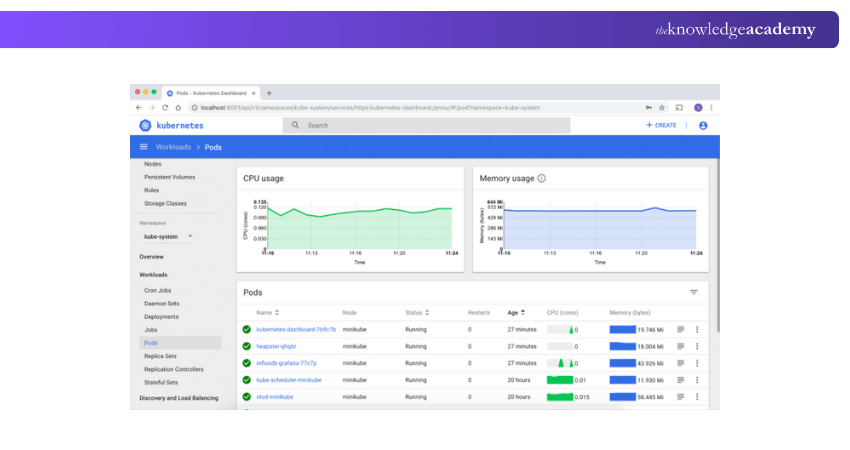
Kubernetes Dashboard provides a web-based graphical interface for Kubernetes clusters. It allows users to view and manage resources such as workloads, services, configuration objects and storage resources. It can make common administrative tasks easier to visualise, particularly for users who prefer a graphical interface alongside command-line tools.
2) Rancher
Rancher provides centralised Kubernetes management capabilities and can help organisations manage multiple clusters through a common interface. It supports areas such as cluster administration, access management and application operations, making it particularly useful where teams need greater visibility across multiple Kubernetes environments.
3) kOps
kOps, short for Kubernetes Operations, is an automated cluster provisioning tool for creating and managing Kubernetes clusters. It can automate parts of cluster provisioning, configuration and upgrades. It is particularly associated with Kubernetes cluster lifecycle management on cloud infrastructure.
Kubernetes Command-line Tools
Command-line tools are useful for Developers and Administrators who need fast and direct interaction with Kubernetes clusters. Here are the key examples:
1) kubectl
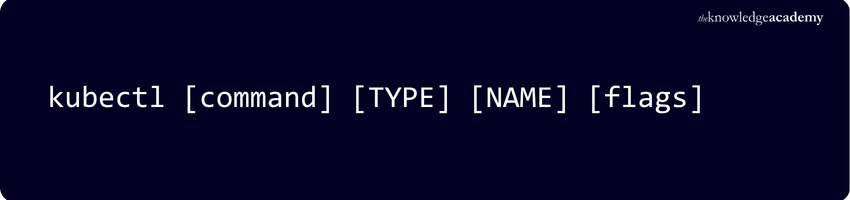
kubectl is the primary command-line tool for communicating with Kubernetes clusters. It enables users to inspect and manage Kubernetes resources and perform administrative and troubleshooting tasks. Common uses include creating and updating resources, viewing cluster information, inspecting workloads, accessing logs and troubleshooting applications.
2) kubectx and kubens
kubectx and kubens simplify switching between Kubernetes contexts and namespaces. They can be particularly useful for developers and administrators working across multiple clusters or namespaces. Instead of repeatedly entering longer commands, users can move between environments more efficiently.
3) K9s
K9s provides a terminal-based interface for interacting with Kubernetes clusters. It gives users visibility into workloads, logs and cluster resources while retaining a command-line-oriented workflow. This can help Administrators navigate and troubleshoot Kubernetes resources more efficiently.
4) Stern
Stern helps users stream logs from multiple Kubernetes pods and containers. This can simplify debugging applications whose workloads are distributed across several pods. It is particularly useful when users need to follow related logs without inspecting each pod individually.
Understand the power of containerised workloads with our Architecting with Google Kubernetes Engine Training - Sign up now!
Kubernetes Development Tools
Development tools can make it easier to build, test and iterate on applications before or while running them in Kubernetes environments. Here are the key examples:
1) Minikube
Minikube enables Developers to run a local Kubernetes cluster. It is commonly used for learning, experimentation and local application development. Developers can test Kubernetes concepts and workloads without requiring a larger remote cluster.
2) Skaffold
Skaffold supports continuous development workflows for Kubernetes applications. It can automate activities involved in building, deploying and updating applications during development. This reduces repetitive manual steps when Developers make frequent code changes.
3) Tilt
Tilt focuses on improving the development feedback loop for applications running in Kubernetes. It can automate builds and updates while giving developers visibility into application status. This can help teams identify problems more quickly during development.
4) Okteto
Okteto is designed to support cloud-native development workflows. It can help Developers build and test applications using development environments connected to Kubernetes-based infrastructure.
DID YOU KNOW?
Netflix uses Kubernetes. They originally built their own custom container management system called Titus before Kubernetes became popular. Today, they integrate open-source Kubernetes components and use Amazon EKS (Elastic Kubernetes Service)
Kubernetes Deployment and GitOps Tools
Deployment tools help teams package, release and manage applications in Kubernetes. GitOps tools extend this approach by using version-controlled configuration as the desired state for environments. Here are the key examples:
1) Helm
Helm is a package manager for Kubernetes. It uses charts to package Kubernetes resources and configuration needed to deploy applications. Helm can simplify repeatable deployments, application upgrades, configuration management and rollbacks.
2) Argo CD
Argo CD is a declarative Continuous Delivery tool built around GitOps practices. It compares the desired application state stored in Git with the state running in Kubernetes and can synchronise differences. This provides teams with a version-controlled and repeatable approach to managing deployments.
3) Flux
Flux is another GitOps tool that keeps Kubernetes clusters synchronised with configuration stored in Git repositories. It enables teams to manage desired cluster and application state through version control and automate changes to Kubernetes environments.
4) Flagger
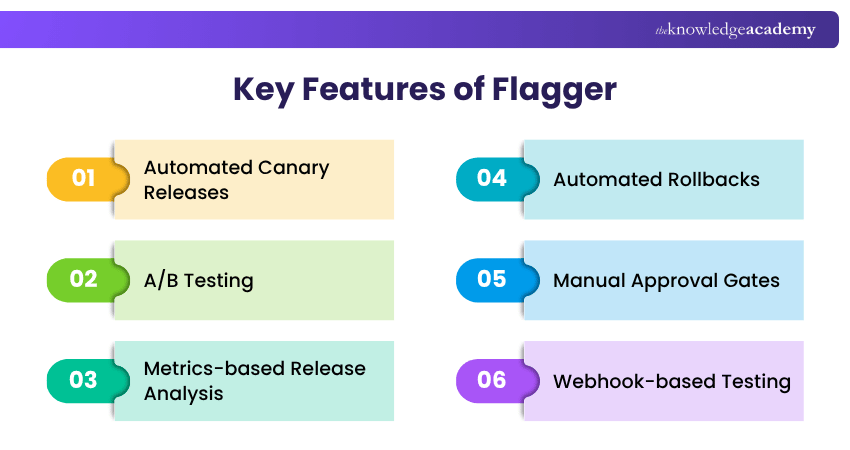
Flagger supports progressive delivery techniques such as canary releases. It can automate the gradual rollout of new application versions and use metrics to help determine whether releases should progress. This can reduce the risk associated with introducing application changes into production environments. Here are the key features of Flagger:
5) Jenkins X
Jenkins X provides CI/CD capabilities designed around cloud-native and Kubernetes development workflows. It supports automation around application delivery and GitOps-oriented practices.
Kubernetes Networking and Service Mesh Tools
Kubernetes networking tools help workloads communicate across clusters and networks. Service mesh technologies add capabilities for managing service-to-service communication, traffic behaviour, security and observability. Here are the key examples:
1) Calico
Calico provides networking and network security capabilities for Kubernetes. It supports connectivity between workloads and enables teams to define and enforce network policies. This makes it useful where organisations need greater control over which workloads can communicate.
2) Flannel
Flannel provides networking between Kubernetes nodes and pods. It creates an overlay network that enables workloads running across different hosts to communicate. Its relatively straightforward networking model makes it suitable for environments that do not require the broader network policy capabilities offered by more feature-rich solutions.
3) Istio
Istio is a service mesh that helps manage communication between services. It provides capabilities for traffic management, security and observability without requiring every application to implement these functions independently. It can be particularly useful in complex microservices environments where teams need detailed control over service-to-service traffic.
4) Contour
Contour is an ingress controller built around Envoy. It helps manage incoming application traffic and routing into Kubernetes workloads. It can be used where teams need to manage HTTP and HTTPS traffic entering applications running within Kubernetes.
Pro Tip
Avoid introducing multiple tools that solve the same problem unless there is a clear operational need. A leaner toolchain can reduce integration effort, maintenance requirements and troubleshooting complexity.
Kubernetes Monitoring and Observability Tools
Monitoring and observability help teams understand what is happening across Kubernetes infrastructure and applications. Metrics and dashboards can help Administrators identify performance problems, resource pressure and unusual behaviour. Here are the key examples:
1) Prometheus
Prometheus is an open-source monitoring system widely used with Kubernetes. It collects and stores time-series metrics that teams can query to understand the health and performance of systems and applications. It also supports alerting workflows that can notify teams when predefined conditions are met.
2) Grafana
Grafana is a visualisation platform that can connect to data sources such as Prometheus. It enables teams to create dashboards, charts and other visualisations from monitoring data. Prometheus and Grafana are frequently complementary: Prometheus collects and queries metrics, while Grafana provides flexible ways to visualise them.
3) kube-state-metrics
kube-state-metrics exposes metrics about the state of Kubernetes objects. These metrics can provide information about resources such as deployments, pods and nodes. The data can be collected by monitoring systems such as Prometheus and used to understand cluster state.
4) cAdvisor
cAdvisor collects information about container resource usage and performance. Metrics can include CPU, memory and other resource utilisation information. These insights can help Administrators investigate resource consumption and identify potential performance bottlenecks.
Code smarter and deploy faster than ever before with our DevOps Certification. Sign up today!
Kubernetes Security Tools
Kubernetes security requires attention across configuration, policies, workloads and runtime activity. Different security tools address different layers of this problem. Here are the key examples:
1) kube-bench
kube-bench checks Kubernetes environments against applicable CIS Kubernetes Benchmark recommendations. It can help teams identify configuration areas that may require attention and support security assessment activities.
Trainer Insight
Kubernetes security is not solved by one tool. Configuration assessment, policy enforcement and runtime detection address different risks, so choose tools according to the security layers you need to strengthen.
2) Falco
Falco focuses on runtime security for cloud-native environments. It monitors system activity and can detect behaviour that matches defined security rules. This can help teams identify suspicious activity while containers and workloads are running.
3) Open Policy Agent
Open Policy Agent (OPA) is a general-purpose policy engine that enables organisations to define policies as code. Within Kubernetes ecosystems, policy-based approaches can be used to evaluate whether resources meet organisational requirements before certain actions are allowed.
Kubernetes Cost Management and Optimisation Tools
Kubernetes environments can become difficult to optimise when teams lack visibility into how workloads consume infrastructure resources. Cost management tools help connect resource usage with financial information. Here are the key examples:
1) Kubecost
Kubecost provides Kubernetes-focused cost monitoring and allocation capabilities. It can help teams understand how workloads, namespaces and other Kubernetes resources contribute to infrastructure costs. This visibility can support budgeting, allocation and optimisation decisions.
2) CloudZero
CloudZero provides cloud cost intelligence capabilities that can help organisations understand spending across cloud resources and workloads, including Kubernetes environments. It can help teams investigate cost drivers and connect infrastructure spending with engineering activity.
Remember
Cost visibility does not automatically produce cost savings. Teams still need to investigate inefficient resource usage, understand workload requirements and make appropriate optimisation decisions.
Kubernetes Backup and Disaster Recovery Tools
Kubernetes applications may need protection against accidental deletion, configuration errors, infrastructure failures and other disruptions. Backup and recovery tools can help preserve important cluster resources and persistent data. Here are the key examples:
Velero
Velero provides backup, restore and migration capabilities for Kubernetes resources and persistent volumes. Teams can use it to create backups and support disaster recovery or migration scenarios. A backup strategy should still be designed around the organisation's recovery requirements and tested regularly.
Simplify Kubernetes management and catalyse greater innovation with our Running Containers on Amazon Elastic Kubernetes Service EKS Training. Sign up now!
How to Choose the Right Kubernetes Tools?
There is no single Kubernetes Toolchain that suits every organisation. Tool selection should reflect the problem being solved, the existing technology environment and the team's ability to operate the solution effectively. Consider the following steps:
1) Define the Problem: Start by identifying the operational challenge. Determine whether you need better deployment automation, monitoring, networking, security, development workflows, cost visibility or cluster management.
2) Check Compatibility: Evaluate whether the tool works with your Kubernetes environment, infrastructure, cloud services and existing DevOps technologies.
3) Consider Scale and Complexity: A tool that works well for a small development environment may not provide the capabilities required across multiple production clusters. Consider current requirements as well as how the environment may evolve.
4) Evaluate Team Skills: Consider whether your team has the expertise required to configure, operate, troubleshoot and maintain the tool. A feature-rich platform provides limited value if it introduces more complexity than the team can realistically manage.
5) Review Integration Requirements: Determine how well the tool fits with existing CI/CD pipelines, monitoring systems, security processes, repositories and development workflows.
6) Assess Operational Overhead: Every additional tool introduces some level of maintenance. Consider configuration, upgrades, resource requirements, integrations and troubleshooting alongside its features.
7) Test Before Wider Adoption: Where practical, evaluate tools in a controlled environment before introducing them across production workloads. Testing can reveal integration, usability and operational issues early.
Simplify app management with our Docker Course- kickstart your journey now!

The Knowledge Academy develops accessible learning content across Project Management, IT, Cybersecurity, Data Science, Business Analysis, HR, Accounting and Finance, Leadership and Health and Safety. Its resources combine subject research with clear explanations to help professionals build practical knowledge across a wide range of disciplines.
View Detail

 If you wish to make any changes to your course, please


