


We may not have the course you’re looking for. If you enquire or give us a call on 01344203999 and speak to our training experts, we may still be able to help with your training requirements.
Top 10 FinOps Tools: Features and Comparison
ByShristi RoyLast updated on: 02 November 2026
Compare popular FinOps tools, explore their features and understand how to select the right solution for managing cloud costs and improving financial efficiency.
Quick Preview
1. FinOps tools help organisations track, analyse and manage cloud spending across services, teams and projects.2. AWS, Azure and Google Cloud provide native cost management, while IBM Cloudability and Flexera One FinOps support multi-cloud financial management.3. Tools such as CloudZero and Datadog help organisations understand spending patterns, identify inefficiencies and improve financial decisions.4. OpenCost provides Kubernetes cost visibility and allocation, while CAST AI supports automated resource optimisation.5. The best FinOps tool depends on cloud infrastructure, budgeting needs, integration capabilities and long-term business goals.
"Why has our cloud spending increased again this month?"
"We've deployed more resources, but we don't know which team is responsible for the additional costs."
"Can we identify where the money is going before the next billing cycle?"
This is a common challenge for organisations using cloud services. As cloud environments expand, tracking expenses, identifying wasted resources and managing budgets become increasingly difficult. FinOps tools help organisations understand technology spending and make informed financial decisions.
This blog explores the top FinOps tools, their features and suitable applications to help you identify the right solution. Let's dive in!
Top 10 FinOps Tools to Consider
FinOps tools differ in their capabilities, supported environments and approaches to cost management. Some provide native cloud financial management, while others specialise in multi-cloud reporting, unit economics or Kubernetes optimisation. Here are 10 notable FinOps tools worth considering:
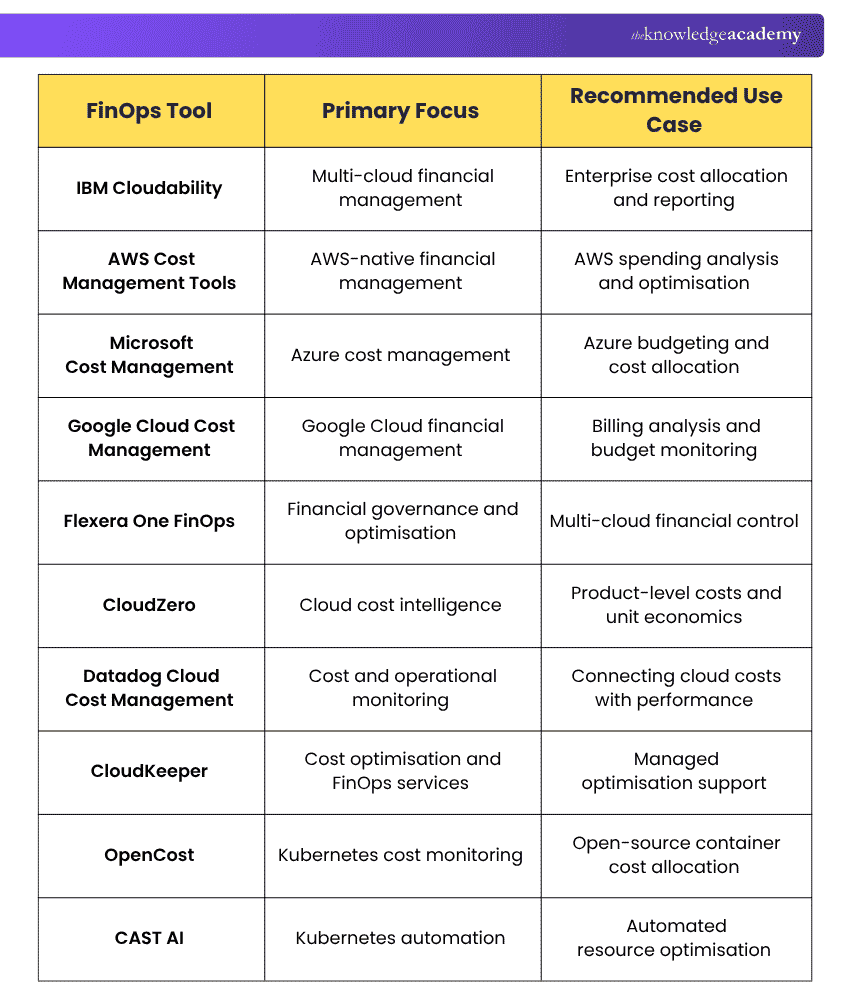
1) IBM Cloudability
IBM Cloudability is a FinOps platform that helps organisations manage cloud expenditure across multiple cloud providers. It provides financial visibility, cost allocation, forecasting and optimisation capabilities to support cloud financial management. Cloudability is particularly useful for organisations that need to understand cloud spending across departments, applications and business units.
Key Features:
a) Multi-cloud Cost Visibility: Analyse spending across supported cloud environments through consolidated reporting.
b) Cost Allocation: Assign cloud expenditure across business units, teams and projects.
c) Budgeting and Forecasting: Monitor budgets and estimate future cloud spending using financial and usage data.
d) Cost Optimisation: Identify potential savings through resource and commitment-related recommendations.
e) Financial Reporting: Create cost reports that support accountability and financial planning.
Best Suited For: Enterprises managing multiple cloud environments that require detailed financial reporting, cost allocation and governance.

2) AWS Cost Management Tools
AWS Cost Management tools provide native services for monitoring, analysing and optimising spending within Amazon Web Services (AWS). These capabilities help organisations understand AWS usage, manage budgets and identify potential savings opportunities. AWS provides several services that support different FinOps activities.
Key Features:
a) AWS Cost Explorer: Analyses historical AWS spending, usage patterns and cost trends while supporting forecasting.
b) AWS Budgets: Helps organisations monitor cost and usage budgets and receive alerts when thresholds are reached or forecast to be exceeded.
c) AWS Cost Anomaly Detection: Identifies unusual spending patterns using machine learning.
d) AWS Cost Optimisation Hub: Consolidates optimisation recommendations, including resource rightsizing, idle resource removal and savings plans or reserved instances recommendations.
e) AWS Data Exports: Provides detailed billing and usage information, including Cost and Usage Report 2.0.
f) AWS Savings Plans and Reserved Instances: Commitment-based purchasing options that offer discounted rates for eligible AWS usage and can support FinOps cost optimisation strategies.
Best Suited For: Organisations primarily using AWS that want integrated cost monitoring, forecasting and optimisation capabilities.
Pro Tip
Before purchasing a separate FinOps platform, evaluate AWS Cost Explorer, AWS Budgets and Cost Optimisation Hub. These native services may already meet your initial reporting, alerting and optimisation requirements.
3) Microsoft Cost Management
Microsoft Cost Management provides financial management capabilities for tracking and controlling cloud expenditure, particularly in Microsoft Azure environments. It helps organisations analyse spending, allocate shared costs and monitor budgets using information from Azure resources and subscriptions.
Key Features:
a) Cost Analysis: Examine expenditure by service, resource group, location and other supported dimensions.
b) Budget Management: Define spending budgets and configure threshold alerts.
c) Cost Allocation: Distribute eligible shared costs across business units, projects or other reporting groups.
d) Cost Forecasting: Review projected spending based on available historical usage and billing information.
e) Cost Exports: Export financial information for reporting and integration with other systems.
f) Optimisation Insights: Use recommendations and related Azure capabilities to identify improvement opportunities.
Best Suited For: Organisations using Microsoft Azure that require built-in cost monitoring, budgeting and financial accountability.
4) Google Cloud Cost Management
Google Cloud Cost Management provides tools for analysing, monitoring and optimising spending on Google Cloud services. It allows organisations to examine billing information, configure budgets and export detailed cost data for further analysis.
Key Features:
a) Cloud Billing Reports: Visualise expenditure across projects, services and billing accounts.
b) Budgets and Alerts: Monitor spending against defined financial thresholds.
c) Cost Allocation: Use projects, labels and resource hierarchies to organise and attribute expenditure.
d) Billing Data Export: Export detailed billing information to BigQuery for customised analysis.
e) Optimisation Recommendations: Identify opportunities to improve resource efficiency using applicable Google Cloud recommendation services.
f) Billing APIs: Manage billing accounts, budgets and pricing information programmatically.
Best Suited For: Organisations primarily operating on Google Cloud that require cost visibility, detailed billing analysis and budget monitoring.
5) Flexera One FinOps
Flexera One FinOps is a portfolio of financial management and optimisation solutions designed to help organisations improve visibility, governance and efficiency across technology environments. It supports FinOps activities across cloud providers and related technology categories, helping teams connect resource consumption with business expenditure.
Key Features:
a) Unified Cost Visibility: Consolidate financial information across supported cloud environments. This helps organisations monitor spending trends and gain a clearer understanding of their overall cloud expenditure.
b) Cost Allocation: Map technology expenditure to relevant departments, teams and applications. This improves financial accountability and helps identify which business areas contribute most to cloud spending.
c) Budgeting and Forecasting: Support financial planning by monitoring spending patterns and projected costs. This enables organisations to anticipate future expenses and make informed budget decisions.
d) Usage Optimisation: Identify idle or overprovisioned resources that may be suitable for adjustment. This helps organisations reduce unnecessary spending while maintaining efficient resource utilisation.
e) Policy-based Automation: Apply configured policies to support optimisation activities. This helps teams maintain consistent cost controls and reduce the manual effort involved in managing cloud resources.
f) Financial Governance: Support collaboration between FinOps, IT, engineering and finance teams. This promotes shared financial responsibility and helps align cloud spending decisions with organisational goals.
Best Suited For: Organisations managing complex multi-cloud environments that require financial governance, reporting and continuous optimisation.
Discover how technology is transforming banking, payments, investments and financial services with the up-to-date FinTech Course – Sign up now!
6) CloudZero
CloudZero is a cloud cost intelligence platform that helps organisations understand how technology expenditure relates to applications, products, customers and business activities. Rather than focusing only on total cloud bills, CloudZero helps teams analyse spending through business-relevant dimensions.
Key Features:
a) Cloud Cost Intelligence: Analyse cloud expenses across supported services and environments.
b) Cost Allocation: Attribute expenditure to products, features, engineering teams and other business dimensions.
c) Unit Economics: Measure financial efficiency using metrics such as cost per customer, transaction or API request.
d) Cost Anomaly Detection: Identify unexpected changes in technology spending.
e) Cost Analysis: Investigate trends and understand the factors driving expenditure.
f) Financial Collaboration: Help engineering and finance teams work with shared cost information.
Best Suited For: SaaS businesses, technology companies and organisations that want to connect cloud expenditure with product performance and business growth.
Trainer's Insight
Total cloud expenditure does not always reveal whether spending is efficient. For example, spending may rise as an organisation serves more customers. Measuring cost per customer or transaction helps determine whether resources are being used more efficiently as the business grows.
7) Datadog Cloud Cost Management
Datadog Cloud Cost Management helps organisations analyse cloud spending alongside infrastructure and application monitoring information. It connects cost analysis with operational telemetry, helping engineering teams investigate how resource utilisation and application behaviour affect expenditure.
Key Features:
a) Cloud Cost Visibility: Monitor spending trends across supported cloud services.
b) Cost Allocation: Attribute expenditure to relevant teams, services and applications.
c) Operational Context: Examine cloud costs alongside infrastructure performance and utilisation data.
d) Cost Investigation: Identify changes in resource consumption that may contribute to increased spending.
e) Kubernetes Cost Visibility: Analyse supported Kubernetes infrastructure and workload costs.
f) Engineering Collaboration: Help teams investigate performance and financial efficiency using related monitoring information.
Best Suited For: Organisations already using Datadog for observability that want to connect cloud spending with application and infrastructure behaviour.
8) CloudKeeper
CloudKeeper provides cloud cost optimisation technologies and FinOps services to help organisations improve spending visibility and resource efficiency. Its CloudKeeper Platform Suite combines cost analytics, usage optimisation and commitment management through dedicated solutions.
Key Features:
a) CloudKeeper Lens: Supports cost visibility, analytics, budgeting and anomaly detection.
b) CloudKeeper Tuner: Helps optimise resource utilisation through activities such as rightsizing and scheduling.
c) CloudKeeper Commit: Supports commitment-based savings optimisation.
d) Cloud Cost Allocation: Attribute spending to teams, products and workloads using resource tags and business dimensions.
e) Managed FinOps Support: Combines technology capabilities with expert-led services.
Best Suited For: Organisations looking for cloud cost optimisation technology combined with managed FinOps expertise.
9) OpenCost
OpenCost is an open-source project designed to measure, monitor and allocate costs associated with Kubernetes environments. It helps engineering teams understand how containerised workloads consume infrastructure resources and how those resources contribute to operational expenditure.
Key Features:
a) Kubernetes Cost Allocation: Analyse expenditure associated with clusters, namespaces, workloads and containers.
b) Resource Cost Monitoring: Examine the costs of CPU, memory, storage and other supported infrastructure resources.
c) Cloud Integration: Use supported cloud billing information through configured provider integrations to improve cost visibility.
d) Showback and Chargeback: Support reporting and allocation of Kubernetes-related costs.
e) Monitoring Integration: Expose cost metrics through Prometheus-compatible endpoints for monitoring and analysis.
f) Open-source Availability: Access and deploy the software without commercial software licensing.
Best Suited For: DevOps teams, platform engineers and organisations needing Kubernetes cost visibility through an open-source solution.
Pro Tip
When analysing Kubernetes expenditure, examine costs at the namespace and workload levels rather than relying only on the total cluster bill. This can help identify resource consumption patterns and opportunities for improvement.
10) CAST AI
CAST AI is a Kubernetes automation and optimisation platform that helps organisations improve resource efficiency and manage infrastructure costs. It focuses on adjusting Kubernetes resources based on workload requirements, helping engineering teams reduce unnecessary capacity while maintaining application reliability.
Key Features:
a) Kubernetes Cost Monitoring: Analyse infrastructure costs associated with clusters and workloads.
b) Workload Rightsizing: Adjust CPU and memory resource requests using observed workload behaviour.
c) Node Optimisation: Improve infrastructure efficiency by selecting and consolidating suitable resources.
d) Autoscaling: Adapt infrastructure capacity to workload demand within configured policies.
e) Spot Instance Optimisation: Use eligible lower-cost cloud capacity where appropriate.
f) Automation Controls: Configure policies to manage automated optimisation actions and resource adjustments.
Best Suited For: Organisations operating Kubernetes workloads that want automated infrastructure optimisation and improved resource efficiency.
Before Selecting a FinOps Tool: Quick Checklist
Use this checklist to assess whether a platform meets your requirements.
□ Identify the cloud providers and services currently in use.□ Define the cost allocation and reporting requirements.□ Review budgeting, forecasting and anomaly detection capabilities.□ Check Kubernetes, SaaS and AI cost support where relevant.□ Evaluate security, access controls and integration requirements.□ Compare licensing costs, implementation effort and ongoing support.□ Test the tool using representative workloads and cost data.
This checklist helps organisations evaluate platforms based on practical requirements rather than feature counts alone.
How to Choose the Right FinOps Tool?
Choosing a suitable FinOps Tool requires more than comparing features. Organisations should consider their cloud architecture, financial processes, operational requirements and long-term goals. Here's what to consider:
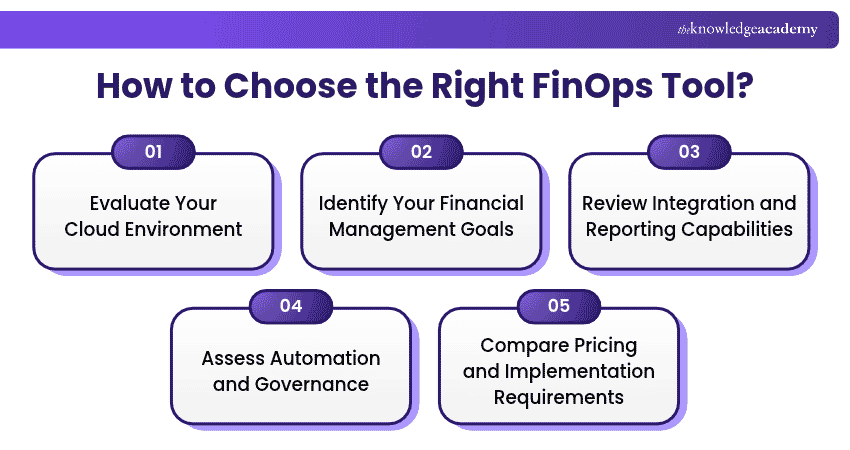
1) Evaluate Your Cloud Environment
Start by identifying the cloud providers, accounts and services your organisation uses. A business operating exclusively on AWS may find native AWS tools sufficient for its initial FinOps requirements.
However, an organisation using AWS, Azure and Google Cloud may benefit from consolidated financial reporting. Also consider whether your environment includes Kubernetes workloads, AI services, SaaS platforms or other technology spending categories.
2) Identify Your Financial Management Goals
Different FinOps tools address different financial challenges. Determine whether your primary objective is to improve spending visibility, allocate costs, forecast budgets or identify optimisation opportunities.
For example, if several departments share cloud infrastructure, detailed cost allocation may be more important than automated resource optimisation. Clear financial goals help organisations avoid purchasing capabilities that do not address their actual requirements.
3) Review Integration and Reporting Capabilities
A suitable FinOps tool should work with your existing technical and financial systems. Evaluate whether the platform can collect relevant cost data and integrate with monitoring, reporting and financial management tools where necessary.
Consider the accuracy, completeness and timeliness of the information available. Inconsistent tagging and incomplete billing data can reduce the effectiveness of financial reporting.
4) Assess Automation and Governance
Some FinOps tools provide recommendations, while others support automated optimisation actions. Consider whether your organisation needs alerts, approval workflows, policy controls or automated resource adjustments. Automation should be introduced carefully. Changes to infrastructure capacity or resource configuration must account for application performance, reliability and business requirements.
5) Compare Pricing and Implementation Requirements
Evaluate the total cost of adopting and operating a FinOps tool. This includes software licensing, integration work, training, maintenance and any additional services required. A platform with extensive capabilities may not provide better value if your organisation needs only basic cost monitoring and budgeting. Where possible, test shortlisted solutions using representative workloads and actual financial reporting requirements before making a final decision.
Elevate traditional finance with digital excellence. Sign up for the Digital Transformation in Financial Services Course now!

Shristi Roy is a Content Writer with experience in journalism, article writing and web content development. Her experience researching and writing about Business Skills and Accounting and Finance enables her to communicate specialised information through clear, engaging narratives.
View Detail

 If you wish to make any changes to your course, please


